一 程序介绍
1.1 文件分布
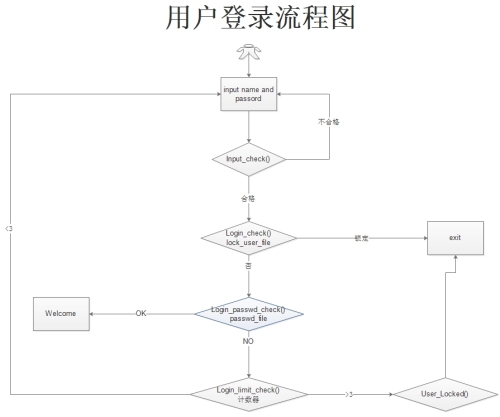
login_user.jpg 流程图信息
README.txt
login_main_v1.1.py 主程序
user_config.conf 配置文件
流程图:
README.txt
####by cw#####
login_main_v1.1.py
#2016-06-04
程序运行说明:
1.运行程序login_main.py
2.输入用户名和密码,Input_check()检查用户输入是否正确,用户名和密码不能为空,密码至少6位数,如果不符合规范,返回到登录界面即可输入
3.如果合格,那么就执行Login_check(),检查用户是否被锁定,如果锁定,则退出,如果没有锁定,继续下一步
4.继续检查用户Login_passwd_check(),登录用户名是否正确,如果正确,就给出欢迎界面
5.如果用户名和密码不对,执行Login_Limit_Check()那么就返回到登录界面,计数器加1,如果计数器大于了3次,那么锁定用户并退出
后续可扩展的内容:
注册用户到mysql
锁定用户可以存储到memcached/redis
web展现次功能
根据后面综合练习继续改进
#######end README.txt###############
user_config.conf
#username,password,status,lock_count
chenwei ,chenwei ,N,0
chenwei2,chenwei,Y,0
chenwei3,chenwei,Y,0
二 编码
具体代码如下,有些实现方法还不够简单,后续第二版本优化
|
1
2
3
4
5
6
7
8
9
10
11
12
13
14
15
16
17
18
19
20
21
22
23
24
25
26
27
28
29
30
31
32
33
34
35
36
37
38
39
40
41
42
43
44
45
46
47
48
49
50
51
52
53
54
55
56
57
58
59
60
61
62
63
64
65
66
67
68
69
70
71
72
73
74
75
76
77
78
79
80
81
82
83
84
85
86
87
88
89
90
91
92
93
94
95
96
97
98
99
100
101
102
103
104
105
|
#/bin/python
#coding=utf-8
#by cw
#2016-06-03
import
os
User_conf_file
=
'D:\chenwei\data\user_config.conf'
User_conf_tmp
=
'D:\chenwei\data\user_config_tmp.conf'
Count_limt
=
0
def
Welcome_Main():
print
'''
Welcome to Python World!!!!!!!
by cw
'''
def
Read_Config_File(
file
,username):
'''
:param file: 配置文件
:param username: 输入的用户名
:return: 读取用户配置文件,返回用户名,锁定状态
'''
fn
=
open
(
file
)
User_conf
=
''
Status
=
''
Count
=
''
Passwd
=
''
for
line
in
fn:
if
line.split(
','
)[
0
].strip()
=
=
username:
#根据用户名去查找,需要注意去掉空格
User_conf
=
line.split(
','
)[
0
]
#返回用户名
Passwd
=
line.split(
','
)[
1
]
#返回密码
Status
=
line.split(
','
)[
2
]
#返回状态
Count
=
line.split(
','
)[
3
]
#返回次数
fn.close()
return
(User_conf,Passwd,Status,Count)
# 返回状态
def
Input_Check(username,passwd):
Flag
=
True
if
len
(username)
=
=
0
:
print
'The username is NULL,please input againt!!!'
Flag
=
False
if
len
(passwd)
=
=
0
:
print
'The passwd is NUll,please input againt!!!!'
Flag
=
False
if
len
(passwd) <
6
:
print
"The passwd length is not enough!"
Flag
=
False
return
Flag
def
Login_Lock_Check(status):
if
status
=
=
'Y'
:
return
False
#the user don't locked
else
:
return
True
#the user locked
def
Lock_Usered(
file
,file_tmp,username):
fn
=
open
(
file
)
fn_tmp
=
open
(file_tmp,
'a'
)
new_line
=
[]
for
line
in
fn.readlines():
#读取配置文件的每一行
if
line.split(
','
)[
0
].strip()
=
=
username:
new_line.append(
"%s ,"
%
username)
new_line.append(
"%s ,"
%
line.split(
','
)[
1
].strip())
new_line.append(
'N,'
)
new_line.append(
'%s \n'
%
line.split(
','
)[
3
].strip())
fn_tmp.writelines(new_line)
continue
fn_tmp.writelines(line)
fn.close()
fn_tmp.close()
os.remove(
file
)
os.rename(file_tmp,
file
)
while
True
:
Config_list
=
''
Name
=
raw_input
(
'Please input your name: '
)
Passwd
=
raw_input
(
'Please input your password: '
)
if
Input_Check(Name,Passwd)
=
=
False
:
#检查用户名和密码的规范性
continue
else
:
Config_list
=
Read_Config_File(User_conf_file,Name)
#返回配置文件里面的内容
if
Login_Lock_Check(Config_list[
2
]):
#返回用户状态
print
"The user is locked"
exit()
else
:
if
Name
=
=
Config_list[
0
]
and
Passwd
=
=
Config_list[
1
]:
Welcome_Main()
exit()
else
:
Count_limt
=
Count_limt
+
1
if
Count_limt
=
=
1
:
print
'The Username or password is not right,you maybe try two!!!'
if
Count_limt
=
=
2
:
print
'The Username or password is not right,you maybe try one!!!'
if
Count_limt >
=
3
:
Lock_Usered(User_conf_file,User_conf_tmp,Name)
print
"user locked!!!"
exit()
|
附件:http://down.51cto.com/data/2367777
本文转自 woshiwei201 51CTO博客,原文链接:http://blog.51cto.com/chenwei/1786067