哈哈,相比于上午的版本。
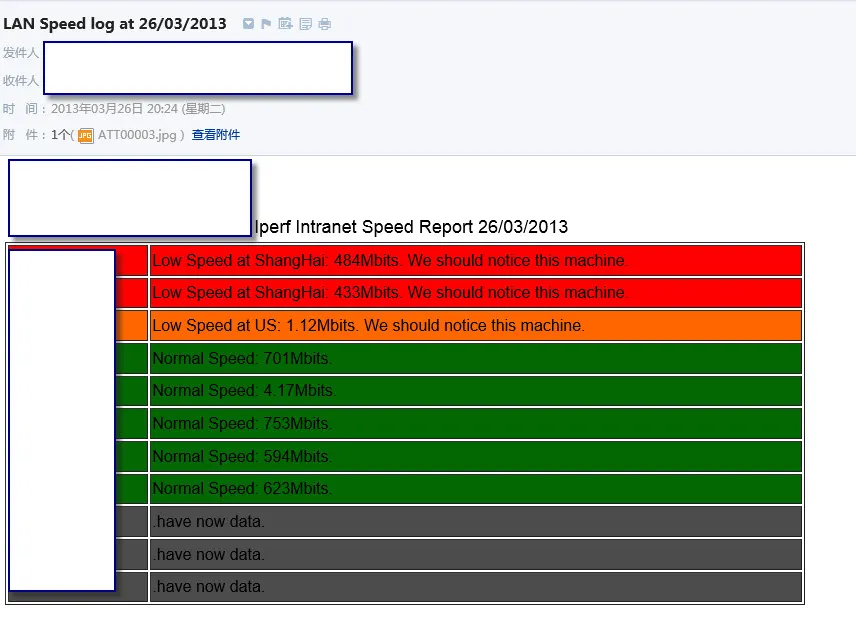
增强如下:
1,用IPERF2,MS更稳定。
2,增加HTML邮件发送,有图片,有色彩,更提醒,不同状态的机器有色彩区别。
3,相对于生成目录下的非TXT文件导致错误问题,增加排除功能。
4,计算机名更准确,不带后缀。
5,不再重复计数
。。。
计划增加:排序功能吧,IP最好也有,作成更通过吧,IPERF稳定性有问题呀。最好能更易分布到不同的服务器上,测试更彻底。
上图是王道:
 1 #!/usr/bin/env python
 2 import sys
 3 import os.path
 4 import datetime
 5 from email.mime.multipart import MIMEMultipart
 6 from email.mime.application import MIMEApplication
 7 from email.mime.text import MIMEText
 8 from email.mime.image import MIMEImage
 9 from email.utils import formatdate
10
11
12 folder = 'D:\Iperf\Log\\'
13 msg_low_sh = ''
14 msg_normal = ''
15 msg_low_us = ''
16 msg_nodata = ''
17 for filename in os.listdir (folder):
18     if (filename.split('.')[1] != "txt") :
19         continue
20     statinfo = os.stat(folder + filename)
21     if (statinfo.st_size == 0):
22         msg_nodata += "<tr color='#4c4c4c'  bgcolor='#4c4c4c' height = '20'><td>" + filename.split('.')[0] + "</td><td>.have now data.</td></tr>\n"
23         continue
24     fp = open(folder + filename,'r')
25     for i, line in enumerate(fp):
26         if (i == 6):
27             speednumber = line.split()
28             if (float(speednumber[5])) < 500 and (float(speednumber[5])) > 10:
29                msg_low_sh += "<tr color=\"#ff0000\" bgcolor='ff0000' height = '20'><td>" + filename.split('.')[0] + "</td><td> Low Speed at ShangHai: " + speednumber[5] + "Mbits. We should notice this machine.</td></tr>\n"
30                continue
31             if (float(speednumber[5])) <1.2:
32                msg_low_us +=  "<tr color=\"#ff6600\" bgcolor='ff6600'  height = '20'><td>" + filename.split('.')[0] + "</td><td>Low Speed at US: " + speednumber[5] + "Mbits. We should notice this machine.</td></tr>\n"
33                continue
34             else:
35               msg_normal +=  "<tr color=\"#036803\" bgcolor='036803' height = '20'><td>" + filename.split('.')[0] + "</td><td> Normal Speed: " + speednumber[5] + "Mbits.</td></tr>\n"
36     fp.close()
37 #print (msg_low_sh)
38 #print (msg_low_us)
39 #print (msg_normal)
40 #print (msg_nodata)
41
42 text_file = open("LANSpeedOutput.txt", "w")
43 text_file.write('<table width="800" border="1"  bordercolor="#000000">')
44 text_file.write(msg_low_sh)
45 text_file.write(msg_low_us)
46 text_file.write(msg_normal)
47 text_file.write(msg_nodata)
48 text_file.write('</table>')
49
50 text_file.close()
51
52 # Define these once; use them twice!
53 strFrom = "a"
54 strTo = ["a","b","c"]
55 date = datetime.datetime.now().strftime( "%d/%m/%Y " )
56
57 # Create the root message and fill in the from, to, and subject headers
58 msgRoot = MIMEMultipart('related')
59 msgRoot['Subject'] = "LAN Speed log at "+date
60 msgRoot['From'] = strFrom
61 msgRoot['To'] = ",".join(strTo)
62 msgRoot.preamble = 'This is a multi-part message in MIME format.'
63
64 # Encapsulate the plain and HTML versions of the message body in an
65 # 'alternative' part, so message agents can decide which they want to display.
66 msgAlternative = MIMEMultipart('alternative')
67 msgRoot.attach(msgAlternative)
68
69 msgText = MIMEText('This is the alternative plain text message.')
70 msgAlternative.attach(msgText)
71
72 # We reference the image in the IMG SRC attribute by the ID we give it below
73 fptxt = open(r'LANSpeedOutput.txt', 'r')
74 msgText = MIMEText('<img src="cid:image1"><font size = 4 > Iperf Intranet Speed Report  '+ date +'</font><br>'+fptxt.read(), 'html')
75 msgAlternative.attach(msgText)
76 fptxt.close()
77
78 # This example assumes the image is in the current directory
79 fp = open(logo.jpg', 'rb')
80 msgImage = MIMEImage(fp.read())
81 fp.close()
82
83 # Define the image's ID as referenced above
84 msgImage.add_header('Content-ID', '<image1>')
85 msgRoot.attach(msgImage)
86
87 # Send the email (this example assumes SMTP authentication is required)
88 import smtplib
89 smtp = smtplib.SMTP()
90 smtp.connect(‘1.2.3.4’)
91 smtp.login('a', '5678')
92 smtp.sendmail(strFrom, strTo, msgRoot.as_string())
93 smtp.quit()