六、错误处理:让程序更健壮
6.1 try-catch-finally
// JavaScript 错误处理
function divide(a, b) {
    try {
        if (b === 0) {
            throw new Error("除数不能为零");
        }
        return a / b;
    } catch (error) {
        console.error("发生错误:", error.message);
        return null;
    } finally {
        console.log("无论是否出错,都会执行");
    }
}

console.log(divide(10, 2));  // 5
console.log(divide(10, 0));  // null(并打印错误)
# Python 错误处理
def divide(a, b):
    try:
        result = a / b
    except ZeroDivisionError as e:
        print(f"除零错误: {e}")
        return None
    except TypeError as e:
        print(f"类型错误: {e}")
        return None
    else:
        # 没有异常时执行
        print("计算成功")
        return result
    finally:
        # 总是执行
        print("清理工作")

print(divide(10, 2))   # 5
print(divide(10, 0))   # None
6.2 常见的异常类型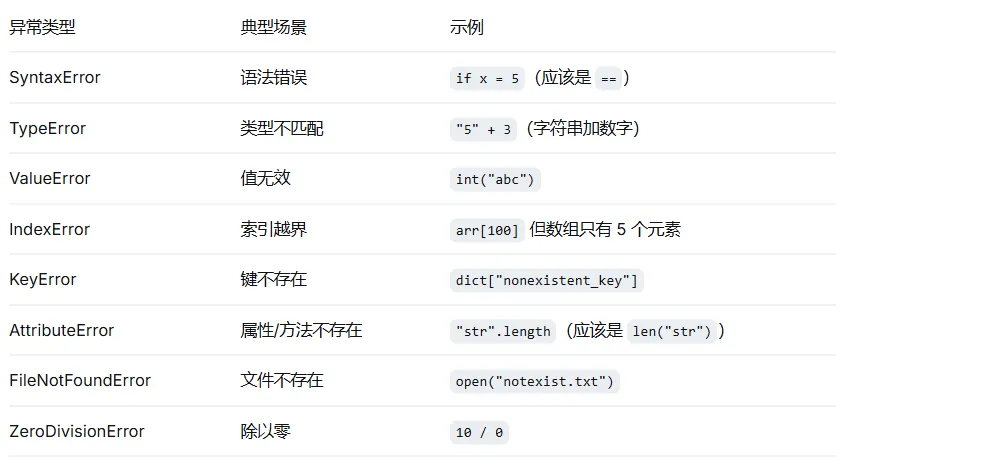
6.3 自定义异常
# Python 自定义异常
class InsufficientBalanceError(Exception):
    """余额不足异常"""
    def __init__(self, balance, amount):
        self.balance = balance
        self.amount = amount
        super().__init__(f"余额不足:当前余额 {balance},需要 {amount}")

class BankAccount:
    def __init__(self, balance=0):
        self.balance = balance

    def withdraw(self, amount):
        if amount > self.balance:
            raise InsufficientBalanceError(self.balance, amount)
        self.balance -= amount
        return self.balance

# 使用
account = BankAccount(100)
try:
    account.withdraw(200)
except InsufficientBalanceError as e:
    print(e)  # 余额不足:当前余额 100,需要 200
七、模块与代码组织
7.1 模块化的重要性
随着项目变大,将代码分割成独立文件(模块)是必要的:
✅ 提高可维护性
✅ 方便团队协作
✅ 避免命名冲突
✅ 代码复用
7.2 导出与导入
// math.js(导出)
// 命名导出
export const PI = 3.14159;
export function add(a, b) { return a + b; }
export function subtract(a, b) { return a - b; }

// 默认导出(每个文件一个)
export default function multiply(a, b) { return a * b; }

// app.js(导入)
import multiply, { PI, add, subtract } from './math.js';

console.log(add(5, 3));      // 8
console.log(PI);             // 3.14159
console.log(multiply(4, 5)); // 20

// 导入所有(命名空间)
import * as MathUtils from './math.js';
console.log(MathUtils.add(2, 3));
# math_utils.py
PI = 3.14159

def add(a, b):
    return a + b

def subtract(a, b):
    return a - b

def multiply(a, b):
    return a * b

# app.py
import math_utils  # 导入整个模块
from math_utils import add, PI  # 导入特定成员
from math_utils import multiply as mul  # 别名

print(add(5, 3))           # 8
print(PI)                  # 3.14159
print(mul(4, 5))           # 20
print(math_utils.subtract(10, 3))  # 7

# 导入所有(不推荐)
from math_utils import *
7.3 包管理
# JavaScript (npm)
npm init -y                 # 初始化项目
npm install lodash          # 安装依赖
npm install -D typescript   # 开发依赖

# package.json
{
  "dependencies": {
    "lodash": "^4.17.21"
  }
}
# Python (pip)
pip install requests
pip freeze > requirements.txt  # 导出依赖
pip install -r requirements.txt # 安装依赖
八、常用算法与编程思维
8.1 时间复杂度入门
理解算法效率很重要,但初级阶段不必死磕,记住常见场景: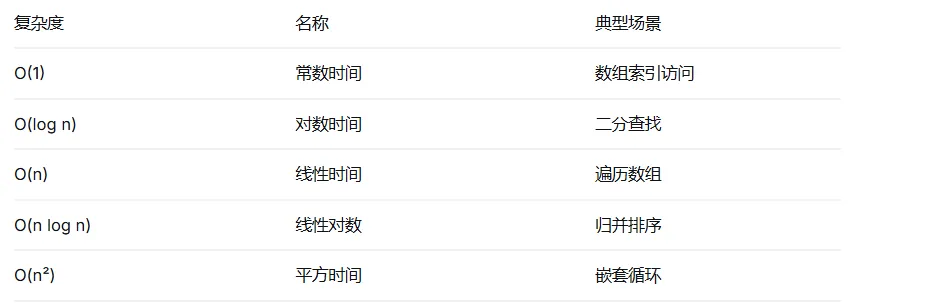
// O(1) - 常数时间
function getFirst(arr) {
    return arr[0];  // 无论数组多大,操作次数固定
}

// O(n) - 线性时间
function findMax(arr) {
    let max = arr[0];
    for (let i = 1; i < arr.length; i++) {  // 循环 n-1 次
        if (arr[i] > max) max = arr[i];
    }
    return max;
}

// O(n²) - 平方时间
function bubbleSort(arr) {
    for (let i = 0; i < arr.length; i++) {      // 外层 n 次
        for (let j = 0; j < arr.length - 1; j++) { // 内层 n 次
            if (arr[j] > arr[j + 1]) {
                [arr[j], arr[j + 1]] = [arr[j + 1], arr[j]];
            }
        }
    }
    return arr;
}
8.2 递归思维
// 遍历树形结构(如文件夹)
function traverse(node, depth = 0) {
    console.log("  ".repeat(depth) + node.name);

    if (node.children) {
        for (const child of node.children) {
            traverse(child, depth + 1);
        }
    }
}

const fileSystem = {
    name: "root",
    children: [
        { name: "src", children: [{ name: "index.js" }, { name: "utils.js" }] },
        { name: "public", children: [{ name: "index.html" }] }
    ]
};

traverse(fileSystem);
8.3 分而治之
// 二分查找(要求数组已排序)
function binarySearch(arr, target) {
    let left = 0;
    let right = arr.length - 1;

    while (left <= right) {
        const mid = Math.floor((left + right) / 2);

        if (arr[mid] === target) {
            return mid;
        } else if (arr[mid] < target) {
            left = mid + 1;
        } else {
            right = mid - 1;
        }
    }
    return -1;
}

console.log(binarySearch([1, 3, 5, 7, 9, 11], 7));  // 3(索引)
九、编程最佳实践与习惯
9.1 代码风格与命名
// ❌ 糟糕的代码
function d(a,b){
    var x=[];
    for(let i=0;i<a.length;i++){
        if(a[i]>b){
            x.push(a[i])
        }
    }
    return x
}

// ✅ 良好的代码
function filterNumbersGreaterThanThreshold(numbers, threshold) {
    const result = [];

    for (let i = 0; i < numbers.length; i++) {
        if (numbers[i] > threshold) {
            result.push(numbers[i]);
        }
    }

    return result;
}

// ✅ 更好的写法(使用高阶函数)
const filterGreaterThanThreshold = (numbers, threshold) =>
    numbers.filter(num => num > threshold);
9.2 注释写在哪里
// ✅ 解释"为什么",而不是"是什么"
// 使用二分查找而不是 indexOf,因为数据量超过 10 万
const index = binarySearch(sortedList, target);

// ❌ 无意义的注释
let count = 0;  // 设置 count 为 0

// ✅ 对复杂逻辑的文档注释
/**
 * 计算两个日期之间的工作日天数(周一至周五)
 * @param {Date} startDate - 开始日期
 * @param {Date} endDate - 结束日期
 * @returns {number} 工作日天数
 */
function getBusinessDays(startDate, endDate) {
    // 排除周末的逻辑...
}
9.3 避免的常见错误
// 1. 忘记初始化变量
let total;  // undefined
total += 5;  // NaN

// ✅ 总是初始化
let total = 0;
total += 5;

// 2. 使用 == 而不是 ===(JavaScript)
if (0 == false) {  // true(会类型转换)
    console.log("小心!");
}
if (0 === false) {  // false(严格相等)
    console.log("更安全");
}

// 3. 忘记处理异步
async function fetchData() {
    const data = await fetch('/api/users');  // 忘记 await?
    console.log(data);  // Promise 对象,不是数据
}

// 4. 修改正在遍历的数组
let arr = [1, 2, 3, 4];
for (let i = 0; i < arr.length; i++) {
    if (arr[i] === 2) {
        arr.splice(i, 1);  // 删除后索引错乱!
    }
}
// ✅ 从后往前遍历,或使用 filter
9.4 调试技巧
// 1. console.log 是好朋友
console.log("变量值:", variable);
console.table(array);  // 表格形式打印数组
console.time("耗时");  // 测量执行时间
// ... 代码 ...
console.timeEnd("耗时");

// 2. 断点调试(浏览器或 VS Code)
debugger;  // 代码会暂停在这里

// 3. 使用断言
console.assert(condition, "条件不满足时的消息");
附加:
常见面试题准备
// 1. 变量提升(JavaScript)
console.log(a);  // undefined(不是报错!)
var a = 5;

// 2. 闭包
function createCounter() {
    let count = 0;
    return function() {
        count++;
        return count;
    };
}
const counter = createCounter();
console.log(counter());  // 1
console.log(counter());  // 2

// 3. 数组去重
const arr = [1, 2, 2, 3, 3, 4];
const unique = [...new Set(arr)];  // [1,2,3,4]

// 4. 斐波那契数列
function fibonacci(n) {
    if (n <= 1) return n;
    let prev = 0, curr = 1;
    for (let i = 2; i <= n; i++) {
        [prev, curr] = [curr, prev + curr];
    }
    return curr;
}