三、组件体系
TDesign提供了超过70个高质量组件,覆盖企业级应用开发的绝大部分场景。以下是核心组件的分类说明。
3.1 基础组件
Button按钮组件
按钮是用户交互中最基础的组件:
<template>
  <!-- 按钮类型 -->
  <t-button theme="primary">主要按钮</t-button>
  <t-button theme="default">默认按钮</t-button>
  <t-button theme="danger">危险按钮</t-button>
  <t-button theme="warning">警告按钮</t-button>
  <t-button theme="success">成功按钮</t-button>

  <!-- 按钮尺寸 -->
  <t-button size="small">小按钮</t-button>
  <t-button size="medium">中按钮</t-button>
  <t-button size="large">大按钮</t-button>

  <!-- 按钮状态 -->
  <t-button disabled>禁用按钮</t-button>
  <t-button loading>加载中</t-button>

  <!-- 图标按钮 -->
  <t-button shape="circle">
    <template #icon><t-icon name="add" /></template>
  </t-button>
</template>
Icon图标组件
TDesign内置了丰富的图标库:
<template>
  <t-icon name="check-circle" />
  <t-icon name="close-circle" />
  <t-icon name="setting" />
  <t-icon name="user" />
</template>
3.2 布局组件
Grid栅格系统
TDesign采用24列栅格系统,基于Flexbox实现:
<template>
  <t-row :gutter="16">
    <t-col :span="12">占12列</t-col>
    <t-col :span="12">占12列</t-col>
  </t-row>

  <t-row :gutter="16">
    <t-col :xs="24" :sm="12" :md="8" :lg="6">
      响应式列
    </t-col>
  </t-row>
</template>
Space间距组件
用于控制子元素之间的间距:
<template>
  <t-space direction="vertical" size="large">
    <t-button>按钮1</t-button>
    <t-button>按钮2</t-button>
  </t-space>
</template>
3.3 导航组件
Menu菜单组件
TDesign提供了侧边栏菜单和顶部菜单两种模式:
<template>
  <t-menu :value="activeMenu" :collapsed="collapsed">
    <t-menu-item value="dashboard">
      <template #icon><t-icon name="dashboard" /></template>
      仪表盘
    </t-menu-item>
    <t-submenu value="system" title="系统管理">
      <template #icon><t-icon name="setting" /></template>
      <t-menu-item value="user">用户管理</t-menu-item>
      <t-menu-item value="role">角色管理</t-menu-item>
    </t-submenu>
  </t-menu>
</template>
Breadcrumb面包屑组件
用于展示页面层级导航:
<template>
  <t-breadcrumb>
    <t-breadcrumb-item to="/">首页</t-breadcrumb-item>
    <t-breadcrumb-item to="/system">系统管理</t-breadcrumb-item>
    <t-breadcrumb-item>用户管理</t-breadcrumb-item>
  </t-breadcrumb>
</template>
Pagination分页组件
<template>
  <t-pagination
    v-model:current="currentPage"
    :total="total"
    :page-size="pageSize"
    show-jumper
    @change="handlePageChange"
  />
</template>
3.4 数据录入组件
Form表单组件
TDesign的表单组件支持完善的验证机制:
<template>
  <t-form
    ref="formRef"
    :data="formData"
    :rules="rules"
    label-width="100px"
    @submit="onSubmit"
  >
    <t-form-item label="用户名" name="username">
      <t-input v-model="formData.username" placeholder="请输入用户名" />
    </t-form-item>

    <t-form-item label="邮箱" name="email">
      <t-input v-model="formData.email" placeholder="请输入邮箱" />
    </t-form-item>

    <t-form-item>
      <t-button theme="primary" type="submit">提交</t-button>
      <t-button theme="default" @click="onReset">重置</t-button>
    </t-form-item>
  </t-form>
</template>

<script setup>
import { ref, reactive } from 'vue';
import { MessagePlugin } from 'tdesign-vue-next';

const formRef = ref();
const formData = reactive({
  username: '',
  email: '',
});

const rules = {
  username: [{ required: true, message: '请输入用户名' }],
  email: [{ required: true, message: '请输入邮箱' }, { type: 'email', message: '邮箱格式不正确' }],
};

const onSubmit = ({ validateResult, firstError }) => {
  if (validateResult === true) {
    MessagePlugin.success('提交成功');
  } else {
    MessagePlugin.warning(firstError);
  }
};
</script>
Select选择器组件
<template>
  <t-select v-model="value" placeholder="请选择" clearable filterable>
    <t-option value="option1" label="选项一" />
    <t-option value="option2" label="选项二" />
    <t-option value="option3" label="选项三" />
  </t-select>
</template>
3.5 数据展示组件
Table表格组件
表格是企业级应用中最复杂的组件之一,TDesign的Table组件功能强大:
<template>
  <t-table
    row-key="id"
    :data="data"
    :columns="columns"
    :pagination="pagination"
    :loading="loading"
    :max-height="500"
    @page-change="onPageChange"
    @sort-change="onSortChange"
  >
    <template #avatar="{ row }">
      <t-image-viewer :images="[row.avatar]">
        <template #trigger>
          <img :src="row.avatar" class="avatar" />
        </template>
      </t-image-viewer>
    </template>
    <template #status="{ row }">
      <t-tag :theme="row.status === 1 ? 'success' : 'default'">
        {
  { row.status === 1 ? '启用' : '禁用' }}
      </t-tag>
    </template>
    <template #operation="{ row }">
      <t-space>
        <t-link theme="primary" @click="handleEdit(row)">编辑</t-link>
        <t-link theme="danger" @click="handleDelete(row)">删除</t-link>
      </t-space>
    </template>
  </t-table>
</template>

<script setup>
import { ref } from 'vue';

const columns = [
  { colKey: 'id', title: 'ID', width: 80 },
  { colKey: 'name', title: '姓名', width: 120, sorter: true },
  { colKey: 'avatar', title: '头像', cell: 'avatar' },
  { colKey: 'status', title: '状态', cell: 'status' },
  { colKey: 'operation', title: '操作', cell: 'operation', width: 150, fixed: 'right' },
];

const data = ref([]);
const loading = ref(false);
const pagination = ref({
  current: 1,
  pageSize: 20,
  total: 0,
});
</script>
Card卡片组件
<template>
  <t-card title="卡片标题" :bordered="true" hover-shadow>
    <template #actions>
      <t-link theme="primary">更多</t-link>
    </template>
    <p>卡片内容区域</p>
  </t-card>
</template>
Tag标签组件
<template>
  <t-tag theme="primary">主要标签</t-tag>
  <t-tag theme="success">成功标签</t-tag>
  <t-tag theme="warning">警告标签</t-tag>
  <t-tag theme="danger">危险标签</t-tag>
  <t-tag closable @close="handleClose">可关闭标签</t-tag>
</template>
3.6 反馈组件
Dialog对话框组件
<template>
  <t-button @click="visible = true">打开对话框</t-button>
  <t-dialog
    v-model:visible="visible"
    header="对话框标题"
    :confirm-btn="confirmBtn"
    @confirm="onConfirm"
  >
    <p>对话框内容</p>
  </t-dialog>
</template>

<script setup>
import { ref } from 'vue';
import { MessagePlugin } from 'tdesign-vue-next';

const visible = ref(false);
const confirmBtn = { content: '确定', theme: 'primary' };

const onConfirm = () => {
  MessagePlugin.success('操作成功');
  visible.value = false;
};
</script>
Message全局提示
<script setup>
import { MessagePlugin } from 'tdesign-vue-next';

const showMessage = () => {
  MessagePlugin.success('操作成功');
  MessagePlugin.warning('警告信息');
  MessagePlugin.error('错误信息');
  MessagePlugin.info('提示信息');
};
</script>
Notification通知组件
<script setup>
import { NotificationPlugin } from 'tdesign-vue-next';

const showNotification = () => {
  NotificationPlugin.success({
    title: '操作成功',
    content: '您的数据已保存',
    duration: 3000,
    placement: 'top-right',
  });
};
</script>
Loading加载组件
<template>
  <t-loading :loading="loading" text="加载中...">
    <div class="content">内容区域</div>
  </t-loading>
</template>
四、主题定制
TDesign提供了完整的主题定制能力,支持运行时动态主题切换和深色模式。
4.1 Design Token体系
TDesign使用CSS自定义属性(设计令牌)作为所有可定制样式的基础。设计令牌分为多个类别: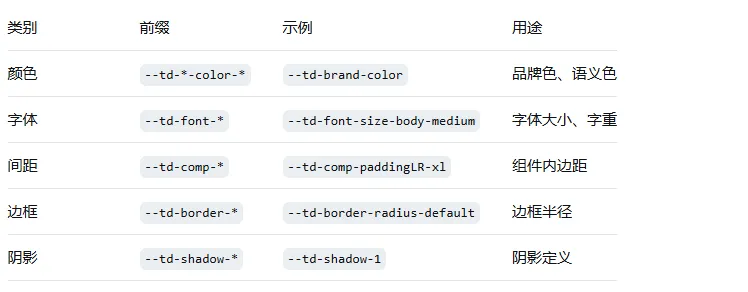
4.2 ConfigProvider主题配置
通过ConfigProvider组件可以实现运行时主题配置:
<template>
  <t-config-provider :globalConfig="globalConfig">
    <App />
  </t-config-provider>
</template>

<script setup>
import { ref } from 'vue';

const globalConfig = ref({
  classPrefix: 't',
  // 主题配置
  theme: {
    token: {
      brandColor: '#0052d9',
      borderRadius: '6px',
    },
  },
});
</script>
4.3 深色模式
TDesign内置了对深色模式的支持,通过添加.dark类即可切换:
<template>
  <t-button @click="toggleDarkMode">切换主题</t-button>
</template>

<script setup>
const toggleDarkMode = () => {
  document.documentElement.classList.toggle('dark');
};
</script>
4.4 主题生成器
TDesign提供了主题生成工具,支持可视化的主题定制:
import { ThemeGenerator } from '@tdesign/theme-generator';

const generator = new ThemeGenerator({
  brandColor: '#0052d9',
  borderRadius: '8px',
});

// 应用生成的主题
generator.apply();
4.5 插件组件的主题支持
从版本1.18.0开始,Dialog、Message、Notification等插件式组件也支持通过ConfigProvider接收主题配置:
<template>
  <t-config-provider :globalConfig="globalConfig">
    <App />
  </t-config-provider>
</template>

<script setup>
const globalConfig = {
  theme: {
    token: {
      brandColor: '#00a870',
    },
  },
};
</script>