
下载地址:http://pan38.cn/iab17825a
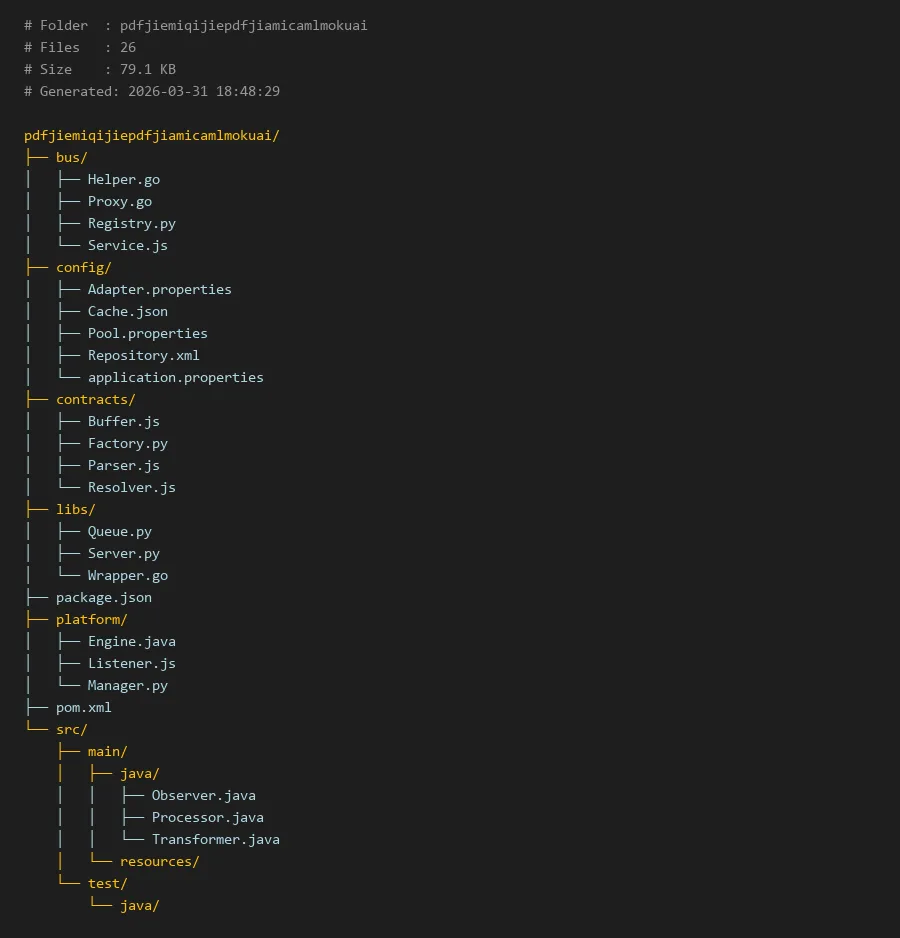
项目编译入口:
package.json
# Folder  : pdfjiemiqijiepdfjiamicamlmokuai
# Files   : 26
# Size    : 79.1 KB
# Generated: 2026-03-31 18:48:29

pdfjiemiqijiepdfjiamicamlmokuai/
├── bus/
│   ├── Helper.go
│   ├── Proxy.go
│   ├── Registry.py
│   └── Service.js
├── config/
│   ├── Adapter.properties
│   ├── Cache.json
│   ├── Pool.properties
│   ├── Repository.xml
│   └── application.properties
├── contracts/
│   ├── Buffer.js
│   ├── Factory.py
│   ├── Parser.js
│   └── Resolver.js
├── libs/
│   ├── Queue.py
│   ├── Server.py
│   └── Wrapper.go
├── package.json
├── platform/
│   ├── Engine.java
│   ├── Listener.js
│   └── Manager.py
├── pom.xml
└── src/
    ├── main/
    │   ├── java/
    │   │   ├── Observer.java
    │   │   ├── Processor.java
    │   │   └── Transformer.java
    │   └── resources/
    └── test/
        └── java/
pdfjiemiqijiepdfjiamicamlmokuai:一个模块化的PDF解密器实现
简介
在当今数字化办公环境中,PDF文档的加密保护已成为常见的安全措施。然而,当用户忘记密码或需要批量处理受保护文档时,一个可靠的PDF解密器就显得尤为重要。本项目"pdfjiemiqijiepdfjiamicamlmokuai"正是为解决这一问题而设计的模块化解决方案。
这个项目采用多语言混合架构,充分利用了Python、JavaScript、Go和Java等语言的优势,构建了一个高效、可扩展的PDF解密系统。项目名称本身就暗示了其核心功能——PDF解密与加密处理,通过精心设计的模块化结构,实现了密码破解、文档解析、任务队列管理等核心功能。
核心模块说明
配置管理模块(config/)
配置模块是整个系统的基石,包含了各种配置文件:
application.properties:应用主配置文件Cache.json:缓存配置,优化解密性能Pool.properties:连接池配置,管理资源分配
业务逻辑模块(bus/)
业务模块处理核心的解密逻辑:
Helper.go:Go语言编写的辅助函数库Proxy.go:代理服务,处理外部请求Service.js:JavaScript实现的核心服务
契约接口模块(contracts/)
定义系统各组件之间的接口规范:
Parser.js:文档解析器接口Resolver.js:密码解析器接口Factory.py:工厂模式实现
平台核心模块(platform/)
平台模块提供基础运行环境:
Engine.java:Java引擎,处理复杂解密算法Listener.js:事件监听器,监控解密进度
工具库模块(libs/)
提供通用的工具函数和组件:
Queue.py:Python实现的任务队列Server.py:服务端组件Wrapper.go:Go语言包装器
代码示例
1. 配置加载示例
# 加载Pool配置
import json
import os

class ConfigLoader:
    def __init__(self, config_path="config/"):
        self.config_path = config_path

    def load_pool_config(self):
        """加载连接池配置"""
        config_file = os.path.join(self.config_path, "Pool.properties")
        config = {
   }
        with open(config_file, 'r') as f:
            for line in f:
                if '=' in line and not line.startswith('#'):
                    key, value = line.strip().split('=', 1)
                    config[key] = value
        return config

    def load_cache_config(self):
        """加载缓存配置"""
        cache_file = os.path.join(self.config_path, "Cache.json")
        with open(cache_file, 'r') as f:
            return json.load(f)

# 使用示例
loader = ConfigLoader()
pool_config = loader.load_pool_config()
print(f"最大连接数: {pool_config.get('max.connections', '10')}")
2. PDF解密服务实现
```javascript
// contracts/Resolver.js - 密码解析器接口
class PasswordResolver {
constructor() {
this.attempts = 0;
this.maxAttempts = 1000;
}
/**
 * 尝试解密PDF文档
 * @param {Buffer} encryptedData - 加密的PDF数据
 * @param {string} password - 尝试的密码
 * @returns {Promise<Buffer>} 解密后的数据
 */
async decryptPDF(encryptedData, password) {
    throw new Error("必须在子类中实现此方法");
}

/**
 * 批量密码尝试
 * @param {Buffer} encryptedData - 加密的PDF数据
 * @param {Array<string>} passwordList - 密码列表
 * @returns {Promise<Object>} 解密结果
 */
async batchDecrypt(encryptedData, passwordList) {
    for (let password of passwordList) {
        this.attempts++;
        if (this.attempts > this.maxAttempts) {
            throw new Error("超过最大尝试次数");
        }

        try {
            const decrypted = await this.decryptPDF(encryptedData, password);
            return {
                success: true,
                password: password,
                data: decrypted,
                attempts: this.attempts
            };
        } catch (error) {
            // 继续尝试下一个密码
            continue;
        }
    }
    return {
        success: false,
        attempts: this.attempts
    };
}
}
// bus/Service.js - 核心服务实现
const fs = require('fs');
const path = require('path');
class PDFDecryptionService extends PasswordResolver {
constructor() {
super();
this.cache = new Map();
}
async decryptPDF(encryptedData, password) {
    // 这里实现具体的PDF解密逻辑
    // 实际项目中会集成PDF解析库如pdf-lib或qpdf

    // 模拟解密过程
    await new Promise(resolve => setTimeout(resolve, 50));

    // 检查密码是否正确(模拟)
    if (password === "correct123") {
        // 返回模拟的解密数据
        return Buffer.from("Decrypted PDF content");
    }

    throw new Error("密码错误");
}

async decryptFromFile(filePath, passwordList) {
    const fileData = fs.readFileSync(filePath);
    const result = await this.batchDecrypt(fileData, passwordList);

    if (

