问题描述
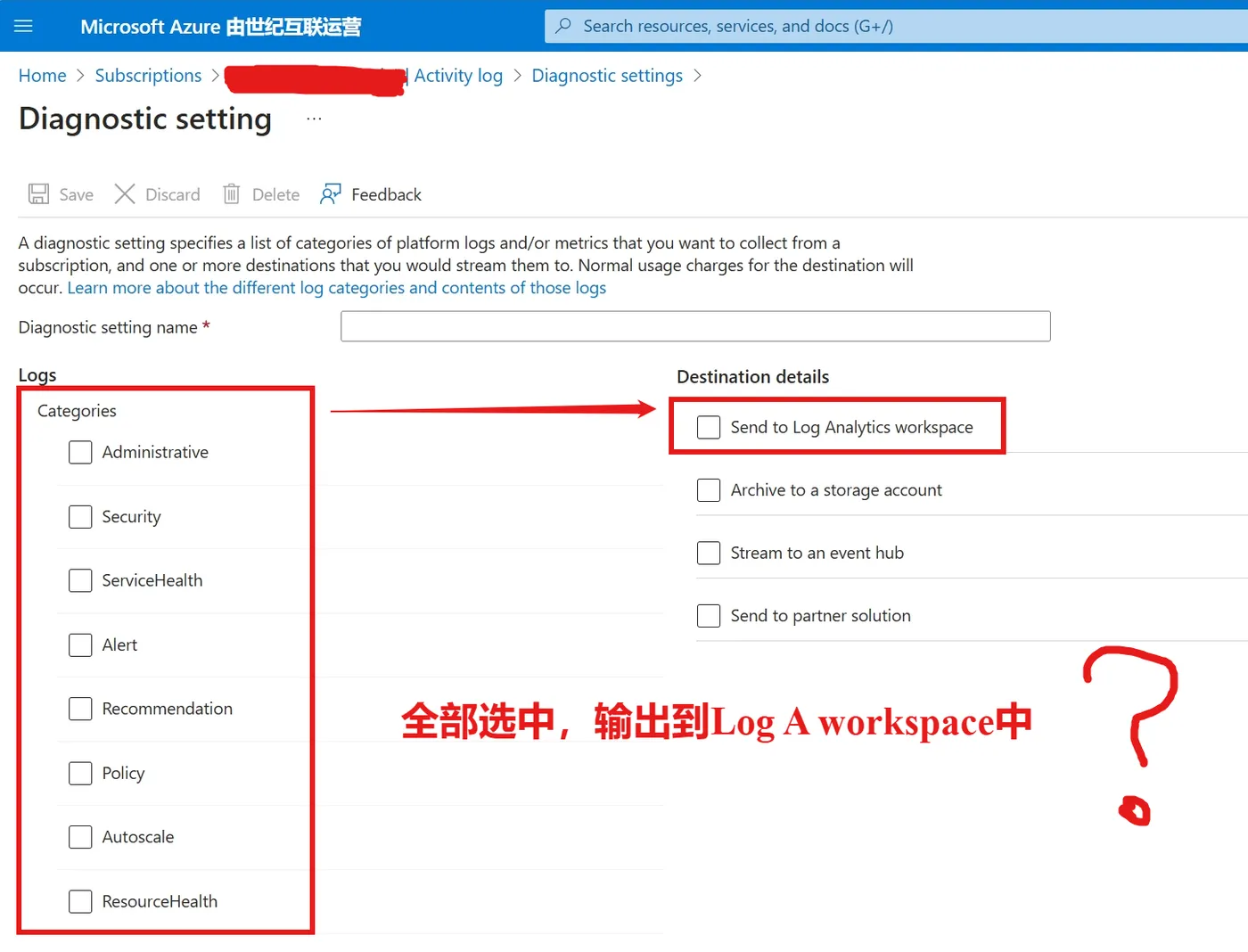
使用Azure Policy服务,对公司内部全部的订阅下的Activity Log,都需要配置导出到Log A Workspace中。
以下Policy规则可以实现此目的。
Policy内容说明
在Policy Rule部分中,选择资源的类型为 "Microsoft.Resources/subscriptions", 效果使用 DeployIfNotExists (如果不存在,则通过修复任务进行修正。
在 existenceCondition 条件中,如果当前订阅已经启用了 diagnostic setting并且输出日志到同一个Log A workspace,表示满足Policy要求,不需要进行修正。
在 deployment 中,使用了 ARM 模板, 为订阅添加Diagnostic Setting并且所有的日志Category均启用。
因 deployment 操作,会修改诊断日志配置(属于Monitor服务)以及Log A Workspace,所以需要为这个ARM Deployment操作给与两个contributor权限, 即 roleDefinitionIds 中的内容。
使用三个输入参数 logAnalytics, effect, logsEnabled 作为Policy的判断条件。
Policy示例
{
  "mode": "All",
  "policyRule": {
    "if": {
      "field": "type",
      "equals": "Microsoft.Resources/subscriptions"
    },
    "then": {
      "effect": "[parameters('effect')]",
      "details": {
        "type": "Microsoft.Insights/diagnosticSettings",
        "deploymentScope": "subscription",
        "existenceScope": "subscription",
        "existenceCondition": {
          "allOf": [
            {
              "field": "Microsoft.Insights/diagnosticSettings/logs.enabled",
              "equals": "[parameters('logsEnabled')]"
            },
            {
              "field": "Microsoft.Insights/diagnosticSettings/workspaceId",
              "equals": "[parameters('logAnalytics')]"
            }
          ]
        },
        "deployment": {
          "location": "chinaeast2",
          "properties": {
            "mode": "incremental",
            "template": {
              "$schema": "https://schema.management.azure.com/schemas/2018-05-01/subscriptionDeploymentTemplate.json#",
              "contentVersion": "1.0.0.0",
              "parameters": {
                "logAnalytics": {
                  "type": "string"
                },
                "logsEnabled": {
                  "type": "string"
                }
              },
              "variables": {},
              "resources": [
                {
                  "name": "policy-enabled-ActivityLogs-to-logA",
                  "type": "Microsoft.Insights/diagnosticSettings",
                  "apiVersion": "2017-05-01-preview",
                  "location": "Global",
                  "properties": {
                    "workspaceId": "[parameters('logAnalytics')]",
                    "logs": [
                      {
                        "category": "Administrative",
                        "enabled": "[parameters('logsEnabled')]"
                      },
                      {
                        "category": "Security",
                        "enabled": "[parameters('logsEnabled')]"
                      },
                      {
                        "category": "ServiceHealth",
                        "enabled": "[parameters('logsEnabled')]"
                      },
                      {
                        "category": "Alert",
                        "enabled": "[parameters('logsEnabled')]"
                      },
                      {
                        "category": "Recommendation",
                        "enabled": "[parameters('logsEnabled')]"
                      },
                      {
                        "category": "Policy",
                        "enabled": "[parameters('logsEnabled')]"
                      },
                      {
                        "category": "Autoscale",
                        "enabled": "[parameters('logsEnabled')]"
                      },
                      {
                        "category": "ResourceHealth",
                        "enabled": "[parameters('logsEnabled')]"
                      }
                    ]
                  }
                }
              ],
              "outputs": {}
            },
            "parameters": {
              "logAnalytics": {
                "value": "[parameters('logAnalytics')]"
              },
              "logsEnabled": {
                "value": "[parameters('logsEnabled')]"
              }
            }
          }
        },
        "roleDefinitionIds": [
          "/providers/microsoft.authorization/roleDefinitions/749f88d5-cbae-40b8-bcfc-e573ddc772fa",
          "/providers/microsoft.authorization/roleDefinitions/92aaf0da-9dab-42b6-94a3-d43ce8d16293"
        ]
      }
    }
  },
  "parameters": {
    "logAnalytics": {
      "type": "String",
      "metadata": {
        "displayName": "Primary Log Analytics workspace",
        "description": "If this workspace is outside of the scope of the assignment you must manually grant 'Log Analytics Contributor' permissions (or similar) to the policy assignment's principal ID.",
        "strongType": "omsWorkspace",
        "assignPermissions": true
      }
    },
    "effect": {
      "type": "String",
      "metadata": {
        "displayName": "Effect",
        "description": "Enable or disable the execution of the policy"
      },
      "allowedValues": [
        "DeployIfNotExists",
        "Disabled"
      ],
      "defaultValue": "DeployIfNotExists"
    },
    "logsEnabled": {
      "type": "String",
      "metadata": {
        "displayName": "Enable logs",
        "description": "Whether to enable logs stream to the Log Analytics workspace - True or False"
      },
      "allowedValues": [
        "True",
        "False"
      ],
      "defaultValue": "True"
    }
  }
}
当在复杂的环境中面临问题,格物之道需:浊而静之徐清,安以动之徐生。 云中,恰是如此!