[Azure Developer]把Azure Function中ILogger对象静态化为静态方法提供日志记录

简介: [Azure Developer]把Azure Function中ILogger对象静态化为静态方法提供日志记录

问题描述

在Azure Function代码中,有默认的ILogger对象来记录函数的日志,如果函数引用了一些静态对象,是否有办法使用这个默认的ILogger对象来记录日志呢?

using System.Net;
using Microsoft.Azure.Functions.Worker;
using Microsoft.Azure.Functions.Worker.Http;
using Microsoft.Extensions.Logging;
namespace Company.Function
{
    public class HttpTrigger1
    {
        private readonly ILogger _logger;
        public HttpTrigger1(ILoggerFactory loggerFactory)
        {
            _logger = loggerFactory.CreateLogger<HttpTrigger1>();
        }
        [Function("HttpTrigger1")]
        public HttpResponseData Run([HttpTrigger(AuthorizationLevel.Function, "get", "post")] HttpRequestData req)
        {
            _logger.LogInformation("C# HTTP trigger function processed a request.");
            var response = req.CreateResponse(HttpStatusCode.OK);
            response.Headers.Add("Content-Type", "text/plain; charset=utf-8");
            response.WriteString("Welcome to Azure Functions!");
            return response;
        }
    }
}


问题解答

可以的,有两种方式来实现:方式一是把_logger对象作为参数传递给静态方法,方式二是自定义一个静态ILogger 对象,然后在静态方法中使用。

方式一:把_logger对象作为参数传递

示例代码:
        [Function("Function1")]
        public HttpResponseData Run([HttpTrigger(AuthorizationLevel.Anonymous, "get", "post")] HttpRequestData req)
        {
   ... 
            //Call Static Fun  without _logger
            GetLocalStaticFun();
            //Call static Fun with _logger 
            GetLocalStaticFun(_logger);
   ... 
        }
        public static void GetLocalStaticFun(ILogger _sublogger = null)
        {
            //TODO Logic process 
            if (_sublogger != null)
            {
                _sublogger.LogInformation("this is static fucntion for testing...LogInformation. @2023/10/25");
            }
        }

测试效果:
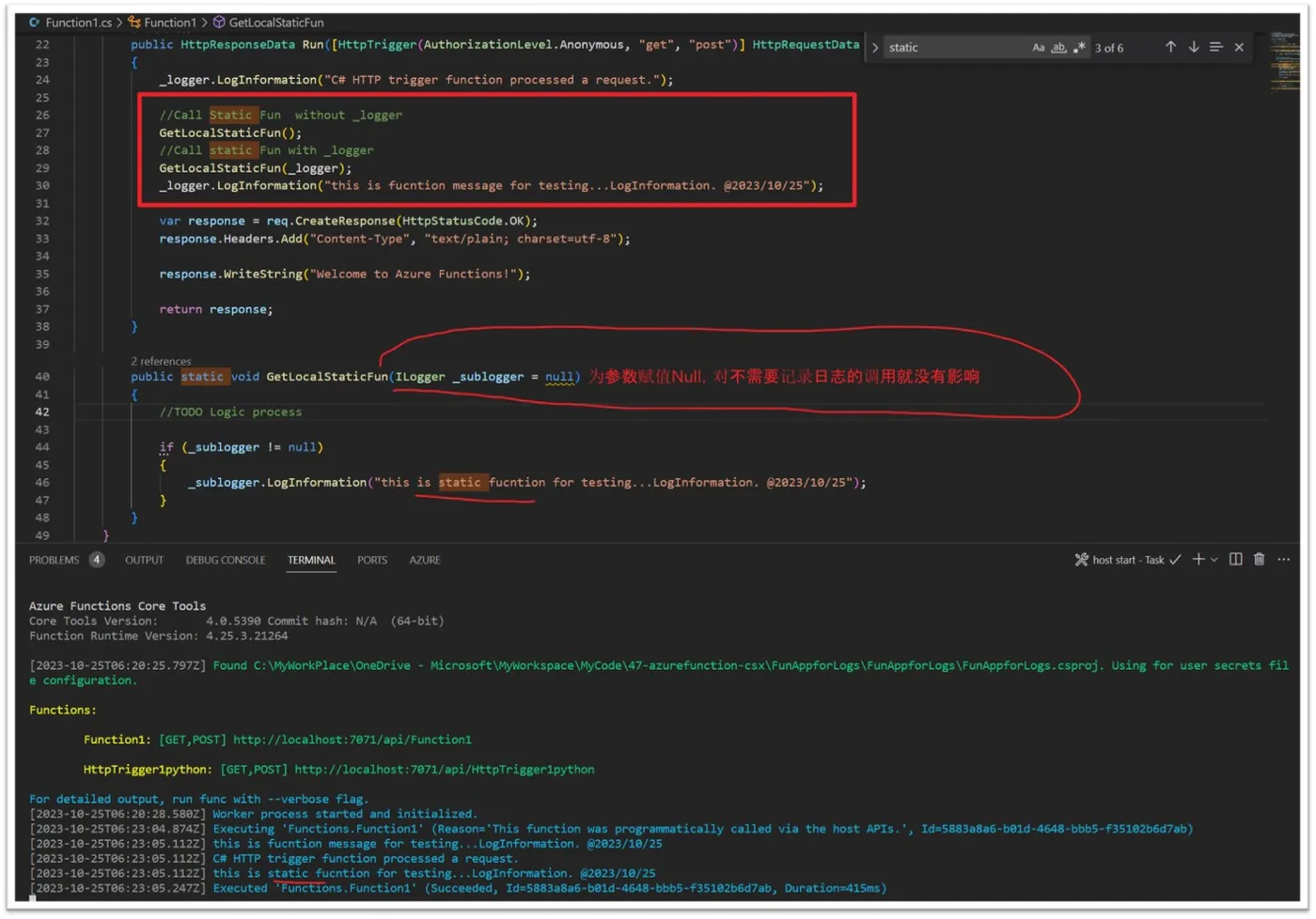
 

方式二:定义静态ILogger对象

示例代码:

static ILoggerFactory _staticLoggerFactory = LoggerFactory.Create(builder =>
             {
                 builder
                 .AddFilter("Microsoft", LogLevel.Warning)
                 .AddFilter("System", LogLevel.Warning)
                 .AddConsole();
             });
        static ILogger _staticloger = _staticLoggerFactory.CreateLogger<Function1>();
        public static void GetStaticLogFun()
        {
            _staticloger.LogInformation("Example log message form static class");
            _staticloger.LogError("Example error message form static class");
        }

注:以此种方式记录的日志,当部署到Azure Function App云服务后,通过在高级工具(kudu)站点查看日志时,与正常的日志不同,在与函数名同名的Folder中,而是在Host Folder中(C:\home\LogFiles\Application\Functions\Host)。


参考资料

ILoggerFactory static create: https://learn.microsoft.com/en-us/dotnet/core/extensions/logging?tabs=command-line#non-host-console-app

 

相关实践学习
【涂鸦即艺术】基于云应用开发平台CAP部署AI实时生图绘板
相关文章
|
API C++
【Azure 环境】VS Code登录China Azure(Function)报错 An error occurred while signing in: invalid_request - AADSTS65002
An error occurred while signing in: invalid_request - AADSTS65002: Consent between first party application 'c27c220f-ce2f-4904-927d-333864217eeb' and first party resource '797f4846-ba00-4fd7-ba43-dac1f8f63013' must be configured via preauthorization - applications owned and operated by Microsoft mus
585 13
|
存储 安全 数据安全/隐私保护
【Azure Function App】在Function App中使用System Managed Identity访问Storage Account
本文介绍了如何在Azure Function中使用托管身份(Managed Identity)替代AzureWebJobsStorage连接函数应用到存储账户,以提高安全性并减少Access Key的使用。具体步骤包括:1) 启用系统分配的身份;2) 为函数应用授予存储访问权限,添加必要角色(如Storage Blob Data Contributor);3) 配置`AzureWebJobsStorage__blobServiceUri`参数指定Blob Service Uri。完成后删除旧配置,即可通过Managed Identity访问Storage Account。
522 20
|
数据安全/隐私保护
【Azure Function App】PowerShell Function 执行 Get-AzAccessToken 的返回值类型问题:System.String 与 System.Security.SecureString
将PowerShell Function部署到Azure Function App后,Get-AzAccessToken返回值类型在不同环境中有差异。正常为SecureString类型,但部分情况下为System.String类型,导致后续处理出错。解决方法是在profile.ps1中设置环境变量$env:AZUREPS_OUTPUT_PLAINTEXT_AZACCESSTOKEN=false,以禁用明文输出。
334 1
|
JSON 数据格式
【Azure 环境】当一个Azure Function资源创建很久了,是否可以获取到它的创建时间呢?
用户在尝试获取 Azure Function App 的创建时间时发现,资源 JSON 中缺少 `createdTime` 字段,仅能查看到 `lastModifiedTime`。同时,活动日志和 Azure Resource Graph 查询也未能提供创建时间信息。经解答,Azure 并未为所有资源类型记录创建时间,建议在部署时将创建时间作为标签记录。若创建时间在 90 天内,可通过部署日志间接获取。
377 7
|
JSON API 数据格式
【Azure APIM】如何把APIM中处理的请求的所有请求头保存在日志中?
Azure API Management 默认诊断日志不记录请求的 Header 和 Body 信息。为实现记录,可通过配置 Trace 策略解决。例如,使用 `context.Request.Headers` 和 `context.Request.Body` 获取相关信息,并以 JSON 或字符串格式保存。示例代码展示了如何将 Headers 转换为 JSON 或逗号分隔字符串形式记录。相关参考资料包括 Set Body Policy 和 Trace Policy 官方文档,帮助进一步了解与扩展功能。
397 36
|
JSON C# 数据格式
【Azure Function】C#独立工作模式下参数类型 ServiceBusReceivedMessage 无法正常工作
Cannot convert input parameter 'message' to type 'Azure.Messaging.ServiceBus.ServiceBusReceivedMessage' from type 'System.String'.
423 73
|
网络协议 API 网络安全
【Azure Function App】发现部分请求Function App遇见 403.72 报错(请求Body>100KB)
在调用Azure Function的HTTP Trigger时,发送POST请求偶尔出现403错误,且响应为空、Header信息少。经排查发现,当请求Body大于100KB时会触发403.72错误,原因是启用了“Client Certificate mode”为“Optional Interactive User”。解决方法是将该模式设置为“Ignore”。由于TLS重新协商机制限制,大请求体无法正常处理,导致此问题。
420 1
【Azure Function】Function App出现System.IO.FileNotFoundException异常
Exception while executing function: xxxxxxx,The type initializer for 'xxxxxx.Storage.Adls2.StoreDataLakeGen2Reading' threw an exception. Could not load file or assembly 'Microsoft.Extensions.Configuration, Version=9.0.0.0, Culture=neutral, PublicKeyToken=adb9793829ddae60'. The system cannot find the
467 64
|
存储 数据可视化 开发工具
【Application Insights】Application Insights存储的Function App的日志存在"Operation Link" 为空的情况
在将 Azure Functions 升级到 .NET 8 和 Isolated Worker 模式后,Application Insights 的请求日志中 `operation_Link` 字段为空,导致分布式追踪无法正常关联。解决方法包括:确保引用正确的 SDK 包(如 `Microsoft.Azure.Functions.Worker.ApplicationInsights`),正确配置 Application Insights 服务,移除默认日志过滤规则,并使用最新依赖包以支持分布式追踪。通过这些步骤,可恢复端到端事务视图的可视化效果。
320 11

热门文章

最新文章