BackTrader 中文文档(二十四)(2)https://developer.aliyun.com/article/1505446
脚本代码和用法
在backtrader源代码中作为示例提供。用法:
$ ./memory-savings.py --help
usage: memory-savings.py [-h] [--data DATA] [--save SAVE] [--datalines]
                         [--lendetails] [--plot]
Check Memory Savings
optional arguments:
  -h, --help    show this help message and exit
  --data DATA   Data to be read in (default: ../../datas/yhoo-1996-2015.txt)
  --save SAVE   Memory saving level [1, 0, -1, -2] (default: 0)
  --datalines   Print data lines (default: False)
  --lendetails  Print individual items memory usage (default: False)
  --plot        Plot the result (default: False)
代码:
from __future__ import (absolute_import, division, print_function,
                        unicode_literals)
import argparse
import sys
import backtrader as bt
import backtrader.feeds as btfeeds
import backtrader.indicators as btind
import backtrader.utils.flushfile
class TestInd(bt.Indicator):
    lines = ('a', 'b')
    def __init__(self):
        self.lines.a = b = self.data.close - self.data.high
        self.lines.b = btind.SMA(b, period=20)
class St(bt.Strategy):
    params = (
        ('datalines', False),
        ('lendetails', False),
    )
    def __init__(self):
        btind.SMA()
        btind.Stochastic()
        btind.RSI()
        btind.MACD()
        btind.CCI()
        TestInd().plotinfo.plot = False
    def next(self):
        if self.p.datalines:
            txt = ','.join(
                ['%04d' % len(self),
                 '%04d' % len(self.data0),
                 self.data.datetime.date(0).isoformat()]
            )
            print(txt)
    def loglendetails(self, msg):
        if self.p.lendetails:
            print(msg)
    def stop(self):
        super(St, self).stop()
        tlen = 0
        self.loglendetails('-- Evaluating Datas')
        for i, data in enumerate(self.datas):
            tdata = 0
            for line in data.lines:
                tdata += len(line.array)
                tline = len(line.array)
            tlen += tdata
            logtxt = '---- Data {} Total Cells {} - Cells per Line {}'
            self.loglendetails(logtxt.format(i, tdata, tline))
        self.loglendetails('-- Evaluating Indicators')
        for i, ind in enumerate(self.getindicators()):
            tlen += self.rindicator(ind, i, 0)
        self.loglendetails('-- Evaluating Observers')
        for i, obs in enumerate(self.getobservers()):
            tobs = 0
            for line in obs.lines:
                tobs += len(line.array)
                tline = len(line.array)
            tlen += tdata
            logtxt = '---- Observer {} Total Cells {} - Cells per Line {}'
            self.loglendetails(logtxt.format(i, tobs, tline))
        print('Total memory cells used: {}'.format(tlen))
    def rindicator(self, ind, i, deep):
        tind = 0
        for line in ind.lines:
            tind += len(line.array)
            tline = len(line.array)
        thisind = tind
        tsub = 0
        for j, sind in enumerate(ind.getindicators()):
            tsub += self.rindicator(sind, j, deep + 1)
        iname = ind.__class__.__name__.split('.')[-1]
        logtxt = '---- Indicator {}.{} {} Total Cells {} - Cells per line {}'
        self.loglendetails(logtxt.format(deep, i, iname, tind, tline))
        logtxt = '---- SubIndicators Total Cells {}'
        self.loglendetails(logtxt.format(deep, i, iname, tsub))
        return tind + tsub
def runstrat():
    args = parse_args()
    cerebro = bt.Cerebro()
    data = btfeeds.YahooFinanceCSVData(dataname=args.data)
    cerebro.adddata(data)
    cerebro.addstrategy(
        St, datalines=args.datalines, lendetails=args.lendetails)
    cerebro.run(runonce=False, exactbars=args.save)
    if args.plot:
        cerebro.plot(style='bar')
def parse_args():
    parser = argparse.ArgumentParser(
        formatter_class=argparse.ArgumentDefaultsHelpFormatter,
        description='Check Memory Savings')
    parser.add_argument('--data', required=False,
                        default='../../datas/yhoo-1996-2015.txt',
                        help='Data to be read in')
    parser.add_argument('--save', required=False, type=int, default=0,
                        help=('Memory saving level [1, 0, -1, -2]'))
    parser.add_argument('--datalines', required=False, action='store_true',
                        help=('Print data lines'))
    parser.add_argument('--lendetails', required=False, action='store_true',
                        help=('Print individual items memory usage'))
    parser.add_argument('--plot', required=False, action='store_true',
                        help=('Plot the result'))
    return parser.parse_args()
if __name__ == '__main__':
    runstrat()
在指标中混合时间框架
原文:
www.backtrader.com/blog/posts/2016-05-05-indicators-mixing-timeframes/indicators-mixing-timeframes/
发布版本 1.3.0.92 带来了一个新的可能性,可以将来自不同时间框架(数据源和/或指标)的数据混合在一起。
发布版本:github.com/mementum/backtrader/releases/tag/1.3.0.92
背景:指标是聪明的愚蠢对象。
- 它们很聪明,因为它们可以进行复杂的计算。
- 它们很笨,因为它们在不知道为计算提供数据的来源的情况下运行
如下所示:
- 如果提供值的数据源具有不同的时间框架,在
Cerebro引擎中长度不同,那么指标将会破裂。
一个计算的例子,在这个例子中data0的时间框架是天,而data1的时间框架是月:
pivotpoint = btind.PivotPoint(self.data1)
sellsignal = self.data0.close < pivotpoint.s1
这里寻找卖出信号,当收盘价低于s1线(第一个支撑位)时
注意
根据定义,PivotPoint在较大的时间框架中运行
这将在过去出现以下错误:
return self.array[self.idx + ago]
IndexError: array index out of range
出于一个很好的原因:self.data.close从第一个瞬间提供值,但PivotPoint(因此s1线)只有在整个月份过去后才会提供值,这大约相当于self.data0.close的 22 个值。在这 22 个closes中,还没有s1的值,并且从底层数组中获取它的尝试会失败。
线对象支持()操作符(Python中的__call__特殊方法)以提供其自身的延迟版本:
close1 = self.data.close(-1)
在此示例中,通过[0]访问close1对象始终包含close提供的先前值(-1)。语法已经被重用以适应不同的时间框架。让我们重写上述的pivotpoint片段:
pivotpoint = btind.PivotPoint(self.data1)
sellsignal = self.data0.close < pivotpoint.s1()
见如何在不带参数的情况下执行()(在后台提供一个None)。以下是发生的情况:
pivotpoint.s1()返回一个内部的LinesCoupler对象,该对象遵循更大范围的节奏。这个连接器会用来自实际s1的最新值填充自身(从NaN的默认值开始)
但是还需要一些额外的东西来使魔法生效。Cerebro必须使用以下内容创建:
cerebro = bt.Cerebro(runonce=False)
或者使用以下内容执行:
cerebro.run(runonce=False)
在此模式下,指标和延迟评估的自动线对象是逐步执行的,而不是在紧密循环中。这使整个操作变慢,但它使其可能
之前破解的底部示例脚本现在可以运行:
$ ./mixing-timeframes.py
输出为:
0021,0021,0001,2005-01-31,2984.75,2935.96,0.00
0022,0022,0001,2005-02-01,3008.85,2935.96,0.00
...
0073,0073,0003,2005-04-15,3013.89,3010.76,0.00
0074,0074,0003,2005-04-18,2947.79,3010.76,1.00
...
在交易 74 处,第 1 次发生close < s1。
该脚本还提供了另一个可能性的见解:将指标的所有线连接起来。之前我们有:
self.sellsignal = self.data0.close < pp.s1()
作为替代方案:
pp1 = pp()
self.sellsignal = self.data0.close < pp1.s1
现在整个PivotPoint指标已经耦合,并且可以访问其任何线条(即p、r1、r2、s1、s2)。脚本只对s1感兴趣,访问是直接的。:
$ ./mixing-timeframes.py --multi
输出:
0021,0021,0001,2005-01-31,2984.75,2935.96,0.00
0022,0022,0001,2005-02-01,3008.85,2935.96,0.00
...
0073,0073,0003,2005-04-15,3013.89,3010.76,0.00
0074,0074,0003,2005-04-18,2947.79,3010.76,1.00
...
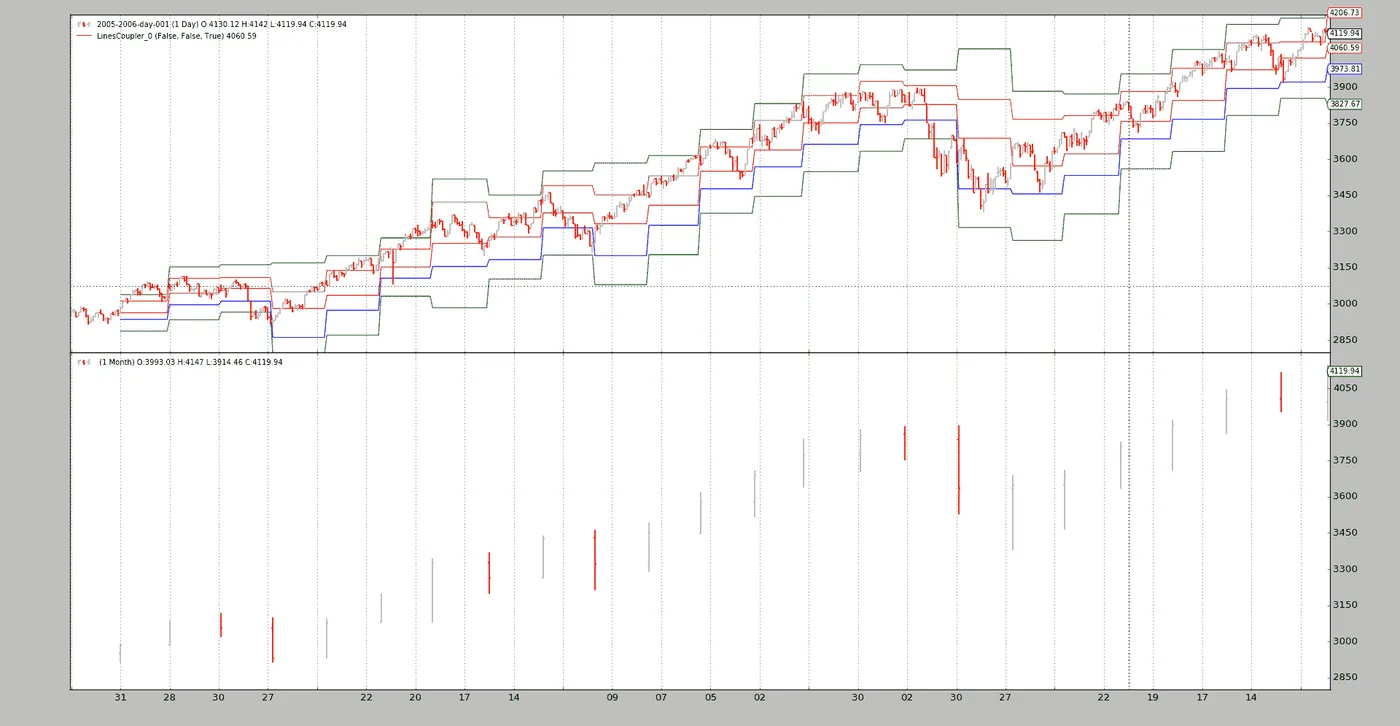
这里没有什么意外。与以前相同。甚至可以绘制“耦合”对象:
$ ./mixing-timeframes.py --multi --plot
完整的耦合语法
对于具有多个线条的lines对象(例如Indicators如PivotPoint):
obj(clockref=None, line=-1)
- 如果
clockref为None,则周围的对象(在示例中为Strategy)将是调整较大时间框架(例如:Months)到较小/更快时间框架(例如:Days)的参考
- 如果愿意,可以使用另一个参考。
line
- If the default `-1` is given, all *lines* are coupled.
- If another integer (for example, `0` or `1`) a single line will be
  coupled and fetched by index (from `obj.lines[x]`)
- If a string is passed, the line will be fetched by name.
  In the sample the following could have been done:
- coupled_s1 = pp(line=‘s1’)
```py`
对于lines对象只有一条线(例如指标PivotPoint的线条s1):
obj(clockref=None)(参见上面的clockref)
结论
在常规的()语法中,不同时间段的数据可以在指标中混合,始终考虑到需要使用runonce=False来实例化或创建cerebro。
脚本代码和用法
在backtrader的源代码中可用作示例。用法:
$ ./mixing-timeframes.py --help
usage: mixing-timeframes.py [-h] [--data DATA] [--multi] [--plot]
Sample for pivot point and cross plotting
optional arguments:
  -h, --help   show this help message and exit
  --data DATA  Data to be read in (default: ../../datas/2005-2006-day-001.txt)
  --multi      Couple all lines of the indicator (default: False)
  --plot       Plot the result (default: False)
代码:
from __future__ import (absolute_import, division, print_function,
                        unicode_literals)
import argparse
import backtrader as bt
import backtrader.feeds as btfeeds
import backtrader.indicators as btind
import backtrader.utils.flushfile
class St(bt.Strategy):
    params = dict(multi=True)
    def __init__(self):
        self.pp = pp = btind.PivotPoint(self.data1)
        pp.plotinfo.plot = False  # deactivate plotting
        if self.p.multi:
            pp1 = pp()  # couple the entire indicators
            self.sellsignal = self.data0.close < pp1.s1
        else:
            self.sellsignal = self.data0.close < pp.s1()
    def next(self):
        txt = ','.join(
            ['%04d' % len(self),
             '%04d' % len(self.data0),
             '%04d' % len(self.data1),
             self.data.datetime.date(0).isoformat(),
             '%.2f' % self.data0.close[0],
             '%.2f' % self.pp.s1[0],
             '%.2f' % self.sellsignal[0]])
        print(txt)
def runstrat():
    args = parse_args()
    cerebro = bt.Cerebro()
    data = btfeeds.BacktraderCSVData(dataname=args.data)
    cerebro.adddata(data)
    cerebro.resampledata(data, timeframe=bt.TimeFrame.Months)
    cerebro.addstrategy(St, multi=args.multi)
    cerebro.run(stdstats=False, runonce=False)
    if args.plot:
        cerebro.plot(style='bar')
def parse_args():
    parser = argparse.ArgumentParser(
        formatter_class=argparse.ArgumentDefaultsHelpFormatter,
        description='Sample for pivot point and cross plotting')
    parser.add_argument('--data', required=False,
                        default='../../datas/2005-2006-day-001.txt',
                        help='Data to be read in')
    parser.add_argument('--multi', required=False, action='store_true',
                        help='Couple all lines of the indicator')
    parser.add_argument('--plot', required=False, action='store_true',
                        help=('Plot the result'))
    return parser.parse_args()
if __name__ == '__main__':
    runstrat()
枢轴点和交叉绘图
原文:
www.backtrader.com/blog/posts/2016-04-28-pivot-point-cross-plotting/pivotpoint-crossplotting/
注意
这篇文章因历史原因而保留。 该指标和示例已在源中进行了更新,PivotPoint 现在可以自动连接自身,从而为用户代码删除了样板。
一个新的帖子将引用此帖子。 与此同时,请检查来源中的更新示例。
收到了一个有趣的请求:
- PivotPoint
它之所以有趣,是因为指标的定义方式。 文献可在 StockCharts 的 PivotPoint 中找到。 PivotPoints 使用过去时间段的 close、high 和 low 价格。 例如,对于每日时间段:
- 每日图表的枢轴点使用先前月份的数据
这可能看起来很麻烦,因为对于每个时间框架,都需要定义必须使用的其他时间框架。 查看公式会引起另一个问题:
Pivot Point (P) = (High + Low + Close)/3
Support 1 (S1) = (P x 2) - High
Support 2 (S2) = P  -  (High  -  Low)
Resistance 1 (R1) = (P x 2) - Low
Resistance 2 (R2) = P + (High  -  Low)
即使文本充满了对 先前期间 和 过去 … 的引用,但公式似乎是参考当前时刻。 让我们遵循 文本 的建议,在我们首次尝试 PivotPoint 时使用 previous。 但首先,让我们通过这样做来解决不同时间框架的问题:
- 该指标不会解决问题
尽管这可能看起来令人困惑,但必须考虑到 指标 必须尽可能愚蠢,并由实际公式组成。 问题将按以下方式解决:
data = btfeeds.ADataFeed(..., timeframe=bt.TimeFrame.Days)
cerebro.adddata(data)
cerebro.resampledata(data, timeframe=bt.TimeFrame.Months)
而后在 策略 中:
class MyStrategy(bt.Strategy):
    def __init__(self):
        self.pp = PivotPoint(self.data1)  # the resampled data
现在清楚了。 该系统将具有数据,再加上额外的输入重采样为所需的时间框架。 PivotPoint 指标将使用已重采样的数据工作,这些数据已处于所需的 每月 时间框架中,以供原始数据时间框架使用,即 每日。
指标可以被开发出来。 让我们从跟随文本指示开始,而不是公式,回望 1 期。
class PivotPoint1(bt.Indicator):
    lines = ('p', 's1', 's2', 'r1', 'r2',)
    def __init__(self):
        h = self.data.high(-1)  # previous high
        l = self.data.low(-1)  # previous low
        c = self.data.close(-1)  # previous close
        self.lines.p = p = (h + l + c) / 3.0
        p2 = p * 2.0
        self.lines.s1 = p2 - h  # (p x 2) - high
        self.lines.r1 = p2 - l  # (p x 2) - low
        hilo = h - l
        self.lines.s2 = p - hilo  # p - (high - low)
        self.lines.r2 = p + hilo  # p + (high - low)
该策略将查看参数 usepp1 来使用此 PivotPoint1
def __init__(self):
        if self.p.usepp1:
            self.pp = PivotPoint1(self.data1)
        else:
            self.pp = PivotPoint(self.data1)
输出由一个简单的 next 方法控制
def next(self):
        txt = ','.join(
            ['%04d' % len(self),
             '%04d' % len(self.data0),
             '%04d' % len(self.data1),
             self.data.datetime.date(0).isoformat(),
             '%.2f' % self.pp[0]])
        print(txt)
让我们执行:
./ppsample --usepp1
输出如下:
0041,0041,0002,2005-02-28,2962.79
0042,0042,0002,2005-03-01,2962.79
...
立即清楚的是:索引 41 已经属于第 2 个月。 这意味着我们已经跳过了 1 个月的指标计算。 现在清楚了为什么 StockCharts 中的文本总是提到计算是在前一个 月 进行的,但公式似乎是参考当前时刻。
- 开发人员可能面临相同的设计决策,即多个数据具有多个时间框架。
在当前 每日 点上,只能交付上一个 月 的 关闭 柱。
这就是为什么 next 方法看的是索引 [0]。 所有这些都有一个非常简单的解决方法,那就是按照 StockCharts 记录的方式编写公式。
class PivotPoint(bt.Indicator):
    lines = ('p', 's1', 's2', 'r1', 'r2',)
    plotinfo = dict(subplot=False)
    def __init__(self):
        h = self.data.high  # current high
        l = self.data.low  # current high
        c = self.data.close  # current high
        self.lines.p = p = (h + l + c) / 3.0
        p2 = p * 2.0
        self.lines.s1 = p2 - h  # (p x 2) - high
        self.lines.r1 = p2 - l  # (p x 2) - low
        hilo = h - l
        self.lines.s2 = p - hilo  # p - (high - low)
        self.lines.r2 = p + hilo  # p + (high - low)
没有 usepp1 的执行:
./ppsample
新输出如下:
0021,0021,0001,2005-01-31,2962.79
0022,0022,0001,2005-02-01,2962.79
...
啊哈!第 1 个月有20个交易日,一旦完成,指标就计算出值并可以传送。唯一打印的行是p,如果两行中的值相同,则是因为该值在整个下一个月内保持不变。引用StockCharts:
Once Pivot Points are set, they do not change and remain in play throughout ...
指标已经可以使用。让我们开始绘图吧。绘图参数已经设置好。
plotinfo = dict(subplot=False)
计算出的值与数据比例一致,并且就像移动平均线一样,可以沿着数据绘制(因此subplot=False)
使用--plot进行执行:
./ppsample --plot
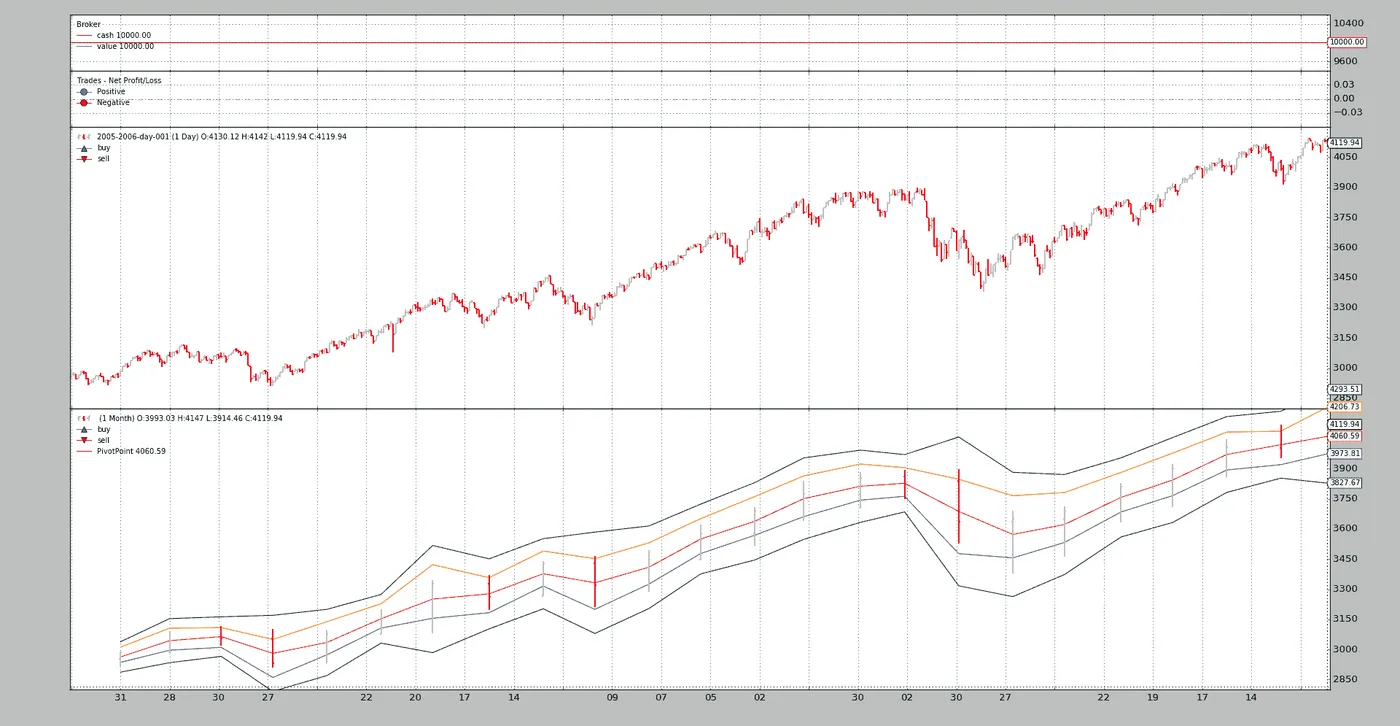
惊人的海蜗牛又开始袭击了。该指标已经绘制在月度数据(其源)上,这在日线图上没有任何视觉指示,而在日线图上,它将非常有帮助。
但backtrader支持从一个数据到另一个数据的交叉绘图。虽然需要在1.2.8.88中进行小的添加以支持将数据交叉绘制到不同时间框架的数据上。
这是通过让plotmaster指定绘图目标来实现的,将其添加到指标的plotinfo属性中:
./ppsample --plot --plot-on-daily
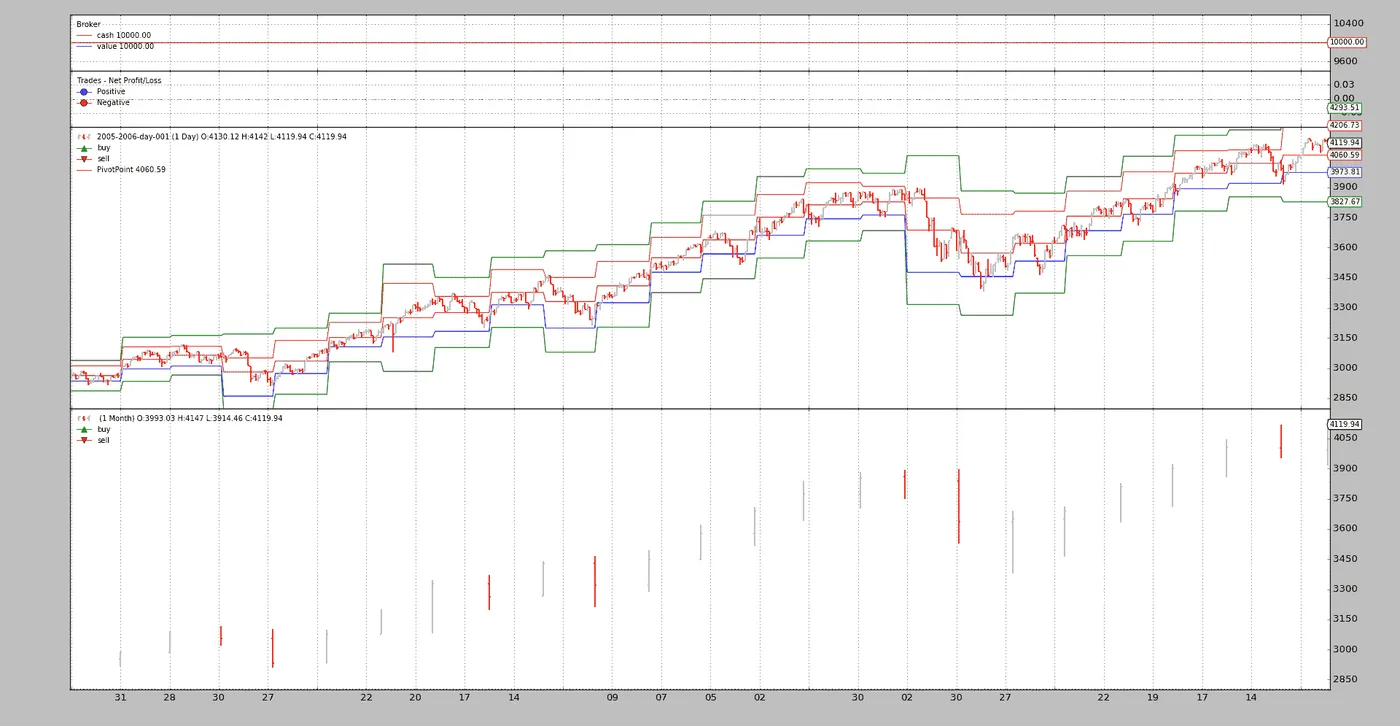
现在视觉反馈对于理解PivotPoint正在提供的内容非常有用。
BackTrader 中文文档(二十四)(4)https://developer.aliyun.com/article/1505450