前后端不分离的抽奖系统
理论基础的话参考这两篇文章
在只有前端的抽奖程序中,我采取的是js模拟后端的情况,现在了这些功能我在后端中使用Java来实现这个功能,还有在原来的基础之上,我再创建数据库,实现存储每次的抽奖结果的功能。
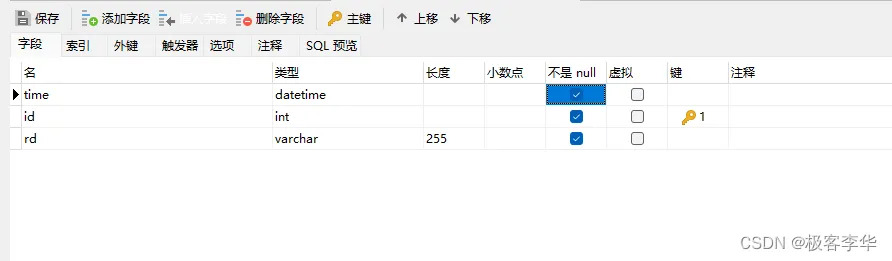
数据库的创建
在这个数据库中,我创建了三个属性,一个是id,一个是每次的记录,还有一个是抽奖的时间,后面我们还会再结合登录页面,添加登录功能与每个用户的抽奖情况的功能。
/*
Navicat MySQL Data Transfer
Source Server         : 本机
Source Server Type    : MySQL
Source Server Version : 80024
Source Host           : localhost:3306
Source Schema         : projectdatabase
Target Server Type    : MySQL
Target Server Version : 80024
File Encoding         : 65001
Date: 11/01/2023 23:59:52
*/
SET NAMES utf8mb4;
SET FOREIGN_KEY_CHECKS = 0;
-- ----------------------------
-- Table structure for record
-- ----------------------------
DROP TABLE IF EXISTS `record`;
CREATE TABLE `record`  (
 `time` datetime NOT NULL,
 `id` int NOT NULL AUTO_INCREMENT,
 `rd` varchar(255) CHARACTER SET utf8mb4 COLLATE utf8mb4_0900_ai_ci NOT NULL,
 `res` int NOT NULL,
 PRIMARY KEY (`id`) USING BTREE
) ENGINE = InnoDB CHARACTER SET = utf8mb4 COLLATE = utf8mb4_0900_ai_ci ROW_FORMAT = Dynamic;
-- ----------------------------
-- Records of record
-- ----------------------------
SET FOREIGN_KEY_CHECKS = 1;
前端创建
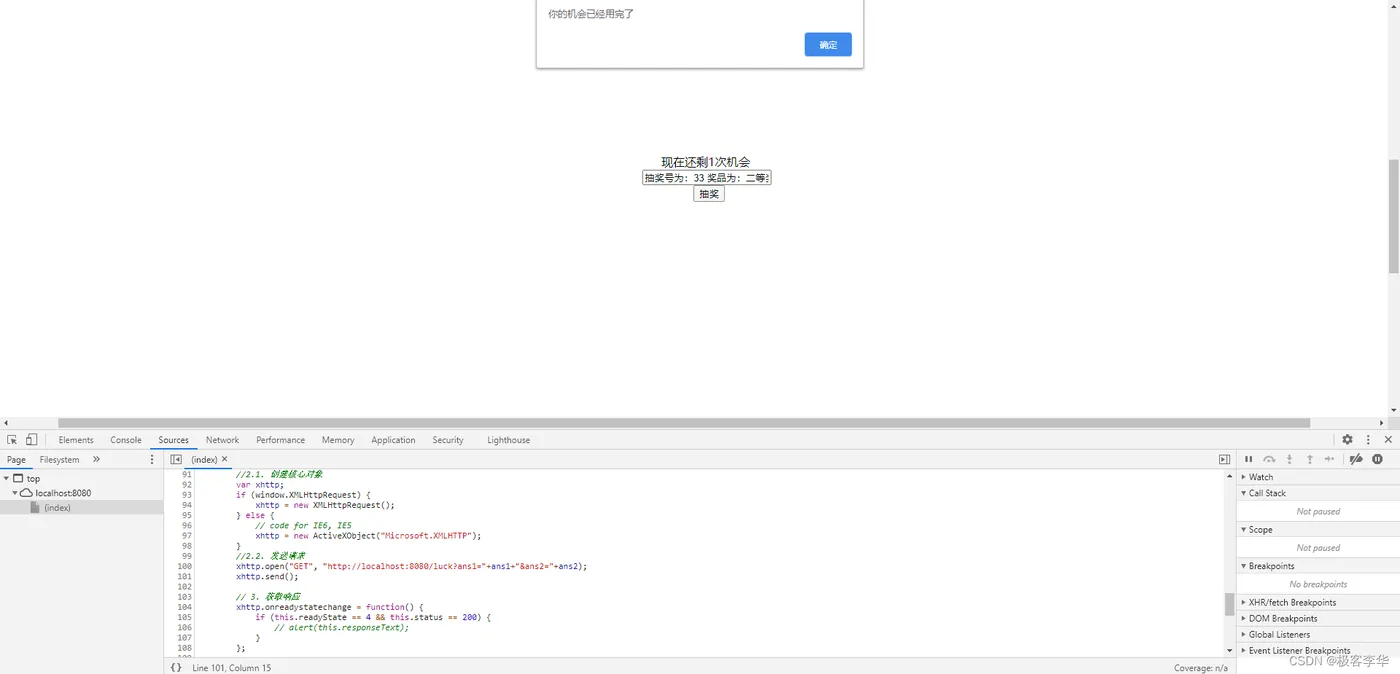
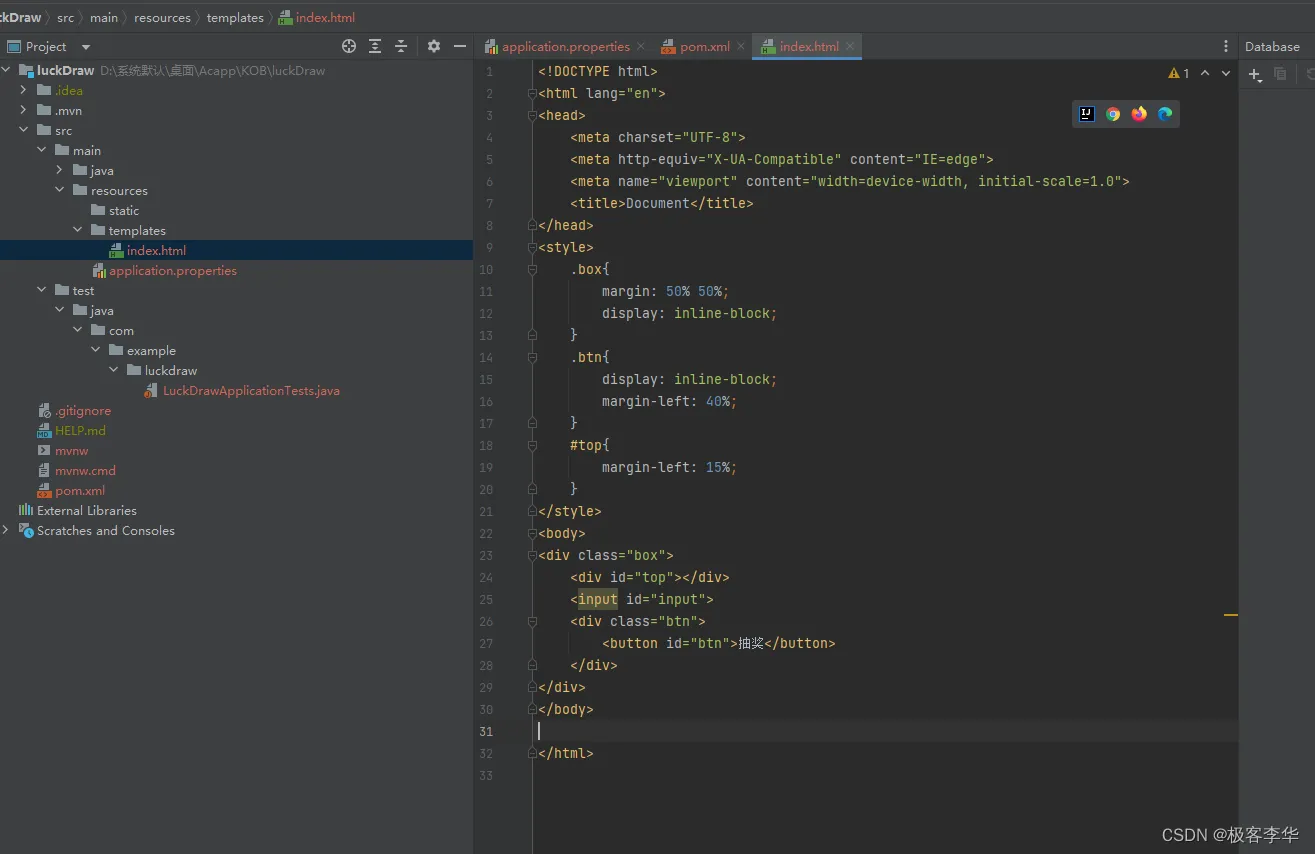
目前的前端部分还没有加上js逻辑,与后端产生联系,我们先对后端进行编写,然后加上一些逻辑,我们在设计前端的时候采取的是把生成抽奖结果的功能放在了前端,然后把生成的结果发送到后端,采取的ajax进行的数据的发送。
index.html
<!DOCTYPE html>
<html lang="en">
<head>
    <meta charset="UTF-8">
    <title>Title</title>
</head>
<style>
  .box{
    margin: 50% 50%;
    display: inline-block;
  }
  .btn{
    display: inline-block;
    margin-left: 40%;
  }
  #top{
    margin-left: 15%;
  }
</style>
<body>
    <div class="box">
      <div id="top"></div>
      <input id="input">
      <div class="btn">
        <button id="btn">抽奖</button>
      </div>
    </div>
</body>
<script>
    function fcRandom(n, m){
        // 生成范围为[n, m]的随机数
        let r = Math.floor(Math.random() * (m - n + 1)) + 1;
        return r;
    }
    // 默认抽奖次数
    var cnt = 3;
    var top = document.getElementById("top").innerHTML = "现在还剩" + cnt + "次机会";
    var input = document.getElementById("input");
    var btn = document.getElementById("btn");
    // 存放用户的抽奖结果
    var set = new Set();
    // 存放抽奖号与与之对应的奖品信息
    let mp = new Map([
        [1, "一等奖"],
        [33, "二等奖"],
        [95, "三等奖"],
        [100, "四等奖"],
        [99 ,  "五等奖"]
    ]);
    // console.log(mp.get(2)===undefined);
    document.getElementById("btn").onclick = function(){
        cnt --;
        // console.log(cnt)
        top = document.getElementById("top").innerHTML = "现在还剩" + cnt + "次机会";
        // 生成抽奖号[1, 100]
        let res = fcRandom(1, 100);
        // 去重检测
        while(set.has(res)){
            res = fcRandom(1, 100);
        }
        // 不重复的话就加进去
        set.add(res);
        var ans1 = res;
        var ans2;
        if (mp.get(res)===undefined){
            ans2 = "谢谢惠顾";
        } else {
            ans2 = mp.get(res);
        }
        res = "抽奖号为:" + res + " 奖品为:" + ans2;
        input.value= res;
        if (cnt <= 0){
            // 机会用完了之后,把按钮设置为禁用
            alert("你的机会已经用完了");
            btn.setAttribute("disabled",true);
            input.value="";
        }
        // let a = new Set();
        // console.log("我被点了")
        //2.1. 创建核心对象
        var xhttp;
        if (window.XMLHttpRequest) {
            xhttp = new XMLHttpRequest();
        } else {
            // code for IE6, IE5
            xhttp = new ActiveXObject("Microsoft.XMLHTTP");
        }
        //2.2. 发送请求
        xhttp.open("GET", "http://localhost:8080/luck?ans1="+ans1+"&ans2="+ans2);
        xhttp.send();
        // 3. 获取响应
        xhttp.onreadystatechange = function() {
            if (this.readyState == 4 && this.status == 200) {
                // alert(this.responseText);
            }
        };
    }
</script>
</html>
后端创建
pom.xml文件
在所有的依赖之中我只能说mybatis-plus永远的神,老师再也不用担心我不会写sql语句了。
<?xml version="1.0" encoding="UTF-8"?>
<project xmlns="http://maven.apache.org/POM/4.0.0" xmlns:xsi="http://www.w3.org/2001/XMLSchema-instance"
  xsi:schemaLocation="http://maven.apache.org/POM/4.0.0 https://maven.apache.org/xsd/maven-4.0.0.xsd">
  <modelVersion>4.0.0</modelVersion>
  <parent>
    <groupId>org.springframework.boot</groupId>
    <artifactId>spring-boot-starter-parent</artifactId>
    <version>2.7.7</version>
    <relativePath/> <!-- lookup parent from repository -->
  </parent>
  <groupId>com.example</groupId>
  <artifactId>luckDraw</artifactId>
  <version>0.0.1-SNAPSHOT</version>
  <name>luckDraw</name>
  <description>luckDraw</description>
  <properties>
    <java.version>1.8</java.version>
  </properties>
  <dependencies>
    <dependency>
      <groupId>org.springframework.boot</groupId>
      <artifactId>spring-boot-starter-thymeleaf</artifactId>
    </dependency>
    <dependency>
      <groupId>mysql</groupId>
      <artifactId>mysql-connector-java</artifactId>
      <scope>runtime</scope>
    </dependency>
    <dependency>
      <groupId>org.springframework.boot</groupId>
      <artifactId>spring-boot-starter-web</artifactId>
    </dependency>
    <dependency>
      <groupId>org.springframework.boot</groupId>
      <artifactId>spring-boot-starter-thymeleaf</artifactId>
    </dependency>
    <!--lombok-->
    <dependency>
      <groupId>org.projectlombok</groupId>
      <artifactId>lombok</artifactId>
    </dependency>
    <dependency>
      <groupId>com.baomidou</groupId>
      <artifactId>mybatis-plus-boot-starter</artifactId>
      <version>3.4.3</version>
    </dependency>
    <dependency>
      <groupId>org.springframework.boot</groupId>
      <artifactId>spring-boot-starter-test</artifactId>
      <scope>test</scope>
    </dependency>
  </dependencies>
  <build>
    <plugins>
      <plugin>
        <groupId>org.springframework.boot</groupId>
        <artifactId>spring-boot-maven-plugin</artifactId>
      </plugin>
    </plugins>
  </build>
</project>
application.properties
spring.datasource.username=root
spring.datasource.password=123456
spring.datasource.url=jdbc:mysql://localhost:3306/projectdatabase?serverTimezone=Asia/Shanghai&useUnicode=true&characterEncoding=utf-8
spring.datasource.driver-class-name=com.mysql.cj.jdbc.Driver
Record
设计类的时候一定要注意的是,这个类的成员变量一定要和数据库中的一一对应。
package com.example.luckdraw.Bean;
import lombok.AllArgsConstructor;
import lombok.Data;
import lombok.NoArgsConstructor;
import java.util.Date;
@Data
@AllArgsConstructor
@NoArgsConstructor
public class Record {
    // 类里面成员名字要和数据库中相同
    private Integer id; // 用户的id
    private String rd; // 每次抽奖的记录
    private Integer res; // 抽奖的结果号码
    private Date time; // 每次抽奖的时间
}
IndexController
这个后端主要负责的就是接受前端的数据,并进行插入到数据库中。
package com.example.luckdraw.Controller;
import com.example.luckdraw.Bean.Record;
import com.example.luckdraw.Dao.RecordDao;
import org.springframework.beans.factory.annotation.Autowired;
import org.springframework.stereotype.Controller;
import org.springframework.web.bind.annotation.RequestMapping;
import org.springframework.web.bind.annotation.ResponseBody;
import javax.servlet.http.HttpServletRequest;
import javax.servlet.http.HttpServletResponse;
import java.rmi.server.RemoteRef;
import java.util.Date;
import java.util.HashMap;
import java.util.HashSet;
import java.util.Random;
@Controller
public class IndexController {
    @Autowired
    private RecordDao recordDao;
    // 设置前端默认页面
    @RequestMapping("/")
    public String index(){
        return"index.html";
    }
    @RequestMapping("/luck")
    @ResponseBody
    public String Luck(HttpServletRequest request, HttpServletResponse response){
        Integer ans1 = Integer.parseInt(request.getParameter("ans1")); // 抽奖的号码
        String ans2 = request.getParameter("ans2"); // 抽奖的结果
        // 首先我们需要直到这个数据库的里面现在的数据量 这样好设置这个新插入数据的id
        Integer size = recordDao.selectList(null).size();
        Record record = new Record(size + 1, ans2, ans1, new Date());
        System.out.println(record);
        recordDao.insert(record);
        return record.toString();
    }
}
RecordDao
万能的mybatis-plus简化开发。
package com.example.luckdraw.Dao;
import com.baomidou.mybatisplus.core.mapper.BaseMapper;
import com.example.luckdraw.Bean.Record;
import org.apache.ibatis.annotations.Mapper;
@Mapper
public interface RecordDao extends BaseMapper<Record> {
}
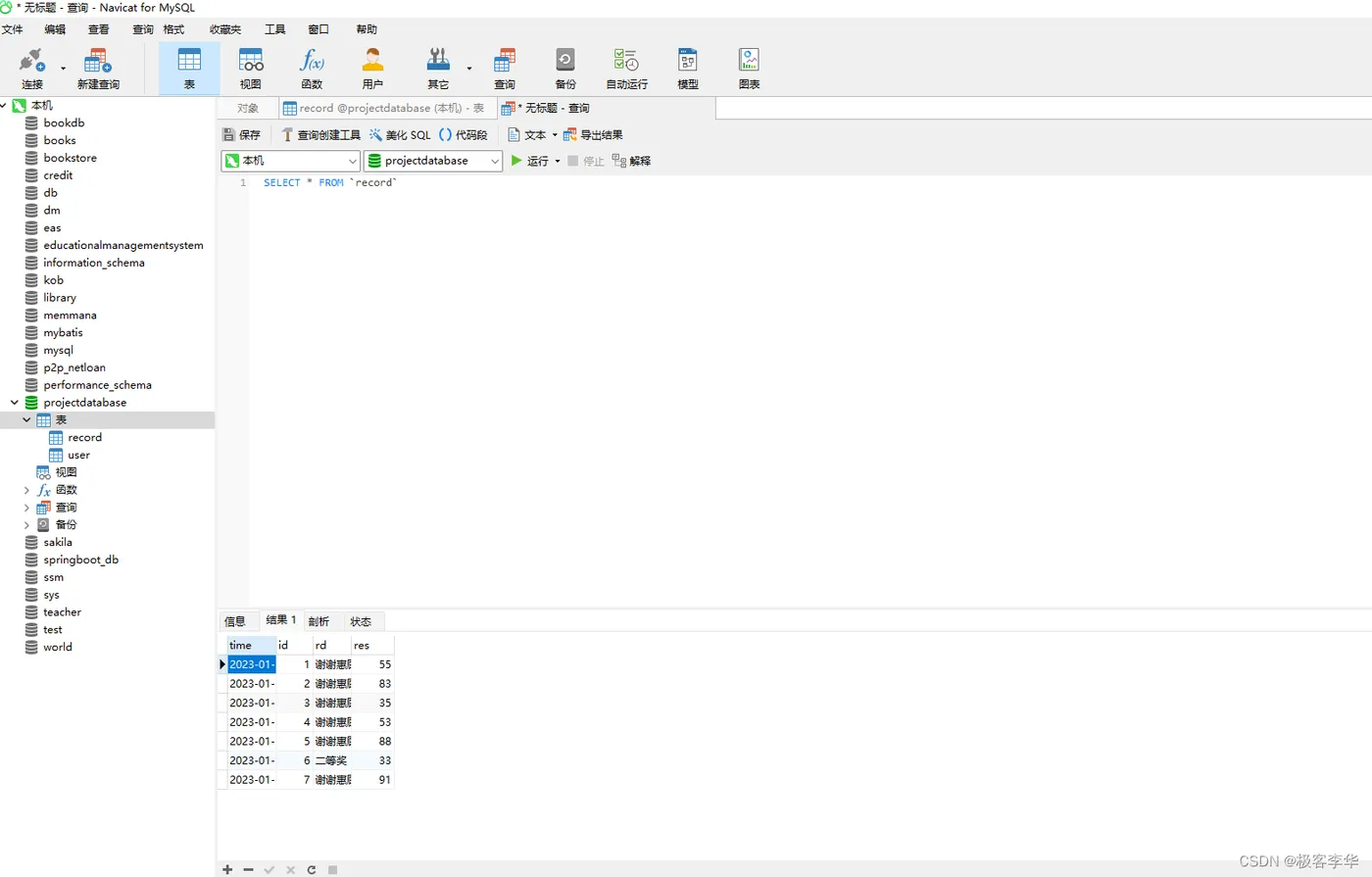
最后运行结果的展示:
每次抽奖的结果和时间都成功的存放在了数据库中。