
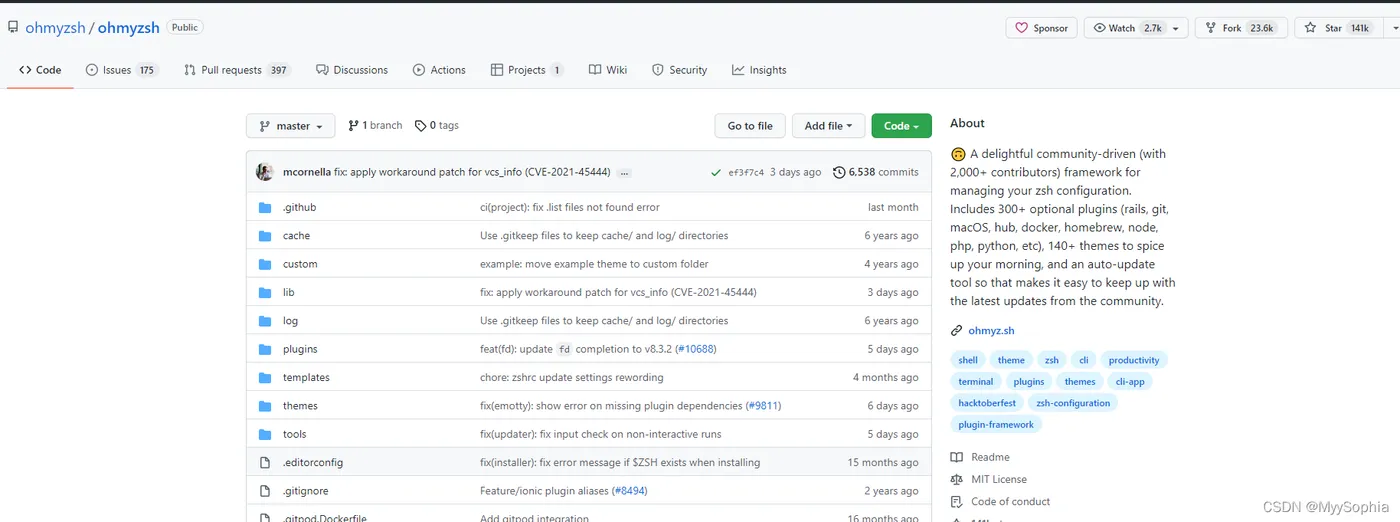
1、github上的Top 10 star
2、安装
curl or wget and git 应该先安装
| Method | Command |
| curl | sh -c "$(curl -fsSL https://raw.githubusercontent.com/ohmyzsh/ohmyzsh/master/tools/install.sh)" |
| wget | sh -c "$(wget -O- https://raw.githubusercontent.com/ohmyzsh/ohmyzsh/master/tools/install.sh)" |
| fetch | sh -c "$(fetch -o - https://raw.githubusercontent.com/ohmyzsh/ohmyzsh/master/tools/install.sh)" |
其实这是将两步合并为一步了,也可以这样
1、wget https://raw.githubusercontent.com/ohmyzsh/ohmyzsh/master/tools/install.sh
2、sh install.sh
如果报错,大多是zsh没安装
yum -y install zsh
 此时再重新执行安装命令。
3、效果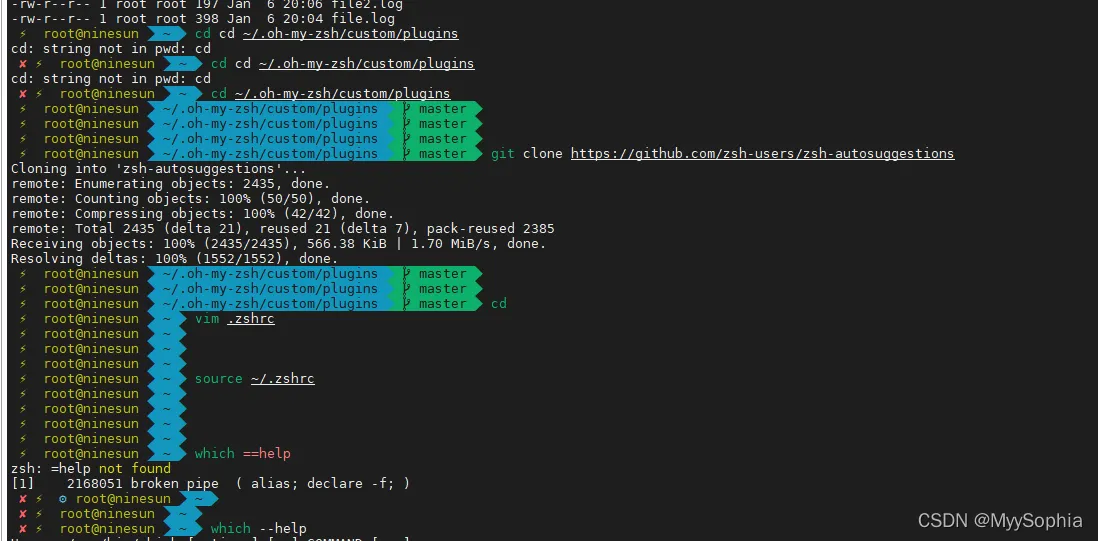 4、如何切换bash
zsh其实就是一个bash的一种 ,是在bash的基础上做了视觉上的优化。总之大多数人就是喜欢这种花花绿绿的,整体面对黑框框容易视觉疲劳。
当然你厌倦了zsh,可以随时切换bash。
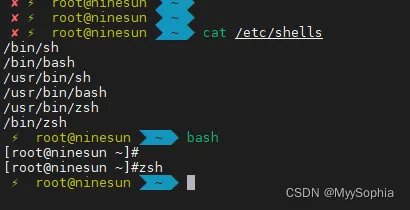
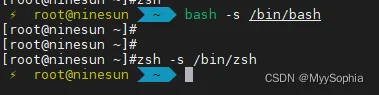
直接bash zsh就好了。这些环境变量都加载好着。如果你执行切不过去。
可以这样:
5、修改主题
zsh最大的魅力就在于可以增加很多主题,例如
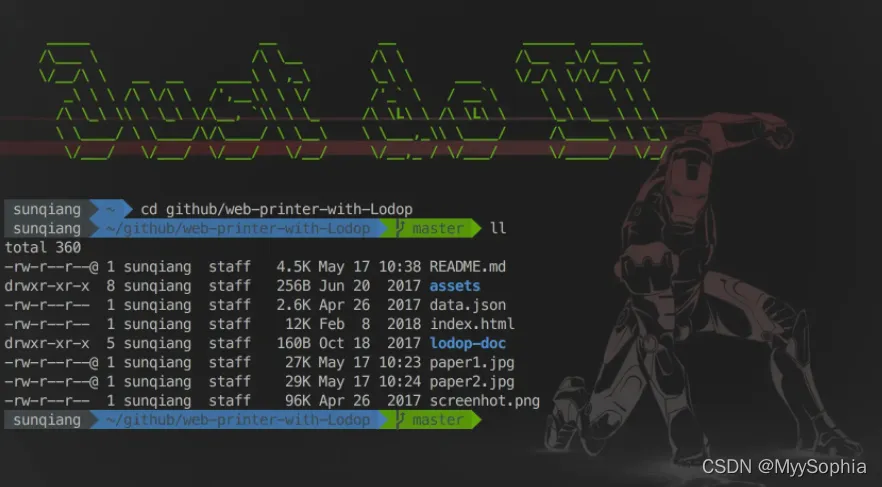
查看主题
⚡ root@ninesun ~ ls ~/.oh-my-zsh/themes 3den.zsh-theme cypher.zsh-theme frisk.zsh-theme jonathan.zsh-theme mikeh.zsh-theme refined.zsh-theme suvash.zsh-theme adben.zsh-theme dallas.zsh-theme frontcube.zsh-theme josh.zsh-theme miloshadzic.zsh-theme rgm.zsh-theme takashiyoshida.zsh-theme af-magic.zsh-theme darkblood.zsh-theme funky.zsh-theme jreese.zsh-theme minimal.zsh-theme risto.zsh-theme terminalparty.zsh-theme afowler.zsh-theme daveverwer.zsh-theme fwalch.zsh-theme jtriley.zsh-theme mira.zsh-theme rixius.zsh-theme theunraveler.zsh-theme agnoster.zsh-theme dieter.zsh-theme gallifrey.zsh-theme juanghurtado.zsh-theme mlh.zsh-theme rkj-repos.zsh-theme tjkirch_mod.zsh-theme alanpeabody.zsh-theme dogenpunk.zsh-theme gallois.zsh-theme junkfood.zsh-theme mortalscumbag.zsh-theme rkj.zsh-theme tjkirch.zsh-theme amuse.zsh-theme dpoggi.zsh-theme garyblessington.zsh-theme kafeitu.zsh-theme mrtazz.zsh-theme robbyrussell.zsh-theme tonotdo.zsh-theme apple.zsh-theme dstufft.zsh-theme gentoo.zsh-theme kardan.zsh-theme murilasso.zsh-theme sammy.zsh-theme trapd00r.zsh-theme arrow.zsh-theme dst.zsh-theme geoffgarside.zsh-theme kennethreitz.zsh-theme muse.zsh-theme simonoff.zsh-theme wedisagree.zsh-theme aussiegeek.zsh-theme duellj.zsh-theme gianu.zsh-theme kiwi.zsh-theme nanotech.zsh-theme simple.zsh-theme wezm+.zsh-theme avit.zsh-theme eastwood.zsh-theme gnzh.zsh-theme kolo.zsh-theme nebirhos.zsh-theme skaro.zsh-theme wezm.zsh-theme awesomepanda.zsh-theme edvardm.zsh-theme gozilla.zsh-theme kphoen.zsh-theme nicoulaj.zsh-theme smt.zsh-theme wuffers.zsh-theme bira.zsh-theme emotty.zsh-theme half-life.zsh-theme lambda.zsh-theme norm.zsh-theme Soliah.zsh-theme xiong-chiamiov-plus.zsh-theme blinks.zsh-theme essembeh.zsh-theme humza.zsh-theme linuxonly.zsh-theme obraun.zsh-theme sonicradish.zsh-theme xiong-chiamiov.zsh-theme bureau.zsh-theme evan.zsh-theme imajes.zsh-theme lukerandall.zsh-theme peepcode.zsh-theme sorin.zsh-theme ys.zsh-theme candy-kingdom.zsh-theme fino-time.zsh-theme intheloop.zsh-theme macovsky-ruby.zsh-theme philips.zsh-theme sporty_256.zsh-theme zhann.zsh-theme candy.zsh-theme fino.zsh-theme itchy.zsh-theme macovsky.zsh-theme pmcgee.zsh-theme steeef.zsh-theme clean.zsh-theme fishy.zsh-theme jaischeema.zsh-theme maran.zsh-theme pygmalion-virtualenv.zsh-theme strug.zsh-theme cloud.zsh-theme flazz.zsh-theme jbergantine.zsh-theme mgutz.zsh-theme pygmalion.zsh-theme sunaku.zsh-theme crcandy.zsh-theme fletcherm.zsh-theme jispwoso.zsh-theme mh.zsh-theme random.zsh-theme sunrise.zsh-theme crunch.zsh-theme fox.zsh-theme jnrowe.zsh-theme michelebologna.zsh-theme re5et.zsh-theme superjarin.zsh-theme ⚡ root@ninesun ~
修改主题
⚡ root@ninesun ~ vim .zshrc #修改这里切换主题 ZSH_THEME="agnoster" # agnoster 主题设置:只显示当前用户名 prompt_context() { if [[ "$USER" != "$DEFAULT_USER" || -n "$SSH_CLIENT" ]]; then prompt_segment black default "%(!.%{%F{yellow}%}.)$USER" fi }
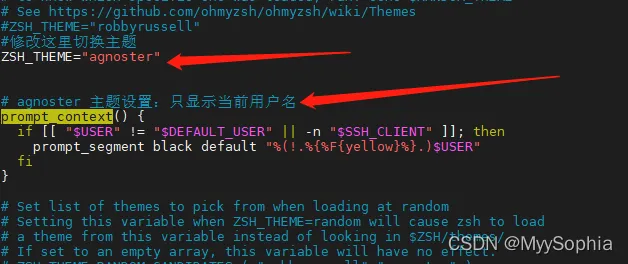
6、增加插件
这里推荐这个博客。
CentOS7安装zsh和oh-my-zsh - StaryJie - 博客园
代码语法高亮显示插件、自动补全插件安装为最后两个最常用的,
其他插件自己慢慢体会,相信你会爱上zsh的。
# 1.进入oh-my-zsh自定义插件目录
cd ~/.oh-my-zsh/custom/plugins
# 2.拉取zsh-autosuggestions代码
git clone https://github.com/zsh-users/zsh-autosuggestions
# 3.在配置文件~/.zshrc中添加插件(注意:自定义安装的插件最好放在所有插件的最下方)
plugins=(
    git
    wd
    colored-man-pages
    yum
    bundler
    rand-quote
    extract
    themes
    gitignore
    zsh_reload
    per-directory-history
    zsh-syntax-highlighting
    zsh-autosuggestions
)
# 4.保存退出之后,source ~/.zshrc即可生效
source ~/.zshrc
7、离线安装手册
- 下载zsh
找一台有外网的机器准备zsh并上传到repo仓库
curl -O 10.50.10.25/pigsty/zsh-5.0.2-34.el7_8.2.x86_64.rpm
yum -y install /tmp/zsh-5.0.2-34.el7_8.2.x86_64.rpm
- git clone oh-my-zsh
git clone git://github.com/robbyrussell/oh-my-zsh.git ~/.oh-my-zsh
#上传到repo仓库
cd /root && curl 10.50.10.25/pigsty/zsh.tar.gz -o /root/zsh.tar.gz && tar -zxvf zsh.tar.gz
- 配置 ~/.zshrc
# If you come from bash you might have to change your $PATH.
# export PATH=$HOME/bin:/usr/local/bin:$PATH
# Path to your oh-my-zsh installation.
export ZSH="$HOME/.oh-my-zsh"
# Set name of the theme to load --- if set to "random", it will
# load a random theme each time oh-my-zsh is loaded, in which case,
# to know which specific one was loaded, run: echo $RANDOM_THEME
# See https://github.com/ohmyzsh/ohmyzsh/wiki/Themes
#ZSH_THEME="robbyrussell"
#修改这里切换主题
ZSH_THEME="agnoster"
# agnoster 主题设置:只显示当前用户名
prompt_context() {
  if [[ "$USER" != "$DEFAULT_USER" || -n "$SSH_CLIENT" ]]; then
    prompt_segment black default "%(!.%{%F{yellow}%}.)$USER"
  fi
}
# Set list of themes to pick from when loading at random
# Setting this variable when ZSH_THEME=random will cause zsh to load
# a theme from this variable instead of looking in $ZSH/themes/
# If set to an empty array, this variable will have no effect.
# ZSH_THEME_RANDOM_CANDIDATES=( "robbyrussell" "agnoster" )
# Uncomment the following line to use case-sensitive completion.
# CASE_SENSITIVE="true"
# Uncomment the following line to use hyphen-insensitive completion.
# Case-sensitive completion must be off. _ and - will be interchangeable.
# HYPHEN_INSENSITIVE="true"
# Uncomment one of the following lines to change the auto-update behavior
# zstyle ':omz:update' mode disabled  # disable automatic updates
# zstyle ':omz:update' mode auto      # update automatically without asking
# zstyle ':omz:update' mode reminder  # just remind me to update when it's time
# Uncomment the following line to change how often to auto-update (in days).
# zstyle ':omz:update' frequency 13
# Uncomment the following line if pasting URLs and other text is messed up.
# DISABLE_MAGIC_FUNCTIONS="true"
# Uncomment the following line to disable colors in ls.
# DISABLE_LS_COLORS="true"
# Uncomment the following line to disable auto-setting terminal title.
# DISABLE_AUTO_TITLE="true"
# Uncomment the following line to enable command auto-correction.
# ENABLE_CORRECTION="true"
# Uncomment the following line to display red dots whilst waiting for completion.
# You can also set it to another string to have that shown instead of the default red dots.
# e.g. COMPLETION_WAITING_DOTS="%F{yellow}waiting...%f"
# Caution: this setting can cause issues with multiline prompts in zsh < 5.7.1 (see #5765)
# COMPLETION_WAITING_DOTS="true"
# Uncomment the following line if you want to disable marking untracked files
# under VCS as dirty. This makes repository status check for large repositories
# much, much faster.
# DISABLE_UNTRACKED_FILES_DIRTY="true"
# Uncomment the following line if you want to change the command execution time
# stamp shown in the history command output.
# You can set one of the optional three formats:
# "mm/dd/yyyy"|"dd.mm.yyyy"|"yyyy-mm-dd"
# or set a custom format using the strftime function format specifications,
# see 'man strftime' for details.
# HIST_STAMPS="mm/dd/yyyy"
# Would you like to use another custom folder than $ZSH/custom?
# ZSH_CUSTOM=/path/to/new-custom-folder
# Which plugins would you like to load?
# Standard plugins can be found in $ZSH/plugins/
# Custom plugins may be added to $ZSH_CUSTOM/plugins/
# Example format: plugins=(rails git textmate ruby lighthouse)
# Add wisely, as too many plugins slow down shell startup.
plugins=(git)
source $ZSH/oh-my-zsh.sh
# User configuration
# export MANPATH="/usr/local/man:$MANPATH"
# You may need to manually set your language environment
# export LANG=en_US.UTF-8
# Preferred editor for local and remote sessions
# if [[ -n $SSH_CONNECTION ]]; then
#   export EDITOR='vim'
# else
#   export EDITOR='mvim'
# fi
# Compilation flags
# export ARCHFLAGS="-arch x86_64"
# Set personal aliases, overriding those provided by oh-my-zsh libs,
# plugins, and themes. Aliases can be placed here, though oh-my-zsh
# users are encouraged to define aliases within the ZSH_CUSTOM folder.
# For a full list of active aliases, run `alias`.
#
# Example aliases
# alias zshconfig="mate ~/.zshrc"
# alias ohmyzsh="mate ~/.oh-my-zsh"
 plugins=(
    git
    wd
    colored-man-pages
    yum
    bundler
    rand-quote
    extract
    themes
    gitignore
    zsh_reload
    per-directory-history
    zsh-syntax-highlighting
    zsh-autosuggestions
)
source ~/.oh-my-zsh/custom/plugins/zsh-syntax-highlighting/zsh-syntax-highlighting.zsh
- chsh -s /bin/zsh 切换默认shell为zsh
 ~]# chsh -s /bin/zsh
Changing shell for root.
Shell changed.
再次进入就直接是zsh了
