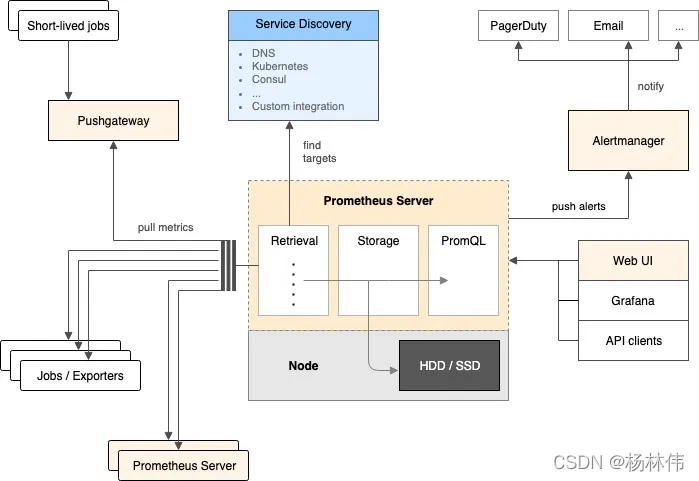
01 整体流程图
02 相关资料
可参考的教程:
- 环境搭建:《Prometheus+Grafana+Alertmanager实现告警推送教程图文详解》
- Grafana面板使用:《Grafana 使用表格面板进行数据可视化》
相关的下载:
- prometheus(国内镜像):https://mirrors.tuna.tsinghua.edu.cn/github-release/prometheus/prometheus/2.34.0%20_%202022-03-15/prometheus-2.34.0.linux-amd64.tar.gz
- pushgateway(国外镜像,较慢):https://github.com/prometheus/pushgateway/releases/download/v1.4.2/pushgateway-1.4.2.linux-amd64.tar.gz
- node-exporter(国外镜像,较慢): https://github.com/prometheus/node_exporter/releases/download/v1.3.1/node_exporter-1.3.1.linux-amd64.tar.gz
- Grafana(国内镜像):https://repo.huaweicloud.com/grafana/8.4.7/grafana-enterprise-8.4.7.linux-amd64.tar.gz
- Alertmanager(国外镜像,较慢):https://github.com/prometheus/alertmanager/releases/download/v0.24.0/alertmanager-0.24.0.linux-amd64.tar.gz
03 相关配置
3.1 prometheus.yml
global:
  scrape_interval: 15s
  evaluation_interval: 15s
alerting:
  alertmanagers:
  - static_configs:
    - targets:
       - localhost:9093
rule_files:
  - "/opt/prometheus_env/prometheus-2.34.0.linux-amd64/alarm_rules.yml"
scrape_configs:
  - job_name: 'prometheus'
    static_configs:
      - targets: ['localhost:9090']
        labels:
          instance: 'prometheus'
  - job_name: 'linux'
    static_configs:
      - targets: ['localhost:9100']
        labels:
          instance: 'localhost'
  - job_name: 'pushgateway'
    static_configs:
      - targets: ['localhost:9091']
        labels:
          instance: 'pushgateway'
3.2 alarm_rules.yml
groups:
- name: node
  rules:
  - alert: server_status
    expr: up{} == 0
    for: 15s
    annotations:
      summary: "机器{{ $labels.instance }} 挂了"
      description: "请立即查看问题!"
3.3 alertmanager.yml
global:
  resolve_timeout: 5m
  smtp_smarthost: 'smtp.exmail.qq.com:465' # 定义163邮箱服务器端
  smtp_from: '您的qq邮箱账号'  #来自哪个邮箱发的
  smtp_auth_username: '您的qq邮箱账号' 邮箱验证
  smtp_auth_password: '邮箱密码'   # 邮箱授权码,不是登录密码
  smtp_require_tls: false   # 是否启用tls
route:
  group_by: ['alertname']
  group_wait: 10s
  group_interval: 10s
  repeat_interval: 3m  # 发送告警后间隔多久再次发送,减少发送邮件频率
  receiver: 'mail'    #发送的告警媒体
receivers:
- name: 'mail'        # 接收者配置,这里要与接收媒体一致
  email_configs:
  - to: '接收人的qq邮箱' #发送给谁的邮箱,多个人多行列出
#inhibit_rules:
#  - source_match:
#      severity: 'critical'
#    target_match:
#      severity: 'warning'
#    equal: ['alertname', 'dev', 'instance']
04 systemctl脚本
4.1 配置
cd /usr/lib/systemd/system
① pushgateway.service文件,内容如下:
[Unit]
Description=Prometheus Push Gateway
After=network.target
[Service]
ExecStart=/opt/prometheus_env/pushgateway-1.4.2.linux-amd64/pushgateway
User=root
[Install]
WantedBy=multi-user.target
② node_exporter.service文件,内容如下:
[Unit]
Description=Prometheus Node Exporter
After=network.target
[Service]
ExecStart=/opt/prometheus_env/node_exporter-1.3.1.linux-amd64/node_exporter
User=root
[Install]
WantedBy=multi-user.target
③ prometheus.service文件,内容如下:
[Unit]
Description=Prometheus Service
After=network.target
[Service]
ExecStart=/opt/prometheus_env/prometheus-2.34.0.linux-amd64/prometheus \
--config.file=/opt/prometheus_env/prometheus-2.34.0.linux-amd64/prometheus.yml \
--web.read-timeout=5m  \
--web.max-connections=10 \
--storage.tsdb.retention=15d \
--storage.tsdb.path=/prometheus/data \
--query.max-concurrency=20 \
--query.timeout=2m
User=root
[Install]
WantedBy=multi-user.target
④ grafana.service文件,内容如下:
[Unit]
Description=Grafana
After=network.target
[Service]
ExecStart=/opt/prometheus_env/grafana-8.4.7/bin/grafana-server \
 --config=/opt/prometheus_env/grafana-8.4.7/conf/defaults.ini \
 --homepath=/opt/prometheus_env/grafana-8.4.7
[Install]
WantedBy=multi-user.target
⑤ alertmanager.service文件,内容如下:
[Unit]
Description=Prometheus alertmanager
After=network.target
[Service]
ExecStart=/opt/prometheus_env/alertmanager-0.24.0.linux-amd64/alertmanager \
--storage.path=/opt/prometheus_env/alertmanager-0.24.0.linux-amd64/data \
--config.file=/opt/prometheus_env/alertmanager-0.24.0.linux-amd64/alertmanager.yml
User=root
[Install]
WantedBy=multi-user.target
4.2 启动
重载配置:
systemctl daemon-reload
开启服务:
systemctl start pushgateway
systemctl start node_exporter
systemctl start prometheus
systemctl start grafana
systemctl start alertmanager
设置开机启动:
systemctl enable pushgateway
systemctl enable node_exporter
systemctl enable prometheus
systemctl enable grafana
systemctl enable alertmanager
查看服务状态:
systemctl status pushgateway
05 其它命令
开启端口,能被浏览器访问(例如开启:3000)
firewall-cmd --zone=public --add-port=3000/tcp --permanent
重启防火墙:
firewall-cmd --reload
查看端口:
netstat -tunlp | grep 9090
查看进程:
ps -elf|grep promethues
模拟CPU升高:
for i in `seq 1 $(cat /proc/cpuinfo |grep "physical id" |wc -l)`; do dd if=/dev/zero of=/dev/null & done
## top命令去查询进程并杀掉 !