系统使用技术:SSM
前端技术:bootstrap、css、js等
开发工具:idea
数据库:mysql5.7
项目介绍:
该系统适合选择框架为SSM,基础中等或以下,做二手商城系统,要求页面美观度高的。主要功能包括:前端用户注册后,可以登陆进行商品查看、购买,能够关注商品、发布商品等。后端包括:用户管理、商品管理、订单管理、留言管理、钱包管理、公告管理。满足二手商城的基本要求。
下面我们来看看功能。
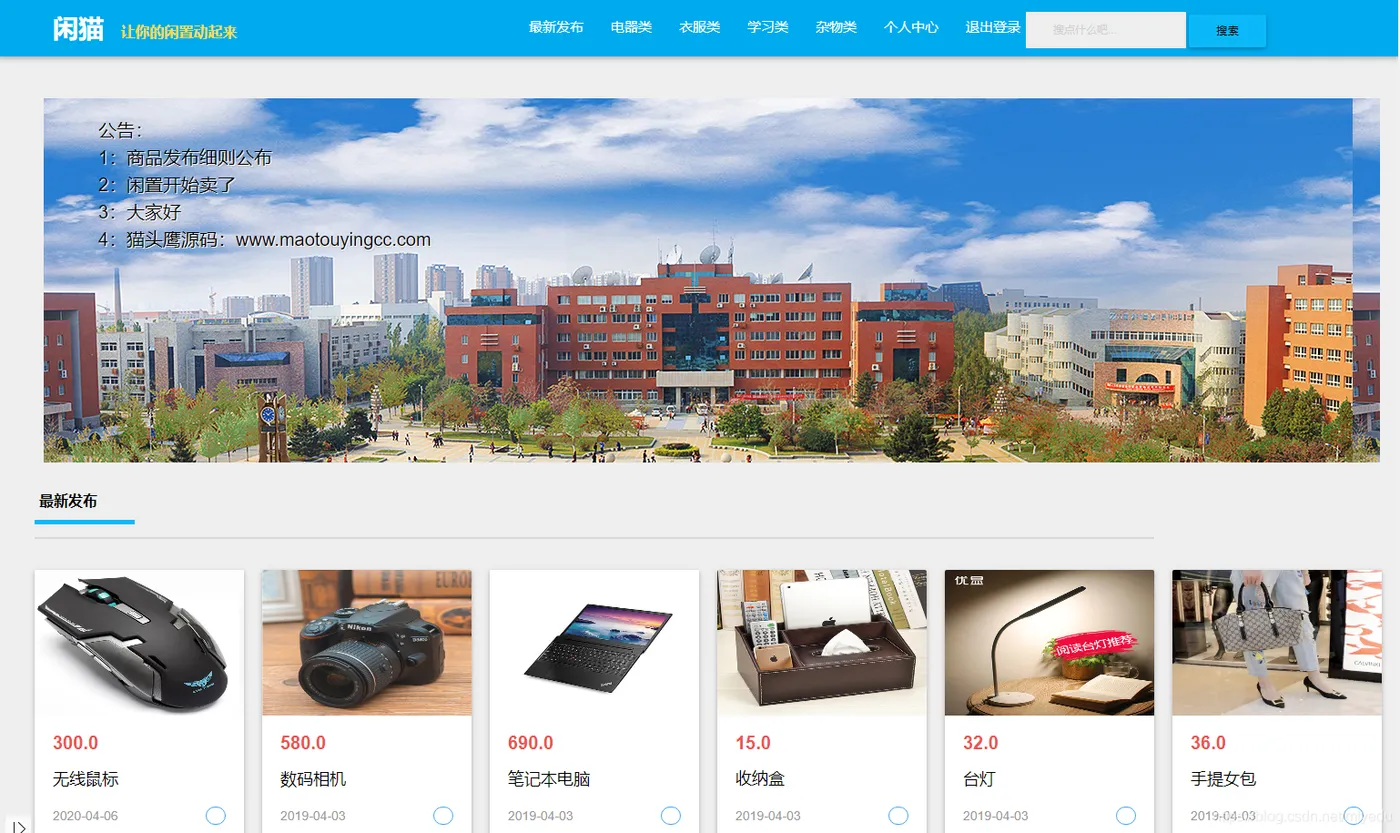
系统首页:
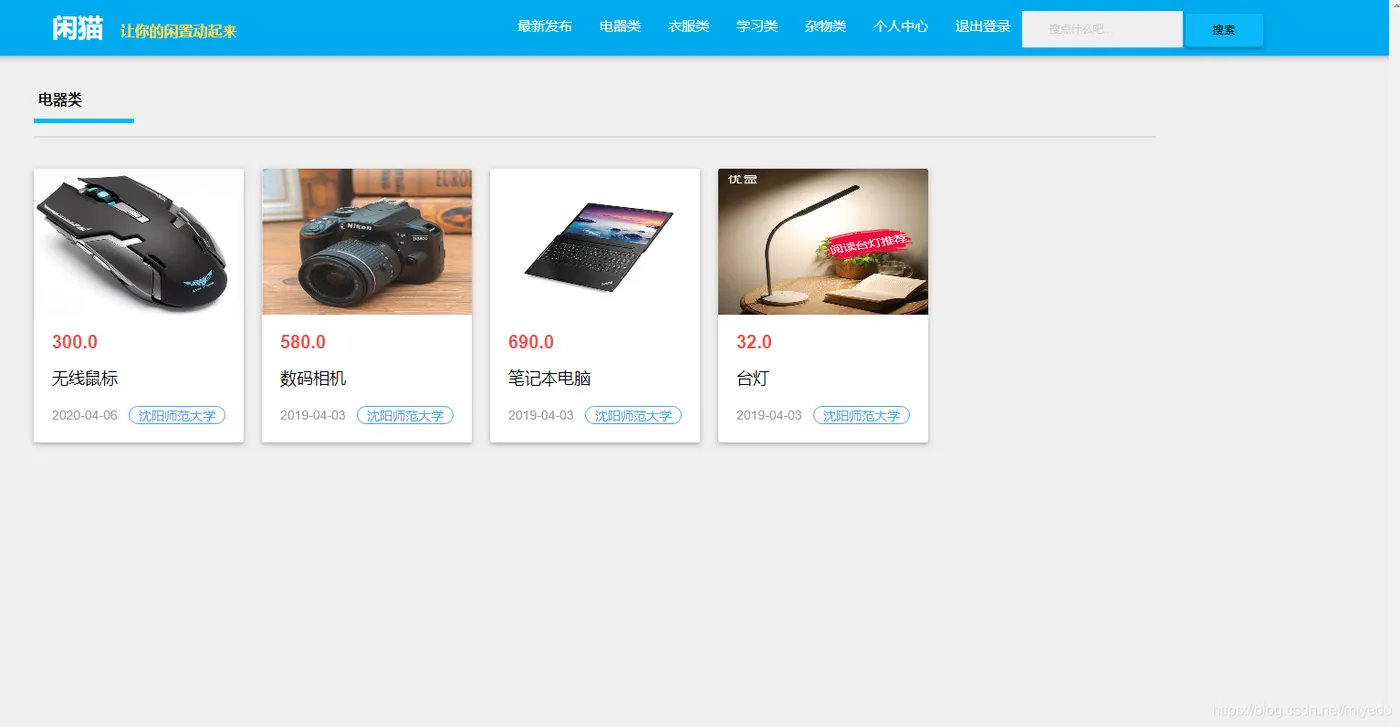
分类查看
查看某个分类的商品
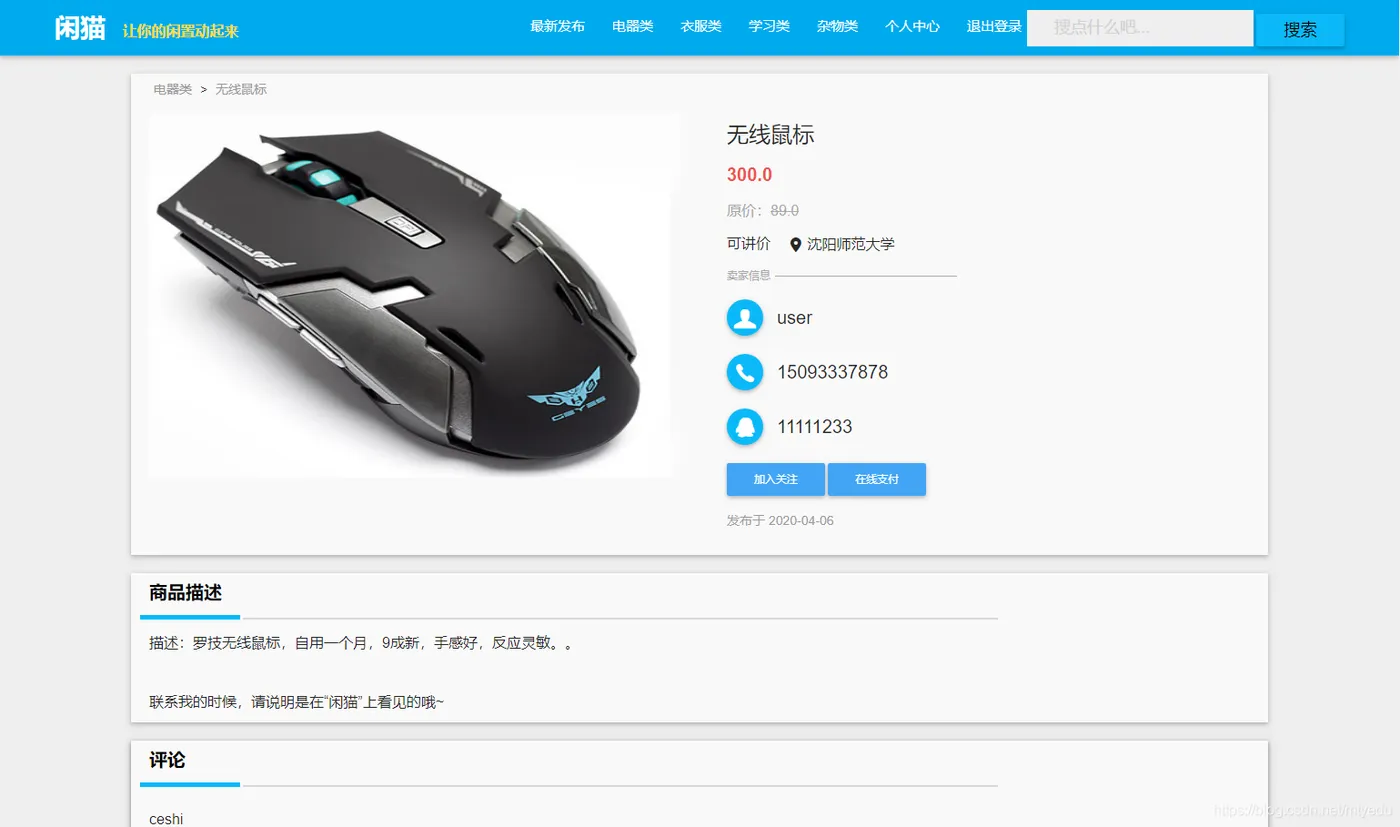
商品详情
查看某一个商品信息
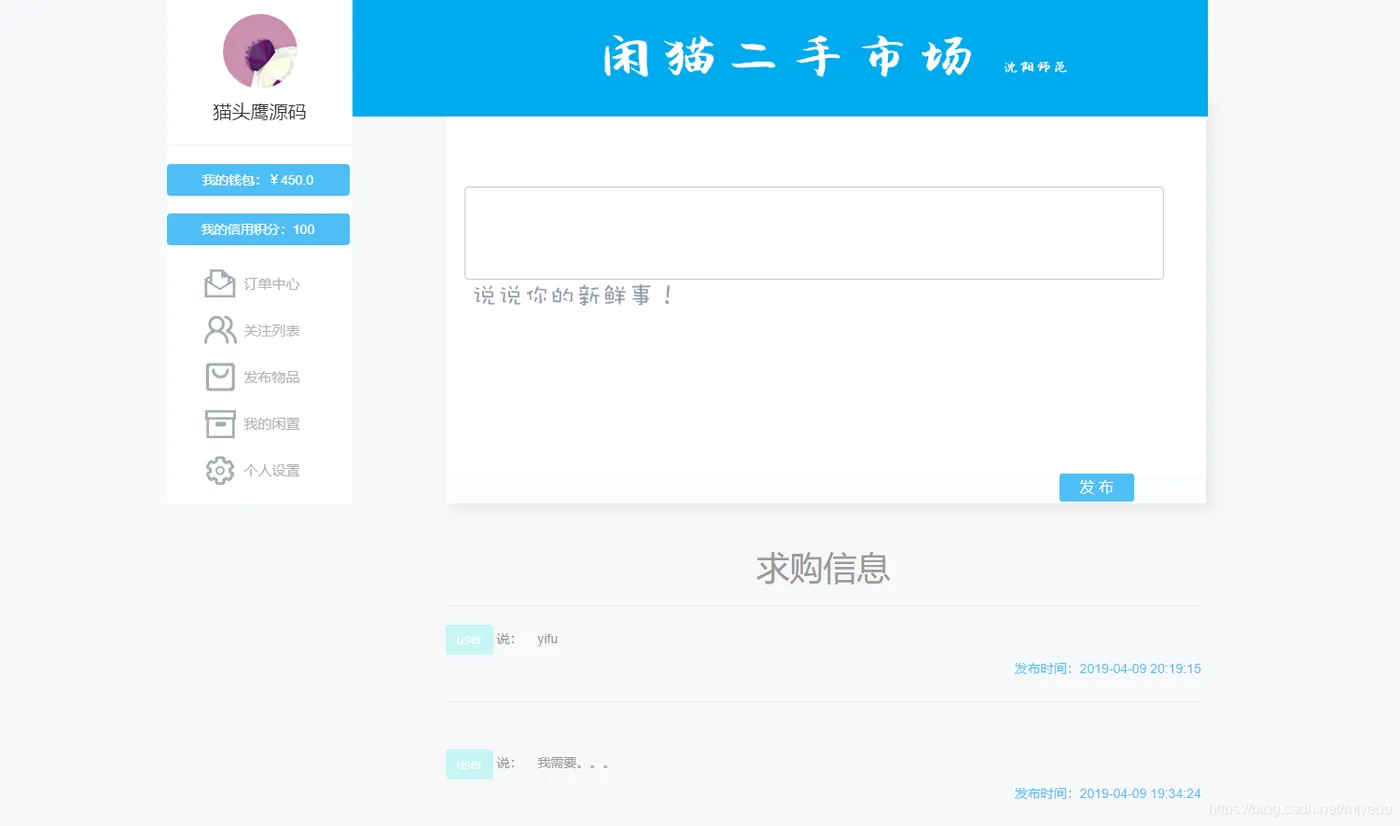
个人中心
查看个人信息及商品等
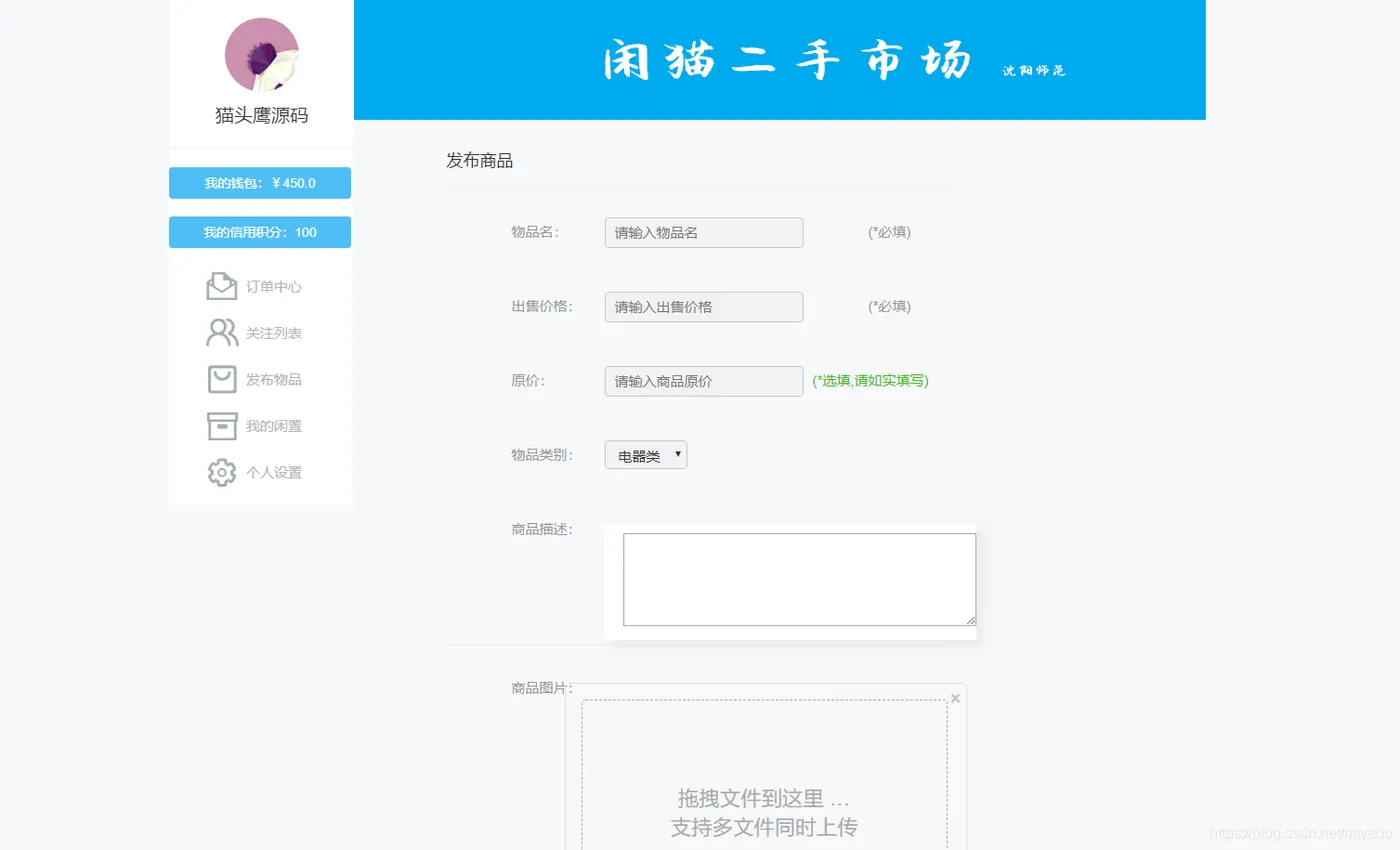
发布商品
可以发布商品
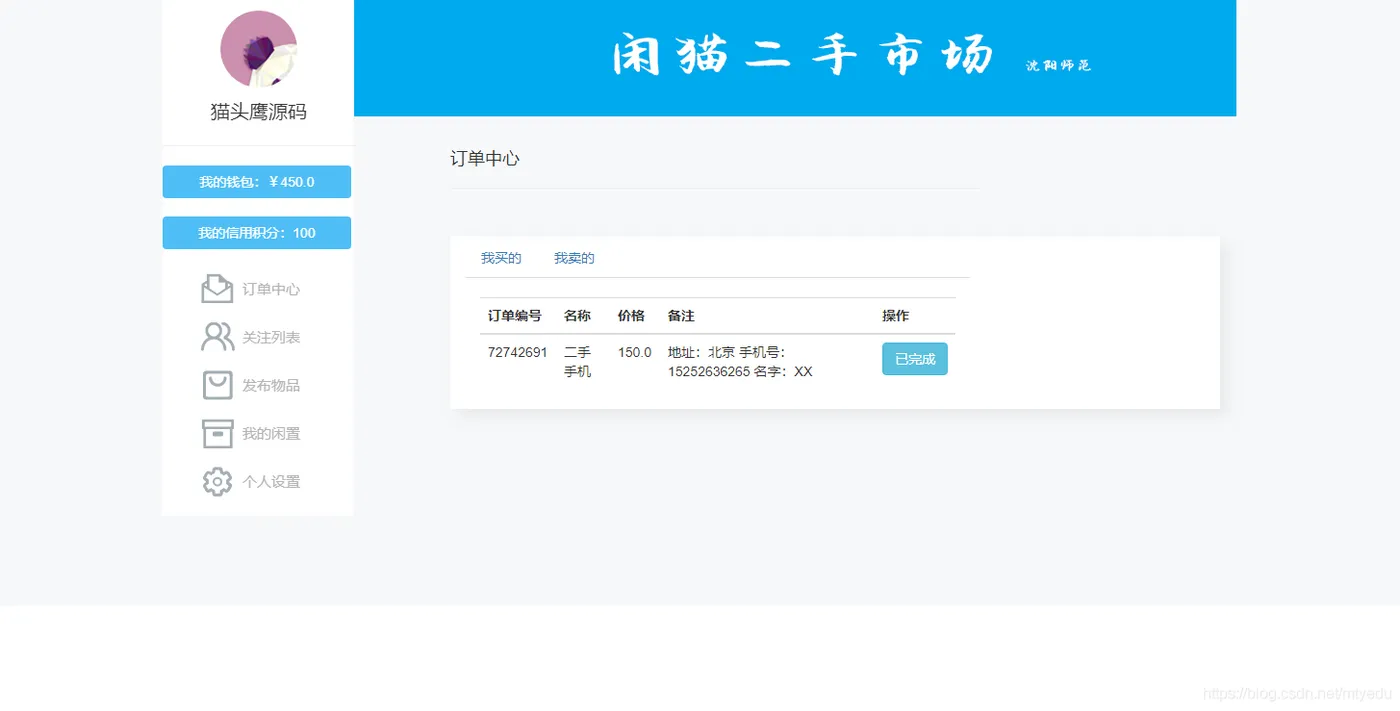
我的订单
查看个人的订单
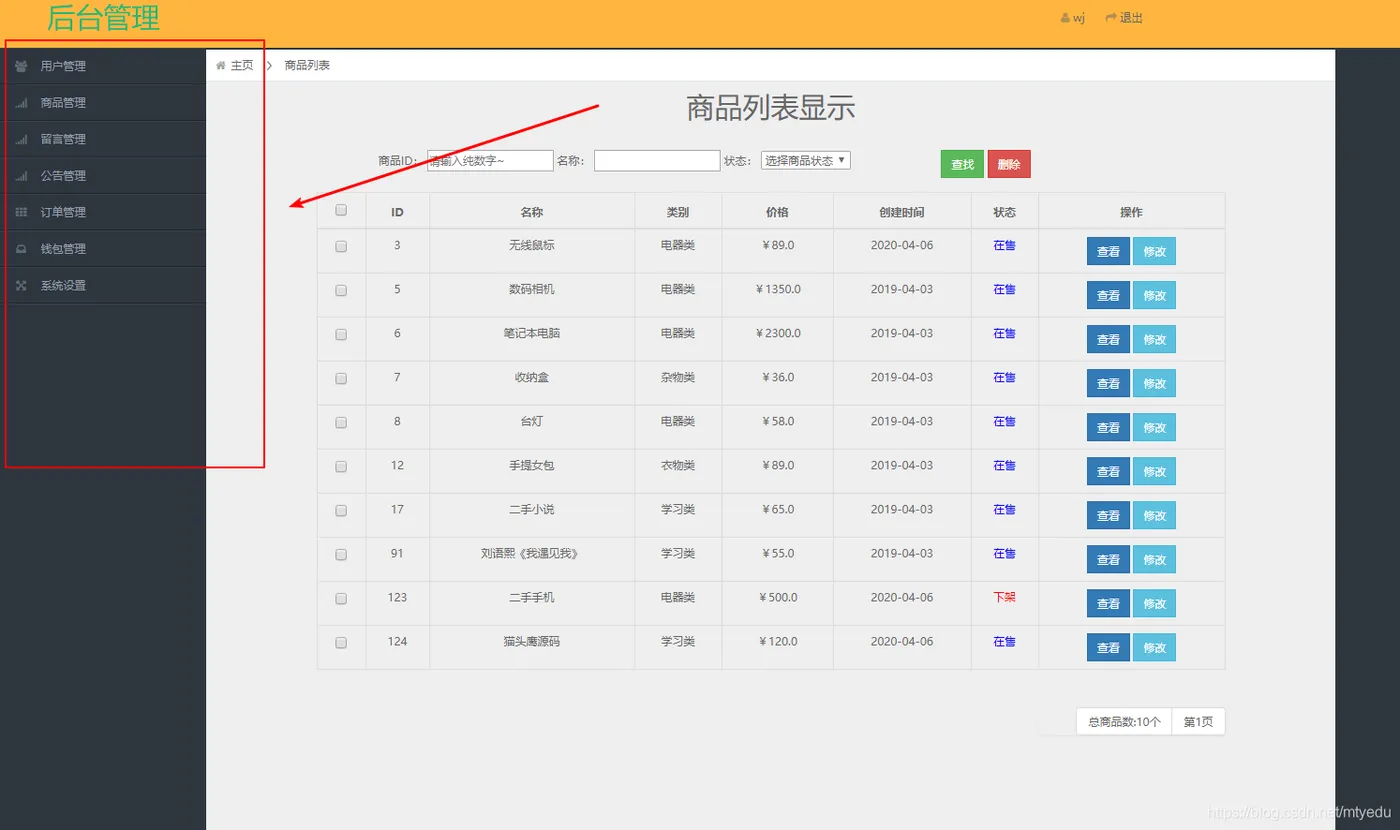
商品管理
对商品进行操作
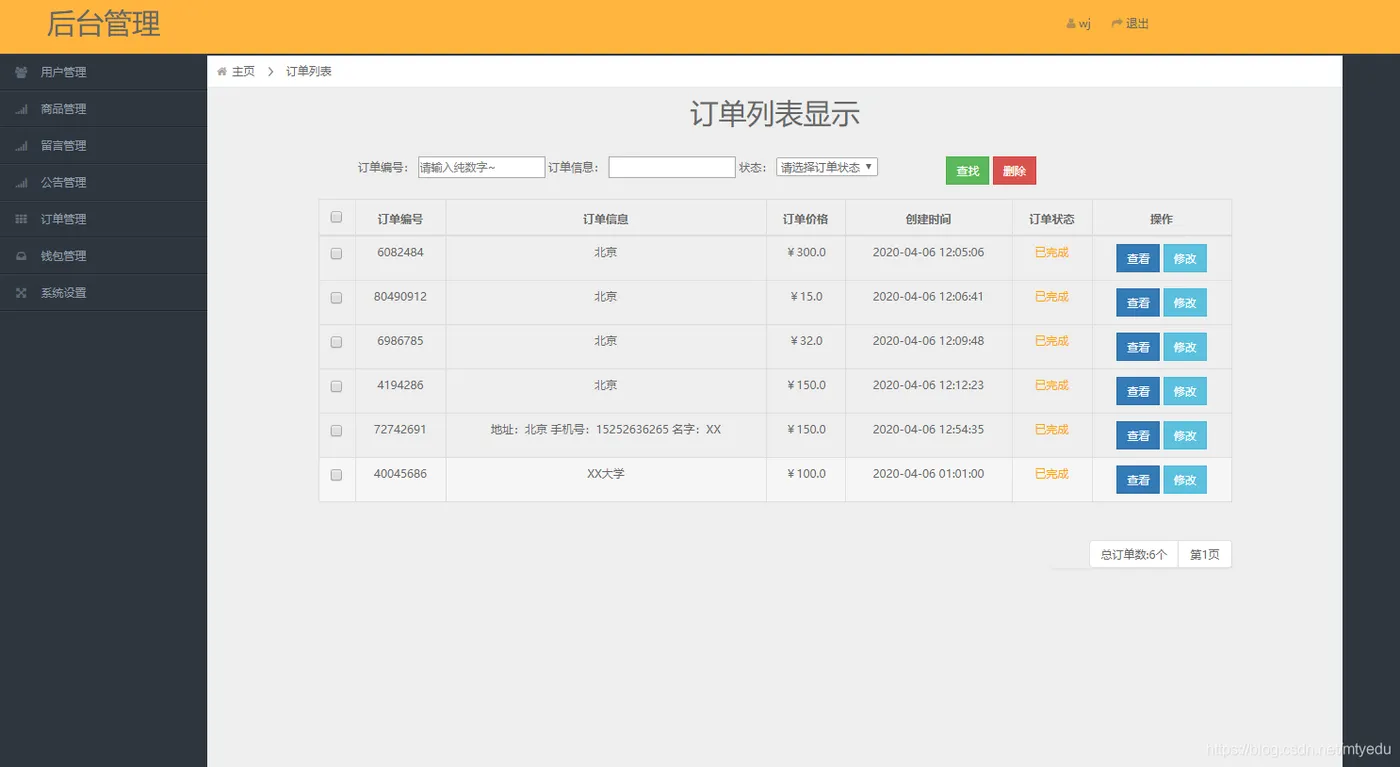
订单管理
对订单进行操作
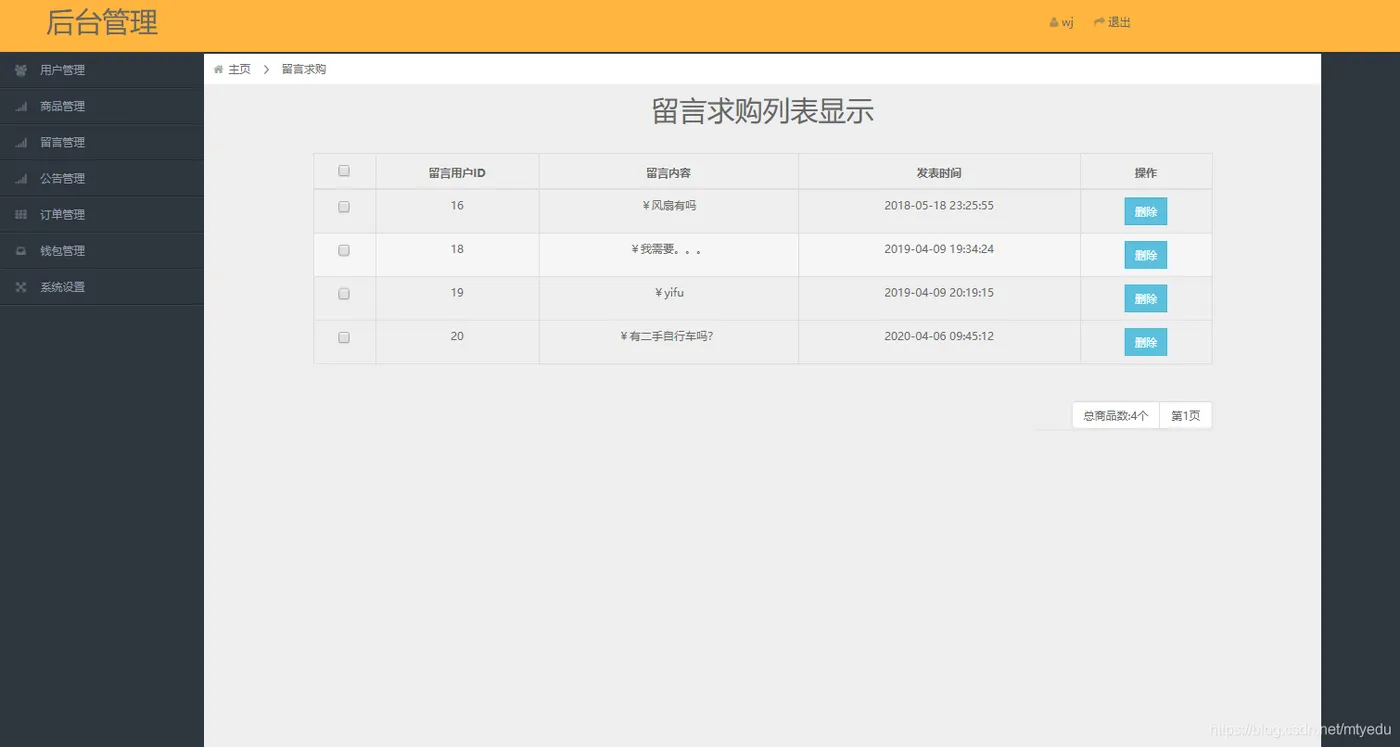
留言管理
对留言进行操作
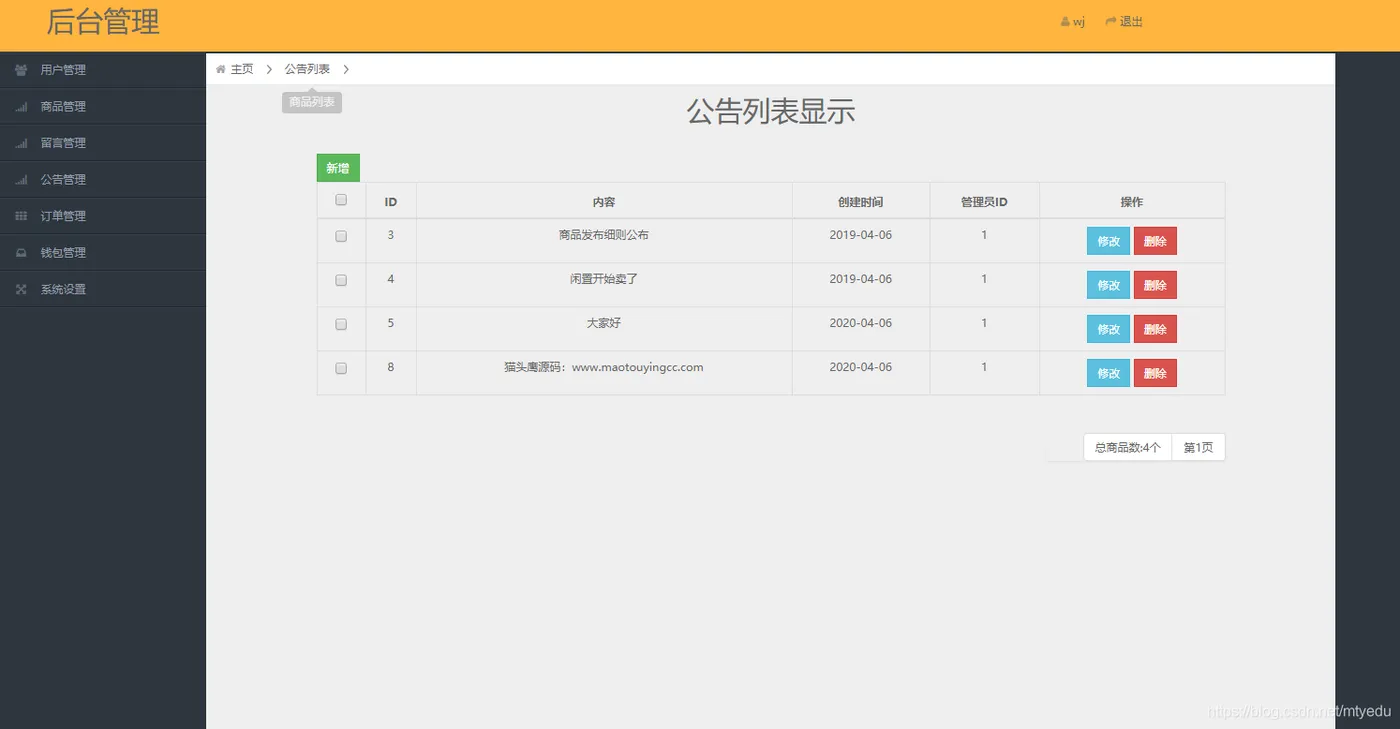
公告管理
对公告行操作
代码
首页信息展示及操作控制层:
@Controller
@RequestMapping(value = "/goods")
public class GoodsController {
  @Autowired
  private GoodsService goodsService;
  @Autowired
  private ImageService imageService;
  @Autowired
  private CatelogService catelogService;
  @Autowired
  private UserService userService;
  @Resource
  private PurseService purseService;
  @Autowired
  private GonggaoService gonggaoService;
  /**
   * 首页显示商品,每一类商品查询6件,根据最新上架排序 key的命名为catelogGoods1、catelogGoods2....
   *
   * @return
   * @throws Exception
   */
  @RequestMapping(value = "/homeGoods")
  public ModelAndView homeGoods() throws Exception {
    ModelAndView modelAndView = new ModelAndView();
    // 商品种类数量
    int catelogSize = 4;
    // 每个种类显示商品数量
    int goodsSize = 10;
    List<Goods> goodsList = null;
    List<GoodsExtend> goodsAndImage = null;
    /* 获取最新发布列表 */
    goodsList = goodsService.getGoodsOrderByDate(goodsSize);
    goodsAndImage = new ArrayList<GoodsExtend>();
    for (int j = 0; j < goodsList.size(); j++) {
      // 将用户信息和image信息封装到GoodsExtend类中,传给前台
      GoodsExtend goodsExtend = new GoodsExtend();
      Goods goods = goodsList.get(j);
      List<Image> images = imageService.getImagesByGoodsPrimaryKey(goods.getId());
      goodsExtend.setGoods(goods);
      goodsExtend.setImages(images);
      goodsAndImage.add(j, goodsExtend);
    }
    String key0 = "catelog" + "Goods";
    modelAndView.addObject(key0, goodsAndImage);
    /* 获取公告 */
    List<Gonggao> gonggaoList = gonggaoService.getGonggaoList();
    modelAndView.addObject("gonggaoList", gonggaoList);
    /* 获取其他列表物品信息 */
    for (int i = 1; i <= catelogSize; i++) {
      goodsList = goodsService.getGoodsByCatelogOrderByDate(i, goodsSize);
      goodsAndImage = new ArrayList<GoodsExtend>();
      for (int j = 0; j < goodsList.size(); j++) {
        // 将用户信息和image信息封装到GoodsExtend类中,传给前台
        GoodsExtend goodsExtend = new GoodsExtend();
        Goods goods = goodsList.get(j);
        List<Image> images = imageService.getImagesByGoodsPrimaryKey(goods.getId());
        goodsExtend.setGoods(goods);
        goodsExtend.setImages(images);
        goodsAndImage.add(j, goodsExtend);
      }
      String key = "catelog" + "Goods" + i;
      modelAndView.addObject(key, goodsAndImage);
    }
    modelAndView.setViewName("goods/homeGoods");
    return modelAndView;
  }
  /**
   * 搜索商品
   *
   * @param str          //ajax传值
   * @return
   * @throws Exception
   */
  @RequestMapping(value = "/search")
  public ModelAndView searchGoods(@RequestParam(value = "str", required = false) String str) throws Exception {
    List<Goods> goodsList = goodsService.searchGoods(str, str);
    List<GoodsExtend> goodsExtendList = new ArrayList<GoodsExtend>();
    for (int i = 0; i < goodsList.size(); i++) {
      GoodsExtend goodsExtend = new GoodsExtend();
      Goods goods = goodsList.get(i);
      List<Image> imageList = imageService.getImagesByGoodsPrimaryKey(goods.getId());
      goodsExtend.setGoods(goods);
      goodsExtend.setImages(imageList);
      goodsExtendList.add(i, goodsExtend);
    }
    ModelAndView modelAndView = new ModelAndView();
    modelAndView.addObject("goodsExtendList", goodsExtendList);
    modelAndView.addObject("search", str);
    modelAndView.setViewName("/goods/searchGoods");
    return modelAndView;
  }
  /**
   * 查询该类商品
   *
   * @param id
   *            要求该参数不为空
   * @return
   * @throws Exception
   */
  @RequestMapping(value = "/catelog")
  public ModelAndView homeGoods(HttpServletRequest request, @RequestParam(value = "str", required = false) String str)
      throws Exception {
    ModelAndView modelAndView = new ModelAndView();
    // 每个种类显示商品数量
    int goodsSize = 12;
    List<Goods> goodsList = null;
    List<GoodsExtend> goodsAndImage = null;
    /* 获取最新发布列表 */
    goodsList = goodsService.getGoodsByStr(goodsSize, str, str);
    goodsAndImage = new ArrayList<GoodsExtend>();
    for (int j = 0; j < goodsList.size(); j++) {
      // 将用户信息和image信息封装到GoodsExtend类中,传给前台
      GoodsExtend goodsExtend = new GoodsExtend();
      Goods goods = goodsList.get(j);
      List<Image> images = imageService.getImagesByGoodsPrimaryKey(goods.getId());
      goodsExtend.setGoods(goods);
      goodsExtend.setImages(images);
      goodsAndImage.add(j, goodsExtend);
    }
    modelAndView.addObject("goodsExtendList", goodsAndImage);
    modelAndView.addObject("search", str);
    modelAndView.setViewName("/goods/catelogGoods");
    return modelAndView;
  }
  /**
   * 查询该类商品
   *
   * @param id
   *            要求该参数不为空
   * @return
   * @throws Exception
   */
  @RequestMapping(value = "/catelog/{id}")
  public ModelAndView catelogGoods(HttpServletRequest request, @PathVariable("id") Integer id,
      @RequestParam(value = "str", required = false) String str) throws Exception {
    List<Goods> goodsList = goodsService.getGoodsByCatelog(id, str, str);
    Catelog catelog = catelogService.selectByPrimaryKey(id);
    List<GoodsExtend> goodsExtendList = new ArrayList<GoodsExtend>();
    for (int i = 0; i < goodsList.size(); i++) {
      GoodsExtend goodsExtend = new GoodsExtend();
      Goods goods = goodsList.get(i);
      List<Image> imageList = imageService.getImagesByGoodsPrimaryKey(goods.getId());
      goodsExtend.setGoods(goods);
      goodsExtend.setImages(imageList);
      goodsExtendList.add(i, goodsExtend);
    }
    ModelAndView modelAndView = new ModelAndView();
    modelAndView.addObject("goodsExtendList", goodsExtendList);
    modelAndView.addObject("catelog", catelog);
    modelAndView.addObject("search", str);
    modelAndView.setViewName("/goods/catelogGoods");
    return modelAndView;
  }
  /**
   * 根据商品id查询该商品详细信息
   *
   * @param id
   * @return
   * @throws Exception
   */
  @RequestMapping(value = "/goodsId/{id}")
  public ModelAndView getGoodsById(HttpServletRequest request, @PathVariable("id") Integer id,
      @RequestParam(value = "str", required = false) String str) throws Exception {
    Goods goods = goodsService.getGoodsByPrimaryKey(id);
    User seller = userService.selectByPrimaryKey(goods.getUserId());
    Catelog catelog = catelogService.selectByPrimaryKey(goods.getCatelogId());
    GoodsExtend goodsExtend = new GoodsExtend();
    List<Image> imageList = imageService.getImagesByGoodsPrimaryKey(id);
    CommentExtend CommentExtend=goodsService.selectCommentsByGoodsId(id);
    goodsExtend.setGoods(goods);
    goodsExtend.setImages(imageList);
    ModelAndView modelAndView = new ModelAndView();
    modelAndView.addObject("CommentExtend",CommentExtend);
    modelAndView.addObject("goodsExtend", goodsExtend);
    modelAndView.addObject("seller", seller);
    modelAndView.addObject("search", str);
    modelAndView.addObject("catelog", catelog);
    modelAndView.setViewName("/goods/detailGoods");
    return modelAndView;
  }
   /**
     * 发布评论
     * @return
     */
    @RequestMapping(value = "/addComments",method=RequestMethod.POST)
    public void deleteFocus(HttpServletRequest request,Comments comments) {
      User cur_user = (User)request.getSession().getAttribute("cur_user");
        comments.setUser(cur_user);
        SimpleDateFormat sdf = new SimpleDateFormat("yyyy-MM-dd hh:mm:ss");
        Date createAt =new Date();
    comments.setCreateAt(sdf.format(createAt));
        goodsService.addComments(comments);
  }
  /**
   * 修改商品信息
   *
   * @return
   * @throws Exception
   */
  @RequestMapping(value = "/editGoods/{id}")
  public ModelAndView editGoods(HttpServletRequest request,@PathVariable("id") Integer id) throws Exception {
    User cur_user = (User) request.getSession().getAttribute("cur_user");
    Goods goods = goodsService.getGoodsByPrimaryKey(id);
    List<Image> imageList = imageService.getImagesByGoodsPrimaryKey(id);
    GoodsExtend goodsExtend = new GoodsExtend();
    goodsExtend.setGoods(goods);
    goodsExtend.setImages(imageList);
    ModelAndView modelAndView = new ModelAndView();
    Integer userId = cur_user.getId();
    Purse myPurse = purseService.getPurseByUserId(userId);
    modelAndView.addObject("myPurse", myPurse);
    // 将商品信息添加到model
    modelAndView.addObject("goodsExtend", goodsExtend);
    modelAndView.setViewName("/goods/editGoods");
    return modelAndView;
  }
  /**
   * 提交商品更改信息
   *
   * @return
   * @throws Exception
   */
  @RequestMapping(value = "/editGoodsSubmit")
  public String editGoodsSubmit(HttpServletRequest request, Goods goods) throws Exception {
    User cur_user = (User) request.getSession().getAttribute("cur_user");
    goods.setUserId(cur_user.getId());
    String polish_time = DateUtil.getNowDay();
    goods.setPolishTime(polish_time);
    goods.setStatus(1);
    goodsService.updateGoodsByPrimaryKeyWithBLOBs(goods.getId(), goods);
    return "redirect:/user/allGoods";
  }
  /**
   * 商品下架
   *
   * @return
   * @throws Exception
   */
  @RequestMapping(value = "/offGoods")
  public ModelAndView offGoods() throws Exception {
    return null;
  }
  /**
   * 用户删除商品
   *
   * @return
   * @throws Exception
   */
  @RequestMapping(value = "/deleteGoods/{id}")
  public String deleteGoods(HttpServletRequest request, @PathVariable("id") Integer id) throws Exception {
    Goods goods = goodsService.getGoodsByPrimaryKey(id);
    // 删除商品后,catlog的number-1,user表的goods_num-1,image删除,更新session的值
    User cur_user = (User) request.getSession().getAttribute("cur_user");
    goods.setUserId(cur_user.getId());
    int number = cur_user.getGoodsNum();
    Integer calelog_id = goods.getCatelogId();
    Catelog catelog = catelogService.selectByPrimaryKey(calelog_id);
    catelogService.updateCatelogNum(calelog_id, catelog.getNumber() - 1);
    userService.updateGoodsNum(cur_user.getId(), number - 1);
    cur_user.setGoodsNum(number - 1);
    request.getSession().setAttribute("cur_user", cur_user);// 修改session值
    //imageService.deleteImagesByGoodsPrimaryKey(id);
    goodsService.deleteGoodsByPrimaryKey(id);
    return "redirect:/user/allGoods";
  }
  /**
   * 发布商品
   *
   * @return
   * @throws Exception
   */
  @RequestMapping(value = "/publishGoods")
  public ModelAndView publishGoods(HttpServletRequest request) {
    // 可以校验用户是否登录
    User cur_user = (User) request.getSession().getAttribute("cur_user");
    // if (cur_user == null) {
    // return "/goods/homeGoods";
    // } else {
    Integer userId = cur_user.getId();
    Purse myPurse = purseService.getPurseByUserId(userId);
    ModelAndView mv = new ModelAndView();
    mv.addObject("myPurse", myPurse);
    mv.setViewName("/goods/pubGoods");
    return mv;
  }
  /**
   * 提交发布的商品信息
   *
   * @return
   * @throws Exception
   */
  @RequestMapping(value = "/publishGoodsSubmit")
  public String publishGoodsSubmit(HttpServletRequest request, Image ima, Goods goods, MultipartFile image)
      throws Exception {
    // 查询出当前用户cur_user对象,便于使用id
    User cur_user = (User) request.getSession().getAttribute("cur_user");
    goods.setUserId(cur_user.getId());
    goodsService.addGood(goods, 10);// 在goods表中插入物品
    // 返回插入的该物品的id
    int goodsId = goods.getId();
    ima.setGoodsId(goodsId);
    imageService.insert(ima);// 在image表中插入商品图片
    // 发布商品后,catlog的number+1,user表的goods_num+1,更新session的值
    int number = cur_user.getGoodsNum();
    Integer calelog_id = goods.getCatelogId();
    Catelog catelog = catelogService.selectByPrimaryKey(calelog_id);
    catelogService.updateCatelogNum(calelog_id, catelog.getNumber() + 1);
    userService.updateGoodsNum(cur_user.getId(), number + 1);
    cur_user.setGoodsNum(number + 1);
    request.getSession().setAttribute("cur_user", cur_user);// 修改session值
    return "redirect:/user/allGoods";
  }
  /**
   * 上传物品
   *
   * @param session
   * @param myfile
   * @return
   * @throws IllegalStateException
   * @throws IOException
   */
  @ResponseBody
  @RequestMapping(value = "/uploadFile")
  public Map<String, Object> uploadFile(HttpSession session, MultipartFile myfile)
      throws IllegalStateException, IOException {
      // 原始名称
      String oldFileName = myfile.getOriginalFilename(); // 获取上传文件的原名
      // 存储图片的物理路径
      String file_path = session.getServletContext().getRealPath("upload");
      // System.out.println("file_path:"+file_path);
      // 上传图片
      if (myfile != null && oldFileName != null && oldFileName.length() > 0) {
        // 新的图片名称
        String newFileName = UUID.randomUUID() + oldFileName.substring(oldFileName.lastIndexOf("."));
        // 新图片
        File newFile = new File(file_path + "/" + newFileName);
        // 将内存中的数据写入磁盘
        myfile.transferTo(newFile);
        // 将新图片名称返回到前端
        Map<String, Object> map = new HashMap<String, Object>();
        map.put("success", "成功啦");
        map.put("imgUrl", newFileName);
        return map;
      } else {
        Map<String, Object> map = new HashMap<String, Object>();
        map.put("error", "图片不合法");
        return map;
      }
    }
  /**
   * 根据商品id查询该商品详细信息
   *
   * @param id
   * @return
   * @throws Exception
   */
  @RequestMapping(value = "/buyId/{id}")
  public ModelAndView getGoodsdetailById(HttpServletRequest request, @PathVariable("id") Integer id)
      throws Exception {
    Goods goods = goodsService.getGoodsByPrimaryKey(id);
    GoodsExtend goodsExtend = new GoodsExtend();
    List<Image> imageList = imageService.getImagesByGoodsPrimaryKey(id);
    goodsExtend.setGoods(goods);
    goodsExtend.setImages(imageList);
    User cur_user = (User)request.getSession().getAttribute("cur_user");
        Integer userId = cur_user.getId();
    Purse myPurse=purseService.getPurseByUserId(userId);
    ModelAndView modelAndView = new ModelAndView();
    modelAndView.addObject("goodsExtend", goodsExtend);
    modelAndView.addObject("myPurse",myPurse);
    modelAndView.setViewName("/user/pay");
    return modelAndView;
  }
}
数据库配置信息:
<!-- 加载数据库参数 -->
    <context:property-placeholder location="classpath:conf/jdbc.properties"/>
    <context:component-scan base-package="com.ldu.service.impl"/>
    <bean id = "dataSource" class = "com.alibaba.druid.pool.DruidDataSource" destroy-method = "close">
        <!-- 数据库基本信息配置 -->
               <property name = "url" value = "${druid.url}" />
        <property name = "username" value = "${druid.username}" />
        <property name = "password" value = "${druid.password}" />
        <property name = "driverClassName" value = "${druid.driverClassName}" />
        <property name = "filters" value = "${druid.filters}" />
        <!-- 最大并发连接数 -->
        <property name = "maxActive" value = "${druid.maxActive}" />
        <!-- 初始化连接数量 -->
        <property name = "initialSize" value = "${druid.initialSize}" />
        <!-- 配置获取连接等待超时的时间 -->
        <property name = "maxWait" value = "${druid.maxWait}" />
        <!-- 最小空闲连接数 -->
        <property name = "minIdle" value = "${druid.minIdle}" />
        <!-- 配置间隔多久才进行一次检测,检测需要关闭的空闲连接,单位是毫秒 -->
        <property name = "timeBetweenEvictionRunsMillis" value ="${druid.timeBetweenEvictionRunsMillis}" />
        <!-- 配置一个连接在池中最小生存的时间,单位是毫秒 -->
        <property name = "minEvictableIdleTimeMillis" value ="${druid.minEvictableIdleTimeMillis}" />
        <property name = "validationQuery" value = "${druid.validationQuery}" />
        <property name = "testWhileIdle" value = "${druid.testWhileIdle}" />
        <property name = "testOnBorrow" value = "${druid.testOnBorrow}" />
        <property name = "testOnReturn" value = "${druid.testOnReturn}" />
        <property name = "maxOpenPreparedStatements" value ="${druid.maxOpenPreparedStatements}" />
以上就是部分功能展示,从整体上来看,本系统功能是十分完整的,而且也与当前的热点话题关联,界面设计简洁大方,交互友好,数据库设计也很合理,规模适中,比较适合毕业设计和课程设计的相关应用。