本课程由魔搭社区 ModelScope 出品,通过实战教程深入讲解如何在 AMD GPU 环境下,结合开源框架DiffSynth-Studio,高效部署和微调 Qwen-Image 系列模型。你将亲手实践:
- 基础文生图推理
- 使用 ArtAug LoRA 提升画质细节
- 高一致性人像外延(outpainting)与多图融合编辑
- 英文、中文、韩文等多语言提示理解
- 从零训练专属 LoRA 模型(如定制“特定狗狗”生成)
准备好了吗?让我们从环境搭建开始,逐步开启 Qwen-Image 的全链路定制之旅!
DiffSynth-Studio: https://github.com/modelscope/DiffSynth-Studio
可在AMD Developer Cloud 打开 [1]
本教程介绍 Qwen-Image [2] 系列(总规模约 860 亿参数)的能力,并讲解如何在 AMD 硬件上结合 DiffSynth-Studio [3] 进行高效微调。我们将展示 AMD GPU 的大显存如何同时加载多个大模型,顺畅完成推理、编辑与训练的复杂工作流。
关键组件
- 硬件:AMD GPU
- 软件:DiffSynth-Studio [3] 和 ROCm [4]
- 模型:Qwen-Image [2]、Qwen-Image-Edit [5],以及自定义 LoRA 适配器
前置条件
开始前,请确保环境满足以下要求:
- 操作系统:Linux(推荐 Ubuntu 22.04)。可参考官方支持系统要求 [6]。
- 硬件:AMD GPU
- 软件:ROCm 6.0 或更高版本、Docker、Python 3.10 或更高版本
注:请按 ROCm 安装指南 [7] 完成安装并验证。
第 1 步:环境准备
按照以下步骤完成环境搭建。
验证硬件可用性
AMD GPU 为生成式 AI 负载提供高性能。在开始前,先确认 GPU 已被正确识别并可用。
!amd-smi
# For ROCm 6.4 and earlier, run rocm-smi instead.

从源码安装 DiffSynth-Studio
为确保与 AMD ROCm 的完全兼容,建议直接从源码安装 DiffSynth-Studio(DiffSynth-Studio 仓库 [3])。
注:安装后请手动更新系统路径,确保无需重启内核即可在 notebook 中导入库。
import os
import sys
# 1. Clone the repository
!git clone https://github.com/modelscope/DiffSynth-Studio.git
# 2. Navigate into the directory
os.chdir("DiffSynth-Studio")
# 3. Checkout the specific commit for reproducibility
!git checkout afd101f3452c9ecae0c87b79adfa2e22d65ffdc3
# 4. Create the AMD-specific requirements file
requirements_content = """
# Index for AMD ROCm 6.4 wheels (Prioritized)
--index-url https://download.pytorch.org/whl/rocm6.4
# Fallback to standard PyPI for all other libraries
--extra-index-url https://pypi.org/simple
# Core PyTorch libraries
torch>=2.0.0
torchvision
# Install the DiffSynth-Studio project and its other dependencies
-e .
""".strip()
with open("requirements-amd.txt", "w") as f:
    f.write(requirements_content)
# 5. Install using the custom requirements
!pip install -r requirements-amd.txt
# 6. Force the current notebook to see the installed package
sys.path.append(os.getcwd())
print(f"Added {os.getcwd()} to system path to enable immediate import.")
# 7. Return to root directory
os.chdir("..")
第 2 步:基础模型推理
本节将演示如何进行基础推理。
加载 Qwen-Image
Qwen-Image [5] 是用于图像生成的大规模模型。配置 pipeline,并将 Transformer、Text Encoder、VAE 等组件加载到 GPU。
注:将下载权重的域名配置为 ModelScope。
import warnings
warnings.filterwarnings("ignore")
import logging
logger = logging.getLogger()
logger.setLevel(logging.CRITICAL)
import os
os.environ["TOKENIZERS_PARALLELISM"] = "false"
os.environ["MODELSCOPE_DOMAIN"] = "www.modelscope.ai"
from diffsynth.pipelines.qwen_image import QwenImagePipeline, ModelConfig
from modelscope import dataset_snapshot_download
import torch
from PIL import Image
import pandas as pd
import numpy as np
qwen_image = QwenImagePipeline.from_pretrained(
    torch_dtype=torch.bfloat16,
    device="cuda",
    model_configs=[
        ModelConfig(model_id="Qwen/Qwen-Image", origin_file_pattern="transformer/diffusion_pytorch_model*.safetensors"),
        ModelConfig(model_id="Qwen/Qwen-Image", origin_file_pattern="text_encoder/model*.safetensors"),
        ModelConfig(model_id="Qwen/Qwen-Image", origin_file_pattern="vae/diffusion_pytorch_model.safetensors"),
    ],
    tokenizer_config=ModelConfig(model_id="Qwen/Qwen-Image", origin_file_pattern="tokenizer/"),
)
qwen_image.enable_lora_magic()
生成基线图像
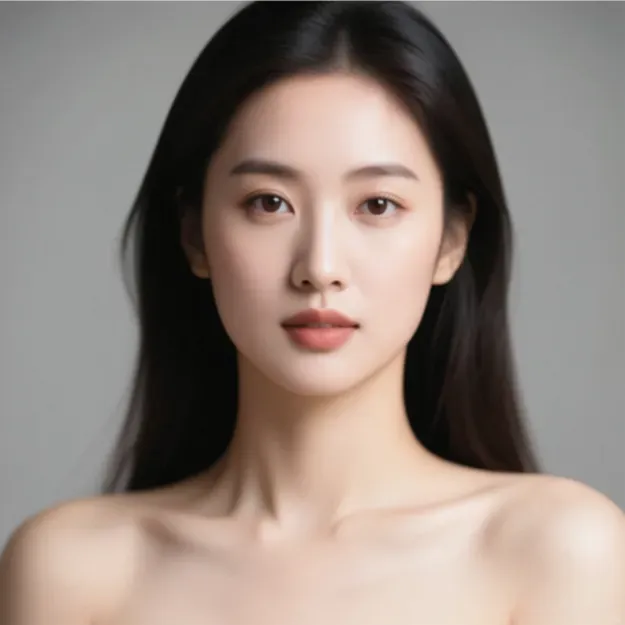
用简单提示词生成第一张图片:“a portrait of a beautiful Asian woman”。
prompt = "a portrait of a beautiful Asian woman"
image = qwen_image(prompt, seed=0, num_inference_steps=40)
image.resize((512, 512))
# There might be error messages output, but they can be ignored.
第 3 步:使用 LoRA 提升画质
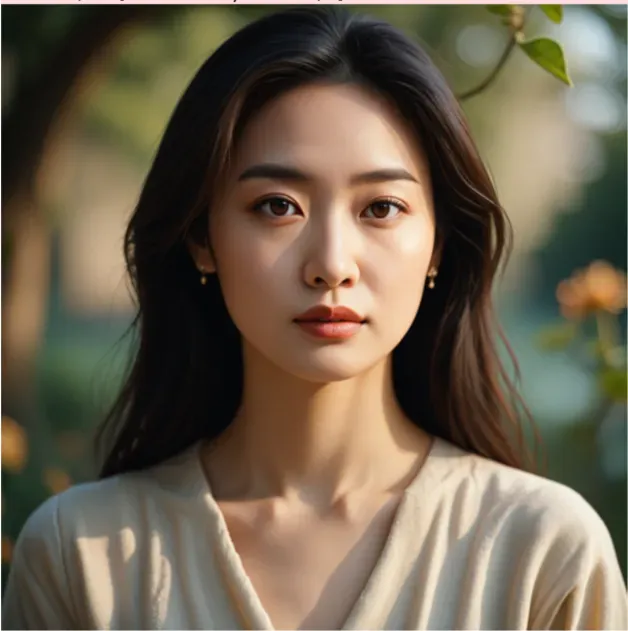
你可能会注意到基线图像在细节层面仍有不足。
加载 Qwen-Image-LoRA-ArtAug-v1 [8],以显著增强视觉精细度与艺术化细节。
qwen_image.load_lora(
    qwen_image.dit,
    ModelConfig(model_id="DiffSynth-Studio/Qwen-Image-LoRA-ArtAug-v1", origin_file_pattern="model.safetensors"),
    hotload=True,
)
使用相同提示词重新生成,观察改进效果。
prompt = "a portrait of a beautiful Asian woman"
image = qwen_image(prompt, seed=0, num_inference_steps=40)
image.save("image_face.jpg")
image.resize((512, 512))
第 4 步:高级图像编辑
本节介绍一些更复杂图像的生成与编辑技巧。
加载编辑流水线
Qwen-Image 系列包含针对不同任务优化的专用模型。下面加载 Qwen-Image-Edit [5],用于图像编辑与修复(in-painting)。
qwen_image_edit = QwenImagePipeline.from_pretrained(
    torch_dtype=torch.bfloat16,
    device="cuda",
    model_configs=[
        ModelConfig(model_id="Qwen/Qwen-Image-Edit", origin_file_pattern="transformer/diffusion_pytorch_model*.safetensors"),
        ModelConfig(model_id="Qwen/Qwen-Image", origin_file_pattern="text_encoder/model*.safetensors"),
        ModelConfig(model_id="Qwen/Qwen-Image", origin_file_pattern="vae/diffusion_pytorch_model.safetensors"),
    ],
    tokenizer_config=ModelConfig(model_id="Qwen/Qwen-Image", origin_file_pattern="tokenizer/"),
    processor_config=ModelConfig(model_id="Qwen/Qwen-Image-Edit", origin_file_pattern="processor/"),
)
qwen_image_edit.enable_lora_magic()
一致性外延(Outpainting)
基于刚生成的人像,向外扩展为远景照片,背景为森林。
prompt = "Realistic photography of a beautiful woman wearing a long dress. The background is a forest."
negative_prompt = "Make the character's fingers mutilated and distorted, enlarge the head to create an unnatural head-to-body ratio, turning the figure into a short-statured big-headed doll. Generate harsh, glaring sunlight and render the entire scene with oversaturated colors. Twist the legs into either X-shaped or O-shaped deformities."
image = qwen_image_edit(prompt, negative_prompt=negative_prompt, edit_image=Image.open("image_face.jpg"), seed=1, num_inference_steps=40)
image.resize((512, 512))
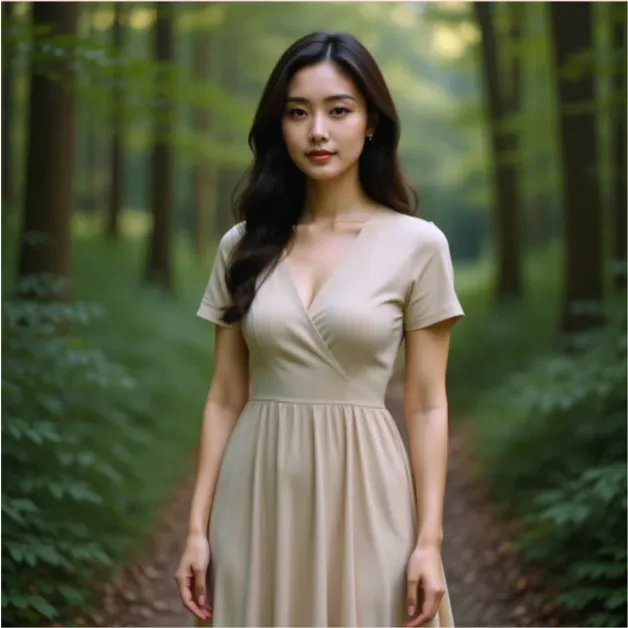
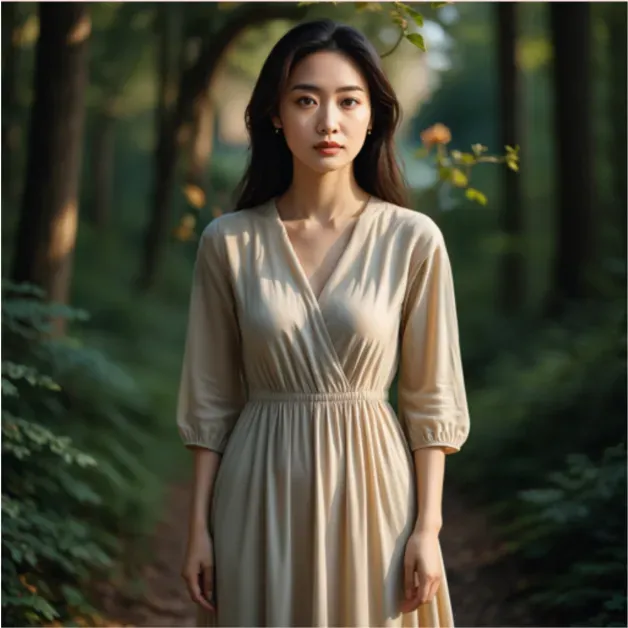
如果人脸出现不一致,加载专用 LoRA:DiffSynth-Studio/Qwen-Image-Edit-F2P [9],可基于人脸参考实现一致性。
qwen_image_edit.load_lora(
    qwen_image_edit.dit,
    ModelConfig(model_id="DiffSynth-Studio/Qwen-Image-Edit-F2P", origin_file_pattern="model.safetensors"),
    hotload=True,
)
prompt = "Realistic photography of a beautiful woman wearing a long dress. The background is a forest."
negative_prompt = "Make the character's fingers mutilated and distorted, enlarge the head to create an unnatural head-to-body ratio, turning the figure into a short-statured big-headed doll. Generate harsh, glaring sunlight and render the entire scene with oversaturated colors. Twist the legs into either X-shaped or O-shaped deformities."
image = qwen_image_edit(prompt, negative_prompt=negative_prompt, edit_image=Image.open("image_face.jpg"), seed=1, num_inference_steps=40)
image.save("image_fullbody.jpg")
image.resize((512, 512))
第 5 步:多语言与多图编辑
Qwen-Image 的文本编码器具备一定的多语言理解能力。先用英文生成一张图像,再用韩文验证它对语义的理解。
先用英文:
qwen_image.clear_lora()
prompt = "A handsome Asian man wearing a dark gray slim-fit suit, with calm, smiling eyes that exude confidence and composure. He is seated at a table, holding a bouquet of red flowers in his hands."
image = qwen_image(prompt, seed=2, num_inference_steps=40)
image.resize((512, 512))

然后用韩文:
qwen_image.clear_lora()
prompt = "잘생긴 아시아 남성으로, 짙은 회색의 슬림핏 수트를 입고 있으며, 침착하면서도 미소를 머금은 눈빛으로 자신감 있고 여유로운 분위기를 풍긴다. 그는 책상 앞에 앉아 붉은 꽃다발을 손에 들고 있다."
image = qwen_image(prompt, seed=2, num_inference_steps=40)
image.save("image_man.jpg")
image.resize((512, 512))

尽管 Qwen-Image 未显式使用韩文语料训练,其文本编码器的基础能力仍可支撑一定的多语言理解。
使用 Qwen-Image-Edit-2509 合并主体
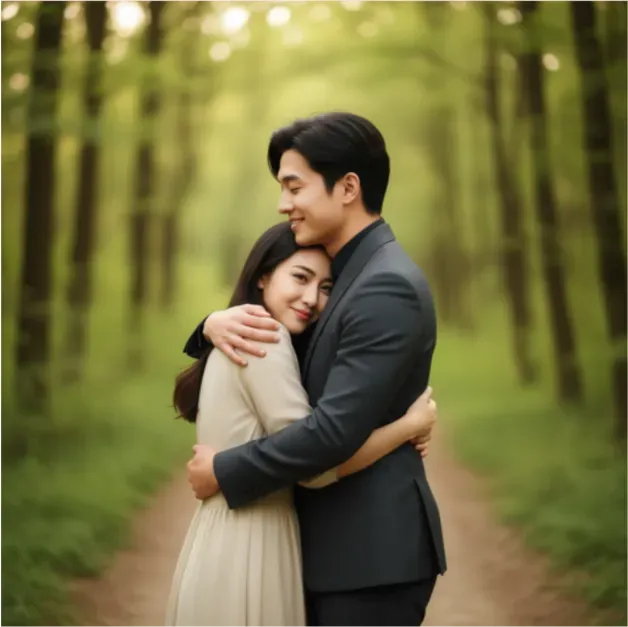
现在我们已有两张图片:森林中的女性与手捧花束的男性。利用支持多图编辑的 Qwen-Image-Edit-2509 [10],将两张独立图像合成为同一场景中的互动画面。
qwen_image_edit_2509 = QwenImagePipeline.from_pretrained(
    torch_dtype=torch.bfloat16,
    device="cuda",
    model_configs=[
        ModelConfig(model_id="Qwen/Qwen-Image-Edit-2509", origin_file_pattern="transformer/diffusion_pytorch_model*.safetensors"),
        ModelConfig(model_id="Qwen/Qwen-Image", origin_file_pattern="text_encoder/model*.safetensors"),
        ModelConfig(model_id="Qwen/Qwen-Image", origin_file_pattern="vae/diffusion_pytorch_model.safetensors"),
    ],
    tokenizer_config=ModelConfig(model_id="Qwen/Qwen-Image", origin_file_pattern="tokenizer/"),
    processor_config=ModelConfig(model_id="Qwen/Qwen-Image-Edit", origin_file_pattern="processor/"),
)
qwen_image_edit_2509.enable_lora_magic()
生成两人同框的照片:
prompt = "이 사랑 넘치는 부부의 포옹하는 모습을 찍은 사진을 생성해 줘."
image = qwen_image_edit_2509(prompt, edit_image=[Image.open("image_fullbody.jpg"), Image.open("image_man.jpg")], seed=3, num_inference_steps=40)
image.save("image_merged.jpg")
image.resize((512, 512))
第 6 步:AMD GPU的实力
当前内存中同时加载了三套大模型。计算总参数规模,理解工作负载的体量。
def count_parameters(model):
    return sum([p.numel() for p in model.parameters()])
print(count_parameters(qwen_image) + count_parameters(qwen_image_edit) + count_parameters(qwen_image_edit_2509))
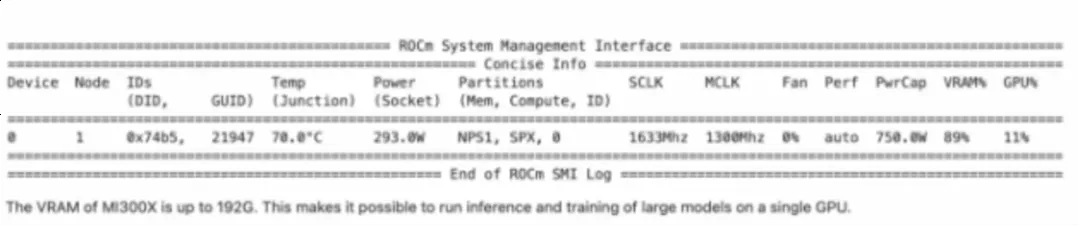
总参数约 860 亿。对于常规 GPU,这几乎不可行。而 AMD GPU具备 192 GB 显存,可将所有模型常驻内存,在推理、编辑、训练之间无缝切换。
!amd-smi
#For ROCm 6.4 and earlier, run rocm-smi instead.
第 7 步:训练自定义 LoRA
接下来从推理转入训练。我们训练一个自定义 LoRA 适配器,让模型学习特定概念(示例为一只特定的狗)。
准备数据集
下载包含 5 张狗狗图片及元数据的小数据集。
!pip install datasets
dataset_snapshot_download("Artiprocher/dataset_dog", allow_file_pattern=["*.jpg", "*.csv"], local_dir="dataset")
images = [Image.open(f"dataset/{i}.jpg") for i in range(1, 6)]
Image.fromarray(np.concatenate([np.array(image.resize((256, 256))) for image in images], axis=1))

查看数据集元数据(包含标注的图像描述):
pd.read_csv("dataset/metadata.csv")
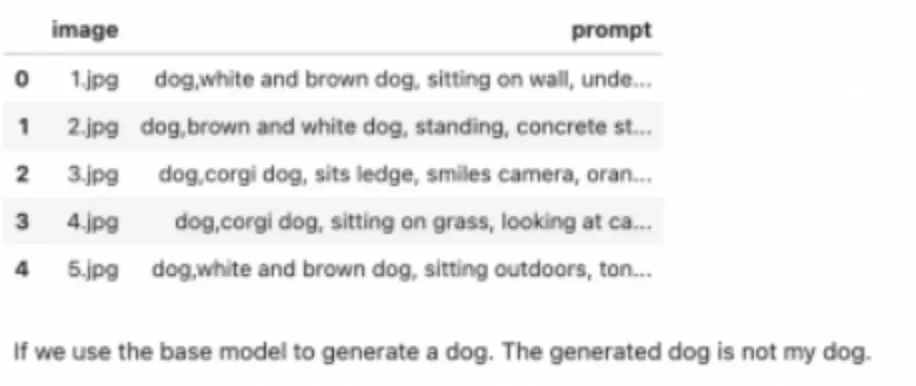
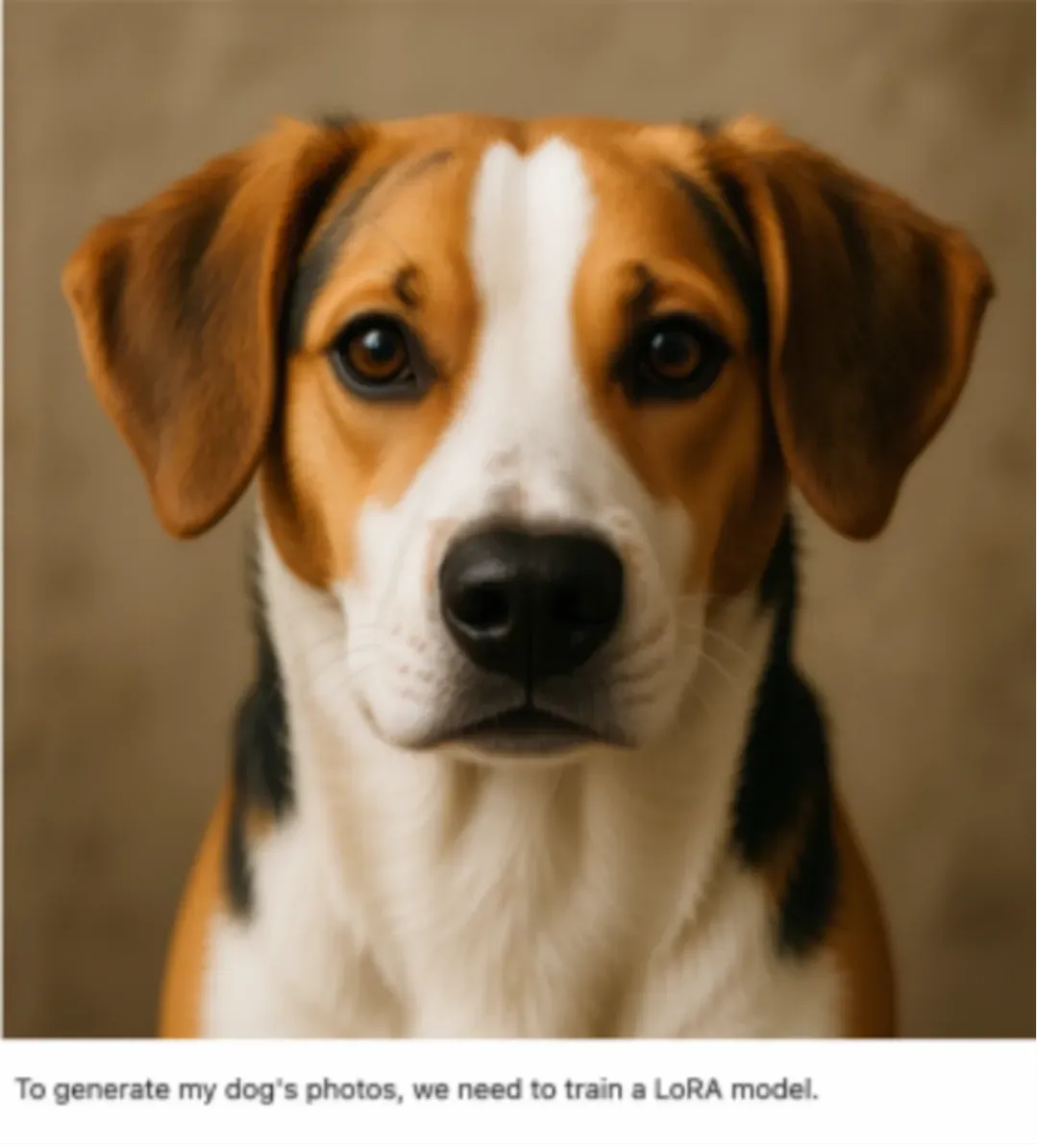
训练前,先用基座模型输出“a dog” 的结果。可见输出为通用狗狗,而非目标个体。
qwen_image.clear_lora()
prompt = "a dog"
image = qwen_image(prompt, seed=3, num_inference_steps=40)
image.resize((512, 512))
运行训练脚本
先释放一部分显存,再下载官方训练脚本并用accelerate启动。
释放内存:
del qwen_image
del qwen_image_edit
del qwen_image_edit_2509
torch.cuda.empty_cache()
下载训练脚本:
!wget https://github.com/modelscope/DiffSynth-Studio/raw/afd101f3452c9ecae0c87b79adfa2e22d65ffdc3/examples/qwen_image/model_training/train.py
启动训练任务:
cmd = rf"""
accelerate launch train.py \
  --dataset_base_path dataset \
  --dataset_metadata_path dataset/metadata.csv \
  --max_pixels 1048576 \
  --dataset_repeat 50 \
  --model_id_with_origin_paths "Qwen/Qwen-Image:transformer/diffusion_pytorch_model*.safetensors,Qwen/Qwen-Image:text_encoder/model*.safetensors,Qwen/Qwen-Image:vae/diffusion_pytorch_model.safetensors" \
  --learning_rate 1e-4 \
  --num_epochs 1 \
  --remove_prefix_in_ckpt "pipe.dit." \
  --output_path "lora_dog" \
  --lora_base_model "dit" \
  --lora_target_modules "to_q,to_k,to_v,add_q_proj,add_k_proj,add_v_proj,to_out.0,to_add_out,img_mlp.net.2,img_mod.1,txt_mlp.net.2,txt_mod.1" \
  --lora_rank 32 \
  --dataset_num_workers 2 \
  --find_unused_parameters
""".strip()
os.system(cmd)
第 8 步:加载自定义 LoRA 推理
训练完成后,重新加载模型,注入新训练的lora_dog,并验证模型是否识别特定的狗狗。
qwen_image = QwenImagePipeline.from_pretrained(
    torch_dtype=torch.bfloat16,
    device="cuda",
    model_configs=[
        ModelConfig(model_id="Qwen/Qwen-Image", origin_file_pattern="transformer/diffusion_pytorch_model*.safetensors"),
        ModelConfig(model_id="Qwen/Qwen-Image", origin_file_pattern="text_encoder/model*.safetensors"),
        ModelConfig(model_id="Qwen/Qwen-Image", origin_file_pattern="vae/diffusion_pytorch_model.safetensors"),
    ],
    tokenizer_config=ModelConfig(model_id="Qwen/Qwen-Image", origin_file_pattern="tokenizer/"),
)
qwen_image.enable_lora_magic()
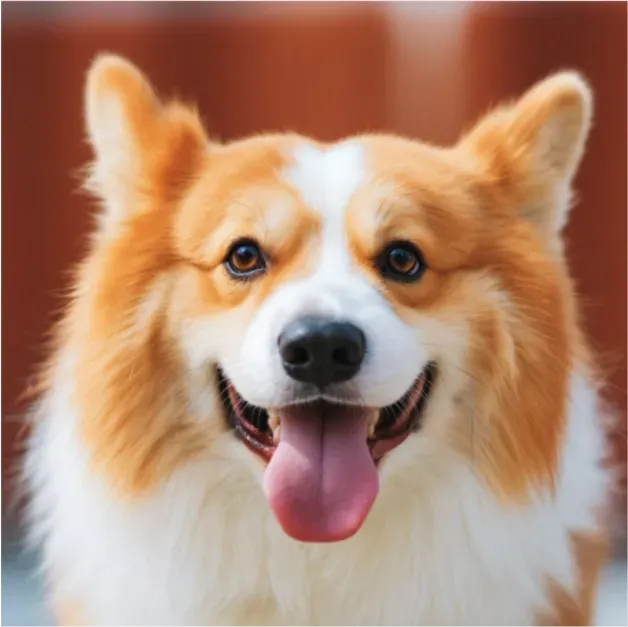
加载刚训练的 LoRA 并生成图片:
qwen_image.load_lora(
    qwen_image.dit,
    "lora_dog/epoch-0.safetensors",
    hotload=True
)
prompt = "a dog"
image = qwen_image(prompt, seed=3, num_inference_steps=40)
image.resize((512, 512))
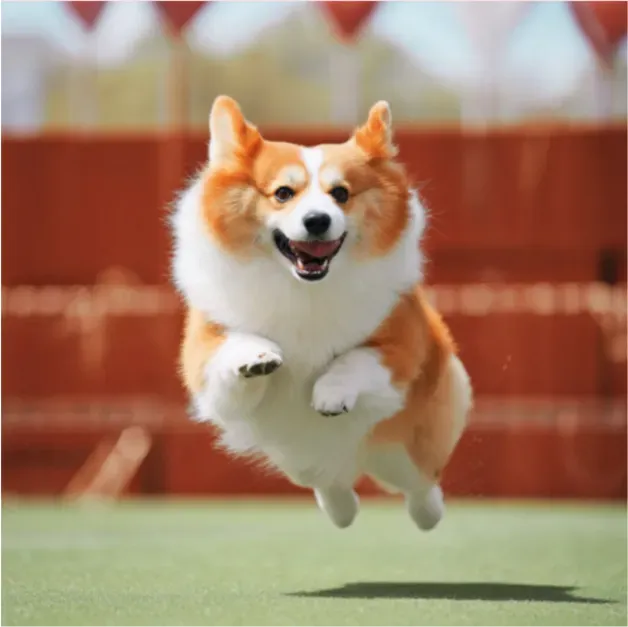
再来一张动态场景图:
prompt = "a dog is jumping."
image = qwen_image(prompt, seed=3, num_inference_steps=40)
image.resize((512, 512))
结语
本教程演示了 AMD GPU 的端到端能力:在单卡上完成总规模约 860 亿参数的推理、进行高一致性的图像编辑,并训练自定义适配器,实现推理—编辑—训练的一体化工作流。
参考链接
1. 从AMD Developer Cloud打开:https://amd-ai-academy.com/github/ROCm/gpuaidev/blob/main/docs/notebooks/fine_tune/qwen_image.ipynb
2. Qwen-Image:https://qwen-image.org/
3. DiffSynth-Studio 仓库:https://github.com/modelscope/DiffSynth-Studio
4. ROCm:https://rocm.docs.amd.com/en/latest/what-is-rocm.html
5. Qwen-Image-Edit:https://www.modelscope.cn/models/Qwen/Qwen-Image-Edit
6. Linux官方支持系统要求:https://rocm.docs.amd.com/projects/install-on-linux/en/latest/reference/system-requirements.html
7. ROCm 安装指南:https://rocm.docs.amd.com/projects/install-on-linux/en/latest/index.html
8. Qwen-Image-LoRA-ArtAug-v1:https://www.modelscope.ai/models/DiffSynth-Studio/Qwen-Image-LoRA-ArtAug-v1
9. DiffSynth-Studio/Qwen-Image-Edit-F2P:https://www.modelscope.ai/models/DiffSynth-Studio/Qwen-Image-Edit-F2P
10. Qwen-Image-Edit-2509:https://www.modelscope.cn/models/Qwen/Qwen-Image-Edit-2509