什么是 OPTIONS 请求
OPTIONS 请求为 发送非简单跨域请求前的预检请求 ,若该请求未正常返回,浏览器会阻止后续的请求发送。
一般情况下,有三种方式会导致浏览器发起预检请求:
- 请求的方法不是 GET/HEAD/POST;
- POST 请求的 Content-Type 并非 application/x-www-form-urlencoded, multipart/form-data 或 text/plain;
- 请求中设置了自定义的 header 字段(如 Token);
显示 OPTIONS 请求
默认情况下,Chrome 和 Microsoft Edge 浏览器不会在 F12 工具的网络选项卡上显示 OPTIONS 请求。
要在这些浏览器中显示 OPTIONS 请求,请执行以下操作:
- chrome://flags/#out-of-blink-cors 或 edge://flags/#out-of-blink-cors;
- 禁用标记;
- 重启;
Firefox 浏览器默认显示 OPTIONS 请求。
发送 OPTIONS 请求给服务器返回 404
若未对 IIS 进行配置,则会导致 OPTIONS 请求被 IIS 直接响应返回,而不会进入到代码中。这也是 Global 中的 Application_BeginRequest 无法捕获到 OPTIONS 请求的原因。
- 检查 webconfig 中的配置,是否移除了对 options 请求的特殊处理可在 IIS 中进行配置: [网站]-[应用程序]-[处理程序映射]
<system.webServer>
  <handlers>
    <remove name="OPTIONSVerbHandler" />
  </handlers>
</system.webServer>- 检查
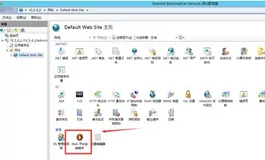
IIS服务器是否安装了 UrlScan,若安装了请检查 AllowVerbs 中是否包含了options,可在IIS中查看是否安装了UrlScan: [网站]-[ISAPI筛选器] (可以找到UrlScan安装路径)
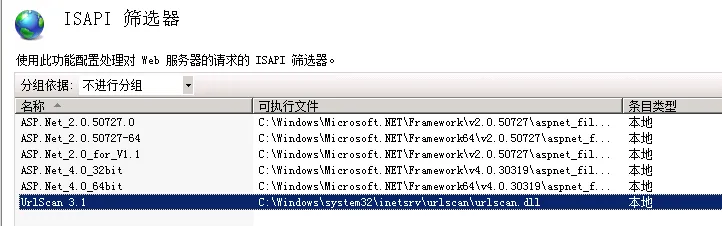
UrlScan 的配置文件为 UrlScan.ini (C:\Windows\System32\inetsrv\urlscan\UrlScan.ini)
将 OPTIONS 从 [DenyVerbs] 中移除并添加到 [AllowVerbs] 下。
- 在 Global.asax 的 Application_BeginRequest 实践中直接响应
OPTIONS请求;
注意:该方式为asp.net(.net framework时代)的处理
//允许所有的 `options` 请求,直接返回 `200` 状态码
private void Application_BeginRequest(object sender, EventArgs e)
{
    if (HttpContext.Current.Request.HttpMethod == "OPTIONS")
    {
        HttpContext.Current.Response.StatusCode = 200;
        HttpContext.Current.Response.Headers["Access-Control-Allow-Origin"] = HttpContext.Current.Request.Headers["origin"];
        HttpContext.Current.Response.End();
    }
}- Application_Start 和 Application_End
第一次访问站点时,创建 HttpApplication 对象,此时会触发 Application_Start,并创建HttpApplication 实例池,应用接请求就从池中获取实例,进行处理。在所有的 HttpApplication 实例闲置达到超时时间,触发应用程序池回收,或者重启站点时就会触发 Application_End 事件,应用程序池的闲置超时时间可以在 iis 设置,站点下 bin 目录下的文件发生改变,webconfig 配置改变等导致站点重启的事件都会触发 Application_End。
- Session_Start 和 Session_End
单个用户访问 Web 应用时,启动会话,服务器为该用户创建一个独立的 Session 对象,并触发Session_Start 事件,此时Session处于可用状态。用户在该会话建立后可以发起若干次请求,当服务器一段时间内未收到用户请求,达到会话超时时间时,触发 Session_End 事件,服务器释放为当前用户保存 Session 的内存。也可以在应用程序中调用 Session.Abandon() 可以手动取消 Session,清空服务器保存的 Session,直到再次调用 Session 时,又会触发 Session_Start,但是 SessionID 不会变化。所有会触发 Application_End 的事件都会在此之前触发 Session_Start。可以在 Web.Config 中添加设置 Session 过期时间( timeout 单位为分钟)。
- Application_BeginRequest 和 Application_EndRequest
在用户会话启动后,每次发起的请求都会触发 Application_BeginRequest 事件,并在请求完成时触发 Application_EndRequest 事件。
- 在 webconfig 中的 Allow-Method 中添加上 options;
<system.webServer>
    <httpProtocol>
      <customHeaders>
        <add name="Access-Control-Allow-Methods" value="OPTIONS,POST,GET" />
        <add name="Access-Control-Allow-Headers" value="x-requested-with,aspxauth" />
        <add name="Access-Control-Allow-Credentials" value="true" />
      </customHeaders>
    </httpProtocol>
</system.webServer>
发送 OPTIONS 请求给服务器返回 405
ajax 跨域在某些情况下会发送 OPTIONS 请求给服务器,如无相关设置会返回 405 错误,在 asp.net core 3.1 webapi 下通过中间件来处理 OPTIONS 请求。
OptionsRequestMiddleware扩展中间件
using Microsoft.AspNetCore.Builder;
using Microsoft.AspNetCore.Http;
using System;
using System.Collections.Generic;
using System.Linq;
using System.Threading.Tasks;

namespace Microsoft.AspNetCore.Builder
{
    /// <summary>
    /// 中间件
    /// </summary>
    public class OptionsRequestMiddleware
    {
        private readonly RequestDelegate _next;

        public OptionsRequestMiddleware(RequestDelegate next)
        {
            _next = next;
        }

        public async Task Invoke(HttpContext context)
        {
            if (context.Request.Method.ToUpper() == "OPTIONS")
            {
                context.Response.StatusCode = 200;
                return;
            }

            await _next.Invoke(context);
        }
    }

    /// <summary>
    /// 扩展中间件
    /// </summary>
    public static class OptionsRequestMiddlewareExtensions
    {
        public static IApplicationBuilder UseOptionsRequest(this IApplicationBuilder app)
        {
            return app.UseMiddleware<OptionsRequestMiddleware>();
        }
    }
}- 在
Startup.cs里面的Configure中使用扩展中间件
public void Configure(IApplicationBuilder app, IWebHostEnvironment env)
 {
      ...
      app.UseOptionsRequest(); // 使用扩展中间件
      ...
 }
在 asp.net core 中优化 OPTIONS 请求
在
ASP.NET Core 中启用跨源请求 (CORS):了解更多请查看 =>
https://docs.microsoft.com/zh-cn/aspnet/core/security/cors?view=aspnetcore-6.0
在跨域策略中设置 SetPreflightMaxAge
// 添加跨域策略
services.AddCors(options =>
{
    string corsPolicyName = _config["CorsPolicyName"]; // 自定义跨域策略名称
    options.AddPolicy(corsPolicyName, builder =>
    {
        builder.AllowAnyOrigin() // 允许任何来源的主机访问
        //.AllowAnyHeader() // 允许任何的Header头部标题
        .WithHeaders("Account", "ClientType", "OrgId", "Token", "Department", "EntAuthVebr") // 自定义请求头
        //.AllowAnyMethod() // 允许任何方法
        .WithMethods(HttpMethods.Options, HttpMethods.Get, HttpMethods.Post, HttpMethods.Put, HttpMethods.Delete) // 允许的谓词方法
        .SetPreflightMaxAge(TimeSpan.FromHours(24)); // 设置预检请求的最大缓存时间
    });
});

...

app.UseCors(corsPolicyName); //使用跨域
总结
了解 OPTIONS 请求的基本功能、作用和大概拦截的原因,逐一排查,分别讲解在 asp.net (.net framework 时代)和 asp.net core (.net core/.net 时代) 的处理方式,OPTIONS 请求在不同的浏览器中默认请求行为表现不一致,通过设置 SetPreflightMaxAge (asp.net core 方式)的最大缓存时间,间接的优化 OPTIONS 请求,减少服务器环境的预检测次数,你是否也遇到类似的问题呢?