问题1:OceanBase时钟同步服务必须开启吗?我保持三台节点时间是一致的也报错了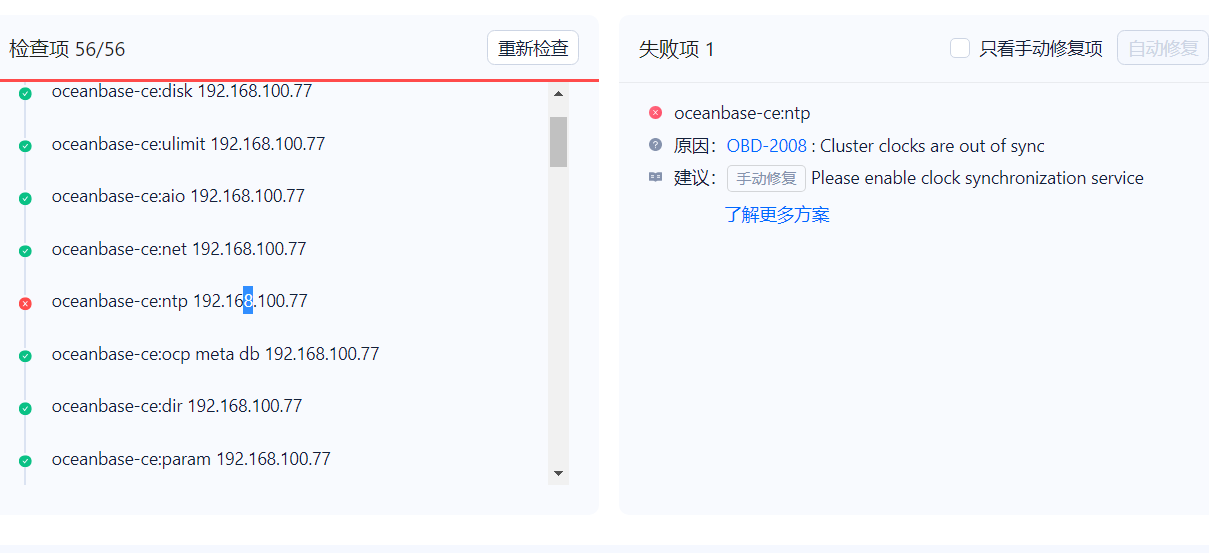 问题2:我试试部署下ntp后看看 我们是内网 整这些有点麻烦
版权声明:本文内容由阿里云实名注册用户自发贡献,版权归原作者所有,阿里云开发者社区不拥有其著作权,亦不承担相应法律责任。具体规则请查看《阿里云开发者社区用户服务协议》和《阿里云开发者社区知识产权保护指引》。如果您发现本社区中有涉嫌抄袭的内容,填写侵权投诉表单进行举报,一经查实,本社区将立刻删除涉嫌侵权内容。
回答1:得开启,我装双节点的,不配置报错,我用obd+配置文件部署,启动的时候会因为ntp启动不起来,配置后,就可以起来,所以感觉它检测的是时间+是否配置时钟同步。 回答2:机器做时间同步 备注:所有的机器依据192.168.56.101作时间同步 192.168.56.101: a. 查看是否安装ntp [root@master0 opt]# rpm -qa|grep ntp ntp-4.2.6p5-1.el6.x86_64 fontpackages-filesystem-1.41-1.1.el6.noarch ntpdate-4.2.6p5-1.el6.x86_64
        b. vim /etc/ntp.conf
            ### 1.add
            restrict 192.168.56.0 mask 255.255.255.0 nomodify notrap #允许192.168.56.网段的ip访问该服务器

            ### 2.edit
            #server 0.rhel.pool.ntp.org iburst
            #server 1.rhel.pool.ntp.org iburst
            #server 2.rhel.pool.ntp.org iburst
            #server 3.rhel.pool.ntp.org iburst

            ### 3.add
            server 127.127.1.0
            fudge 127.127.1.0 stratum 10 #(当该节点无网络连接,使用本地时间作为时间服务器为其他节点提供时间同步)

        c. vim /etc/sysconfig/ntpd
            ### 1.add
            SYNC_HWCLOCK=yes

        d. 重启ntp服务
            [root@master0 opt]# service ntpd start
        e. 开机自启动
            [root@master0 opt]# chkconfig ntpd on

    其他机器:
        a. 测试, 修改成错误时间
            [root@slavea0 student]# ntpdate 192.168.56.101

        b.  使用定时计划,每隔10m进行一次时间同步
            [root@slavea0 student]#crontab -e
            0-59/10 * * * * ntpdate 192.168.56.101 && hwclock -w


            [root@slavea0 student]# crontab -l
            0-59/10 * * * * ntpdate 192.168.56.101 && hwclock -w,此回答整理自钉群“[社区]技术答疑群OceanBase”