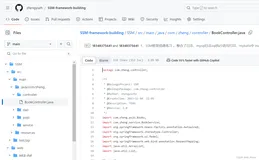
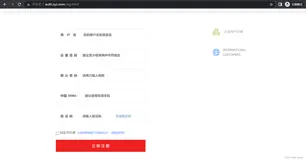
做个记录,供大家参考和自己以后学习学习,直接上代码
验证码部分
jsp部分
    <div class="loginbody">
<div class="login-container">
  <div class="center">
       <img src="images/logo_login.png" />
              </div>
              <div class="space-6"></div>
              <div class="position-relative">
                <div id="login-box" class="login-box widget-box no-border visible">
                  <div class="widget-body">
                    <div class="widget-main">
                      <h4 class="header blue lighter bigger">
                        <i class="icon-coffee green"></i>
                        管理员登录
                      </h4>
                      <div class="login_icon"><img src="images/login.png" /></div>
                      <form class="login" id="login" action="admin/login" method="post">
                        <fieldset>
                    <ul>
   <li class="frame_style form_error"><label class="user_icon"></label><input name="name" value="${name}" type="text"  id="name" /><i>用户名</i></li>
   <li class="frame_style form_error"><label class="password_icon"></label><input name="password" value="${password}" type="password"   id="pwd"/><i>密码</i></li>
   <li class="frame_style form_error"><label class="Codes_icon"></label> <input name="code" type="text" id="Codes_text" class="auautocomplete=off"/><i>验证码</i><div class="Codes_region"><img src="images/yzm.jpg" style="width:80;height:35" id ="checkCode_img"/></div></li>
   <li><i><font color='red'>${error}</font></i></li>
  </ul>
                          <div class="space"></div>
                          <div class="clearfix">
                            <label class="inline">
                              <input type="checkbox" class="ace">
                              <span class="lbl">保存密码</span>
                            </label>
                            <button type="button" class="width-35 pull-right btn btn-sm btn-primary" id="login_btn">
                              <i class="icon-key"></i>
                              登录
                            </button>
                          </div>
                          <div class="space-4"></div>
                        </fieldset>
                      </form>
js代码
var getCodeUrl="/changeCode";//获取验证码的后端地址
$('#checkCode_img').attr('src',getCodeUrl+'?t='+ new Date().getTime()).show();//为了防止浏览器缓存上次的验证码
$('#checkCode_img').click(function(){this.src=getCodeUrl+'?t='+ new Date().getTime();});
Java代码
生成验证码工具类(此部分借用网上的代码,这位仁兄谢谢你了,当时博客链接没保存,不好意思啦,再次感谢)
public class GenConfirmCodeUtil {
    public static final String RANDOMCODEKEY= "RANDOMCODEKEY";//放到session中的key
      private String randString = "0123456789ABCDEFGHIJKLMNOPQRSTUVWXYZ";//随机产生数字与字母组合的字符串
      private int width = 80;// 图片宽
      private int height = 35;// 图片高
      private int lineSize = 40;// 干扰线数量
      private int stringNum = 4;// 随机产生字符数量
      private Random random = new Random();
      /*
       * 获得字体
       */
      private Font getFont() {
          return new Font("Fixedsys", Font.CENTER_BASELINE, 18);
      }
      /*
       * 获得颜色
       */
      private Color getRandColor(int fc, int bc) {
          if (fc > 255)
              fc = 255;
          if (bc > 255)
              bc = 255;
          int r = fc + random.nextInt(bc - fc - 16);
          int g = fc + random.nextInt(bc - fc - 14);
          int b = fc + random.nextInt(bc - fc - 18);
          return new Color(r, g, b);
      }
      /**
       * 生成随机图片
       */
      public void getRandcode(HttpServletRequest request, HttpServletResponse response) {
          HttpSession session = request.getSession();
          // BufferedImage类是具有缓冲区的Image类,Image类是用于描述图像信息的类
          BufferedImage image = new BufferedImage(width, height, BufferedImage.TYPE_INT_BGR);
          Graphics g = image.getGraphics();// 产生Image对象的Graphics对象,改对象可以在图像上进行各种绘制操作
          g.fillRect(0, 0, width, height);
          g.setFont(new Font("Times New Roman", Font.ROMAN_BASELINE, 20));
          g.setColor(getRandColor(110, 133));
          // 绘制干扰线
          for (int i = 0; i <= lineSize; i++) {
              drowLine(g);
          }
          // 绘制随机字符
          String randomString = "";
          for (int i = 1; i <= stringNum; i++) {
              randomString = drowString(g, randomString, i);
          }
          //将生成的随机字符串保存到session中,而jsp界面通过session.getAttribute("RANDOMCODEKEY"),
          //获得生成的验证码,然后跟用户输入的进行比较
          session.removeAttribute(RANDOMCODEKEY);
          session.setAttribute(RANDOMCODEKEY, randomString);
          g.dispose();
          try {
              // 将内存中的图片通过流动形式输出到客户端
              ImageIO.write(image, "JPEG", response.getOutputStream());
          } catch (Exception e) {
              e.printStackTrace();
          }
      }
      /*
       * 绘制字符串
       */
      private String drowString(Graphics g, String randomString, int i) {
          g.setFont(getFont());
          g.setColor(new Color(random.nextInt(101), random.nextInt(111), random
                  .nextInt(121)));
          String rand = String.valueOf(getRandomString(random.nextInt(randString
                  .length())));
          randomString += rand;
          g.translate(random.nextInt(3), random.nextInt(3));
          g.drawString(rand, 13 * i, 16);
          return randomString;
      }
      /*
       * 绘制干扰线
       */
      private void drowLine(Graphics g) {
          int x = random.nextInt(width);
          int y = random.nextInt(height);
          int xl = random.nextInt(13);
          int yl = random.nextInt(15);
          g.drawLine(x, y, x + xl, y + yl);
      }
      /*
       * 获取随机的字符
       */
      public String getRandomString(int num) {
          return String.valueOf(randString.charAt(num));
      }
}
Controller代码
@Controller
public class ConfirmCodeController {
    @RequestMapping(value = "/changeCode")
      public void getVerify(HttpServletRequest request, HttpServletResponse response){
          response.setContentType("image/jpeg");//设置相应类型,告诉浏览器输出的内容为图片
          response.setHeader("Pragma", "No-cache");//设置响应头信息,告诉浏览器不要缓存此内容
          response.setHeader("Cache-Control", "no-cache");
          response.setDateHeader("Expire", 0);
          GenConfirmCodeUtil codeUtil=new GenConfirmCodeUtil();
          try {
              codeUtil.getRandcode(request, response);//输出验证码图片方法
          } catch (Exception e) {
              e.printStackTrace();
          }
      }
}
登录的代码
ServiceImpl
@Service
public class LoginServiceImpl implements LoginService {
  @Autowired
  private TbAdminMapper adminMapper;
  @Override
  public TbAdmin login(String name) {
    TbAdminExample example=new TbAdminExample();
    Criteria criteria = example.createCriteria();
    criteria.andNameEqualTo(name);
    List<TbAdmin> admin = adminMapper.selectByExample(example);
    if(admin.size()>0&&admin!=null) {
      return admin.get(0);
    }
    return null;
  }
}
Controller
public class LoginController {
  @Autowired
  private LoginService loginService;
  @RequestMapping(value="/login",method=RequestMethod.POST)
  public String login(String name,String password,String code,HttpSession session) {
    //获取验证码
    String codeStr = (String) session.getAttribute("RANDOMCODEKEY");
    TbAdmin admin = loginService.login(name);
    try {
      if(code.equalsIgnoreCase(codeStr)) {
        if(admin!=null) {
          if(password.equals(admin.getPassword())) {
            session.setAttribute("admin", admin);
            return "index";
          }
        }
      }else {
         session.setAttribute("error","验证码错误");
               return "redirect:/login.jsp";
      }
    }catch(Exception e) {
      e.printStackTrace();
      session.setAttribute("error", "账号或密码错误");
      return "redirect:/login.jsp";
    }
    return null;
  }