Spring 对 JPA 的支持已经非常强大,开发者只需关心核心业务逻辑的实现代码,无需过多关注 EntityManager 的创建、事务处理等 JPA 相关的处理。Spring Data JPA更是能够根据方法名字自动实现持久层。
目标
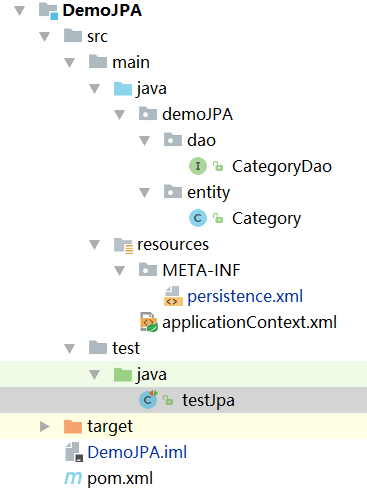
这次我们的目标还是实现前面几节的功能,即对Category的数据层操作。完整和的代码结构:
首先添加实体类Category.java
|
1
2
3
4
5
6
7
8
9
10
11
12
13
14
15
16
17
18
19
20
21
22
23
24
25
26
27
28
29
|
Entity
@Table
(name =
"Category"
)
public
class
Category
implements
Serializable {
@Override
public
String toString() {
return
"id="
+id+
" name="
+name;
}
private
Integer id;
@Id
public
Integer getId() {
return
id;
}
public
void
setId(Integer id) {
this
.id = id;
}
private
String name;
public
String getName() {
return
name;
}
public
void
setName(String name) {
this
.name = name;
}
}
|
引入JPA
JPA 规范要求,配置文件必须命名为 persistence.xml,并存在于类路径下的 META-INF 目录中。该文件通常包含了初始化 JPA 引擎所需的全部信息。Spring 提供的 LocalContainerEntityManagerFactoryBean 提供了非常灵活的配置,persistence.xml 中的信息都可以在此以属性注入的方式提供。
|
1
2
3
4
5
6
7
8
9
10
11
12
13
14
15
16
17
18
|
<?xml version=
"1.0"
encoding=
"UTF-8"
?>
<persistence xmlns=
"http://java.sun.com/xml/ns/persistence"
version=
"2.0"
>
<persistence-unit name=
"category"
transaction-type=
"RESOURCE_LOCAL"
>
<provider>org.hibernate.ejb.HibernatePersistence</provider>
<
class
>demoJPA.entity.Category</
class
>
<properties>
<property name=
"hibernate.connection.driver_class"
value=
"com.mysql.jdbc.Driver"
/>
<property name=
"hibernate.connection.url"
value=
"jdbc:mysql://localhost:3306/store"
/>
<property name=
"hibernate.connection.username"
value=
"root"
/>
<property name=
"hibernate.connection.password"
value=
"root"
/>
<property name=
"hibernate.dialect"
value=
"org.hibernate.dialect.MySQL5Dialect"
/>
<property name=
"hibernate.show_sql"
value=
"true"
/>
<property name=
"hibernate.format_sql"
value=
"true"
/>
<property name=
"hibernate.use_sql_comments"
value=
"false"
/>
<property name=
"hibernate.hbm2ddl.auto"
value=
"update"
/>
</properties>
</persistence-unit>
</persistence>
|
实现数据持久层
接下来到了最核心的部分,就是对于数据持久层的支持。使用 Spring Data JPA 进行持久层开发大致需要的三个步骤:
1.首先引入依赖,这里主要用到spring data commons和spring data jpa两个包。
|
1
2
3
4
5
6
7
8
9
10
11
|
<dependency>
<groupId>org.springframework.data</groupId>
<artifactId>spring-data-commons</artifactId>
<version>
1.13
.
3
.RELEASE</version>
</dependency>
<dependency>
<groupId>org.springframework.data</groupId>
<artifactId>spring-data-jpa</artifactId>
<version>
1.11
.
3
.RELEASE</version>
</dependency>
|
完整的pom:
2.声明持久层接口 CategoryDao继承 Repository 接口。Spring Data JPA 在后台为持久层接口创建代理对象时,会解析方法名字,并自动实现相应的功能。
|
1
2
3
4
5
6
7
8
9
10
|
public
interface
CategoryDao
extends
Repository<Category, Integer> {
void
save(Category category);
Iterable<Category> findAll();
long
count();
void
delete(
int
id);
}
|
3.在 Spring 配置文件中增加一行声明,让 Spring 为声明的接口创建代理对象。配置了 <jpa:repositories> 后,Spring 初始化容器时将会扫描 base-package 指定的包目录及其子目录,为继承 Repository 或其子接口的接口创建代理对象,并将代理对象注册为 Spring Bean,业务层便可以通过 Spring 自动封装的特性来直接使用该对象。
|
1
2
3
4
5
6
7
8
9
10
11
12
13
14
15
16
17
18
|
<context:component-scan base-
package
=
"demoJPA"
/>
<tx:annotation-driven transaction-manager=
"transactionManager"
/>
<jpa:repositories base-
package
=
"demoJPA.dao"
repository-impl-postfix=
"Impl"
entity-manager-factory-ref=
"entityManagerFactory"
transaction-manager-ref=
"transactionManager"
/>
<bean id=
"transactionManager"
class
=
"org.springframework.orm.jpa.JpaTransactionManager"
>
<property name=
"entityManagerFactory"
ref=
"entityManagerFactory"
/>
</bean>
<bean id=
"entityManagerFactory"
class
=
"org.springframework.orm.jpa.LocalContainerEntityManagerFactoryBean"
>
<property name=
"jpaVendorAdapter"
>
<bean
class
=
"org.springframework.orm.jpa.vendor.HibernateJpaVendorAdapter"
>
<property name=
"generateDdl"
value=
"false"
/>
<property name=
"showSql"
value=
"true"
/>
</bean>
</property>
</bean>
|
使用 @Query 创建查询
除了通过解析方法名实现功能外,开发者还可以直接在声明的方法上面使用 @Query 注解,并提供一个查询语句作为参数。Spring Data JPA 在创建代理对象时,便会用提供的查询语句来实现其功能。
@Query 注解的使用非常简单,只需在声明的方法上面标注该注解,同时提供一个 JPQL 查询语句即可。JPQL 语句中通过": 变量"的格式来指定参数,同时在方法的参数前面使用 @Param 将方法参数与 JP QL 中的命名参数对应。
|
1
2
|
@Query
(
"from Category where id=:id"
)
Category findOne(
@Param
(
"id"
)
int
id);
|
开发者也可以通过使用 @Query 来执行一个更新操作,为此,我们需要在使用 @Query 的同时,用 @Modifying 来将该操作标识为修改查询,这样框架最终会生成一个更新的操作,而非查询。
|
1
2
3
4
|
@Transactional
@Modifying
@Query
(
"update Category set name=:name where id=:id"
)
void
updateName(
@Param
(
"id"
)
int
id,
@Param
(
"name"
)String name);
|
单元测试
|
1
2
3
4
5
6
7
8
9
10
11
12
13
14
15
16
17
18
19
20
21
22
23
24
25
26
27
28
29
30
31
32
33
34
35
36
37
38
39
40
41
42
43
44
45
46
47
48
49
|
@ContextConfiguration
(locations =
"classpath:applicationContext.xml"
)
@RunWith
(SpringJUnit4ClassRunner.
class
)
public
class
testJpa {
int
id=
5
;
@Autowired
private
CategoryDao categoryDao;
@Test
public
void
testSave(){
Category category=
new
Category();
category.setId(id);
category.setName(
"test"
);
categoryDao.save(category);
}
@Test
public
void
testUpdateName(){
String name=
"test111"
;
categoryDao.updateName(id,name);
}
@Test
public
void
testFindById(){
Category category=categoryDao.findOne(id);
System.out.println(category);
}
@Test
public
void
count(){
long
count=categoryDao.count();
System.out.println(count);
}
@Test
public
void
testFindAll(){
Iterable<Category> categories=categoryDao.findAll();
for
(Category category:categories){
System.out.println(category);
}
}
@Test
public
void
delete(){
categoryDao.delete(id);
}
}
|
源码地址:https://github.com/cathychen00/learnjava/tree/master/DemoJPA