系统环境:
操作系统:RedHat EL5
Cluster: Oracle GI(Grid Infrastructure)
Oracle: Oracle 11.2.0.1.0
如图所示:RAC 系统架构
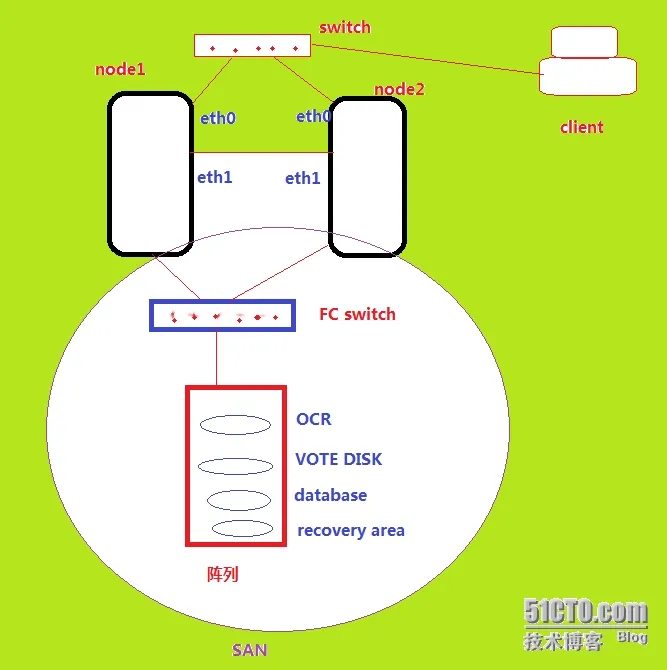
对于Oracle 11G构建RAC首先需要构建GI(Grid Infrastructure)的架构
错误现象:
节点2运行root.sh脚本错误:
[root@hk2 ~]# /u01/11.2.0/grid/root.sh
|
1
2
3
4
5
6
7
8
9
10
11
12
13
14
15
16
17
18
19
20
21
22
23
24
25
26
27
28
29
30
31
32
33
34
35
36
37
38
39
40
41
42
43
44
45
46
47
48
49
|
Running Oracle 11g root.sh script...
The following environment variables are set
as
:
ORACLE_OWNER= grid
ORACLE_HOME= /u01/
11.2.
0
/grid
Enter the full pathname of the local bin directory: [/usr/local/bin]:
Copying dbhome to /usr/local/bin ...
Copying oraenv to /usr/local/bin ...
Copying coraenv to /usr/local/bin ...
Creating /etc/oratab file...
Entries will be added to the /etc/oratab file
as
needed by
Database Configuration Assistant when a database is created
Finished running generic part of root.sh script.
Now product-specific root actions will be performed.
2014
-07
-07
17
:
04
:
37
: Parsing the host name
2014
-07
-07
17
:
04
:
37
: Checking
for
super
user privileges
2014
-07
-07
17
:
04
:
37
: User has
super
user privileges
Using configuration parameter file: /u01/
11.2.
0
/grid/crs/install/crsconfig_params
Creating trace directory
LOCAL ADD MODE
Creating OCR keys
for
user
'root'
, privgrp
'root'
..
Operation successful.
Adding daemon to inittab
CRS
-4123
: Oracle High Availability Services has been started.
ohasd is starting
CRS
-4402
: The CSS daemon was started
in
exclusive
mode but found an active CSS daemon
on
node hk1, number
1
,
and
is terminating
An active cluster was found during
exclusive
startup, restarting to join the cluster
CRS
-2672
: Attempting to start
'ora.mdnsd'
on
'hk2'
CRS
-2676
: Start of
'ora.mdnsd'
on
'hk2'
succeeded
CRS
-2672
: Attempting to start
'ora.gipcd'
on
'hk2'
CRS
-2676
: Start of
'ora.gipcd'
on
'hk2'
succeeded
CRS
-2672
: Attempting to start
'ora.gpnpd'
on
'hk2'
CRS
-2676
: Start of
'ora.gpnpd'
on
'hk2'
succeeded
CRS
-2672
: Attempting to start
'ora.cssdmonitor'
on
'hk2'
CRS
-2676
: Start of
'ora.cssdmonitor'
on
'hk2'
succeeded
CRS
-2672
: Attempting to start
'ora.cssd'
on
'hk2'
CRS
-2672
: Attempting to start
'ora.diskmon'
on
'hk2'
CRS
-2676
: Start of
'ora.diskmon'
on
'hk2'
succeeded
CRS
-2676
: Start of
'ora.cssd'
on
'hk2'
succeeded
CRS
-2672
: Attempting to start
'ora.ctssd'
on
'hk2'
CRS
-2676
: Start of
'ora.ctssd'
on
'hk2'
succeeded
CRS
-2672
: Attempting to start
'ora.drivers.acfs'
on
'hk2'
CRS
-2676
: Start of
'ora.drivers.acfs'
on
'hk2'
succeeded
CRS
-2672
: Attempting to start
'ora.asm'
on
'hk2'
CRS
-2676
: Start of
'ora.asm'
on
'hk2'
succeeded
CRS
-2672
: Attempting to start
'ora.crsd'
on
'hk2'
CRS
-2676
: Start of
'ora.crsd'
on
'hk2'
succeeded
CRS
-2672
: Attempting to start
'ora.evmd'
on
'hk2'
CRS
-2676
: Start of
'ora.evmd'
on
'hk2'
succeeded
Timed out waiting
for
the CRS stack to start.
|
查看日志:
[root@hk2 crsd]# ls
core.12152 core.15934 core.16128 crsd.log crsdOUT.log crsd.trc
[root@hk2 crsd]# tail crsdOUT.log
Unable to resolve address for localhost:2016
ONS runtime exiting
Fatal error: eONS: eonsapi.c: Aug 4 2009 21:09:36
2014-07-07 17:55:31
Changing directory to /u01/11.2.0/grid/log/hk2/crsd
2014-07-07 17:55:31
CRSD REBOOT
Unable to resolve address for localhost:2016
ONS runtime exiting
Fatal error: eONS: eonsapi.c: Aug 4 2009 21:09:36
[root@hk2 crsd]# more crsdOUT.log
2014-07-07 17:08:23
Changing directory to /u01/11.2.0/grid/log/hk2/crsd
2014-07-07 17:08:23
CRSD REBOOT
Unable to resolve address for localhost:2016
ONS runtime exiting
Fatal error: eONS: eonsapi.c: Aug 4 2009 21:09:36
......
错误提示,无法解析localhost主机!
查看/etc/hosts文件:
[root@hk2 crsd]# cat /etc/hosts
|
1
2
3
4
5
6
7
8
9
|
# Do
not
remove the following line,
or
various programs
# that require network functionality will fail.
192.168.
56.101
hk1
192.168.
56.103
hk2
10.10.
10.101
hk1-priv
10.10.
10.103
hk2-priv
192.168.
56.104
hk1-vip
192.168.
56.105
hk2-vip
192.168.
56.106
hk-scan
|
缺少对localhost的解析!
解决方法:
1、编辑/etc/hosts文件
[root@hk1 bin]# cat /etc/hosts
|
1
2
3
4
5
6
7
8
9
10
|
# Do
not
remove the following line,
or
various programs
# that require network functionality will fail.
127.0.
0.1
localhost
192.168.
56.101
hk1
192.168.
56.103
hk2
10.10.
10.101
hk1-priv
10.10.
10.103
hk2-priv
192.168.
56.104
hk1-vip
192.168.
56.105
hk2-vip
192.168.
56.106
hk-scan
|
2、删除CRS的配置,重新运行root.sh
[root@hk2 install]# perl rootcrs.pl -deconfig -force
|
1
2
3
4
5
6
7
8
9
10
11
12
13
14
15
16
17
18
19
20
21
22
23
24
25
26
27
28
29
30
31
32
33
34
35
36
37
38
39
40
41
|
2014
-07
-07
18
:
09
:
51
: Parsing the host name
2014
-07
-07
18
:
09
:
51
: Checking
for
super
user privileges
2014
-07
-07
18
:
09
:
51
: User has
super
user privileges
Using configuration parameter file: ./crsconfig_params
PRCR
-1035
: Failed to look up CRS resource ora.cluster_vip.type
for
1
PRCR
-1068
: Failed to query resources
Cannot communicate
with
crsd
PRCR
-1070
: Failed to check
if
resource ora.gsd is registered
Cannot communicate
with
crsd
PRCR
-1070
: Failed to check
if
resource ora.ons is registered
Cannot communicate
with
crsd
PRCR
-1070
: Failed to check
if
resource ora.eons is registered
Cannot communicate
with
crsd
ACFS
-9200
: Supported
CRS
-4535
: Cannot communicate
with
Cluster Ready Services
CRS
-4000
: Command Stop failed,
or
completed
with
errors.
CRS
-2791
: Starting shutdown of Oracle High Availability Services-managed resources
on
'hk2'
CRS
-2673
: Attempting to stop
'ora.drivers.acfs'
on
'hk2'
CRS
-2673
: Attempting to stop
'ora.mdnsd'
on
'hk2'
CRS
-2673
: Attempting to stop
'ora.gpnpd'
on
'hk2'
CRS
-2673
: Attempting to stop
'ora.cssdmonitor'
on
'hk2'
CRS
-2673
: Attempting to stop
'ora.ctssd'
on
'hk2'
CRS
-2673
: Attempting to stop
'ora.evmd'
on
'hk2'
CRS
-2673
: Attempting to stop
'ora.asm'
on
'hk2'
CRS
-2677
: Stop of
'ora.cssdmonitor'
on
'hk2'
succeeded
CRS
-2677
: Stop of
'ora.mdnsd'
on
'hk2'
succeeded
CRS
-2677
: Stop of
'ora.gpnpd'
on
'hk2'
succeeded
CRS
-2677
: Stop of
'ora.evmd'
on
'hk2'
succeeded
CRS
-2677
: Stop of
'ora.ctssd'
on
'hk2'
succeeded
CRS
-2677
: Stop of
'ora.drivers.acfs'
on
'hk2'
succeeded
CRS
-2677
: Stop of
'ora.asm'
on
'hk2'
succeeded
CRS
-2673
: Attempting to stop
'ora.cssd'
on
'hk2'
CRS
-2677
: Stop of
'ora.cssd'
on
'hk2'
succeeded
CRS
-2673
: Attempting to stop
'ora.diskmon'
on
'hk2'
CRS
-2673
: Attempting to stop
'ora.gipcd'
on
'hk2'
CRS
-2677
: Stop of
'ora.gipcd'
on
'hk2'
succeeded
CRS
-2677
: Stop of
'ora.diskmon'
on
'hk2'
succeeded
CRS
-2793
: Shutdown of Oracle High Availability Services-managed resources
on
'hk2'
has completed
CRS
-4133
: Oracle High Availability Services has been stopped.
error:
package
cvuqdisk is
not
installed
Successfully deconfigured Oracle clusterware stack
on
this
node
|
重新运行root.sh:
[root@hk2 install]# /u01/11.2.0/grid/root.sh
|
1
2
3
4
5
6
7
8
9
10
11
12
13
14
15
16
17
18
19
20
21
22
23
24
25
26
27
28
29
30
31
32
33
34
35
36
37
38
39
40
41
42
43
44
45
46
47
48
49
50
51
52
53
54
55
56
57
58
59
60
61
62
|
Running Oracle 11g root.sh script...
The following environment variables are set
as
:
ORACLE_OWNER= grid
ORACLE_HOME= /u01/
11.2.
0
/grid
Enter the full pathname of the local bin directory: [/usr/local/bin]:
The file
"dbhome"
already exists
in
/usr/local/bin. Overwrite it? (y/n)
[n]: y
Copying dbhome to /usr/local/bin ...
The file
"oraenv"
already exists
in
/usr/local/bin. Overwrite it? (y/n)
[n]: y
Copying oraenv to /usr/local/bin ...
The file
"coraenv"
already exists
in
/usr/local/bin. Overwrite it? (y/n)
[n]: y
Copying coraenv to /usr/local/bin ...
Entries will be added to the /etc/oratab file
as
needed by
Database Configuration Assistant when a database is created
Finished running generic part of root.sh script.
Now product-specific root actions will be performed.
2014
-07
-07
18
:
11
:
35
: Parsing the host name
2014
-07
-07
18
:
11
:
35
: Checking
for
super
user privileges
2014
-07
-07
18
:
11
:
35
: User has
super
user privileges
Using configuration parameter file: /u01/
11.2.
0
/grid/crs/install/crsconfig_params
LOCAL ADD MODE
Creating OCR keys
for
user
'root'
, privgrp
'root'
..
Operation successful.
Adding daemon to inittab
CRS
-4123
: Oracle High Availability Services has been started.
ohasd is starting
CRS
-4402
: The CSS daemon was started
in
exclusive
mode but found an active CSS daemon
on
node hk1, number
1
,
and
is terminating
An active cluster was found during
exclusive
startup, restarting to join the cluster
CRS
-2672
: Attempting to start
'ora.mdnsd'
on
'hk2'
CRS
-2676
: Start of
'ora.mdnsd'
on
'hk2'
succeeded
CRS
-2672
: Attempting to start
'ora.gipcd'
on
'hk2'
CRS
-2676
: Start of
'ora.gipcd'
on
'hk2'
succeeded
CRS
-2672
: Attempting to start
'ora.gpnpd'
on
'hk2'
CRS
-2676
: Start of
'ora.gpnpd'
on
'hk2'
succeeded
CRS
-2672
: Attempting to start
'ora.cssdmonitor'
on
'hk2'
CRS
-2676
: Start of
'ora.cssdmonitor'
on
'hk2'
succeeded
CRS
-2672
: Attempting to start
'ora.cssd'
on
'hk2'
CRS
-2672
: Attempting to start
'ora.diskmon'
on
'hk2'
CRS
-2676
: Start of
'ora.diskmon'
on
'hk2'
succeeded
CRS
-2676
: Start of
'ora.cssd'
on
'hk2'
succeeded
CRS
-2672
: Attempting to start
'ora.ctssd'
on
'hk2'
CRS
-2676
: Start of
'ora.ctssd'
on
'hk2'
succeeded
CRS
-2672
: Attempting to start
'ora.drivers.acfs'
on
'hk2'
CRS
-2676
: Start of
'ora.drivers.acfs'
on
'hk2'
succeeded
CRS
-2672
: Attempting to start
'ora.asm'
on
'hk2'
CRS
-2676
: Start of
'ora.asm'
on
'hk2'
succeeded
CRS
-2672
: Attempting to start
'ora.crsd'
on
'hk2'
CRS
-2676
: Start of
'ora.crsd'
on
'hk2'
succeeded
CRS
-2672
: Attempting to start
'ora.evmd'
on
'hk2'
CRS
-2676
: Start of
'ora.evmd'
on
'hk2'
succeeded
hk2
2014
/
07
/
07
18
:
13
:
53
/u01/
11.2.
0
/grid/cdata/hk2/backup_20140707_181353.olr
Preparing packages
for
installation...
cvuqdisk
-1.0.
7
-1
Configure Oracle Grid Infrastructure
for
a Cluster ... succeeded
Updating inventory properties
for
clusterware
Starting Oracle Universal Installer...
Checking swap space: must be greater than
500
MB. Actual
4095
MB Passed
The inventory pointer is located
at
/etc/oraInst.loc
The inventory is located
at
/u01/app/oraInventory
'UpdateNodeList'
was successful.
|
@脚本运行成功!
3、验证
[root@hk2 bin]# ./crs_stat -t
|
1
2
3
4
5
6
7
8
9
10
11
12
|
Name Type Target State Host
------------------------------------------------------------
ora.eons ora.eons.type ONLINE ONLINE hk1
ora.gsd ora.gsd.type OFFLINE OFFLINE
ora.hk1.gsd application OFFLINE OFFLINE
ora.hk1.ons application ONLINE ONLINE hk1
ora.hk1.vip ora....t1.type ONLINE ONLINE hk1
ora.hk2.gsd application OFFLINE OFFLINE
ora.hk2.ons application ONLINE ONLINE hk2
ora.hk2.vip ora....t1.type ONLINE ONLINE hk2
ora....network ora....rk.type ONLINE ONLINE hk1
ora.ons ora.ons.type ONLINE ONLINE hk1
|
@至此,问题解决!