- The Classpath Checker eclipse plugin
That means it is able to: Detect if a jar file is missing in your classpath. In case a class in your classpath depends on other classes that are not present in the classpath, the plugin warns you and gives you the missing class names. Detect if you have some duplicated classes in all your jar files. In case of duplicated classes, this plugin warns you. If there are version conflicts in the duplicated classes, it helps you to determine which is the wrong Jar to remove from your classpath. Why do I need this plugin?
As you know, current java projects depend of more and more external libraries, and 3rd party products. Obviously, each 3rd party product embeds its own libraries, consequently it becomes very difficult to be sure there are no classpath problems in the application. One terrible behavior is when the libraries order becomes important in the classpath! That's why Classpath Checker can help you.
To install the Classpath Checker plugin:
In Eclipse, click on Help -> Software Update -> Find and Install... Choose the Search for new features to install option, and click Next. Click New Remote Site. Enter the following: Name: Classpath Checker URL: and click OK. "Classpath Checker" should appear under Sites to include in search.
Click the checkbox next to it to select it, and click Finish. You should see Classpath Checker under Select features to install.
(You may have to click on one or two triangles to make it visible in the tree.)
Select the checkbox next to it and click next. Select the I accept option to accept the license and click Next. Make sure the location is correct where you're installing it. The default (your workspace) should be fine. Click Finish. The plugin is not digitally signed. Go ahead and install it anyway. Click Yes to make Eclipse restart itself.
After installing the plugin, you have to right click on your java project, then select "Properties".
The following dialog is displayed, select the "Classpath Checker" section, and then check the "Activate classpath checker".
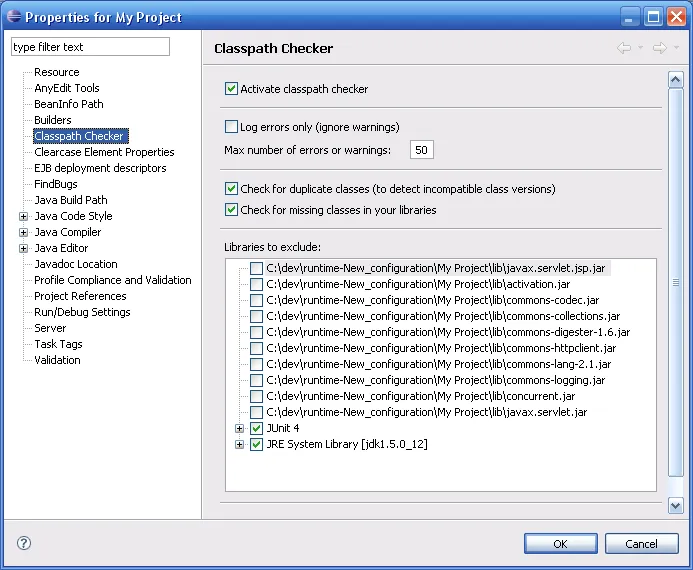
Then after a full build, you can provoke it, by clicking on "Project/clean..." in the eclipse menu, you get errors or warnings on your project.
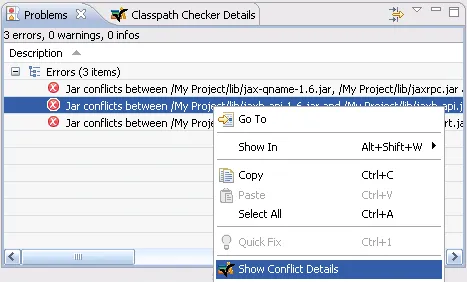
For each problem you can right click and select "Show Conflict Details". This action opens the view "Classpath Checker Details" that display more information on the problem.
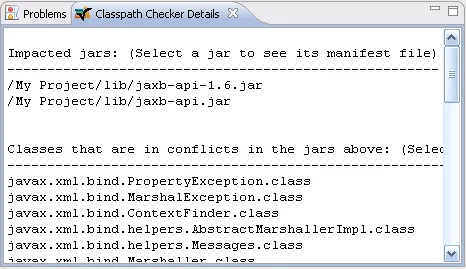
In order to help you to find what is the problem, you can click on an impacted jar that will open its associated Manifest file. That is usefull to check the jar versions. To have a better understanding of what is the problem, you can click on a class that will open the description view of the selected class.
| 1.4.3 | Support of Eclipse Ganymede (The "Show Conflict Details" popup menu was not availaible) |
| 1.4.2 | Bugs fix |
| 1.4.1 | Bugs fix |
| 1.4.0 | New Feature: "Libraries to exclude" groups the libraries by category New Feature: The build is now optimized and runs only when there is a change in the classpath New property: To search only for duplicate classes New property: To search only for missing classes Bugs fix |
| 1.3.0 | Property change: "class exclusion pattern" replaced by "libraries to exclude" Bugs fix |
| 1.2.0 | New Feature: Detect missing classes in the classpath New Property: To limit the number of error or warning New Property: To ignore warnings Bugs fix Installation steps if you have the version 1.1.0: To upgrade you must first uninstall the previous version. In eclipse: Help/Software Updates/Manage Configuration Right-Click on "Classpath Checker Feature 1.1.0" and select Uninstall. After the uninstall, re-start eclipse. Then perform the operation described |
| 1.1.0 | Improve performance Bugs fix |
| 1.0.0 | Initial Version Detect multiple class versions in the classpath |
Please send an email to classpathchecker@free.fr for your comments, suggestions and/or bug.
Visit the author's web site: http://pascalemily.free.fr