As part of my work in OpenDaylight, we are looking at creating a router using Open vSwitch... Why? Well OpenStack requires some limited L3 capabilities and we think that we can handle those in a distributed router.
Test Topology
My test topology looks like this:
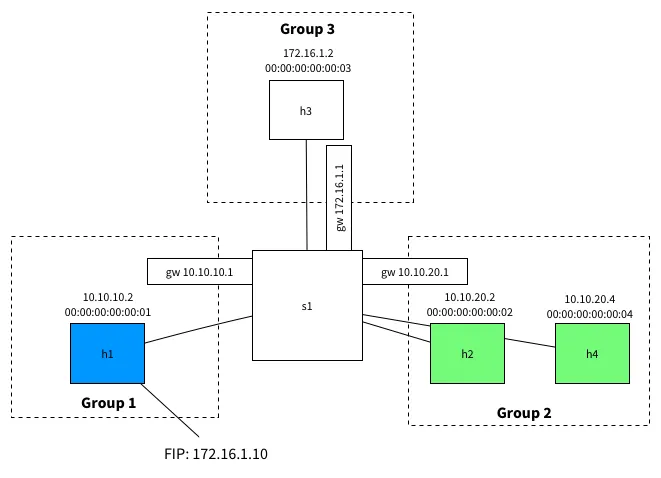
We have a host in an external network 172.16.1.0/24, one host in an internal network 10.10.10.0/24 and two hosts in another internal network 10.10.20.0/24.
As such, The hosts in the 10.x.x.x range should be able to speak to each other, but should not be able to speak to external hosts.
The host 10.10.10.2 has a floating IP of 172.16.1.10 and should be reachable on this address from the external 172.16.1.0/24network. To do this, we'll use DNAT for traffic from 172.16.1.2 -> 172.16.1.10 and SNAT for traffic back from10.10.10.2 -> 172.16.1.2
If you'd like to recreate this topology you can checkout the OpenDaylight OVSDB project source on GitHub and:
vagrant up mininet
vagrant ssh mininet
cd /vagrant/resources/mininet
sudo mn --custom topo.py --topo l3
The Pipeline
Our router is implemented using the following pipeline:
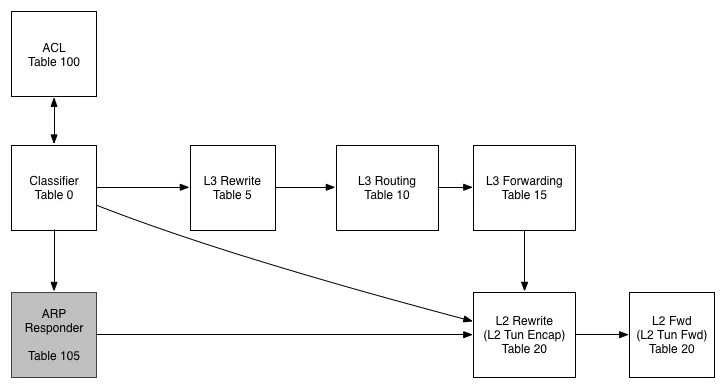
Table 0 - Classifier
In this table we work out what traffic is interesting for us before pushing it further along the pipeline
Table 100 - ACL
While we don't use this table today, the idea would be to filter traffic in this table (or series of tables) and to then resubmit to the classifier once we have scrubbed them.
Table 105 - ARP Responder
In this table we use some OVS-Jitsu to take an incoming ARP Request and turn it in to an ARP reply
Table 5 - L3 Rewrite
In this table, we make any L3 modifications we need to before a packet is routed
Table 10 - L3 Routing
The L3 routing table is where the routing magic happens. Here we modify the Source MAC address, Decrement the TTL and push to the L2 tables for forwarding
Table 15 - L3 Forwarding
In the L3 forwarding table we resolve a destination IP address to the correct MAC address for L2 forwarding.
Table 20 - L2 Rewrites
While we aren't using this table in this example, typically we would push/pop any L2 encapsulations here like a VLAN tag or a VXLAN/GRE Tunnel ID.
Table 25 - L2 Forwarding
In this table we do our L2 lookup and forward out the correct port. We also handle L2 BUM traffic here using OpenFlow Groups - no VLANs!
The Flows
To program the flows, paste the following in to mininet:

## Set Bridge to use OpenFlow 1.3
sh ovs-vsctl set Bridge s1 "protocols=OpenFlow13"

## Create Groups
sh ovs-ofctl add-group -OOpenFlow13 s1 group_id=1,type=all,bucket=output:1
sh ovs-ofctl add-group -OOpenFlow13 s1 group_id=2,type=all,bucket=output:2,4
sh ovs-ofctl add-group -OOpenFlow13 s1 group_id=3,type=all,bucket=output:3

## Table 0 - Classifier
# Send ARP to ARP Responder
sh ovs-ofctl add-flow -OOpenFlow13 s1 "table=0, priority=1000, dl_type=0x0806, actions=goto_table=105"
# Send L3 traffic to L3 Rewrite Table
sh ovs-ofctl add-flow -OOpenFlow13 s1 "table=0, priority=100, dl_dst=00:00:5E:00:02:01, action=goto_table=5"
sh ovs-ofctl add-flow -OOpenFlow13 s1 "table=0, priority=100, dl_dst=00:00:5E:00:02:02, action=goto_table=5"
sh ovs-ofctl add-flow -OOpenFlow13 s1 "table=0, priority=100, dl_dst=00:00:5E:00:02:03, action=goto_table=5"
# Send L3 to L2 Rewrite Table
sh ovs-ofctl add-flow -OOpenFlow13 s1 "table=0, priority=0, action=goto_table=20"

## Table 5 - L3 Rewrites
# Exclude connected subnets
sh ovs-ofctl add-flow -OOpenFlow13 s1 "table=5, priority=65535, dl_type=0x0800, nw_dst=10.10.10.0/24 actions=goto_table=10"
sh ovs-ofctl add-flow -OOpenFlow13 s1 "table=5, priority=65535, dl_type=0x0800, nw_dst=10.10.20.0/24 actions=goto_table=10"
# DNAT
sh ovs-ofctl add-flow -OOpenFlow13 s1 "table=5, priority=100, dl_type=0x0800,  nw_dst=172.16.1.10 actions=mod_nw_dst=10.10.10.2, goto_table=10"
# SNAT
sh ovs-ofctl add-flow -OOpenFlow13 s1 "table=5, priority=100, dl_type=0x0800,  nw_src=10.10.10.2, actions=mod_nw_src=172.16.1.10,  goto_table=10"
# If no rewrite needed, continue to table 10
sh ovs-ofctl add-flow -OOpenFlow13 s1 "table=5, priority=0, actions=goto_table=10"

## Table 10 - IPv4 Routing
sh  ovs-ofctl add-flow -OOpenFlow13 s1 "table=10, dl_type=0x0800, nw_dst=10.10.10.0/24, actions=mod_dl_src=00:00:5E:00:02:01, dec_ttl, goto_table=15"
sh  ovs-ofctl add-flow -OOpenFlow13 s1 "table=10, dl_type=0x0800, nw_dst=10.10.20.0/24, actions=mod_dl_src=00:00:5E:00:02:02, dec_ttl, goto_table=15"
sh  ovs-ofctl add-flow -OOpenFlow13 s1 "table=10, dl_type=0x0800, nw_dst=172.16.1.0/24, actions=mod_dl_src=00:00:5E:00:02:03, dec_ttl, goto_table=15"
# Explicit drop if cannot route
sh  ovs-ofctl add-flow -OOpenFlow13 s1 "table=10, priority=0, actions=output:0"

## Table 15 - L3 Forwarding
sh ovs-ofctl add-flow -OOpenFlow13 s1 "table=15, dl_type=0x0800, nw_dst=10.10.10.2, actions=mod_dl_dst:00:00:00:00:00:01, goto_table=20"
sh ovs-ofctl add-flow -OOpenFlow13 s1 "table=15, dl_type=0x0800, nw_dst=10.10.20.2, actions=mod_dl_dst:00:00:00:00:00:02, goto_table=20"
sh ovs-ofctl add-flow -OOpenFlow13 s1 "table=15, dl_type=0x0800, nw_dst=10.10.20.4, actions=mod_dl_dst:00:00:00:00:00:04, goto_table=20"
sh ovs-ofctl add-flow -OOpenFlow13 s1 "table=15, dl_type=0x0800, nw_dst=172.16.1.2, actions=mod_dl_dst:00:00:00:00:00:03, goto_table=20"
sh ovs-ofctl add-flow -OOpenFlow13 s1 "table=15, priority=0, actions=goto_table=20"

## Table 20 - L2 Rewrite
# Go to next table
sh  ovs-ofctl add-flow -OOpenFlow13 s1 "table=20, priority=0, actions=goto_table=25"

## Table 25 - L2 Forwarding
# Use groups for BUM traffic
sh ovs-ofctl add-flow -OOpenFlow13 s1 "table=25, in_port=1, dl_dst=01:00:00:00:00:00/01:00:00:00:00:00, actions=group=1"
sh ovs-ofctl add-flow -OOpenFlow13 s1 "table=25, in_port=2, dl_dst=01:00:00:00:00:00/01:00:00:00:00:00, actions=group=2"
sh ovs-ofctl add-flow -OOpenFlow13 s1 "table=25, in_port=3, dl_dst=01:00:00:00:00:00/01:00:00:00:00:00, actions=group=3"
sh ovs-ofctl add-flow -OOpenFlow13 s1 "table=25, in_port=4, dl_dst=01:00:00:00:00:00/01:00:00:00:00:00, actions=group=2"
sh ovs-ofctl add-flow -OOpenFlow13 s1 "table=25, dl_dst=00:00:00:00:00:01,actions=output=1"
sh ovs-ofctl add-flow -OOpenFlow13 s1 "table=25, dl_dst=00:00:00:00:00:02,actions=output=2"
sh ovs-ofctl add-flow -OOpenFlow13 s1 "table=25, dl_dst=00:00:00:00:00:03,actions=output=3"
sh ovs-ofctl add-flow -OOpenFlow13 s1 "table=25, dl_dst=00:00:00:00:00:04,actions=output=4"

## Table 105 - ARP Responder
# Respond to ARP for Router Addresses
sh ovs-ofctl add-flow -OOpenFlow13 s1 "table=105, dl_type=0x0806, nw_dst=10.10.10.1, actions=move:NXM_OF_ETH_SRC[]->NXM_OF_ETH_DST[], mod_dl_src:00:00:5E:00:02:01, load:0x2->NXM_OF_ARP_OP[], move:NXM_NX_ARP_SHA[]->NXM_NX_ARP_THA[], move:NXM_OF_ARP_SPA[]->NXM_OF_ARP_TPA[], load:0x00005e000201->NXM_NX_ARP_SHA[], load:0x0a0a0a01->NXM_OF_ARP_SPA[], in_port"
sh ovs-ofctl add-flow -OOpenFlow13 s1 "table=105,  dl_type=0x0806, nw_dst=10.10.20.1, actions=move:NXM_OF_ETH_SRC[]->NXM_OF_ETH_DST[],  mod_dl_src:00:00:5E:00:02:02, load:0x2->NXM_OF_ARP_OP[], move:NXM_NX_ARP_SHA[]->NXM_NX_ARP_THA[], move:NXM_OF_ARP_SPA[]->NXM_OF_ARP_TPA[], load:0x00005e000202->NXM_NX_ARP_SHA[], load:0xa0a1401->NXM_OF_ARP_SPA[], in_port"
sh ovs-ofctl add-flow -OOpenFlow13 s1 "table=105,  dl_type=0x0806, nw_dst=172.16.1.1, actions=move:NXM_OF_ETH_SRC[]->NXM_OF_ETH_DST[],  mod_dl_src:00:00:5E:00:02:03, load:0x2->NXM_OF_ARP_OP[], move:NXM_NX_ARP_SHA[]->NXM_NX_ARP_THA[], move:NXM_OF_ARP_SPA[]->NXM_OF_ARP_TPA[], load:0x00005e000203->NXM_NX_ARP_SHA[], load:0xac100101->NXM_OF_ARP_SPA[], in_port"
# Proxy ARP for all floating IPs go below
sh ovs-ofctl add-flow -OOpenFlow13 s1 "table=105, dl_type=0x0806, nw_dst=172.16.1.10, actions=move:NXM_OF_ETH_SRC[]->NXM_OF_ETH_DST[], mod_dl_src:00:00:5E:00:02:03, load:0x2->NXM_OF_ARP_OP[], move:NXM_NX_ARP_SHA[]->NXM_NX_ARP_THA[], move:NXM_OF_ARP_SPA[]->NXM_OF_ARP_TPA[], load:0x00005e000203->NXM_NX_ARP_SHA[], load:0xac10010a->NXM_OF_ARP_SPA[], in_port"
# if we made it here, the arp packet is to be handled as any other regular L2 packet
sh ovs-ofctl add-flow -OOpenFlow13 s1 "table=105, priority=0, action=resubmit(,20)"
If you'd like to paste these in without comments, you can use this Gist
Testing
We can run a pingall to test this out:
mininet> pingall
*** Ping: testing ping reachability
h1 -> h2 h3 h4
h2 -> h1 X h4
h3 -> X X X
h4 -> h1 h2 X
*** Results: 41% dropped (7/12 received)
hosts 1,2 and 4 can speak to each other. Everything initiated by h3 is dropped (as expected) but h1 can speak to h3 (thanks to NAT). We can test our DNAT and Proxy ARP for Floating IP's using this command:
mininet> h3 ping 172.16.1.10
PING 172.16.1.10 (172.16.1.10) 56(84) bytes of data.
64 bytes from 172.16.1.10: icmp_seq=1 ttl=63 time=1.30 ms
64 bytes from 172.16.1.10: icmp_seq=2 ttl=63 time=0.043 ms
64 bytes from 172.16.1.10: icmp_seq=3 ttl=63 time=0.045 ms
64 bytes from 172.16.1.10: icmp_seq=4 ttl=63 time=0.050 ms
^C
--- 172.16.1.10 ping statistics ---
4 packets transmitted, 4 received, 0% packet loss, time 2999ms
rtt min/avg/max/mdev = 0.043/0.360/1.305/0.545 ms
Cool! It works!
Conclusion
So far we've implemented the nuts and bolts of routing, but we are missing one crucial piece - ICMP handling. Without this useful things like Path MTU Discovery won't work and neither will diagnostics tools like Ping and Traceroute. I think we can do this using a Open vSwitch but first we'll need to add some new NXM fields to ICMP Data and ICMP Checksum and to also make the existing OXM's writable through set_field. I'm going to start talking to the OVS community about this to see if it's possible so watch this space!
@dave_tucker
Helpful Links and Further Reading
ovs-ofctl Man Page Neutron ARP Responder Write Up Address Resolution Protocol OpenFlow 1.3.1 Spec
本文转自feisky博客园博客,原文链接:http://www.cnblogs.com/feisky/p/4040667.html,如需转载请自行联系原作者