
一个分数的版面问题,仪表盘来接
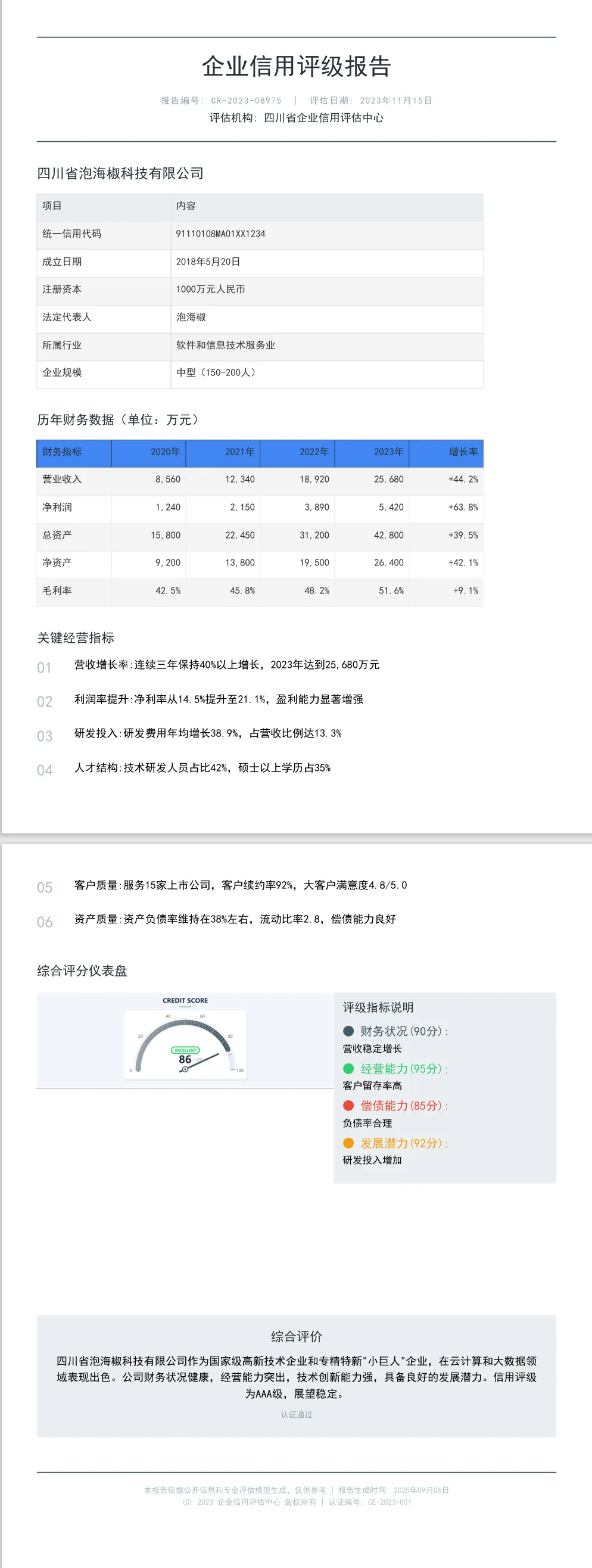
评级报告的文字部分其实已经把结论写全了——"信用评级为AAA级,展望稳定"。但评审翻页时第一眼要的不是一句话,是那个数。仪表盘把单个分数画成指针加刻度弧,86 分落在弧线哪个位置、离满分多远,扫一眼就有结论。jquick-pdf 的 Guage 渲染成 SVG 灌进 ${svg} 占位符,本篇素材是官方 Demo JQuickCreditReport09GuageTest,输出 D:\test\creditreport\09_guage.pdf。排版上它还有个红利:仪表盘是方形图,400×400 的占位在分栏里不挑邻居,相邻区块的高度变化对它的布局影响最小,版式改动时的连带成本比长条图表低。
整页灰蓝工业风:上下两条分隔线夹住 24 号大标题的抬头,信息表和财务表都是线框风格,指标区用大号灰序号领航,图表区仪表盘在左、说明面板在右。(效果预览图 alt:jquick-pdf 仪表盘信用评级报告 PDF,灰蓝主题,指针式信用评分仪表盘居左,评级指标说明面板居右)
官网示例:
- FORMULAS 示例页:https://www.jquick.org/jquick-pdf/demo/09_guage/
- github 地址:https://github.com/paohaijiao/jquick-pdf
真实渲染效果预览
以下为上述代码 + 模板真实运行生成的 PDF 首屏预览(由 jquick-pdf 渲染输出,非示意图):
从模板第一行开始拆
credit_report_09_guage.txt 全文 168 行,七个区块。
夹心抬头:两条分隔线包住标题
<div style="textAlignment:center; marginBottom:22px">
  <lineSeparator style="strokeColor:#455A64"></lineSeparator>
  <h1 style="fontSize:24; color:#263238; textAlignment:center; bold:true; marginTop:12px; marginBottom:8px">'企业信用评级报告'</h1>
  <p style="fontSize:9; color:#90a4ae; characterSpacing:1; textAlignment:center; marginBottom:4px">'报告编号: CR-2023-08975  |  评估日期: 2023年11月15日'</p>
  <p style="fontSize:11; color:#263238; textAlignment:center; marginBottom:12px">'评估机构: 四川省企业信用评估中心'</p>
  <lineSeparator style="strokeColor:#455A64"></lineSeparator>
</div>
抬头这次没有色带,改成两条 strokeColor:#455A64 分隔线上下夹住标题——仪式感靠留白和线,不靠色块。fontSize:24 是这套模板的最大主标题,配合 marginTop:12px 把标题从上线下压出呼吸距离。顺带记一个全局节奏值:七个区块的间距统一 marginBottom:22px,整页松紧由这一个数定调,想整体收紧或放宽就全局替换它,逐区改不同值节奏就散了。
characterSpacing:1 是个新面孔:报告编号那行 9 号灰字加了 1 像素字距。数字与竖线混排的元信息行加了字距后明显松快,挤在一起的小字最怕这个。删掉它这行立刻变密,长编号行在窄版心会显挤——元信息行的可选优化,正文别用,正文加字距影响阅读速度。
信息表:项目内容两列
<tr>
  <th style="backgroundColor:#eceff1; color:#263238; bold:true; padding:7px; textAlignment:left; width:180px">'项目'</th>
  <th style="backgroundColor:#eceff1; color:#263238; bold:true; padding:7px; textAlignment:left; width:420px">'内容'</th>
</tr>
<tr>
  <td style="padding:7px; textAlignment:left; bold:true">'统一信用代码'</td>
  <td style="padding:7px; textAlignment:left">'91110108MA01XX1234'</td>
</tr>
信息表走两列结构但加了真正的表头行——"项目/内容"两个 th 垫 #eceff1 浅灰,180px 加 420px 正好 600。左列 td 全部 bold:true,标签加粗、值不加粗,粗细差代替色差做层级。padding:7px 比常见模板的 6px 略松,行高多出的呼吸感在纯线框风格里是必要的——没有底色隔行,间距就是唯一的分隔手段。首行 th 写的是"项目/内容"这种泛化表头,不是具体字段名:字段名已经当 td 加粗放在左列了,th 只负责声明表格结构。这个写法字段固定时没毛病,字段动态生成时要注意 th 行和 td 行是两个循环拼接,别把字段名漏进 th。
财务表:transparent 表头的线框风
<th style="backgroundColor:transparent; color:#263238; bold:true; padding:7px; textAlignment:left; borderBottom:1px solid #263238">'财务指标'</th>
<td style="padding:7px; textAlignment:right; borderBottom:1px solid #eceff1">'8,560'</td>
和实底表头完全两条路:th 的 backgroundColor:transparent 明确声明透明,靠 borderBottom:1px solid #263238 一条深色粗线压住表头;数据行用 #eceff1 浅灰细线,没有斑马纹。整张表只剩"一条深线加多条浅线"的层次,浅灰纸面上打印复印都不糊——线框风天然亲和黑白输出,这是它对比实底表的实际优势。
留意增长率列这次没有上色加粗,和数值列同样式。这份模板的配色克制到增长率也只用线分层——如果业务上增长率是必读项,把 color:#263238 换成主题深色加 bold:true 即可,一行的事。
指标区:大号灰序号领航
<div style="display:flex; marginBottom:14px">
  <div style="width:50px; fontSize:16; bold:true; color:#b0bec5">'01'</div>
  <div style="width:540px; fontSize:11">'营收增长率:连续三年保持40%以上增长,2023年达到25,680万元'</div>
</div>
六条指标用 01 到 06 的文字序号领航:16 号粗体 #b0bec5 大灰字占 50px,正文 540px。序号压得比正文大、颜色又退到最浅,视觉上"在场但不抢戏",从上往下扫一遍,评审能立刻感到清单的量感。50px 改窄序号会挤压,改宽正文行宽缩水,590 的总账是配好的。这里序号是写死的文字不是自动编号,插入新条目要手动顺延——条目会动态增减的场景,这一列得由数据侧生成。
图表区:仪表盘在左,面板在右
<div style="display:flex; justifyContent:space-between">
  <svg style="width:400px;height:400px">${svg}</svg>
  <div style="width:300px; padding:12px; backgroundColor:#eceff1; borderRadius:2px">
    <h3 style="fontSize:12; color:#263238; bold:true; marginBottom:8px">'评级指标说明'</h3>
    <div style="fontSize:10; marginBottom:6px">
      <span style="color:#455A64; bold:true">'● 财务状况(90分): '</span>
      '营收稳定增长'
    </div>
    <!-- 经营能力 / 偿债能力 / 发展潜力,三条同构 -->
  </div>
</div>
仪表盘 svg 写死 400×400,Java 侧的 Guage 没有显式宽高配置,这个框就是最终渲染尺寸。borderRadius:2px 的说明面板浅灰底,四个维度分压着四个色点。图左文右的动线是"先结论后依据":评审先看到分数落在哪一档,再往右找构成解释,比图文上下堆叠省一次视线跳转。有个数据一致性的坑值得写进评审清单:仪表盘的 86 分来自 GuageConfig.score(86),面板里四个维度分 90/95/85/92 是模板里写死的文字,综合评价段落里也只字未提 86——三处数字在真实业务里必须同源,模板只负责渲染,对账是数据层的事,别让评审发现仪表盘的数和文字对不上。
Java 侧的仪表盘配置就一段:
GuageConfig scoreConfig = GuageConfig.builder()
        .score(86)
        .pointerColor(new Color(69, 90, 100))
        .backgroundColor(new Color(240, 242, 245))
        .title("CREDIT SCORE")
        .build();
JGuageOption guageOption = JGuageOption.builder().scoreMeter(scoreConfig).build();
JOption option = new JOption();
option.setGuageOption(guageOption);

String svg = JChartRendererFactory.renderChart(JChartType.Guage, option);
score(86) 定指针位置;pointerColor 用 #455A64 深灰蓝和主题同源,指针色如果改大红大绿,风格立刻散掉;backgroundColor(240,242,245) 是表盘底的浅灰,和模板 #eceff1 一个色系但不同值——表盘底和面板底故意差半档,图和文有分界又不突兀。title("CREDIT SCORE") 是英文,全中文报告里仪表盘内嵌一行英文标识是这套模板的取舍,业务要求全中文就换成"信用评分",注意表盘内空间有限,四个字以内稳妥。整条链是 builder 链式构造,五条配置一行到底,比逐个 setter 罗列好读,后续加配置直接往链上接。还有一行别忽略:测试方法上标了 @SuppressWarnings("deprecation"),说明这条构造链有已标记过时的 API,升级 jquick-pdfx 版本时先跑编译看告警,别等运行期才碰。
浅灰结论块与页脚
<div style="marginBottom:22px; backgroundColor:#eceff1; borderRadius:2px; padding:20px; textAlignment:center">
  <h2 style="fontSize:13; color:#263238; bold:true; textAlignment:center; marginBottom:8px">'综合评价'</h2>
结论区不用深色底,#eceff1 浅灰加 2px 小圆角,文字全部居中——深色块是"宣示",浅灰块是"存档",两份模板的收尾取向不同。padding:20px 是全篇最松的内边距,结论文字在灰底里留足四周。页脚 8 号 #b0bec5 浅灰字,比正文页脚再降一档,版权信息的存在感压到最低。整页配色值得单独记一笔:从头到尾没有出现纯黑,最深的字色是 #263238,中间隔着 #455A64、#90a4ae,最浅落到 #b0bec5——全篇灰阶全部落在蓝灰区间,所谓"工业风"不是某个组件的功劳,是这条字色阶梯整体营造出来的。要换主题时这条阶梯得整体平移,只换一档,灰阶会断层。
复现清单
1. 新建 Maven 工程引入附录坐标(jquick-pdfx 4.7.0+);
2. 模板文件放到 src/test/resources/report/credit_report_09_guage.txt;
3. 拷贝附录 Java 类,确认 JQuickConstant.path 指向本地输出目录;
4. 运行 report09Guage(),打开输出的 09_guage.pdf;
5. 对照检查:仪表盘指针落位、表盘底色与说明面板底色的深浅关系、夹心抬头的两条分隔线是否齐整;
6. 图表空白时先查两处:setFlexLayout(true) 是否已开、bind 的键与 ${svg} 是否一致。
动手改三行验证
1. 把 score(86) 改成 62 重跑,观察指针落点变化——再对照说明面板四个维度分,
   体会综合分与分项分"两套数字"如果不同源,评审会不会追问;
2. 把序号列 width:50px 改成 90px 重跑,观察 540px 正文被压窄后
   长指标行折行、六条清单高度参差的现象;
3. 把 characterSpacing:1 整段删掉重跑,对比报告编号行变密后的拥挤程度。
仪表盘在评级报告里的适用边界
仪表盘只服务"单一核心 KPI":综合评分、负债率红线、流动比率。一份报告放一个仪表盘是点睛,放三个以上就散了——多指标该回表格或分项面板。它对灰度打印友好:指针是深色、刻度是浅灰线,黑白输出后指针位置依然清晰,这点比多色系图表强。表盘弧线的分区颜色由组件内部决定,模板侧控制不了,对分区色有硬要求的场景先渲染一次看效果再定版式。模板骨架——夹心抬头、两列信息表、线框财务表、序号指标栏、左图右面板、浅灰结论——换掉 #263238/#455A64/#eceff1 三个主色就能整体换装。
完整源码附录
依赖版本 4.7.0+。本项目基于 Apache-2.0 协议开源,使用时请保留源码文件头部原有的 License 与版权声明。
Maven 依赖
<dependency>
    <groupId>io.github.paohaijiao</groupId>
    <artifactId>jquick-pdfx</artifactId>
    <version>4.7.0</version>
    <scope>test</scope>
</dependency>
Gradle 依赖
testImplementation 'io.github.paohaijiao:jquick-pdfx:4.7.0'
Java 测试类(JQuickCreditReport09GuageTest.java)
/*
 * Licensed under the Apache License, Version 2.0 (the "License");
 * you may not use this file except in compliance with the License.
 * You may obtain a copy of the License at
 *
 *     http://www.apache.org/licenses/LICENSE-2.0
 *
 * Unless required by applicable law or agreed to in writing, software
 * distributed under the License is distributed on an "AS IS" BASIS,
 * WITHOUT WARRANTIES OR CONDITIONS OF ANY KIND, either express or implied.
 * See the License for the specific language governing permissions and
 * limitations under the License.
 *
 * Copyright (c) [2025-2099] Martin (goudingcheng@gmail.com)
 */
package com.github.paohaijiao.biz.report;

import com.github.paohaijiao.JOption;
import com.github.paohaijiao.config.JPdfConfig;
import com.github.paohaijiao.demo.constant.JQuickConstant;
import com.github.paohaijiao.enums.JChartType;
import com.github.paohaijiao.executor.JQuickPdfFactory;
import com.github.paohaijiao.factory.JChartRendererFactory;
import com.github.paohaijiao.guage.GuageConfig;
import com.github.paohaijiao.guage.JGuageOption;
import org.junit.Test;

import java.awt.Color;
import java.io.File;
import java.io.FileOutputStream;
import java.io.IOException;

/**
 * 统一信用报告 —— 风格 09:仪表盘(石墨灰)
 *
 * <p>以 {@code report/credit_report_09_guage.txt} 为模板,把仪表盘渲染成 SVG 后
 * 绑定到模板中的 {@code ${svg}} 占位符,输出到 {@code D:\test\creditreport\09_guage.pdf}。</p>
 *
 * @author Martin
 * @version 1.0.0
 */
public class JQuickCreditReport09GuageTest {


    public static final String path = JQuickConstant.path;

    @Test
    @SuppressWarnings("deprecation")
    public void report09Guage() throws IOException {

        GuageConfig scoreConfig = GuageConfig.builder()
                .score(86)
                .pointerColor(new Color(69, 90, 100))
                .backgroundColor(new Color(240, 242, 245))
                .title("CREDIT SCORE")
                .build();
        JGuageOption guageOption = JGuageOption.builder().scoreMeter(scoreConfig).build();
        JOption option = new JOption();
        option.setGuageOption(guageOption);

        String svg = JChartRendererFactory.renderChart(JChartType.Guage, option);

        File dir = new File(path + "creditreport");
        if (!dir.exists()) {

            dir.mkdirs();
        }
        FileOutputStream fileOutputStream = new FileOutputStream(path + "creditreport/09_guage.pdf");
        JPdfConfig config = new JPdfConfig();
        // 开启 flex 行布局:图表与其右侧的指标说明面板在宽度允许时并排,而不是换行堆叠。
        config.getLayoutConfig().setFlexLayout(true);
        JQuickPdfFactory factory = new JQuickPdfFactory(config);
        factory.bind("svg", svg);
        byte[] bytes = factory.executeResource("report/credit_report_09_guage.txt");
        fileOutputStream.write(bytes);
        fileOutputStream.close();
    }
}
模板文件(report/credit_report_09_guage.txt)
<pdf>
<body>
  <div style="textAlignment:center; marginBottom:22px">
    <lineSeparator style="strokeColor:#455A64"></lineSeparator>
    <h1 style="fontSize:24; color:#263238; textAlignment:center; bold:true; marginTop:12px; marginBottom:8px">'企业信用评级报告'</h1>
    <p style="fontSize:9; color:#90a4ae; characterSpacing:1; textAlignment:center; marginBottom:4px">'报告编号: CR-2023-08975  |  评估日期: 2023年11月15日'</p>
    <p style="fontSize:11; color:#263238; textAlignment:center; marginBottom:12px">'评估机构: 四川省企业信用评估中心'</p>
    <lineSeparator style="strokeColor:#455A64"></lineSeparator>
  </div>

  <div style="marginBottom:22px">
    <h2 style="fontSize:14; color:#263238; bold:true; marginBottom:10px">'四川省泡海椒科技有限公司'</h2>
    <table style="width:600px; fontSize:10">
      <tr>
        <th style="backgroundColor:#eceff1; color:#263238; bold:true; padding:7px; textAlignment:left; width:180px">'项目'</th>
        <th style="backgroundColor:#eceff1; color:#263238; bold:true; padding:7px; textAlignment:left; width:420px">'内容'</th>
      </tr>
      <tr>
        <td style="padding:7px; textAlignment:left; bold:true">'统一信用代码'</td>
        <td style="padding:7px; textAlignment:left">'91110108MA01XX1234'</td>
      </tr>
      <tr>
        <td style="padding:7px; textAlignment:left; bold:true">'成立日期'</td>
        <td style="padding:7px; textAlignment:left">'2018年5月20日'</td>
      </tr>
      <tr>
        <td style="padding:7px; textAlignment:left; bold:true">'注册资本'</td>
        <td style="padding:7px; textAlignment:left">'1000万元人民币'</td>
      </tr>
      <tr>
        <td style="padding:7px; textAlignment:left; bold:true">'法定代表人'</td>
        <td style="padding:7px; textAlignment:left">'泡海椒'</td>
      </tr>
      <tr>
        <td style="padding:7px; textAlignment:left; bold:true">'所属行业'</td>
        <td style="padding:7px; textAlignment:left">'软件和信息技术服务业'</td>
      </tr>
      <tr>
        <td style="padding:7px; textAlignment:left; bold:true">'企业规模'</td>
        <td style="padding:7px; textAlignment:left">'中型(150-200人)'</td>
      </tr>
    </table>
  </div>

  <div style="marginBottom:22px">
    <h2 style="fontSize:13; color:#263238; bold:true; marginBottom:10px">'历年财务数据(单位:万元)'</h2>
    <table style="width:600px; fontSize:10">
      <tr>
        <th style="backgroundColor:transparent; color:#263238; bold:true; padding:7px; textAlignment:left; borderBottom:1px solid #263238">'财务指标'</th>
        <th style="backgroundColor:transparent; color:#263238; bold:true; padding:7px; textAlignment:right; borderBottom:1px solid #263238">'2020年'</th>
        <th style="backgroundColor:transparent; color:#263238; bold:true; padding:7px; textAlignment:right; borderBottom:1px solid #263238">'2021年'</th>
        <th style="backgroundColor:transparent; color:#263238; bold:true; padding:7px; textAlignment:right; borderBottom:1px solid #263238">'2022年'</th>
        <th style="backgroundColor:transparent; color:#263238; bold:true; padding:7px; textAlignment:right; borderBottom:1px solid #263238">'2023年'</th>
        <th style="backgroundColor:transparent; color:#263238; bold:true; padding:7px; textAlignment:right; borderBottom:1px solid #263238">'增长率'</th>
      </tr>
      <tr>
        <td style="padding:7px; textAlignment:left; borderBottom:1px solid #eceff1">'营业收入'</td>
        <td style="padding:7px; textAlignment:right; borderBottom:1px solid #eceff1">'8,560'</td>
        <td style="padding:7px; textAlignment:right; borderBottom:1px solid #eceff1">'12,340'</td>
        <td style="padding:7px; textAlignment:right; borderBottom:1px solid #eceff1">'18,920'</td>
        <td style="padding:7px; textAlignment:right; borderBottom:1px solid #eceff1">'25,680'</td>
        <td style="padding:7px; textAlignment:right; borderBottom:1px solid #eceff1">'+44.2%'</td>
      </tr>
      <tr>
        <td style="padding:7px; textAlignment:left; borderBottom:1px solid #eceff1">'净利润'</td>
        <td style="padding:7px; textAlignment:right; borderBottom:1px solid #eceff1">'1,240'</td>
        <td style="padding:7px; textAlignment:right; borderBottom:1px solid #eceff1">'2,150'</td>
        <td style="padding:7px; textAlignment:right; borderBottom:1px solid #eceff1">'3,890'</td>
        <td style="padding:7px; textAlignment:right; borderBottom:1px solid #eceff1">'5,420'</td>
        <td style="padding:7px; textAlignment:right; borderBottom:1px solid #eceff1">'+63.8%'</td>
      </tr>
      <tr>
        <td style="padding:7px; textAlignment:left; borderBottom:1px solid #eceff1">'总资产'</td>
        <td style="padding:7px; textAlignment:right; borderBottom:1px solid #eceff1">'15,800'</td>
        <td style="padding:7px; textAlignment:right; borderBottom:1px solid #eceff1">'22,450'</td>
        <td style="padding:7px; textAlignment:right; borderBottom:1px solid #eceff1">'31,200'</td>
        <td style="padding:7px; textAlignment:right; borderBottom:1px solid #eceff1">'42,800'</td>
        <td style="padding:7px; textAlignment:right; borderBottom:1px solid #eceff1">'+39.5%'</td>
      </tr>
      <tr>
        <td style="padding:7px; textAlignment:left; borderBottom:1px solid #eceff1">'净资产'</td>
        <td style="padding:7px; textAlignment:right; borderBottom:1px solid #eceff1">'9,200'</td>
        <td style="padding:7px; textAlignment:right; borderBottom:1px solid #eceff1">'13,800'</td>
        <td style="padding:7px; textAlignment:right; borderBottom:1px solid #eceff1">'19,500'</td>
        <td style="padding:7px; textAlignment:right; borderBottom:1px solid #eceff1">'26,400'</td>
        <td style="padding:7px; textAlignment:right; borderBottom:1px solid #eceff1">'+42.1%'</td>
      </tr>
      <tr>
        <td style="padding:7px; textAlignment:left; borderBottom:1px solid #eceff1">'毛利率'</td>
        <td style="padding:7px; textAlignment:right; borderBottom:1px solid #eceff1">'42.5%'</td>
        <td style="padding:7px; textAlignment:right; borderBottom:1px solid #eceff1">'45.8%'</td>
        <td style="padding:7px; textAlignment:right; borderBottom:1px solid #eceff1">'48.2%'</td>
        <td style="padding:7px; textAlignment:right; borderBottom:1px solid #eceff1">'51.6%'</td>
        <td style="padding:7px; textAlignment:right; borderBottom:1px solid #eceff1">'+9.1%'</td>
      </tr>
    </table>
  </div>

  <div style="marginBottom:22px">
    <h2 style="fontSize:13; color:#263238; bold:true; marginBottom:12px">'关键经营指标'</h2>
    <div style="display:flex; marginBottom:14px">
      <div style="width:50px; fontSize:16; bold:true; color:#b0bec5">'01'</div>
      <div style="width:540px; fontSize:11">'营收增长率:连续三年保持40%以上增长,2023年达到25,680万元'</div>
    </div>
    <div style="display:flex; marginBottom:14px">
      <div style="width:50px; fontSize:16; bold:true; color:#b0bec5">'02'</div>
      <div style="width:540px; fontSize:11">'利润率提升:净利率从14.5%提升至21.1%,盈利能力显著增强'</div>
    </div>
    <div style="display:flex; marginBottom:14px">
      <div style="width:50px; fontSize:16; bold:true; color:#b0bec5">'03'</div>
      <div style="width:540px; fontSize:11">'研发投入:研发费用年均增长38.9%,占营收比例达13.3%'</div>
    </div>
    <div style="display:flex; marginBottom:14px">
      <div style="width:50px; fontSize:16; bold:true; color:#b0bec5">'04'</div>
      <div style="width:540px; fontSize:11">'人才结构:技术研发人员占比42%,硕士以上学历占35%'</div>
    </div>
    <div style="display:flex; marginBottom:14px">
      <div style="width:50px; fontSize:16; bold:true; color:#b0bec5">'05'</div>
      <div style="width:540px; fontSize:11">'客户质量:服务15家上市公司,客户续约率92%,大客户满意度4.8/5.0'</div>
    </div>
    <div style="display:flex; marginBottom:14px">
      <div style="width:50px; fontSize:16; bold:true; color:#b0bec5">'06'</div>
      <div style="width:540px; fontSize:11">'资产质量:资产负债率维持在38%左右,流动比率2.8,偿债能力良好'</div>
    </div>
  </div>

  <div style="marginBottom:22px">
    <h2 style="fontSize:13; color:#263238; bold:true; marginBottom:12px">'综合评分仪表盘'</h2>
    <div style="display:flex; justifyContent:space-between">
      <svg style="width:400px;height:400px">${svg}</svg>
      <div style="width:300px; padding:12px; backgroundColor:#eceff1; borderRadius:2px">
        <h3 style="fontSize:12; color:#263238; bold:true; marginBottom:8px">'评级指标说明'</h3>
        <div style="fontSize:10; marginBottom:6px">
          <span style="color:#455A64; bold:true">'● 财务状况(90分): '</span>
          '营收稳定增长'
        </div>
        <div style="fontSize:10; marginBottom:6px">
          <span style="color:#2ecc71; bold:true">'● 经营能力(95分): '</span>
          '客户留存率高'
        </div>
        <div style="fontSize:10; marginBottom:6px">
          <span style="color:#e74c3c; bold:true">'● 偿债能力(85分): '</span>
          '负债率合理'
        </div>
        <div style="fontSize:10; marginBottom:6px">
          <span style="color:#f39c12; bold:true">'● 发展潜力(92分): '</span>
          '研发投入增加'
        </div>
      </div>
    </div>
  </div>

  <div style="marginBottom:22px; backgroundColor:#eceff1; borderRadius:2px; padding:20px; textAlignment:center">
    <h2 style="fontSize:13; color:#263238; bold:true; textAlignment:center; marginBottom:8px">'综合评价'</h2>
    <p style="fontSize:11; textAlignment:center; marginBottom:8px">
      '四川省泡海椒科技有限公司作为国家级高新技术企业和专精特新"小巨人"企业,在云计算和大数据领域表现出色。'
      '公司财务状况健康,经营能力突出,技术创新能力强,具备良好的发展潜力。信用评级为AAA级,展望稳定。'
    </p>
    <p style="fontSize:8; color:#90a4ae; textAlignment:center">'认证通过'</p>
  </div>

  <div style="textAlignment:center; marginTop:20px">
    <lineSeparator style="strokeColor:#455A64"></lineSeparator>
    <p style="fontSize:8; color:#b0bec5; textAlignment:center; marginTop:8px">'本报告依据公开信息和专业评估模型生成,仅供参考 | 报告生成时间: 2025年09月06日'</p>
    <p style="fontSize:8; color:#b0bec5; textAlignment:center">'© 2023 企业信用评估中心 版权所有 | 认证编号: CE-2023-001'</p>
  </div>
</body>
</pdf>
