漏斗图放进信用报告,解决的是转化效率说不清的问题
官网示例:
- FORMULAS 示例页:https://www.jquick.org/jquick-pdf/demo/08_funnel/
- github 地址:https://github.com/paohaijiao/jquick-pdf
评级报告里最常被追问的不是财务数字,是经营效率——客户从线索到商务洽谈、方案确认、合同签订,每个环节掉多少,文字描述没有画面感。漏斗图把四个环节画成上宽下窄的层级,每层宽度就是该环节的量,收窄速度就是转化效率。jquick-pdf 的漏斗图渲染成 SVG 后灌进模板的 ${svg} 占位符,一个图表区块就交代完这条业务链。本篇素材是官方 Demo JQuickCreditReport08FunnelTest,输出 D:\test\creditreport\08_funnel.pdf。
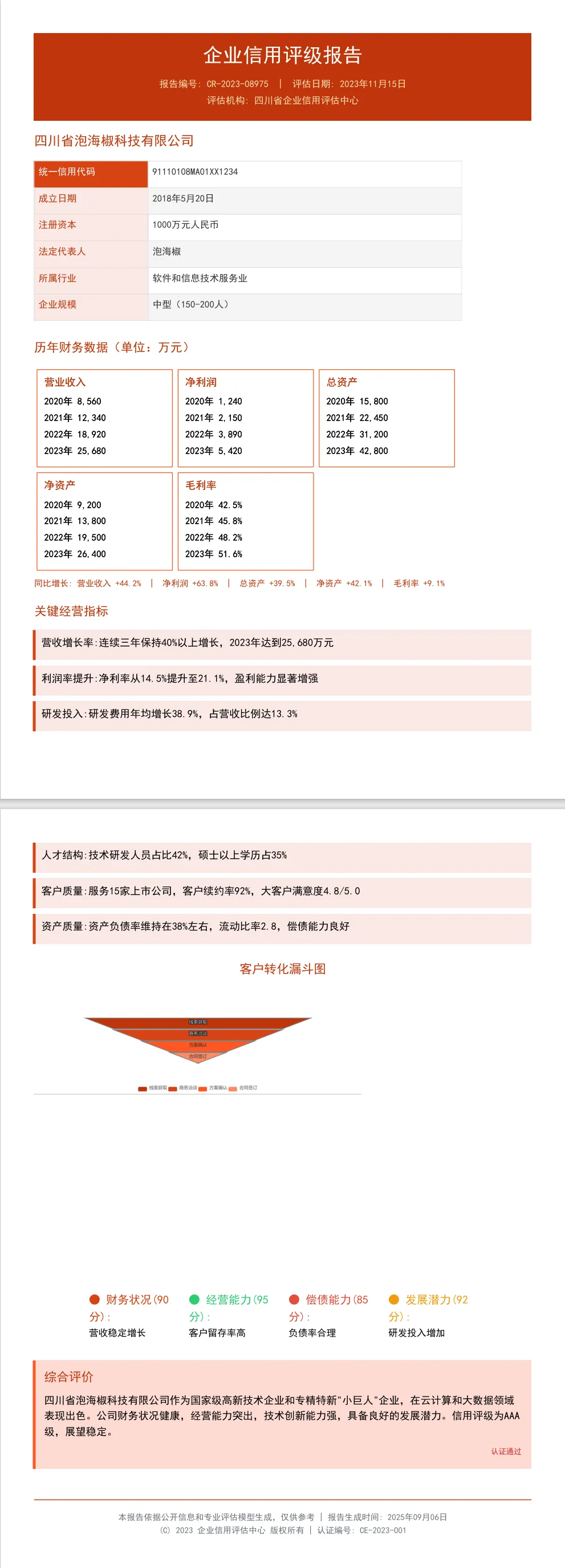
整页深橙主题:顶部一条实底色带横贯版心,白字标题压在上面;企业信息是两列表格;财务数据不走大表,拆成五张小卡一行排开;中部一个居中的四层橙色漏斗;结论区用渐变底收尾。(效果预览图 alt:jquick-pdf 漏斗图信用评级报告 PDF,深橙主题实底抬头,四层客户转化漏斗居中,财务数据卡片横排展示)
真实渲染效果预览
以下为上述代码 + 模板真实运行生成的 PDF 首屏预览(由 jquick-pdf 渲染输出,非示意图):
从模板第一行开始拆
credit_report_08_funnel.txt 全文 143 行,七个区块。老规矩,Java 配置放到对应区块后面当注脚。
实底抬头:一条通栏色带
<div style="backgroundColor:#BF360C; color:white; paddings:16px; marginBottom:18px">
  <h1 style="fontSize:21; color:white; textAlignment:center; bold:true; marginBottom:6px">'企业信用评级报告'</h1>
  <p style="fontSize:10; color:#ffe0b2; textAlignment:center; marginBottom:3px">'报告编号: CR-2023-08975  |  评估日期: 2023年11月15日'</p>
  <p style="fontSize:10; color:#ffe0b2; textAlignment:center">'评估机构: 四川省企业信用评估中心'</p>
</div>
白底抬头看多了,这条实底深橙色带反而在一堆报告里有辨识度。机构信息用 #ffe0b2 浅橙而不是白——深底上的次级信息降一档饱和,主标题保持纯白,层级靠色差拉开。抬头里每个子元素都显式声明了字色,深底容器不声明就是黑字压深底,这条纪律所有深色块通用。主标题 fontSize:21 比常见的 22 号还收了一号,深底上的大号白字有膨胀感,字号往回收一点,色带里的留白才撑得住;两行机构信息之间只留 marginBottom:3px,紧凑排成一组,与标题的 6px 拉开主次。
有一行必须拎出来说:paddings:16px。拼的是 paddings,不是 padding。如果渲染引擎只认 padding,这条内边距就不生效,白字会贴着色带上下边缘。拿到模板先跑一次看抬头边缘——贴边就把拼写改掉,不贴边说明引擎做了容错。三十秒能确认的事,别等排版评审才暴露。
企业信息:两列表格替代卡片
<table style="width:600px; fontSize:10">
  <tr>
    <th style="backgroundColor:#D84315; color:white; bold:true; padding:6px; textAlignment:left; width:160px">'统一信用代码'</th>
    <td style="padding:6px; textAlignment:left; width:440px">'91110108MA01XX1234'</td>
  </tr>
  <tr>
    <th style="backgroundColor:#fbe9e7; color:#BF360C; bold:true; padding:6px; textAlignment:left">'成立日期'</th>
    <td style="padding:6px; textAlignment:left">'2018年5月20日'</td>
  </tr>
  <!-- 注册资本 / 法定代表人 / 所属行业 / 企业规模,四行同构 -->
</table>
六个字段压进一张两列表:首行 th 深橙实底白字兼当表头,后续行 th 垫 #fbe9e7 浅橙当标签列,定宽 160px,右列 440px 放值。相比横排小卡,两列表对字段长度宽容得多——18 位信用代码、带括号的企业规模说明,都能一行放完,不存在卡片宽度不够导致换行参差的问题。字段少而长,这个写法比 flex 卡稳。
财务数据:大表拆成五张小卡
<div style="display:flex; flexWrap:wrap">
  <div style="width:190px; padding:10px; border:1px solid #FF5722; borderRadius:6px; margin:4px">
    <div style="fontSize:11; bold:true; color:#BF360C; marginBottom:6px">'营业收入'</div>
    <div style="fontSize:10; marginBottom:3px">'2020年 8,560'</div>
    <div style="fontSize:10; marginBottom:3px">'2021年 12,340'</div>
    <div style="fontSize:10; marginBottom:3px">'2022年 18,920'</div>
    <div style="fontSize:10">'2023年 25,680'</div>
  </div>
  <!-- 净利润 / 总资产 / 净资产 / 毛利率,四张同构卡片 -->
</div>
<p style="fontSize:9; color:#BF360C; marginTop:8px">'同比增长: 营业收入 +44.2%  |  净利润 +63.8%  |  总资产 +39.5%  |  净资产 +42.1%  |  毛利率 +9.1%'</p>
五张 190px 卡片靠 flexWrap 自动排成两行(190×3 加边距约 600,一行三张)。每张卡竖排四个年份,指标名 11 号粗体深橙压顶。这个布局换的是"按指标阅读":评审盯净利润,就顺着那张卡从上往下扫四个年份。代价是同期横向对比弱了,比 2023 年五个指标要跨卡。卡下那行 9 号深橙的同比汇总算是补偿——五个增长率串成一行,横向的账一行补齐。还有个单位细节:四张卡数值是万元,毛利率那张是百分号,同一排卡片单位混排而指标名又不带单位,快速阅读容易串行,复用模板时建议把单位写进指标名("毛利率(%)"),一个字的事省掉一次误解。
宽度账算一遍:190×3 加 margin 共 578px,卡进 600px 版心留 22px 余量。把 width 改成 200,一行只剩两张,五张卡变三行,区块高度直接多出近一倍。flexWrap 的换行永远由子项宽度决定,动版式先算宽度。
指标横条:整行一色块
<div style="marginBottom:8px; padding:10px; backgroundColor:#fbe9e7; borderLeft:4px solid #D84315; fontSize:11">
  '营收增长率:连续三年保持40%以上增长,2023年达到25,680万元'
</div>
六条指标退回整行横条:浅橙底、4px 深橙左边线、11 号字。整行版式对长文本宽容——"服务15家上市公司,客户续约率92%"这种双短句在 580px 行宽一行放完;塞进半宽卡片就得折行,卡片高度立刻不齐。文本长度不可控时,横条比卡片省心。
漏斗区块:居中 svg 加横排说明
<div style="textAlignment:center">
  <svg style="width:460px;height:400px">${svg}</svg>
</div>
<div style="display:flex; justifyContent:center; marginTop:10px">
  <div style="width:140px; padding:8px; fontSize:10">
    <span style="color:#D84315; bold:true">'● 财务状况(90分): '</span>
    '营收稳定增长'
  </div>
  <!-- 经营能力 / 偿债能力 / 发展潜力,三项同构 -->
</div>
漏斗不配侧面板,textAlignment:center 居中独占,下方四个 140px 说明项用 justifyContent:center 横排居中。svg 写死 460×400,而 Java 里漏斗画布 width(600)——又是尺寸不一致的组合,600 宽的图进 460 的框,渲染时缩放或留白,做宽漏斗版式先把两处对齐。说明项的四个色点还是绿红橙混搭,和漏斗的橙色系不是一套,只做条目分隔、不做扇区对应,别当图例读。
Java 侧的漏斗配置作为注脚挂在这:
JFunnelOption funnelOption = JFunnelOption.createDefaultFunnel();
funnelOption = funnelOption
        .title(new Title().text("客户转化漏斗").subtext("2023年度数据"))
        .funnel(new Funnel()
                .width(600)
                .topY(80)
                .bottomY(200)
                .gap(2)
                .borderColor(Color.GRAY)
        ).series(Collections.singletonList(
                new Series()
                        .name("转化")
                        .type("funnel")
                        .data(Arrays.asList(
                                new DataItem("线索获取", 12000),
                                new DataItem("商务洽谈", 6000),
                                new DataItem("方案确认", 2800),
                                new DataItem("合同签订", 900)
                        ))))
        .colors(
                new Color(191, 54, 12),
                new Color(216, 67, 21),
                new Color(255, 87, 34),
                new Color(255, 138, 101)
        );
JOption option = new JOption();
option.setFunnelOption(funnelOption);

String svg = JChartRendererFactory.renderChart(JChartType.Funnel, option);
四个落点:data 列表顺序就是漏斗层级顺序,线索获取最宽、合同签订最窄——传参按业务环节从上游到下游排,排反了图形和业务对不上;colors 按数据顺序一一对应,深橙压大头、浅橙收尾巴,颜色深浅和数值同向;gap(2) 管层间像素缝,改 0 层紧贴、改 6 间隙明显,缝越大漏斗越"轻";topY(80)/bottomY(200) 是漏斗在画布里的纵向起止位置,动之前确认 svg 框高度容得下;borderColor(Color.GRAY) 给每层描一圈灰边,同色系相邻层即使色差小也有硬边界,去掉描边后浅橙两层之间的分界就只剩 gap 那条缝。
还有一处语义重复要提:模板 h2 写着"客户转化漏斗图",Java 里 title 又传了"客户转化漏斗"、subtext 带年份——图内外两层标题讲的是同一件事。真实项目二选一:去掉 Java 侧 title 让区块标题唯一,或删掉模板 h2 只留图内标题。双重标题是版式评审最先挑的毛病,别留到评审。
渐变结论块与页脚
<div style="marginBottom:18px; background:linear-gradient(135deg, #fbe9e7 0%, #ffccbc 100%); borderLeft:4px solid #FF5722; padding:14px">
  <h2 style="fontSize:13; color:#BF360C; bold:true; marginBottom:8px">'综合评价'</h2>
  <p style="fontSize:8; color:#d32f2f; textAlignment:right">'认证通过'</p>
</div>
结论区底色从实底换成 135 度线性渐变,浅橙过渡到中橙。渐变只在浅色系里安全:正文还是默认深色字,压在浅端没问题,渐变改深了对比度立刻吃紧,动渐变色时两端都要离白字远一点。右下角"认证通过"是 #d32f2f 红——整页橙灰绿里唯一的红,留给印章位刚好。页脚照例 <lineSeparator> 加两行 9 号灰字,marginTop:20px 撑开与结论区的距离。
复现清单
1. 新建 Maven 工程引入附录坐标(jquick-pdfx 4.7.0+);
2. 模板文件放到 src/test/resources/report/credit_report_08_funnel.txt;
3. 拷贝附录 Java 类,确认 JQuickConstant.path 指向本地输出目录;
4. 运行 report08Funnel(),打开输出的 08_funnel.pdf;
5. 对照检查:抬头色带边缘间距、漏斗四层颜色深浅方向、图例色点是否被误读为层级对应;
6. 图表空白时先查两处:setFlexLayout(true) 是否已开、bind 的键与 ${svg} 是否一致。
动手改两行验证
1. 把抬头 paddings:16px 改成 padding:16px,对比抬头文字与色带上下边缘的间距;
2. 把 DataItem 顺序换成 900/2800/6000/12000 重跑,观察漏斗"倒挂"后
   图形层级与业务环节的对应如何失真。
漏斗图在评级报告里的适用边界
漏斗图只吃"环节递减"的数据:获客转化、审批流转、售后工单分派。并列指标、时间序列套漏斗都是错位——没有逐层收窄语义的数据画出来只是梯形装饰。灰度打印时四层橙色深浅差被压缩,黑白存档场景建议每层直接标数值。层宽是相对量,绝对差靠同比行补齐,图表和那行 9 号汇总搭配着用才完整。这套模板的骨架——实底抬头、两列信息表、卡片化财务、横条指标、居中图表、渐变结论——区块各自独立,换主题色全局替换那几个十六进制值就能复用。最后提醒一句图例:四个色点的颜色与漏斗四层无关,如果业务上需要"色点对应层级"的真图例,得把 span 的颜色逐个改成 colors 里那四个 Color 的十六进制值,顺序也按 data 排——现在的混配色只适合当装饰分隔。
完整源码附录
依赖版本 4.7.0+。本项目基于 Apache-2.0 协议开源,使用时请保留源码文件头部原有的 License 与版权声明。
Maven 依赖
<dependency>
    <groupId>io.github.paohaijiao</groupId>
    <artifactId>jquick-pdfx</artifactId>
    <version>4.7.0</version>
    <scope>test</scope>
</dependency>
Gradle 依赖
testImplementation 'io.github.paohaijiao:jquick-pdfx:4.7.0'
Java 测试类(JQuickCreditReport08FunnelTest.java)
/*
 * Licensed under the Apache License, Version 2.0 (the "License");
 * you may not use this file except in compliance with the License.
 * You may obtain a copy of the License at
 *
 *     http://www.apache.org/licenses/LICENSE-2.0
 *
 * Unless required by applicable law or agreed to in writing, software
 * distributed under the License is distributed on an "AS IS" BASIS,
 * WITHOUT WARRANTIES OR CONDITIONS OF ANY KIND, either express or implied.
 * See the License for the specific language governing permissions and
 * limitations under the License.
 *
 * Copyright (c) [2025-2099] Martin (goudingcheng@gmail.com)
 */
package com.github.paohaijiao.biz.report;

import com.github.paohaijiao.JOption;
import com.github.paohaijiao.config.JPdfConfig;
import com.github.paohaijiao.demo.constant.JQuickConstant;
import com.github.paohaijiao.enums.JChartType;
import com.github.paohaijiao.executor.JQuickPdfFactory;
import com.github.paohaijiao.factory.JChartRendererFactory;
import com.github.paohaijiao.funnel.*;
import org.junit.Test;

import java.awt.Color;
import java.io.File;
import java.io.FileOutputStream;
import java.io.IOException;
import java.util.Arrays;
import java.util.Collections;

/**
 * 统一信用报告 —— 风格 08:漏斗图(深橙)
 *
 * <p>以 {@code report/credit_report_08_funnel.txt} 为模板,把漏斗图渲染成 SVG 后
 * 绑定到模板中的 {@code ${svg}} 占位符,输出到 {@code D:\test\creditreport\08_funnel.pdf}。</p>
 *
 * @author Martin
 * @version 1.0.0
 */
public class JQuickCreditReport08FunnelTest {


    public static final String path = JQuickConstant.path;

    @Test
    public void report08Funnel() throws IOException {

        JFunnelOption funnelOption = JFunnelOption.createDefaultFunnel();
        funnelOption = funnelOption
                .title(new Title().text("客户转化漏斗").subtext("2023年度数据"))
                .funnel(new Funnel()
                        .width(600)
                        .topY(80)
                        .bottomY(200)
                        .gap(2)
                        .borderColor(Color.GRAY)
                ).series(Collections.singletonList(
                        new Series()
                                .name("转化")
                                .type("funnel")
                                .data(Arrays.asList(
                                        new DataItem("线索获取", 12000),
                                        new DataItem("商务洽谈", 6000),
                                        new DataItem("方案确认", 2800),
                                        new DataItem("合同签订", 900)
                                ))))
                .colors(
                        new Color(191, 54, 12),
                        new Color(216, 67, 21),
                        new Color(255, 87, 34),
                        new Color(255, 138, 101)
                );
        JOption option = new JOption();
        option.setFunnelOption(funnelOption);

        String svg = JChartRendererFactory.renderChart(JChartType.Funnel, option);

        File dir = new File(path + "creditreport");
        if (!dir.exists()) {

            dir.mkdirs();
        }
        FileOutputStream fileOutputStream = new FileOutputStream(path + "creditreport/08_funnel.pdf");
        JPdfConfig config = new JPdfConfig();
        // 开启 flex 行布局:图表与其右侧的指标说明面板在宽度允许时并排,而不是换行堆叠。
        config.getLayoutConfig().setFlexLayout(true);
        JQuickPdfFactory factory = new JQuickPdfFactory(config);
        factory.bind("svg", svg);
        byte[] bytes = factory.executeResource("report/credit_report_08_funnel.txt");
        fileOutputStream.write(bytes);
        fileOutputStream.close();
    }
}
模板文件(report/credit_report_08_funnel.txt)
<pdf>
<body>
  <div style="backgroundColor:#BF360C; color:white; paddings:16px; marginBottom:18px">
    <h1 style="fontSize:21; color:white; textAlignment:center; bold:true; marginBottom:6px">'企业信用评级报告'</h1>
    <p style="fontSize:10; color:#ffe0b2; textAlignment:center; marginBottom:3px">'报告编号: CR-2023-08975  |  评估日期: 2023年11月15日'</p>
    <p style="fontSize:10; color:#ffe0b2; textAlignment:center">'评估机构: 四川省企业信用评估中心'</p>
  </div>

  <div style="marginBottom:18px">
    <h2 style="fontSize:14; color:#BF360C; bold:true; marginBottom:10px">'四川省泡海椒科技有限公司'</h2>
    <table style="width:600px; fontSize:10">
      <tr>
        <th style="backgroundColor:#D84315; color:white; bold:true; padding:6px; textAlignment:left; width:160px">'统一信用代码'</th>
        <td style="padding:6px; textAlignment:left; width:440px">'91110108MA01XX1234'</td>
      </tr>
      <tr>
        <th style="backgroundColor:#fbe9e7; color:#BF360C; bold:true; padding:6px; textAlignment:left">'成立日期'</th>
        <td style="padding:6px; textAlignment:left">'2018年5月20日'</td>
      </tr>
      <tr>
        <th style="backgroundColor:#fbe9e7; color:#BF360C; bold:true; padding:6px; textAlignment:left">'注册资本'</th>
        <td style="padding:6px; textAlignment:left">'1000万元人民币'</td>
      </tr>
      <tr>
        <th style="backgroundColor:#fbe9e7; color:#BF360C; bold:true; padding:6px; textAlignment:left">'法定代表人'</th>
        <td style="padding:6px; textAlignment:left">'泡海椒'</td>
      </tr>
      <tr>
        <th style="backgroundColor:#fbe9e7; color:#BF360C; bold:true; padding:6px; textAlignment:left">'所属行业'</th>
        <td style="padding:6px; textAlignment:left">'软件和信息技术服务业'</td>
      </tr>
      <tr>
        <th style="backgroundColor:#fbe9e7; color:#BF360C; bold:true; padding:6px; textAlignment:left">'企业规模'</th>
        <td style="padding:6px; textAlignment:left">'中型(150-200人)'</td>
      </tr>
    </table>
  </div>

  <div style="marginBottom:18px">
    <h2 style="fontSize:13; color:#BF360C; bold:true; marginBottom:10px">'历年财务数据(单位:万元)'</h2>
    <div style="display:flex; flexWrap:wrap">
      <div style="width:190px; padding:10px; border:1px solid #FF5722; borderRadius:6px; margin:4px">
        <div style="fontSize:11; bold:true; color:#BF360C; marginBottom:6px">'营业收入'</div>
        <div style="fontSize:10; marginBottom:3px">'2020年 8,560'</div>
        <div style="fontSize:10; marginBottom:3px">'2021年 12,340'</div>
        <div style="fontSize:10; marginBottom:3px">'2022年 18,920'</div>
        <div style="fontSize:10">'2023年 25,680'</div>
      </div>
      <div style="width:190px; padding:10px; border:1px solid #FF5722; borderRadius:6px; margin:4px">
        <div style="fontSize:11; bold:true; color:#BF360C; marginBottom:6px">'净利润'</div>
        <div style="fontSize:10; marginBottom:3px">'2020年 1,240'</div>
        <div style="fontSize:10; marginBottom:3px">'2021年 2,150'</div>
        <div style="fontSize:10; marginBottom:3px">'2022年 3,890'</div>
        <div style="fontSize:10">'2023年 5,420'</div>
      </div>
      <div style="width:190px; padding:10px; border:1px solid #FF5722; borderRadius:6px; margin:4px">
        <div style="fontSize:11; bold:true; color:#BF360C; marginBottom:6px">'总资产'</div>
        <div style="fontSize:10; marginBottom:3px">'2020年 15,800'</div>
        <div style="fontSize:10; marginBottom:3px">'2021年 22,450'</div>
        <div style="fontSize:10; marginBottom:3px">'2022年 31,200'</div>
        <div style="fontSize:10">'2023年 42,800'</div>
      </div>
      <div style="width:190px; padding:10px; border:1px solid #FF5722; borderRadius:6px; margin:4px">
        <div style="fontSize:11; bold:true; color:#BF360C; marginBottom:6px">'净资产'</div>
        <div style="fontSize:10; marginBottom:3px">'2020年 9,200'</div>
        <div style="fontSize:10; marginBottom:3px">'2021年 13,800'</div>
        <div style="fontSize:10; marginBottom:3px">'2022年 19,500'</div>
        <div style="fontSize:10">'2023年 26,400'</div>
      </div>
      <div style="width:190px; padding:10px; border:1px solid #FF5722; borderRadius:6px; margin:4px">
        <div style="fontSize:11; bold:true; color:#BF360C; marginBottom:6px">'毛利率'</div>
        <div style="fontSize:10; marginBottom:3px">'2020年 42.5%'</div>
        <div style="fontSize:10; marginBottom:3px">'2021年 45.8%'</div>
        <div style="fontSize:10; marginBottom:3px">'2022年 48.2%'</div>
        <div style="fontSize:10">'2023年 51.6%'</div>
      </div>
    </div>
    <p style="fontSize:9; color:#BF360C; marginTop:8px">'同比增长: 营业收入 +44.2%  |  净利润 +63.8%  |  总资产 +39.5%  |  净资产 +42.1%  |  毛利率 +9.1%'</p>
  </div>

  <div style="marginBottom:18px">
    <h2 style="fontSize:13; color:#BF360C; bold:true; marginBottom:10px">'关键经营指标'</h2>
    <div style="marginBottom:8px; padding:10px; backgroundColor:#fbe9e7; borderLeft:4px solid #D84315; fontSize:11">
      '营收增长率:连续三年保持40%以上增长,2023年达到25,680万元'
    </div>
    <div style="marginBottom:8px; padding:10px; backgroundColor:#fbe9e7; borderLeft:4px solid #D84315; fontSize:11">
      '利润率提升:净利率从14.5%提升至21.1%,盈利能力显著增强'
    </div>
    <div style="marginBottom:8px; padding:10px; backgroundColor:#fbe9e7; borderLeft:4px solid #D84315; fontSize:11">
      '研发投入:研发费用年均增长38.9%,占营收比例达13.3%'
    </div>
    <div style="marginBottom:8px; padding:10px; backgroundColor:#fbe9e7; borderLeft:4px solid #D84315; fontSize:11">
      '人才结构:技术研发人员占比42%,硕士以上学历占35%'
    </div>
    <div style="marginBottom:8px; padding:10px; backgroundColor:#fbe9e7; borderLeft:4px solid #D84315; fontSize:11">
      '客户质量:服务15家上市公司,客户续约率92%,大客户满意度4.8/5.0'
    </div>
    <div style="marginBottom:8px; padding:10px; backgroundColor:#fbe9e7; borderLeft:4px solid #D84315; fontSize:11">
      '资产质量:资产负债率维持在38%左右,流动比率2.8,偿债能力良好'
    </div>
  </div>

  <div style="marginBottom:18px">
    <h2 style="fontSize:13; color:#BF360C; bold:true; textAlignment:center; marginBottom:10px">'客户转化漏斗图'</h2>
    <div style="textAlignment:center">
      <svg style="width:460px;height:400px">${svg}</svg>
    </div>
    <div style="display:flex; justifyContent:center; marginTop:10px">
      <div style="width:140px; padding:8px; fontSize:10">
        <span style="color:#D84315; bold:true">'● 财务状况(90分): '</span>
        '营收稳定增长'
      </div>
      <div style="width:140px; padding:8px; fontSize:10">
        <span style="color:#2ecc71; bold:true">'● 经营能力(95分): '</span>
        '客户留存率高'
      </div>
      <div style="width:140px; padding:8px; fontSize:10">
        <span style="color:#e74c3c; bold:true">'● 偿债能力(85分): '</span>
        '负债率合理'
      </div>
      <div style="width:140px; padding:8px; fontSize:10">
        <span style="color:#f39c12; bold:true">'● 发展潜力(92分): '</span>
        '研发投入增加'
      </div>
    </div>
  </div>

  <div style="marginBottom:18px; background:linear-gradient(135deg, #fbe9e7 0%, #ffccbc 100%); borderLeft:4px solid #FF5722; padding:14px">
    <h2 style="fontSize:13; color:#BF360C; bold:true; marginBottom:8px">'综合评价'</h2>
    <p style="fontSize:11; textAlignment:left; marginBottom:8px">
      '四川省泡海椒科技有限公司作为国家级高新技术企业和专精特新"小巨人"企业,在云计算和大数据领域表现出色。'
      '公司财务状况健康,经营能力突出,技术创新能力强,具备良好的发展潜力。信用评级为AAA级,展望稳定。'
    </p>
    <p style="fontSize:8; color:#d32f2f; textAlignment:right">'认证通过'</p>
  </div>

  <div style="textAlignment:center; marginTop:20px">
    <lineSeparator style="strokeColor:#D84315"></lineSeparator>
    <p style="fontSize:9; color:#6c757d; textAlignment:center; marginTop:8px">'本报告依据公开信息和专业评估模型生成,仅供参考 | 报告生成时间: 2025年09月06日'</p>
    <p style="fontSize:9; color:#6c757d; textAlignment:center">'© 2023 企业信用评估中心 版权所有 | 认证编号: CE-2023-001'</p>
  </div>
</body>
</pdf>