JEB Pro v5.30 (macOS, Linux, Windows) - 逆向工程平台

简介: JEB Pro v5.30 (macOS, Linux, Windows) - 逆向工程平台

JEB Pro v5.30 (macOS, Linux, Windows) - 逆向工程平台

Reverse Engineering for Professionals.

请访问原文链接:https://sysin.org/blog/jeb/ 查看最新版。原创作品,转载请保留出处。

作者主页:sysin.org


JEB Decompiler

JEB

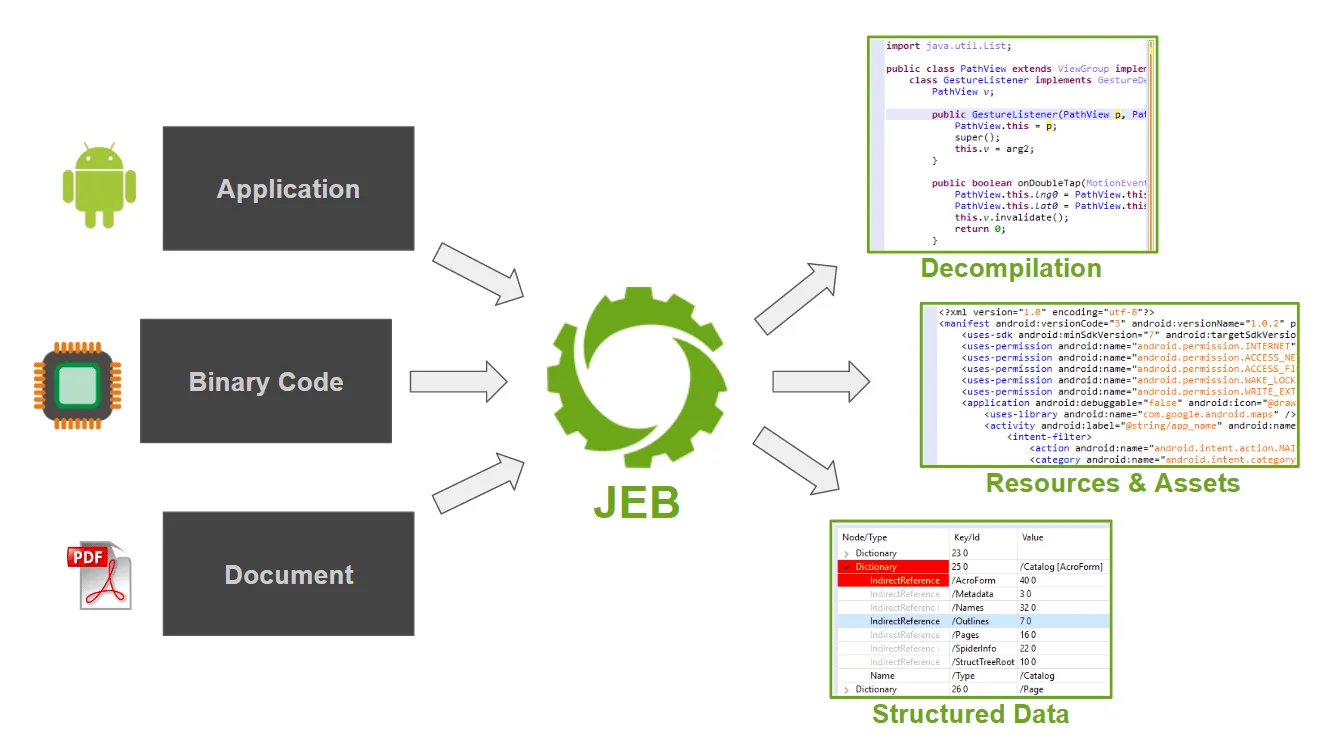
JEB 是逆向工程平台,用于对代码和文档文件进行反汇编、反编译、调试和分析,手动或作为分析管道的一部分。

反编译和调试二进制代码和混淆应用程序。分解和分析文档文件。

Android Dalvik,Intel x86,ARM,MIPS,RISC-V,S7 PLC,Java,WebAssembly & Ethereum Decompilers。
JEB

新增功能

JEB 5.30 (June 11, 2025)

  • arm parser: upgrades
  • dex: fix: persist the pools mappings (in DexFileParser objects)
  • dexdec: minor updates
  • dart: added support for parsing v3.8 snapshots
  • persistence/jdb2: a minor fix
  • gui: maintenance updates

下载地址

JEB Pro v5.30 (macOS, Linux, Windows) x64/arm64, 2025-06-11

更多:HTTP 协议与安全

目录
相关文章
|
安全 Linux 生物认证
Nexpose 8.25.0 for Linux & Windows - 漏洞扫描
751 0
Nexpose 8.25.0 for Linux & Windows - 漏洞扫描
|
安全 Linux 生物认证
Nexpose 8.24.0 for Linux & Windows - 漏洞扫描
706 17
Nexpose 8.24.0 for Linux & Windows - 漏洞扫描
|
SQL 安全 Linux
Metasploit Pro 4.22.8-20251014 (Linux, Windows) - 专业渗透测试框架
694 1
Metasploit Pro 4.22.8-20251014 (Linux, Windows) - 专业渗透测试框架
|
Linux 网络安全 iOS开发
Metasploit Framework 6.4.95 (macOS, Linux, Windows) - 开源渗透测试框架
1404 1
Metasploit Framework 6.4.95 (macOS, Linux, Windows) - 开源渗透测试框架
|
Linux 虚拟化 iOS开发
VMware Workstation Pro 25H2 macOS Unlocker & OEM BIOS 2.7 for Linux
3737 3
VMware Workstation Pro 25H2 macOS Unlocker & OEM BIOS 2.7 for Linux
|
Linux 虚拟化 iOS开发
VMware Remote Console 13.0.1 for macOS, Linux, Windows - vSphere 虚拟机控制台的桌面客户端
2667 0
VMware Remote Console 13.0.1 for macOS, Linux, Windows - vSphere 虚拟机控制台的桌面客户端
|
Linux 应用服务中间件 Shell
二、Linux文本处理与文件操作核心命令
熟悉了Linux的基本“行走”后,就该拿起真正的“工具”干活了。用grep这个“放大镜”在文件里搜索内容,用find这个“探测器”在系统中寻找文件,再用tar把东西打包带走。最关键的是要学会使用管道符|,它像一条流水线,能把这些命令串联起来,让简单工具组合出强大的功能,比如 ps -ef | grep 'nginx' 就能快速找出nginx进程。
1200 1
二、Linux文本处理与文件操作核心命令
linux命令—stat
`stat` 是 Linux 系统中用于查看文件或文件系统详细状态信息的命令。相比 `ls -l`,它提供更全面的信息,包括文件大小、权限、所有者、时间戳(最后访问、修改、状态变更时间)、inode 号、设备信息等。其常用选项包括 `-f` 查看文件系统状态、`-t` 以简洁格式输出、`-L` 跟踪符号链接,以及 `-c` 或 `--format` 自定义输出格式。通过这些选项,用户可以灵活获取所需信息,适用于系统调试、权限检查、磁盘管理等场景。
937 137
|
安全 Ubuntu Unix
一、初识 Linux 与基本命令
玩转Linux命令行,就像探索一座新城市。首先要熟悉它的“地图”,也就是/根目录下/etc(放配置)、/home(住家)这些核心区域。然后掌握几个“生存口令”:用ls看周围,cd去别处,mkdir建新房,cp/mv搬东西,再用cat或tail看文件内容。最后,别忘了随时按Tab键,它能帮你自动补全命令和路径,是提高效率的第一神器。
1925 58
|
存储 安全 Linux
Linux卡在emergency mode怎么办?xfs_repair 命令轻松解决
Linux虚拟机遇紧急模式?别慌!多因磁盘挂载失败。本文教你通过日志定位问题,用`xfs_repair`等工具修复文件系统,三步快速恢复。掌握查日志、修磁盘、验重启,轻松应对紧急模式,保障系统稳定运行。
1851 2