vLLM适配昇腾方案
参考官方文档:功能介绍-vLLM-MindIE开源第三方服务化框架适配开发指南-服务化集成部署-MindIE1.0.0开发文档-昇腾社区
vLLM框架在昇腾环境适配的整体方案为上层运行vLLM框架原生的逻辑,包括请求调度、Batch组建、Ray分布式拉起多卡服务等;下层模型推理与后处理通过MindIE LLM提供的GeneratorTorch统一接口接入MindIE模型仓统一进行管理,实现加速库整图模式的模型推理加速。
vLLM框架下层模型推理对接Text Generator接口的基本方式为实例化Text Generator中的GeneratorTorch类,继而通过该类的实例对象的forward_tensor和sample函数分别去使用MindIE LLM的模型推理和后处理功能。
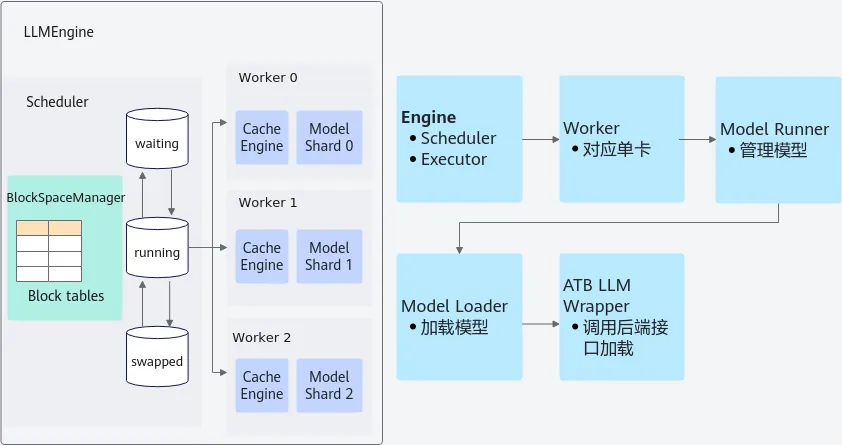
当前MindIE 1.0.0版本已经适配vLLM的版本有:0.3.3/0.4.2/0.6.2。
安装+部署
环境准备
- MindIE安装
参考MindIE安装指南:产品版本信息-版本说明-MindIE1.0.0开发文档-昇腾社区
- vLLM安装
以vLLM 0.4.2为例,提供两种安装方式:
方式1:拉取Vllm-MindIE代码仓进行安装
# 以vLLM 0.4.2为例,对应Vllm-MindIE仓的br_noncom_vllm_patch_v0.4.2
# 1.拉取Vllm-MindIE仓对应分支代码
git clone -b br_noncom_vllm_patch_v0.4.2 https://gitee.com/ascend/Vllm-MindIE.git
# 2.执行安装脚本
cd Vllm-MindIE
bash install.sh
Vllm-MindIE代码仓定向开源,如要申请权限请联系华为工程师。
方式2:根据MindIE官方文档提供的适配参考代码手工修改
参考链接:详细说明-vLLM 0.4.2 版本昇腾框架适配说明-适配说明-vLLM-MindIE开源第三方服务化框架适配开发指南-服务化集成部署-MindIE1.0.0开发文档-昇腾社区
适配代码仓的目录结构如下所示:
├── cover
│   ├── requirements-ascend.txt
│   ├── setup.py
│   └── vllm
│       └── __init__.py
├── examples
│   ├── offline_inference.py
│   ├── offline_inference.sh
│   └── start_server.sh
├── install.sh
├── OWNERS
├── README.en.md
├── README.md
└── vllm_npu
    ├── README.md
    ├── requirements.txt
    ├── setup.py
    └── vllm_npu
        ├── attention
        │   ├── backends.py
        │   ├── __init__.py
        │   └── selector.py
        ├── config.py
        ├── core
        │   └── __init__.py
        ├── engine
        │   ├── arg_utils.py
        │   ├── ascend_engine.py
        │   ├── async_ascend_engine.py
        │   └── __init__.py
        ├── executor
        │   ├── ascend_executor.py
        │   ├── ascend_ray_executor.py
        │   ├── __init__.py
        │   └── ray_utils.py
        ├── __init__.py
        ├── model_executor
        │   ├── ascend_model_loader.py
        │   ├── __init__.py
        │   ├── layers
        │   │   ├── ascend_sampler.py
        │   │   └── __init__.py
        │   └── models
        │       ├── ascend
        │       │   ├── __init__.py
        │       │   └── mindie_llm_wrapper.py
        │       └── __init__.py
        ├── npu_adaptor.py
        ├── usage
        │   ├── __init__.py
        │   └── usage_lib.py
        ├── utils.py
        └── worker
            ├── ascend_model_runner.py
            ├── ascend_worker.py
            ├── cache_engine.py
            └── __init__.py
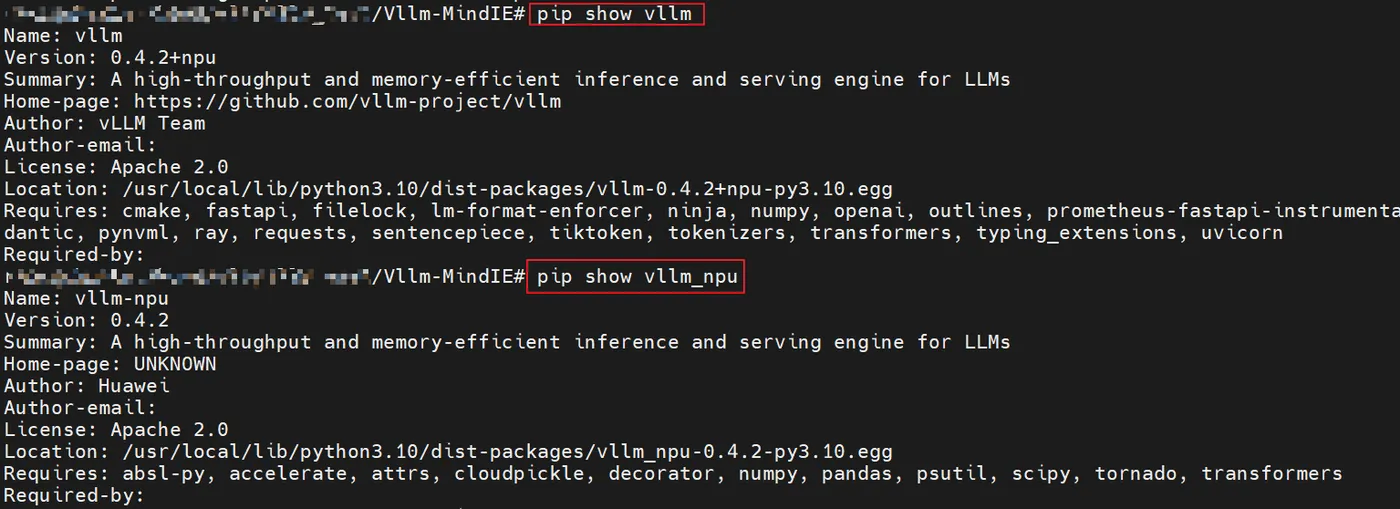
检查是否安装成功:
pip show vllm
pip show vllm_npu
回显如下表示安装成功:
服务部署
- 离线推理
cd Vllm-MindIE/examples
# 修改offline_inference.sh中--model_path为本地的模型权重路径,如:--model_path /data/models/LLaMA3-8B/
# 执行脚本
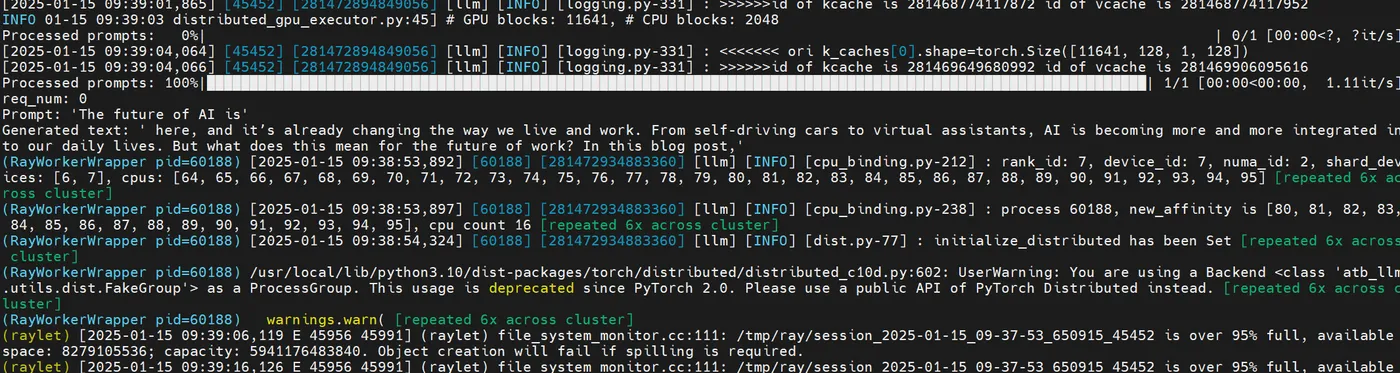
bash offline_inference.sh
输出结果如下:
- 在线推理
启动服务:
cd Vllm-MindIE/examples
# 修改start_server.sh中--model_path为本地的模型权重路径,如:--model_path /data/models/LLaMA3-8B/
# 执行脚本
bash start_server.sh
回显结果如下:

发送请求:
# model_path根据实际情况填写
curl http://localhost:8000/v1/completions \
-H "Content-Type: application/json" \
-d '{
"model": "model_path",
"max_tokens": 100,
"temperature": 0,
"top_p": 0.9,
"prompt": "The future of AI is"
}'
响应结果如下: