问题描述
在 “使用 Azure SDK for Go 进行 Azure 身份验证” 文章中的 Go 示例代码进行登录Azure时,默认指向的是Globa Azure。当只修改AAD AZURE_CLIENT_ID , AZURE_TENANT_ID 和 AZURE_CLIENT_SECRET参数值,运行会抛出以下错误:
The resource principal named https://management.core.windows.net/ was not found in the tenant named XXXXXXXX有限公司. This cf the application has not been installed by the administrator of the tenant or consented to by any user in the tenant. You might have sent your authentication request to the wrong tenant.
那么如何能够连接到China Azure呢?
问题解答
Go代码中,使用 azidentity.NewDefaultAzureCredential(nil) 函数登录Azure AD,并且没有传入参数。所以默认就是登录到Global Azure中。
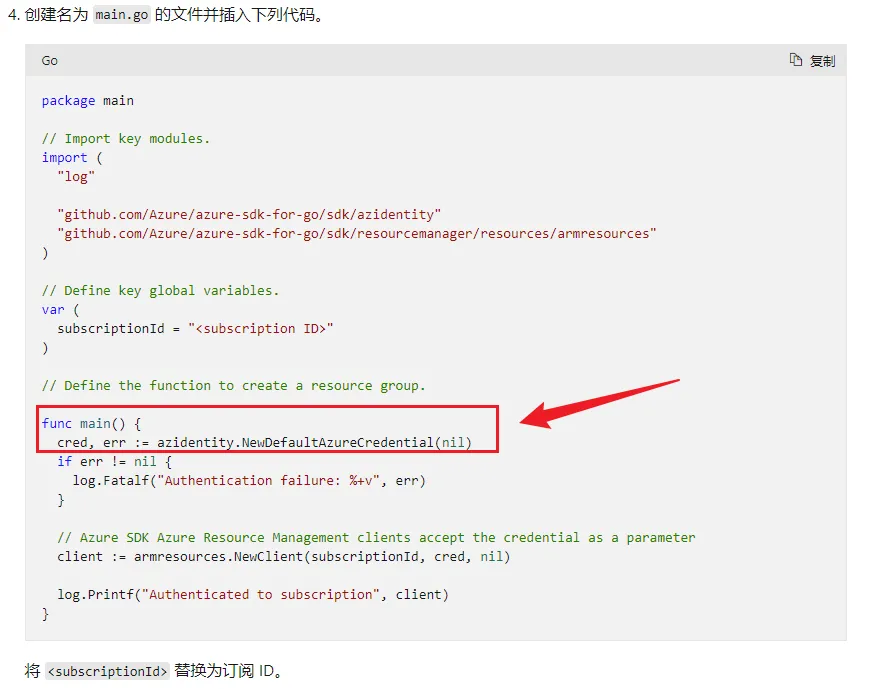
查看NewDefaultAzureCredential的构造函数,可以添加 ClientSecretCredentialOptions 参数,来设置登录的Azure 环境。
// NewClientSecretCredential constructs a ClientSecretCredential. Pass nil for options to accept defaults.
func NewClientSecretCredential(tenantID string, clientID string, clientSecret string, options *ClientSecretCredentialOptions) (*ClientSecretCredential, error) {
    if options == nil {
        options = &ClientSecretCredentialOptions{}
    }
    cred, err := confidential.NewCredFromSecret(clientSecret)
    if err != nil {
        return nil, err
    }
    c, err := getConfidentialClient(clientID, tenantID, cred, &options.ClientOptions)
    if err != nil {
        return nil, err
    }
    return &ClientSecretCredential{client: c}, nil
}
func getConfidentialClient(clientID, tenantID string, cred confidential.Credential, co *azcore.ClientOptions, additionalOpts ...confidential.Option) (confidential.Client, error) {
    if !validTenantID(tenantID) {
        return confidential.Client{}, errors.New(tenantIDValidationErr)
    }
    authorityHost, err := setAuthorityHost(co.Cloud)
    if err != nil {
        return confidential.Client{}, err
    }
    o := []confidential.Option{
        confidential.WithAuthority(runtime.JoinPaths(authorityHost, tenantID)),
        confidential.WithAzureRegion(os.Getenv(azureRegionalAuthorityName)),
        confidential.WithHTTPClient(newPipelineAdapter(co)),
    }
    o = append(o, additionalOpts...)
    return confidential.New(clientID, cred, o...)
}
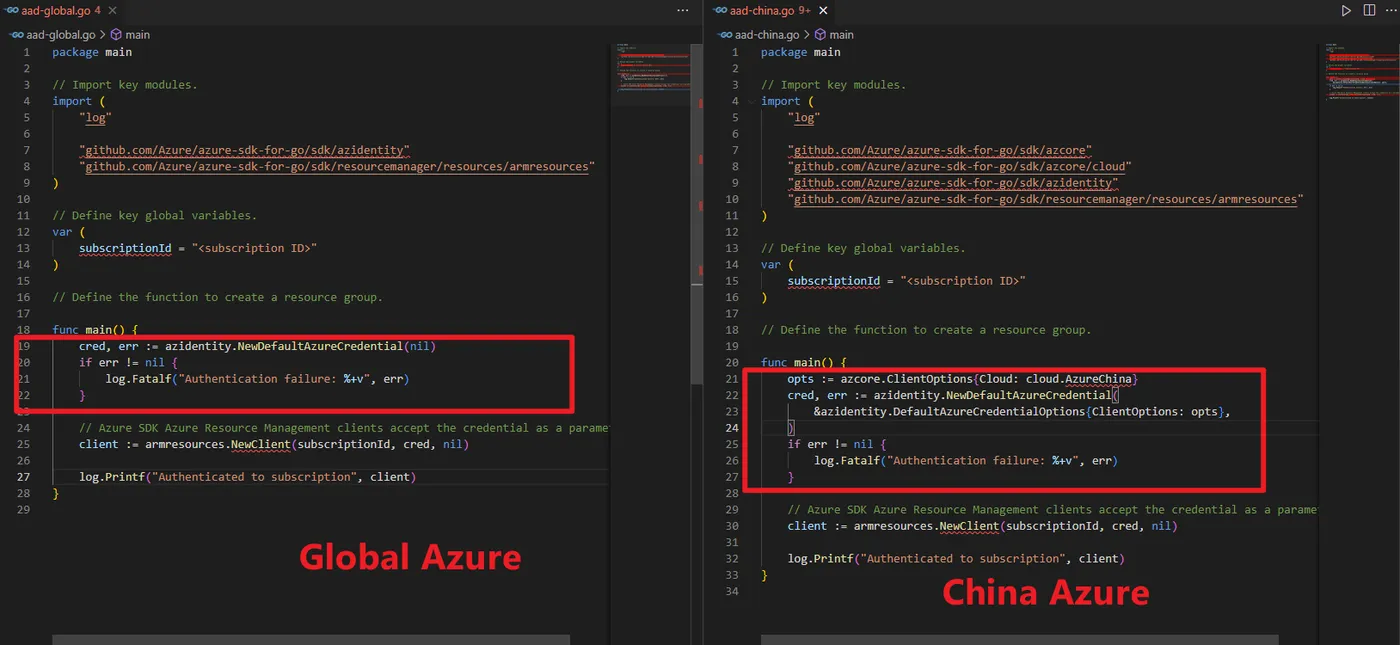
所以修改代码就是添加环境参数!
opts := azcore.ClientOptions{Cloud: cloud.AzureChina}
    cred, err := azidentity.NewDefaultAzureCredential(
        &azidentity.DefaultAzureCredentialOptions{ClientOptions: opts},
    )
修改前后的代码对比图:
附录:修改后的全部代码
package main
// Import key modules.
import (
    "log"
    "github.com/Azure/azure-sdk-for-go/sdk/azcore"
    "github.com/Azure/azure-sdk-for-go/sdk/azcore/cloud"
    "github.com/Azure/azure-sdk-for-go/sdk/azidentity"
    "github.com/Azure/azure-sdk-for-go/sdk/resourcemanager/resources/armresources"
)
// Define key global variables.
var (
    subscriptionId = "<subscription ID>"
)
// Define the function to create a resource group.
func main() {
    opts := azcore.ClientOptions{Cloud: cloud.AzureChina}
    cred, err := azidentity.NewDefaultAzureCredential(
        &azidentity.DefaultAzureCredentialOptions{ClientOptions: opts},
    )
    if err != nil {
        log.Fatalf("Authentication failure: %+v", err)
    }
    // Azure SDK Azure Resource Management clients accept the credential as a parameter
    client := armresources.NewClient(subscriptionId, cred, nil)
    log.Printf("Authenticated to subscription", client)
}
参考资料
Go SDK 设置Cloud : https://pkg.go.dev/github.com/Azure/azure-sdk-for-go/sdk/azcore/cloud#section-sourcefiles
使用 DefaultAzureCredential 对 ResourceClient 进行身份验证 : https://learn.microsoft.com/zh-cn/azure/developer/go/azure-sdk-authentication?tabs=bash
Successfully Authenticate AzureChina with an Azure Public Credential #18508 : https://github.com/Azure/azure-sdk-for-go/issues/18508