1.简单介绍vite,搭建vite项目
1.1什么是vite?
Vite是一种新型前端构建工具,能够显著提升前端开发体验。它主要由两部分组成:
- 一个开发服务器,它基于 原生 ES 模块 提供了 丰富的内建功能,如速度快到惊人的 模块热更新(HMR)。
- 一套构建指令,它使用 Rollup 打包你的代码,并且它是预配置的,可输出用于生产环境的高度优化过的静态资源。
Vite 意在提供开箱即用的配置,同时它的 插件 API 和 JavaScript API 带来了高度的可扩展性,并有完整的类型支持。
Vite 将会使用 esbuild 预构建依赖。Esbuild 使用 Go 编写,并且比以 JavaScript 编写的打包器预构建依赖快 10-100 倍。
1.2初始化vite
npm init vite@latest
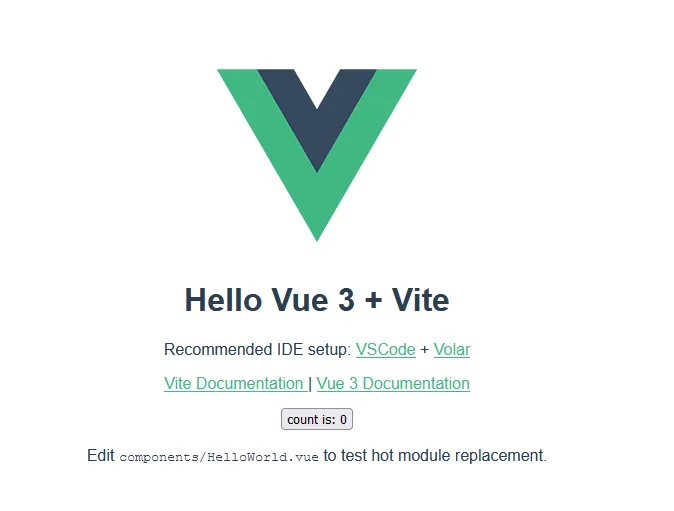
1.3新建第一个vite项目
Vuex 是一个专为 Vue.js 应用程序开发的状态管理模式 + 库。它采用集中式存储管理应用的所有组件的状态,并以相应的规则保证状态以一种可预测的方式发生变化。
2.安装vuex
npm install vuex@next --save
3.Vuex基础介绍
3.1 vuex
每一个 Vuex 应用的核心就是 store(仓库)。“store”基本上就是一个容器,它包含着你的应用中大部分的状态 (state)。Vuex 和单纯的全局对象有以下两点不同:
Vuex 的状态存储是响应式的。当 Vue 组件从 store 中读取状态的时候,若 store 中的状态发生变化,那么相应的组件也会相应地得到高效更新。
你不能直接改变 store 中的状态。改变 store 中的状态的唯一途径就是显式地提交 (commit) mutation。这样使得我们可以方便地跟踪每一个状态的变化,从而让我们能够实现一些工具帮助我们更好地了解我们的应用。
主要包含五个部分:State、Getters、Mutations、Actions、Module。
3.1.1 State概念
Vuex 使用单一状态树——是的,用一个对象就包含了全部的应用层级状态。至此它便作为一个“唯一数据源 (SSOT)”而存在。这也意味着,每个应用将仅仅包含一个 store 实例。单一状态树让我们能够直接地定位任一特定的状态片段,在调试的过程中也能轻易地取得整个当前应用状态的快照。
3.1.2 分割模块(module)
由于使用单一状态树,应用的所有状态会集中到一个比较大的对象。当应用变得非常复杂时,store 对象就有可能变得相当臃肿。
为了解决以上问题,Vuex 允许我们将 store 分割成模块(module)。每个模块拥有自己的 state、mutation、action、getter、甚至是嵌套子模块——从上至下进行同样方式的分割:由此此处分割为两个状态管理模块。(test和test1模块)。
//store/test.js
export const test = {
    namespaced: true,
    state: {
        name: '叫我詹躲躲',
        gender: '男',
        profession: '前端开发',
        age: 10
    }
}

//store/test1.js
export const test1 = {
    namespaced: true,
    state: {
        name: '二月',
        sport: '跑步、代码和音乐',
        publics:'叫我詹躲躲',
        amount:100
    },
}
3.1.3命名空间(namespaced)
默认情况下,模块内部的 action 和 mutation 仍然是注册在全局命名空间的——这样使得多个模块能够对同一个 action 或 mutation 作出响应。Getter 同样也默认注册在全局命名空间,但是目前这并非出于功能上的目的(仅仅是维持现状来避免非兼容性变更)。必须注意,不要在不同的、无命名空间的模块中定义两个相同的 getter 从而导致错误。
如果希望你的模块具有更高的封装度和复用性,你可以通过添加 namespaced: true 的方式使其成为带命名空间的模块。
3.1.4 Getters定义
有时候我们需要从 store 中的 state 中派生出一些状态,如:
//store/test.js
export const test = {
    namespaced: true,
    state: {
        name: '叫我詹躲躲',
        gender: '男',
        profession: '前端开发',
        age: 10
    },
    //从state派生的一些状态,可以将该部分抽离出来成函数方便调用
    getters: {
        getUserInfo: state => {
            return state.name + '的职业是' + state.profession
        },
        getUserSex: state => {
            return state.name + '的性别是' + state.gender
        }
    },
}

//store/test1.js
export const test1 = {
    namespaced: true,
    state: {
        name: '二月',
        sport: '跑步、代码和音乐',
        publics:'叫我詹躲躲',
        amount:100
    },
    getters: {
        getSport: state => {
            return state.name + '喜欢的运行是' + state.sport
        },
        getPublics: state => {
            return state.name + '的公众号是' + state.publics
        }
    },
}
3.1.5.mutations定义
更改 Vuex 的 store 中的状态的唯一方法是提交 mutation。Vuex 中的 mutation 非常类似于事件:每个 mutation 都有一个字符串的事件类型 (type)和一个回调函数 (handler)。这个回调函数就是我们实际进行状态更改的地方,并且它会接受 state 作为第一个参数:
//store/test.js
export const test = {
    namespaced: true,
    state: {
        name: '叫我詹躲躲',
        gender: '男',
        profession: '前端开发',
        age: 10
    },
    //从state派生的一些状态,可以将该部分抽离出来成函数方便调用
    getters: {
        getUserInfo: state => {
            return state.name + '的职业是' + state.profession
        },
        getUserSex: state => {
            return state.name + '的性别是' + state.gender
        }
    },
    mutations: {
        testMutation1(state) {
            // 变更状态
            state.age++;
        },
        // 第二个参数是载荷
        testMutation2(state, payload) {
            state.age += payload.content;
        }
    },
}

//store/test1.js
export const test1 = {
    namespaced: true,
    state: {
        name: '二月',
        sport: '跑步、代码和音乐',
        publics:'叫我詹躲躲',
        amount:100
    },
    getters: {
        getSport: state => {
            return state.name + '喜欢的运行是' + state.sport
        },
        getPublics: state => {
            return state.name + '的公众号是' + state.publics
        }
    },
    mutations: {
        test1Mutation1(state) {
            state.amount++;
        },
        // 第二个参数是载荷
        test1Mutation2(state, payload) {
            state.amount += payload.amount;
        }
    },
}
3.1.6.actions定义
Action 类似于 mutation,不同在于:
Action 提交的是 mutation,而不是直接变更状态。
Action 可以包含任意异步操作。
//store/test.js
export const test = {
    namespaced: true,
    state: {
        name: '叫我詹躲躲',
        gender: '男',
        profession: '前端开发',
        age: 10
    },
    //从state派生的一些状态,可以将该部分抽离出来成函数方便调用
    getters: {
        getUserInfo: state => {
            return state.name + '的职业是' + state.profession
        },
        getUserSex: state => {
            return state.name + '的性别是' + state.gender
        }
    },
    mutations: {
        testMutation1(state) {
            // 变更状态
            state.age++;
        },
        // 第二个参数是载荷
        testMutation2(state, payload) {
            state.age += payload.content;
        }
    },
    actions: {
        testAction1(context) {
            context.commit('testMutation1');
        },
        //通过参数解构来简化代码,testAction1简化为testAction2写法
        testAction2({ commit }, payload) {
            commit({
                type: 'testMutation2',
                content: payload.content
            });
        }
    }
}

//store/test1.js
export const test1 = {
    namespaced: true,
    state: {
        name: '二月',
        sport: '跑步、代码和音乐',
        publics:'叫我詹躲躲',
        amount:100
    },
    getters: {
        getSport: state => {
            return state.name + '喜欢的运行是' + state.sport
        },
        getPublics: state => {
            return state.name + '的公众号是' + state.publics
        }
    },
    mutations: {
        test1Mutation1(state) {
            state.amount++;
        },
        // 第二个参数是载荷
        test1Mutation2(state, payload) {
            state.amount += payload.amount;
        }
    },
    actions: {
        test1Action1(context) {
            context.commit('test1Mutation1');
        },
        test1Action2({ commit }, payload) {
            commit({
                type: 'test1Mutation1',
                content: payload.content
            });
        }
    }
}
已经维护了store仓库,在组件中使用我们的状态。
4.状态使用
4.1 引入
//store/index.js 内容

import { createStore } from "vuex";
import { test } from "./modules/test";
import { test1 } from "./modules/test1";

export const store = createStore({
  // Vuex允许store分割成小的module,每个模块拥有自己的state、mutation、action、getter;
  // 访问test的状态:store.state.test
  modules: {
    test, //store模块1
    test1 //store模块2
  }
});
main.js使用
//main.js
import { createApp } from 'vue'
import App from './App.vue'
import { store } from './store'
let app = createApp(App)
app.use(store).mount('#app')
4.2 组件中使用状态
4.2.1 使用state

test里面的状态
//test里面的状态
<h3>1.test模块state的状态</h3>
<h5>{{userName}}</h5>
<h5>{{userInfo}}</h5>

<script setup>
import { computed } from 'vue'
import { useStore } from 'vuex'
const store = useStore()
/* ------------test模块状态-----------------*/
//获取test1模块的状态
const userName = computed(() => store.state.test.name)
const userInfo = computed(
  () => store.state.test.name + '的职业是:' + store.state.test.profession
)
</script>
test1里面的状态
//test1里面的状态
<h3>1.test1模块state的状态</h3>
<h5>{{sport}}</h5>
<h5>公众号:{{publics}}</h5>

//获取test2模块的状态
const publics = computed(() => store.state.test1.publics)
const sport = computed(
  () => store.state.test1.name + '喜欢的运动:' + store.state.test1.sport
)
4.2.2 使用getters

test模块getters的状态
<h3>2.test模块getters的状态</h3>
<h5>{{getUserInfo}}</h5>
<h5>{{getUserSex}}</h5>

//获取getters
const getUserInfo = computed(() => store.getters['test/getUserInfo'])
const getUserSex = computed(() => store.getters['test/getUserSex'])
test1模块getters的状态
<h3>2.test1模块getters的状态</h3>
<h5>{{getSport}}</h5>
<h5>{{getPublics}}</h5>

//获取getters
const getSport = computed(() => store.getters['test1/getSport'])
const getPublics = computed(() => store.getters['test1/getPublics'])
4.2.3 使用mutations

用mutations改变test模块age的状态
<h3>3.用mutations改变test模块age的状态</h3>
<button @click="testClick">改变test状态(age)</button>
<h5>{{age}}</h5>

//通过mutations改变状态,改变test模块的age
const age = computed(() => store.state.test.age)
const testClick = () => {
  store.commit('test/testMutation1')
}
用mutations改变test1模块amount的状态
<h3>3.用mutations改变test1模块amount的状态</h3>
<button @click="test1Click">改变test1状态(amount)</button>
<h5>{{amount}}</h5>

//通过mutations改变状态,改变test1模块的amount
const amount = computed(() => store.state.test1.amount)
const test1Click = () => {
  store.commit('test1/test1Mutation1')
}
4.2.4 使用actions

用actions改变test模块age的状态
<h3>4.用actions改变test模块age的状态</h3>
<button @click="changeActions">改变test状态(age)</button>
<h5>{{age}}</h5>

//通过actions改变状态,改变test模块的age
const changeActions = () => {
  store.dispatch('test/testAction1')
}
用actions改变test1模块amount的状态
<h3>4.用actions改变test1模块amount的状态</h3>
<button @click="changeActions1">改变test状态(amount)</button>
<h5>{{amount}}</h5>

//通过actions改变状态,改变test模块的amount
const changeActions1 = () => {
  store.dispatch('test1/test1Action1')
}
完整的Demo示例
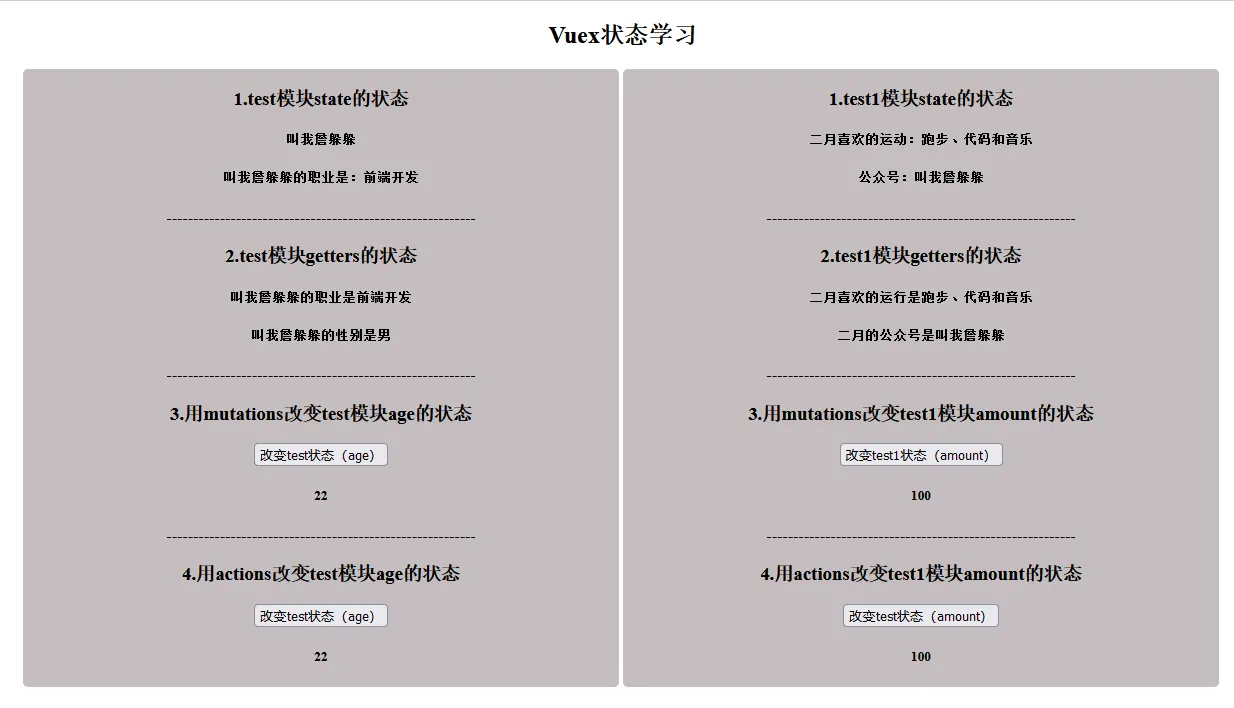
<template>
  <div>
    <h2>Vuex状态学习</h2>
    <div class="wrapper">
      <div class="left-box">
        <h3>1.test模块state的状态</h3>
        <h5>{{userName}}</h5>
        <h5>{{userInfo}}</h5>
        ----------------------------------------------------------
        <h3>2.test模块getters的状态</h3>
        <h5>{{getUserInfo}}</h5>
        <h5>{{getUserSex}}</h5>
        ----------------------------------------------------------
        <h3>3.用mutations改变test模块age的状态</h3>
        <button @click="testClick">改变test状态(age)</button>
        <h5>{{age}}</h5>
        ----------------------------------------------------------
        <h3>4.用actions改变test模块age的状态</h3>
        <button @click="changeActions">改变test状态(age)</button>
        <h5>{{age}}</h5>
      </div>

      <div class="line"></div>
      <div class="right-box">
        <h3>1.test1模块state的状态</h3>
        <h5>{{sport}}</h5>
        <h5>公众号:{{publics}}</h5>
        ----------------------------------------------------------
        <h3>2.test1模块getters的状态</h3>
        <h5>{{getSport}}</h5>
        <h5>{{getPublics}}</h5>
        ----------------------------------------------------------
        <h3>3.用mutations改变test1模块amount的状态</h3>
        <button @click="test1Click">改变test1状态(amount)</button>
        <h5>{{amount}}</h5>
        ----------------------------------------------------------
        <h3>4.用actions改变test1模块amount的状态</h3>
        <button @click="changeActions1">改变test状态(amount)</button>
        <h5>{{amount}}</h5>
      </div>
    </div>

  </div>
</template>
<script setup>
import { computed } from 'vue'
import { useStore } from 'vuex'
const store = useStore()
/* ------------test模块状态-----------------*/
//获取test1模块的状态
const userName = computed(() => store.state.test.name)
const userInfo = computed(
  () => store.state.test.name + '的职业是:' + store.state.test.profession
)
//获取getters
const getUserInfo = computed(() => store.getters['test/getUserInfo'])
const getUserSex = computed(() => store.getters['test/getUserSex'])

//通过mutations改变状态,改变test模块的age
const age = computed(() => store.state.test.age)
const testClick = () => {
  store.commit('test/testMutation1')
}

//通过actions改变状态,改变test模块的age
const changeActions = () => {
  store.dispatch('test/testAction1')
}

/* -----------test1模块状态------------------*/
//获取test2模块的状态
const publics = computed(() => store.state.test1.publics)
const sport = computed(
  () => store.state.test1.name + '喜欢的运动:' + store.state.test1.sport
)
//获取getters
const getSport = computed(() => store.getters['test1/getSport'])
const getPublics = computed(() => store.getters['test1/getPublics'])

//通过mutations改变状态,改变test1模块的amount
const amount = computed(() => store.state.test1.amount)
const test1Click = () => {
  store.commit('test1/test1Mutation1')
}

//通过actions改变状态,改变test模块的amount
const changeActions1 = () => {
  store.dispatch('test1/test1Action1')
}
</script>

<style scoped>
h2 {
  text-align: center;
}
.wrapper {
  width:1200px;
  margin: 0 auto;
}
.left-box,
.right-box {
  width:calc(50% - 4px);
  display: inline-block;
  text-align: center;
  background: #c4bebf;
  border-radius: 5px;
}
.line {
  height: 100%;
  width: 4px;
  display: inline-block;
}
</style>
5.插件
Vuex 的 store 接受 plugins 选项,这个选项暴露出每次 mutation 的钩子。Vuex 插件就是一个函数,它接收 store 作为唯一参数:
const myPlugin = (store) => {
  // 当 store 初始化后调用
  store.subscribe((mutation, state) => {
    // 每次 mutation 之后调用
    // mutation 的格式为 { type, payload }
  })
}
5.1 使用插件
const store = createStore({
  plugins: [myPlugin]
})
以上是vuex的使用和部分参数的解释,每天进步一点点,欢迎一起学习交流。我是叫我詹躲躲。文章不定期更新到 个人博客(https://zhanhongzhu.top)、掘金、思否和微信公众号【叫我詹躲躲】。一起精进,一起成长。
参考文章
vuex中文文档:https://vuex.vuejs.org/zh/