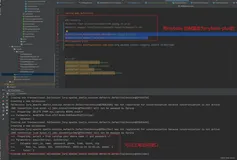
在使用springboot集成camunda卡蒙达工作流引擎时报错,报错信息如下:
Description:
An attempt was made to call a method that does not exist. The attempt was made from the following location:
com.baomidou.mybatisplus.core.MybatisMapperAnnotationBuilder.getLanguageDriver(MybatisMapperAnnotationBuilder.java:385)
The following method did not exist:
org.apache.ibatis.session.Configuration.getLanguageDriver(Ljava/lang/Class;)Lorg/apache/ibatis/scripting/LanguageDriver;
The calling method’s class, com.baomidou.mybatisplus.core.MybatisMapperAnnotationBuilder, was loaded from the following location:
jar:file:/G:/repository/com/baomidou/mybatis-plus-core/3.5.1/mybatis-plus-core-3.5.1.jar!/com/baomidou/mybatisplus/core/MybatisMapperAnnotationBuilder.class
The called method’s class, org.apache.ibatis.session.Configuration, is available from the following locations:
jar:file:/G:/repository/org/mybatis/mybatis/3.4.4/mybatis-3.4.4.jar!/org/apache/ibatis/session/Configuration.class
The called method’s class hierarchy was loaded from the following locations:
org.apache.ibatis.session.Configuration: file:/G:/repository/org/mybatis/mybatis/3.4.4/mybatis-3.4.4.jar
Action:
Correct the classpath of your application so that it contains compatible versions of the classes com.baomidou.mybatisplus.core.MybatisMapperAnnotationBuilder and org.apache.ibatis.session.Configuration
解决方法
这个报错原因是因为我框架里面本身已经引入了mybatis的依赖了,而camunda里面也带了mybatis,所以只需要在引入camunda的时候排除掉mybatis即可。
原来代码:
<dependency>
      <groupId>org.camunda.bpm.springboot</groupId>
      <artifactId>camunda-bpm-spring-boot-starter</artifactId>
      <version>3.4.0</version>
    </dependency>
    <dependency>
      <groupId>org.camunda.bpm.springboot</groupId>
      <artifactId>camunda-bpm-spring-boot-starter-rest</artifactId>
      <version>3.4.0</version>
    </dependency>
    <dependency>
      <groupId>org.camunda.bpm.springboot</groupId>
      <artifactId>camunda-bpm-spring-boot-starter-webapp</artifactId>
      <version>3.4.0</version>
    </dependency>
解决后的代码:
<dependency>
      <groupId>org.camunda.bpm.springboot</groupId>
      <artifactId>camunda-bpm-spring-boot-starter</artifactId>
      <exclusions>
        <exclusion>
          <groupId>org.mybatis</groupId>
          <artifactId>mybatis</artifactId>
        </exclusion>
      </exclusions>
      <version>3.4.0</version>
    </dependency>
    <dependency>
      <groupId>org.camunda.bpm.springboot</groupId>
      <artifactId>camunda-bpm-spring-boot-starter-rest</artifactId>
      <exclusions>
        <exclusion>
          <groupId>org.mybatis</groupId>
          <artifactId>mybatis</artifactId>
        </exclusion>
      </exclusions>
      <version>3.4.0</version>
    </dependency>
    <dependency>
      <groupId>org.camunda.bpm.springboot</groupId>
      <artifactId>camunda-bpm-spring-boot-starter-webapp</artifactId>
      <exclusions>
        <exclusion>
          <groupId>org.mybatis</groupId>
          <artifactId>mybatis</artifactId>
        </exclusion>
      </exclusions>
      <version>3.4.0</version>
    </dependency>
刷新maven依赖即可解决问题。