概述
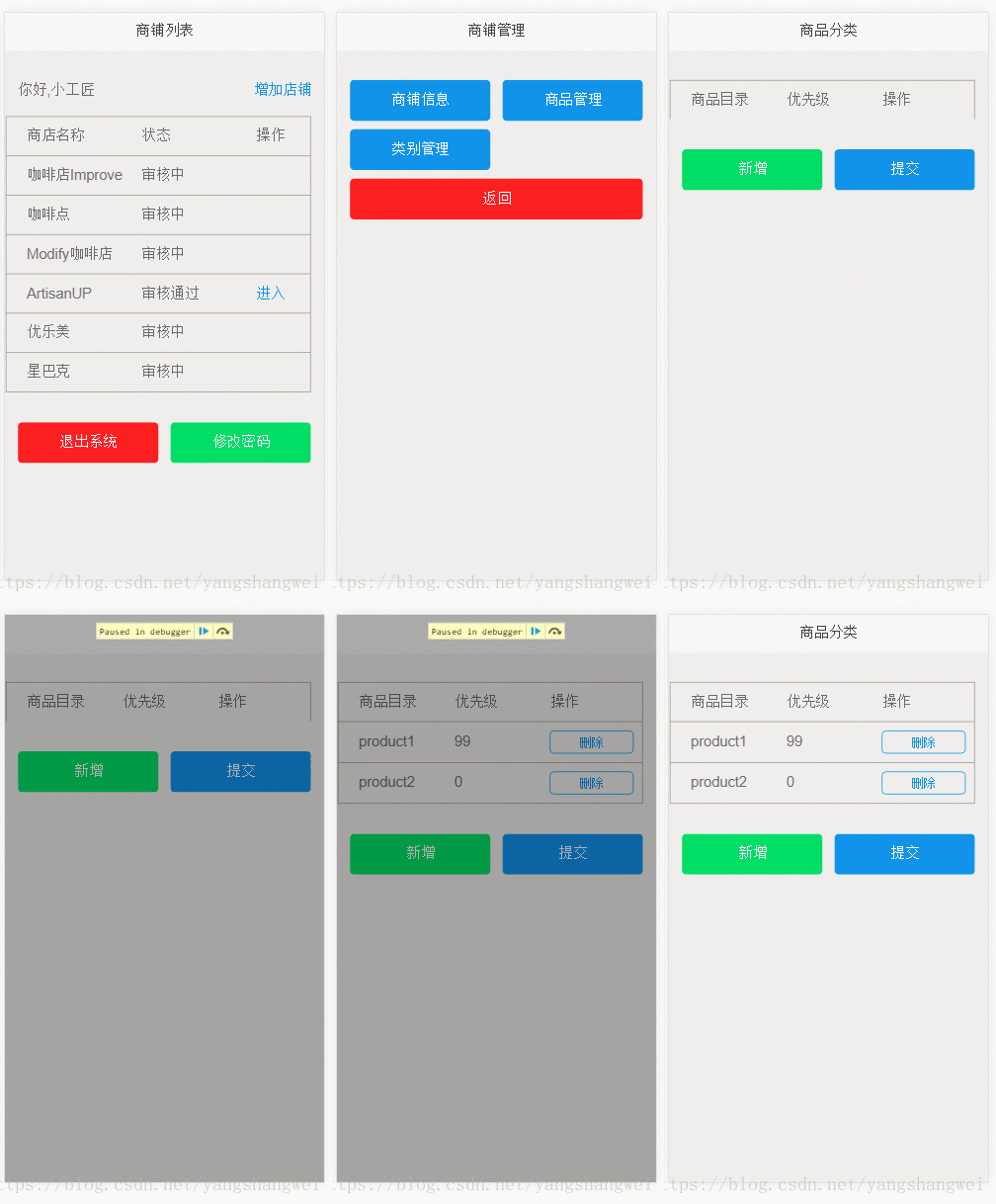
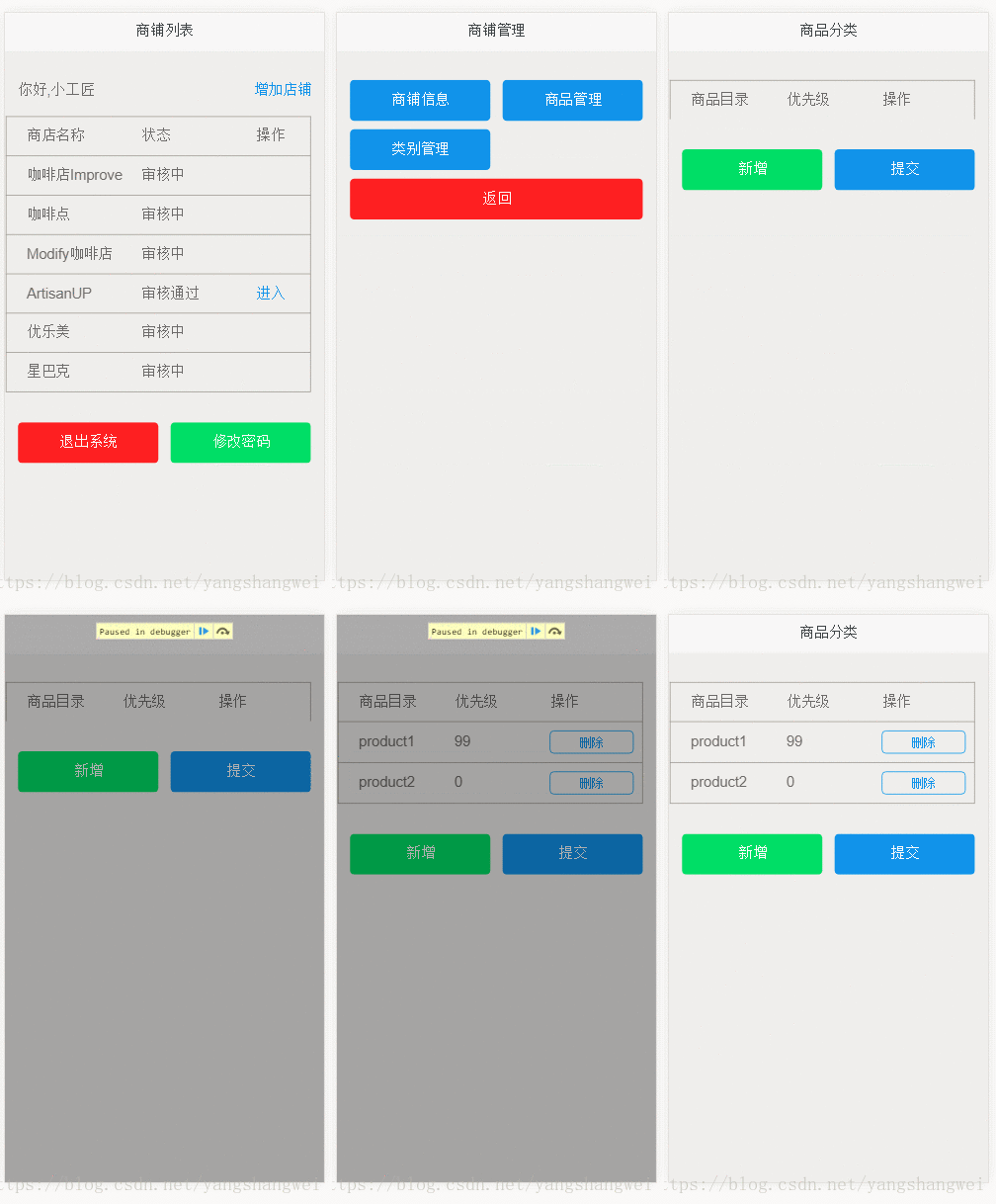
进入owner拥有的店铺列表后,对某个店铺进行管理,其中类别管理模块的效果如上。所以获取商品类别的时候要传入shopId.
通过前面的博客,我们对开发流程有了较为清晰的认识,这里我们将类别管理这部分的内容从下至上来实现下吧。
Dao层
ProductCategoryDao接口
package com.artisan.o2o.dao;
import java.util.List;
import com.artisan.o2o.entity.ProductCategory;
public interface ProductCategoryDao {
  List<ProductCategory> selectProductCategoryList(long shopId);
}
ProductCategoryDao Mapper配置文件
<?xml version="1.0" encoding="UTF-8"?>
<!DOCTYPE mapper PUBLIC "-//mybatis.org//DTD Mapper 3.0//EN"
    "http://mybatis.org/dtd/mybatis-3-mapper.dtd">
<mapper namespace="com.artisan.o2o.dao.ProductCategoryDao">
  <select id="selectProductCategoryList" resultType="ProductCategory">
    SELECT
      tpc.product_category_id,
      tpc.product_category_name,
      tpc.product_category_desc,
      tpc.priority,
      tpc.create_time,
      tpc.last_edit_time,
      tpc.shop_id
    FROM
      tb_product_category tpc
    WHERE
      tpc.shop_id = #{shopId}
    ORDER BY
      priority
    DESC
  </select>
</mapper>
单元测试
构造测试数据

编写单元测试
package com.artisan.o2o.dao;
import static org.junit.Assert.assertEquals;
import java.util.List;
import org.junit.Test;
import org.springframework.beans.factory.annotation.Autowired;
import com.artisan.o2o.BaseTest;
import com.artisan.o2o.entity.ProductCategory;
public class ProductCategoryTest extends BaseTest {
  @Autowired
  ProductCategoryDao productCategoryDao;
  @Test
  public void testSelectProductCategoryList() {
    long shopId = 5L;
    List<ProductCategory> productCategories = productCategoryDao.selectProductCategoryList(shopId);
    // shopId = 5 有2条测试数据,期望list中有2条
    assertEquals(2, productCategories.size());
    // SQL中按照权重排序, product1 priority 99 ,期望第一条数据是 product1
    assertEquals("product1", productCategories.get(0).getProductCategoryName());
    for (ProductCategory productCategory : productCategories) {
      System.out.println(productCategory.toString());
    }
    productCategories = productCategoryDao.selectProductCategoryList(6L);
    assertEquals(0, productCategories.size());
  }
}
检查是否符合预期,单元测试通过
JDBC Connection [com.mchange.v2.c3p0.impl.NewProxyConnection@60856961] will not be managed by Spring
==>  Preparing: SELECT tpc.product_category_id, tpc.product_category_name, tpc.product_category_desc, tpc.priority, tpc.create_time, tpc.last_edit_time, tpc.shop_id FROM tb_product_category tpc WHERE tpc.shop_id = ? ORDER BY priority DESC
==> Parameters: 5(Long)
<==    Columns: product_category_id, product_category_name, product_category_desc, priority, create_time, last_edit_time, shop_id
<==        Row: 1, product1, product1_desc, 99, 2018-06-09 01:49:15.0, 2018-06-09 01:49:15.0, 5
<==        Row: 2, product2, product2_desc, 0, 2018-06-09 01:49:40.0, 2018-06-09 01:49:40.0, 5
<==      Total: 2
Closing non transactional SqlSession [org.apache.ibatis.session.defaults.DefaultSqlSession@4ff8d125]
ProductCategory [productCategoryId=1, shopId=5, productCategoryName=product1, productCategoryDesc=product1_desc, priority=99, createTime=Sat Jun 09 01:49:15 BOT 2018, lastEditTime=Sat Jun 09 01:49:15 BOT 2018]
ProductCategory [productCategoryId=2, shopId=5, productCategoryName=product2, productCategoryDesc=product2_desc, priority=0, createTime=Sat Jun 09 01:49:40 BOT 2018, lastEditTime=Sat Jun 09 01:49:40 BOT 2018]
Creating a new SqlSession
SqlSession [org.apache.ibatis.session.defaults.DefaultSqlSession@34c01041] was not registered for synchronization because synchronization is not active
JDBC Connection [com.mchange.v2.c3p0.impl.NewProxyConnection@c94fd30] will not be managed by Spring
==>  Preparing: SELECT tpc.product_category_id, tpc.product_category_name, tpc.product_category_desc, tpc.priority, tpc.create_time, tpc.last_edit_time, tpc.shop_id FROM tb_product_category tpc WHERE tpc.shop_id = ? ORDER BY priority DESC
==> Parameters: 6(Long)
<==      Total: 0
Closing non transactional SqlSession [org.apache.ibatis.session.defaults.DefaultSqlSession@34c01041]
Service层
ProductCategoryService 接口
package com.artisan.o2o.service;
import java.util.List;
import com.artisan.o2o.entity.ProductCategory;
public interface ProductCategoryService {
  List<ProductCategory> queryProductCategoryList(long shopId);
}
ProductCategoryServiceImpl接口实现类
package com.artisan.o2o.service.impl;
import java.util.List;
import org.springframework.beans.factory.annotation.Autowired;
import org.springframework.stereotype.Service;
import com.artisan.o2o.dao.ProductCategoryDao;
import com.artisan.o2o.entity.ProductCategory;
import com.artisan.o2o.service.ProductCategoryService;
/**
 *
 *
 * @ClassName: ProductCategoryServiceImpl
 *
 * @Description: 使用@Service,交由Spring托管
 *
 * @author: Mr.Yang
 *
 * @date: 2018年6月9日 上午2:46:07
 */
@Service
public class ProductCategoryServiceImpl implements ProductCategoryService {
  @Autowired
  private ProductCategoryDao productCategoryDao;
  @Override
  public List<ProductCategory> queryProductCategoryList(long shopId) {
    return productCategoryDao.selectProductCategoryList(shopId);
  }
}
单元测试
编写单元测试用例
package com.artisan.o2o.service;
import java.util.List;
import org.junit.Assert;
import org.junit.Test;
import org.springframework.beans.factory.annotation.Autowired;
import com.artisan.o2o.BaseTest;
import com.artisan.o2o.entity.ProductCategory;
public class ProductCategoryServiceTest extends BaseTest {
  @Autowired
  private ProductCategoryService productCategoryService;
  @Test
  public void testQueryProductCategoryList() {
    long shopId = 5L;
    List<ProductCategory> productCategories = productCategoryService.queryProductCategoryList(shopId);
    Assert.assertNotNull(productCategories);
    Assert.assertEquals(2, productCategories.size());
    for (ProductCategory productCategory : productCategories) {
      System.out.println(productCategory.toString());
    }
  }
}
检查是否符合预期,单元测试通过
JDBC Connection [com.mchange.v2.c3p0.impl.NewProxyConnection@60856961] will not be managed by Spring
==>  Preparing: SELECT tpc.product_category_id, tpc.product_category_name, tpc.product_category_desc, tpc.priority, tpc.create_time, tpc.last_edit_time, tpc.shop_id FROM tb_product_category tpc WHERE tpc.shop_id = ? ORDER BY priority DESC
==> Parameters: 5(Long)
<==    Columns: product_category_id, product_category_name, product_category_desc, priority, create_time, last_edit_time, shop_id
<==        Row: 1, product1, product1_desc, 99, 2018-06-09 01:49:15.0, 2018-06-09 01:49:15.0, 5
<==        Row: 2, product2, product2_desc, 0, 2018-06-09 01:49:40.0, 2018-06-09 01:49:40.0, 5
<==      Total: 2
Closing non transactional SqlSession [org.apache.ibatis.session.defaults.DefaultSqlSession@4ff8d125]
ProductCategory [productCategoryId=1, shopId=5, productCategoryName=product1, productCategoryDesc=product1_desc, priority=99, createTime=Sat Jun 09 01:49:15 BOT 2018, lastEditTime=Sat Jun 09 01:49:15 BOT 2018]
ProductCategory [productCategoryId=2, shopId=5, productCategoryName=product2, productCategoryDesc=product2_desc, priority=0, createTime=Sat Jun 09 01:49:40 BOT 2018, lastEditTime=Sat Jun 09 01:49:40 BOT 2018]
Controller层
泛型类 Result
package com.artisan.o2o.dto;
/**
 *
 *
 * @ClassName: Result
 *
 * @Description: 封装json对象,所有返回结果都使用它
 *
 * @author: Mr.Yang
 *
 * @date: 2018年6月16日 上午1:55:55
 *
 * @param <T>
 */
public class Result<T> {
  // 是否成功的标识
  private boolean success;
  // 成功时返回的数据
  private T data;
  // 错误码
  private int errorCode;
  // 错误信息
  private String errMsg;
  /**
   *
   * @Title:Result
   *
   * @Description:空的构造函数
   */
  public Result() {
    super();
  }
  /**
   *
   * @Title:Result
   *
   * @Description:数据获取成功时使用的构造器
   *
   * @param success
   * @param data
   */
  public Result(boolean success, T data) {
    this.success = success;
    this.data = data;
  }
  /***
   *
   *
   * @Title:Result
   *
   * @Description:数据获取失败时使用的构造器
   *
   * @param success
   * @param errorCode
   * @param errMsg
   */
  public Result(boolean success, int errorCode, String errMsg) {
    this.success = success;
    this.errorCode = errorCode;
    this.errMsg = errMsg;
  }
  public boolean isSuccess() {
    return success;
  }
  public void setSuccess(boolean success) {
    this.success = success;
  }
  public T getData() {
    return data;
  }
  public void setData(T data) {
    this.data = data;
  }
  public int getErrorCode() {
    return errorCode;
  }
  public void setErrorCode(int errorCode) {
    this.errorCode = errorCode;
  }
  public String getErrMsg() {
    return errMsg;
  }
  public void setErrMsg(String errMsg) {
    this.errMsg = errMsg;
  }
}
前面博文的代码中,我们都是使用的Map作为返回值,然后通过@ResponseBody转换为JSON对象(也可以继续使用Map,一样的效果)。 这里我们换另外一种方式,将操作结果以及数据存到到List中,然后使用Result泛型类,返回Result给前台。
状态信息ProductCategoryStateEnum
将对ProductCategoryState的状态信息封装到ProductCategoryStateEnum中
package com.artisan.o2o.enums;
public enum ProductCategoryStateEnum {
  INNER_ERROR(-1001, "操作失败"), NULL_SHOP(-1002, "Shop信息为空");
  private int state ;
  private String stateInfo;
  /**
   *
   *
   * @Title:ProductCategoryStateEnum
   *
   * @Description:构造函数
   *
   * @param state
   * @param stateInfo
   */
  private ProductCategoryStateEnum(int state, String stateInfo) {
    this.state = state;
    this.stateInfo = stateInfo;
  }
  public int getState() {
    return state;
  }
  public String getStateInfo() {
    return stateInfo;
  }
  /**
   *
   *
   * @Title: stateOf
   *
   * @Description:
   *               通过state获取productCategoryStateEnum,从而可以调用ProductCategoryStateEnum
   *               #getStateInfo()获取stateInfo
   *
   * @param index
   * @return
   *
   * @return: ProductCategoryStateEnum
   */
  public static ProductCategoryStateEnum stateOf(int index) {
    for (ProductCategoryStateEnum productCategoryStateEnum : values()) {
      if (productCategoryStateEnum.getState() == index) {
        return productCategoryStateEnum;
      }
    }
    return null;
  }
}
控制类ProductCategoryController
package com.artisan.o2o.web.shopadmin;
import java.util.List;
import javax.servlet.http.HttpServletRequest;
import org.springframework.beans.factory.annotation.Autowired;
import org.springframework.stereotype.Controller;
import org.springframework.web.bind.annotation.RequestMapping;
import org.springframework.web.bind.annotation.RequestMethod;
import org.springframework.web.bind.annotation.ResponseBody;
import com.artisan.o2o.dto.Result;
import com.artisan.o2o.entity.ProductCategory;
import com.artisan.o2o.entity.Shop;
import com.artisan.o2o.enums.ProductCategoryStateEnum;
import com.artisan.o2o.service.ProductCategoryService;
@Controller
@RequestMapping(value = "/shopadmin")
public class ProductCategoryController {
  @Autowired
  private ProductCategoryService productCategoryService;
  /**
   *
   *
   * @Title: getProductCategoryByShopId
   *
   * @Description: 根据ShopId获取productCategory
   *
   * @param request
   *
   * @return: Result<List<ProductCategory>>
   */
  @RequestMapping(value = "/getproductcategorybyshopId", method = RequestMethod.GET)
  @ResponseBody
  public Result<List<ProductCategory>> getProductCategoryByShopId(HttpServletRequest request) {
    List<ProductCategory> productCategoryList ;
    ProductCategoryStateEnum ps;
    // 在进入到
    // shop管理页面(即调用getShopManageInfo方法时),如果shopId合法,便将该shop信息放在了session中,key为currentShop
    // 这里我们不依赖前端的传入,因为不安全。 我们在后端通过session来做
    Shop currentShop = (Shop) request.getSession().getAttribute("currentShop");
    if (currentShop != null && currentShop.getShopId() != null) {
      try {
        productCategoryList = productCategoryService.queryProductCategoryList(currentShop.getShopId());
        return new Result<List<ProductCategory>>(true, productCategoryList);
      } catch (Exception e) {
        e.printStackTrace();
        ps = ProductCategoryStateEnum.INNER_ERROR;
        return new Result<List<ProductCategory>>(false, ps.getState(), ps.getStateInfo());
      }
    } else {
      ps = ProductCategoryStateEnum.NULL_SHOP;
      return new Result<List<ProductCategory>>(false, ps.getState(), ps.getStateInfo());
    }
  }
}
ShopAdminController 添加路由信息转发到页面
@RequestMapping(value = "/productcategorymanage", method = RequestMethod.GET)
  public String productcategoryManage() {
    return "shop/productcategorymanage";
  }
单元测试
启动tomcat,访问
http://localhost:8080/o2o/shopadmin/getproductcategorybyshopId?shopId=5
或者
http://localhost:8080/o2o/shopadmin/getproductcategorybyshopId
我们这里不依赖前台的入参,当用户进入管理页面时,我们将shop的信息写入session中,从session中获取shop的信息,当直接访问改方法时,因为session中没有数据,所以返回
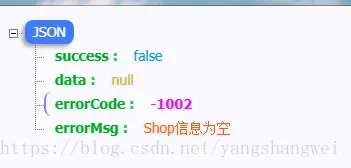
如果从shop列表页面进入后,然后再访问上述URL ,可以得到如下返回,JSON类型的数据
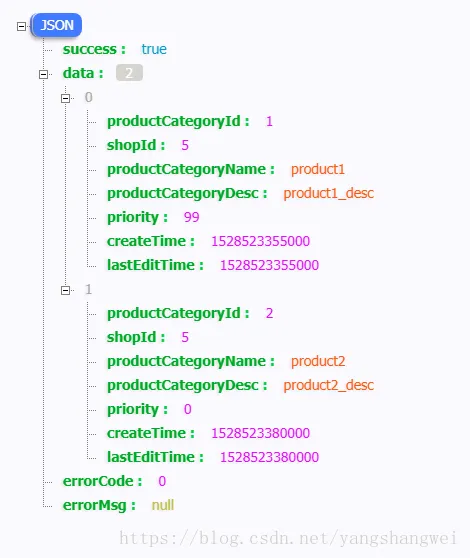
View层
根据控制层的路由规则以及viewResolver

需要在shop目录下编写 productcategorymanage.html
productcategorymanage.html
<!DOCTYPE html>
<html>
<head>
<meta charset="utf-8">
<meta http-equiv="X-UA-Compatible" content="IE=edge">
<title>商品分类</title>
<meta name="viewport" content="initial-scale=1, maximum-scale=1">
<link rel="shortcut icon" href="/o2o/favicon.ico">
<meta name="apple-mobile-web-app-capable" content="yes">
<meta name="apple-mobile-web-app-status-bar-style" content="black">
<link rel="stylesheet"
  href="//g.alicdn.com/msui/sm/0.6.2/css/sm.min.css">
<link rel="stylesheet"
  href="//g.alicdn.com/msui/sm/0.6.2/css/sm-extend.min.css">
<!-- 自定义的CSS -->
<link rel="stylesheet"
  href="../resources/css/shop/productcategorymanage.css">
</head>
<body>
  <header class="bar bar-nav">
    <h1 class="title">商品分类</h1>
  </header>
  <div class="content">
    <div class="content-block">
      <div class="row row-product-category">
        <div class="col-33">商品目录</div>
        <div class="col-33">优先级</div>
        <div class="col-33">操作</div>
      </div>
      <!-- 通过js从后台加载数据,动态的添加内容 -->
      <div class="product-categroy-wrap"></div>
    </div>
    <!-- 预占两个按钮,后续完善 -->
    <div class="content-block">
      <div class="row">
        <div class="col-50">
          <a href="#" class="button button-big button-fill button-success"
            id="new">新增</a>
        </div>
        <div class="col-50">
          <a href="#" class="button button-big button-fill" id="submit">提交</a>
        </div>
      </div>
    </div>
  </div>
  <script type='text/javascript'
    src='//g.alicdn.com/sj/lib/zepto/zepto.min.js' charset='utf-8'></script>
  <script type='text/javascript'
    src='//g.alicdn.com/msui/sm/0.6.2/js/sm.min.js' charset='utf-8'></script>
  <script type='text/javascript'
    src='//g.alicdn.com/msui/sm/0.6.2/js/sm-extend.min.js' charset='utf-8'></script>
  <script type='text/javascript' src='../resources/js/common/common.js'
    charset='utf-8'></script>
  <script type='text/javascript'
    src='../resources/js/shop/productcategorymanage.js' charset='utf-8'></script>
</body>
</html>
productcategorymanage.js
$(function () {
    var shopId = getQueryString("shopId");
    var productCategoryURL = '/o2o/shopadmin/getproductcategorybyshopId?shopId=' + shopId;
    $.getJSON(productCategoryURL,function(data){
      if (data.success) {
      var dataList = data.data;
      $('.product-categroy-wrap').html('');
      var tempHtml = '';
      dataList.map(function(item, index) {
            tempHtml += ''
                + '<div class="row row-product-category now">'
                + '<div class="col-33 product-category-name">'
                + item.productCategoryName
                + '</div>'
                + '<div class="col-33">'
                + item.priority
                + '</div>'
                + '<div class="col-33"><a href="#" class="button delete" data-id="'
                + item.productCategoryId
                + '">删除</a></div>' + '</div>';
          });
      $('.product-categroy-wrap').append(tempHtml);
    }
    });
});
productcategorymanage.css
.row-product-category {
    border: 1px solid #999;
    padding: .5rem;
    border-bottom: none;
}
.row-product-category:last-child {
    border-bottom: 1px solid #999;
}
.category-input {
    border: none;
    background-color: #eee;
}
.product-category-name {
    white-space: nowrap;
    overflow-x: scroll;
}
运行测试
可以通过前台debug和后台debug的方式,一步步的联调,会得到如下结果。
Github地址
代码地址: https://github.com/yangshangwei/o2o