- 拓扑设计
- 拓扑介绍
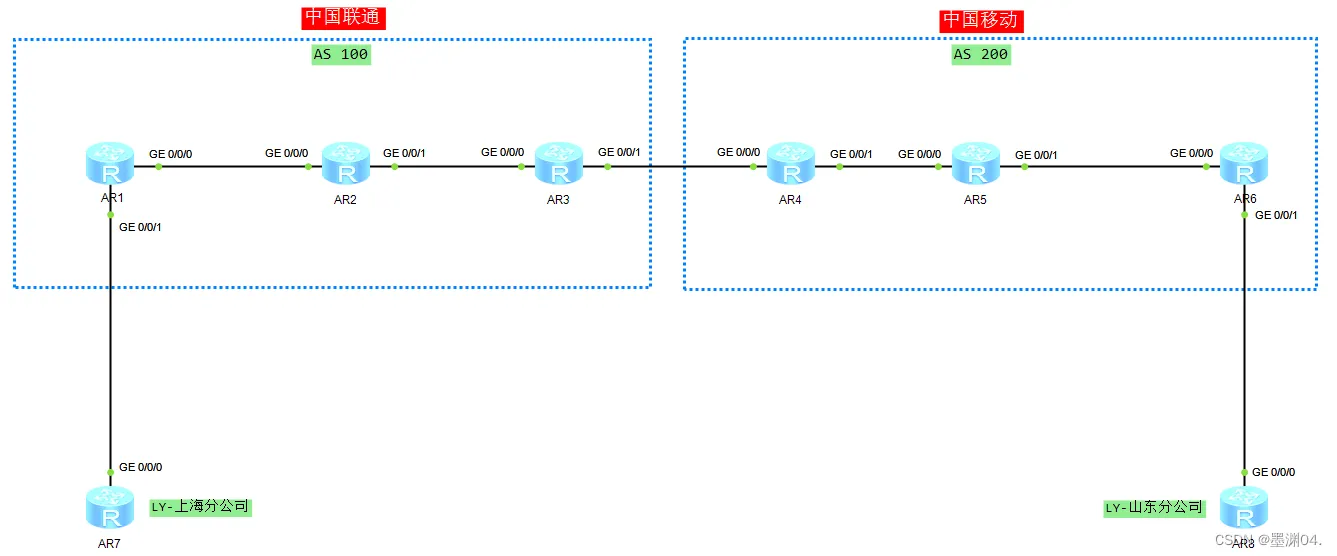
如图,上海分公司与山东分公司之间为保证业务可以互通,需要使用MPLS VPN技术进行连接。且为了使设备减轻压力,只有R1与R6设备需要建立VPN实例且运行MP-BGP协议,因为网络需要经过联通与移动两个AS域,所以使用MPLS VPN OptionC方案来进行配置。
- 数据配置
R1配置
ip vpn-instance vpn1
 ipv4-family
  route-distinguisher 1:1
  vpn-target 1:6 export-extcommunity
  vpn-target 6:1 import-extcommunity
#
mpls lsr-id 1.1.1.1
mpls
#
mpls ldp
#
isis 1
 is-level level-2
 cost-style wide
 network-entity 49.0000.0000.0001.00
#
interface GigabitEthernet0/0/0
 ip binding vpn-instance vpn1
 ip address 17.1.1.1 255.255.255.0
 ospf enable 1 area 0.0.0.0
#
interface GigabitEthernet0/0/1
 ip address 12.1.1.1 255.255.255.0
 isis enable 1
 mpls
 mpls ldp
#
interface LoopBack0
 ip address 1.1.1.1 255.255.255.255
 isis enable 1
#
bgp 100
 peer 3.3.3.3 as-number 100
 peer 3.3.3.3 connect-interface LoopBack0
 peer 6.6.6.6 as-number 200
 peer 6.6.6.6 ebgp-max-hop 255
 peer 6.6.6.6 connect-interface LoopBack0
 #
 ipv4-family unicast
  undo synchronization
  peer 3.3.3.3 enable
  peer 3.3.3.3 label-route-capability
  peer 6.6.6.6 enable
 #
 ipv4-family vpnv4
  policy vpn-target
  peer 6.6.6.6 enable
 #
 ipv4-family vpn-instance vpn1
  import-route ospf 1
#
ospf 1 vpn-instance vpn1
import-route bgp
 area 0.0.0.0
R2配置
mpls lsr-id 2.2.2.2
mpls
#
mpls ldp
#
isis 1
 is-level level-2
 cost-style wide
 network-entity 49.0000.0000.0002.00
#
interface GigabitEthernet0/0/0
 ip address 12.1.1.2 255.255.255.0
 isis enable 1
 mpls
 mpls ldp
#
interface GigabitEthernet0/0/1
 ip address 23.1.1.2 255.255.255.0
 isis enable 1
 mpls
 mpls ldp
#
interface LoopBack0
 ip address 2.2.2.2 255.255.255.255
 isis enable 1
R3配置
mpls lsr-id 3.3.3.3
mpls
#
mpls ldp
#
isis 1
 is-level level-2
 cost-style wide
 network-entity 49.0000.0000.0003.00
#
interface GigabitEthernet0/0/0
 ip address 23.1.1.3 255.255.255.0
 isis enable 1
 mpls
 mpls ldp
#
interface GigabitEthernet0/0/1
 ip address 34.1.1.3 255.255.255.0
 mpls
#
interface LoopBack0
 ip address 3.3.3.3 255.255.255.255
 isis enable 1
#
bgp 100
 peer 1.1.1.1 as-number 100
 peer 1.1.1.1 connect-interface LoopBack0
 peer 34.1.1.4 as-number 200
 #
 ipv4-family unicast
  undo synchronization
  network 1.1.1.1 255.255.255.255
  peer 1.1.1.1 enable
  peer 1.1.1.1 route-policy 2 export
  peer 1.1.1.1 label-route-capability
  peer 34.1.1.4 enable
  peer 34.1.1.4 route-policy 1 export
  peer 34.1.1.4 label-route-capability
#
route-policy 1 permit node 10
 if-match ip-prefix 1.1.1.1
 apply mpls-label
#
route-policy 2 permit node 10
 if-match mpls-label
 apply mpls-label
R4配置
mpls lsr-id 4.4.4.4
mpls
#
mpls ldp
#
isis 1
 is-level level-2
 cost-style wide
 network-entity 50.0000.0000.0004.00
interface GigabitEthernet0/0/0
 ip address 34.1.1.4 255.255.255.0
 mpls
#
interface GigabitEthernet0/0/1
 ip address 45.1.1.4 255.255.255.0
 isis enable 1
 mpls
 mpls ldp
#
interface LoopBack0
 ip address 4.4.4.4 255.255.255.255
 isis enable 1
#
bgp 200
 peer 6.6.6.6 as-number 200
 peer 6.6.6.6 connect-interface LoopBack0
 peer 34.1.1.3 as-number 100
 #
 ipv4-family unicast
  undo synchronization
  network 6.6.6.6 255.255.255.255
  peer 6.6.6.6 enable
  peer 6.6.6.6 route-policy 2 export
  peer 6.6.6.6 label-route-capability
  peer 34.1.1.3 enable
  peer 34.1.1.3 route-policy 1 export
  peer 34.1.1.3 label-route-capability
#
route-policy 2 permit node 10
 if-match mpls-label
 apply mpls-label
#
route-policy 1 permit node 10
 if-match ip-prefix 6.6.6.6
 apply mpls-label
#
ip ip-prefix 6.6.6.6 index 10 permit 6.6.6.6 32
R5配置
mpls lsr-id 5.5.5.5
mpls
#
mpls ldp
#
isis 1
 is-level level-2
 cost-style wide
 network-entity 50.0000.0000.0005.00
#
interface GigabitEthernet0/0/0
 ip address 45.1.1.5 255.255.255.0
 isis enable 1
 mpls
 mpls ldp
#
interface GigabitEthernet0/0/1
 ip address 56.1.1.5 255.255.255.0
 isis enable 1
 mpls
 mpls ldp
#
interface LoopBack0
 ip address 5.5.5.5 255.255.255.255
 isis enable 1