前言
为了方便前端的测试人员测试我编写的接口,之前我特地去学习使用了一下swagger这个工具,但是自己使用起来感觉很不错,但是过了一段时间之后,我高高兴兴地让我前端的同事来用这玩意儿进行测试的时候,竟然翻车了.说实话,但是自己是真特么尴尬.
之后自己在改的过程中还是遇到了很多的问题,这些问题有之前自己碰到过,但是自己当初自己当初根本就没有好好考虑过为什么要这么做,导致这次自己在解决的过程中碰壁十分严重.
如果想要看一开始如何配置swagger的话,可以去看我之前的这两篇文章.
SSM整合Swagger
前后端接口测试神器Swagger基本使用
404问题
这个问题相对来说还是比较好解决的,但是由于我自己之前根本就没有好好考虑过,所以也卡了很久.
其实404问题很简单,说白了就是没有匹配到我们所需要的资源,只要我们将我们需要的资源重新匹配进去就行了,这里网上的很多解决方案都是提示大家在 springmvc的配置文件 里面添加以下这几行代码就行了
 <mvc:resources mapping="swagger-ui.html" location="classpath:/META-INF/resources/" />
 <mvc:resources mapping="/webjars/**" location="classpath:/META-INF/resources/webjars/" />
但是因为自己是SSM框架的项目,
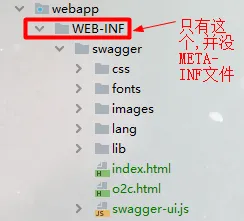
我自己看了看我的项目路径中好像没有 /META-INF/resources/ 这个路径所以,我就将这个路径改成了这个 /WEB-INF/swagger/ ,嘿嘿,当初我这样改完还感觉我还挺聪明,没想着照抄,但是后来自己测试了半天,发现根本就没什么用,页面还是一是报404错误,之后我找了半天终于找了一篇博客说清楚了,其实这里的路径并不是指我们的项目的路径,而是指我们对应的依赖下的路径,这里看下图,就能理解了.
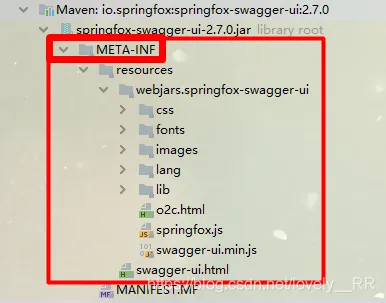
所以解决问题的时候还是要多深究一下,如果你是springboot的项目出现404错误,就需要在创建一个WebMvcConfig继承WebMvcConfigurerAdapter,然后添加以下的代码即可
@Configuration
public class WebMvcConfig extends WebMvcConfigurerAdapter {
    @Override
    public void addResourceHandlers(ResourceHandlerRegistry registry) {
        registry.addResourceHandler("swagger-ui.html")
                .addResourceLocations("classpath:/META-INF/resources/");
        registry.addResourceHandler("/webjars")
                .addResourceLocations("classpath:/META-INF/resources/webjars/");
    }
    @Override
    public void configureDefaultServletHandling(DefaultServletHandlerConfigurer configurer) {
        configurer.enable();
    }
}
弹窗问题
如果你的项目运用了shiro或springsecurity等安全框架的,相信你应该知道我要说什么了,很明显你的资源肯定会被拦截掉,所以我们要将相应的资源打开,这里有两种
- 配置文件时通过 .xml 文件编写的
这里我们就只需要在过滤器链中添加以下代码即可
/v2/api-docs = anon
/swagger-resources/configuration/ui = anon
/swagger-resources = anon
/swagger-resources/configuration/security = anon
/swagger-ui.html = anon
/webjars/** = anon
配置文件通过 .class 文件编写
就需要在配置文件中添加以下代码
public void configure(WebSecurity web)throws Exception{
web.ignoring().antMatchers("/v2/api-docs",//swagger api json
                            "/swagger-resources/configuration/ui",//用来获取支持的动作
                            "/swagger-resources",//用来获取api-docs的URI
                            "/swagger-resources/configuration/security",//安全选项
                            "/swagger-ui.html",
                            "/webjars/**").permitAll()
}
而且我建议你们使用2.7.0版本的Swagger,因为经过我自己的实践后发现2.9.2版本的确存在以下bug,我使用2.9.2的版本仍然出现弹窗,使用2.7.0版本后,问题成功解决.
跨域问题
因为毕竟我们的接口主要是给前端的测试人员用的,所以肯定是要在他的电脑上访问我们的文件的,所以必须要解决跨域的问题,这里主要也是两种
springboot项目
我们只需要在你的web配置文件中添加以下代码就能实现跨域
@Override
    public void addInterceptors(InterceptorRegistry registry) {
        // 添加拦截接口请求处理,
//        registry.addInterceptor(loginInterceptor).addPathPatterns("/api/**");
    }
    /**
     * 拦截后的跨域解决
     *
     * @param registry
     */
    @Override
    public void addCorsMappings(CorsRegistry registry) {
        registry.addMapping("/**")
                .allowCredentials(true)
                .allowedHeaders("*")
                .allowedOrigins("*")
                .allowedMethods("GET",
                "POST", "PUT", "OPTIONS");
    }
    /**
     * 处理拦截前处理检测 授权跨域问题
     *
     * @return
     */
    @Bean
    public CorsFilter corsFilter() {
        UrlBasedCorsConfigurationSource source = new UrlBasedCorsConfigurationSource();
        source.registerCorsConfiguration("/**", corsConfig());
        return new CorsFilter(source);
    }
    /**
     * @return
     */
    private CorsConfiguration corsConfig() {
        CorsConfiguration corsConfiguration = new CorsConfiguration();
        // 请求常用的三种配置,*代表允许所有,当时你也可以自定义属性(比如header只能带什么,只能是post方式等等)
        corsConfiguration.addAllowedOrigin("*");
        corsConfiguration.addAllowedHeader("*");
        corsConfiguration.addAllowedMethod("*");
        corsConfiguration.setAllowCredentials(true);
        corsConfiguration.setMaxAge(3600L);
        return corsConfiguration;
    }
SSM项目
SSM项目的步骤相对多几步,
添加依赖
<dependency>
      <groupId>com.thetransactioncompany</groupId>
      <artifactId>cors-filter</artifactId>
      <version>2.5</version>
    </dependency>
创建关于跨域的配置文件,然后添加下面的代码,
@Configuration
public class InterceptorConfig extends WebMvcConfigurationSupport {
    @Override
    protected void addInterceptors(InterceptorRegistry registry) {
        registry.addInterceptor(authenticationInterceptor())
                .addPathPatterns("/**")
                .excludePathPatterns("/user/login")
                .excludePathPatterns("/swagger/**","/swagger-ui.html/**","/swagger-resources/**");
        super.addInterceptors(registry);
    }
    @Bean
    public ProcessInterceptor currentUserMethodArgumentResolver(){
        return new ProcessInterceptor();
    }
    @Bean
    public ProcessInterceptor authenticationInterceptor(){
        return new ProcessInterceptor();
    }
    @Override
    protected void addCorsMappings(CorsRegistry registry) {
        registry.addMapping("/**")
                .allowedOrigins("*")
                .allowCredentials(true)
                .allowedMethods("GET", "POST", "DELETE", "PUT")
                 .maxAge(3600);
        super.addCorsMappings(registry);
    }
}
之后web.xml文件中再配置跨域的过滤器即可
     <filter>
    <filter-name>CORS</filter-name>
    <filter-class>com.thetransactioncompany.cors.CORSFilter</filter-class>
    <init-param>
      <param-name>cors.allowOrigin</param-name>
      <param-value>*</param-value>
    </init-param>
    <init-param>
      <param-name>cors.supportedMethods</param-name>
      <param-value>GET, POST, HEAD, PUT, DELETE</param-value>
    </init-param>
    <init-param>
      <param-name>cors.supportedHeaders</param-name>
      <param-value>Accept, Origin, X-Requested-With, Content-Type, Last-Modified</param-value>
    </init-param>
    <init-param>
      <param-name>cors.exposedHeaders</param-name>
      <param-value>Set-Cookie</param-value>
    </init-param>
    <init-param>
      <param-name>cors.supportsCredentials</param-name>
      <param-value>true</param-value>
    </init-param>
  </filter>
  <filter-mapping>
    <filter-name>CORS</filter-name>
    <url-pattern>/*</url-pattern>
  </filter-mapping>
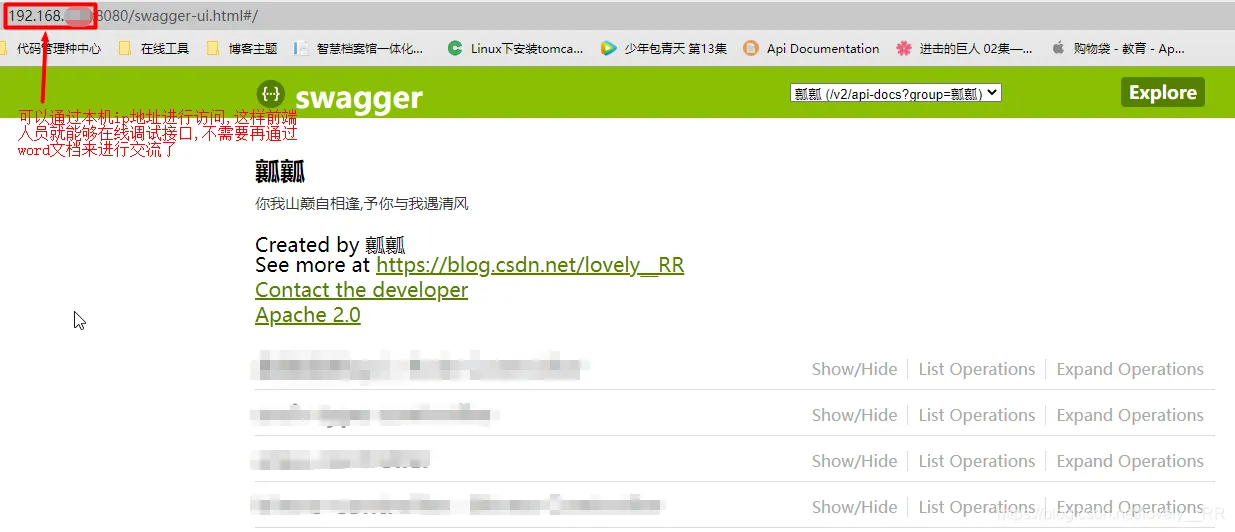
上述问题都解决完成后,应该就能正常通过本机的ip进行访问了