1.vuex是什么?
Vuex是一个为Vue.js开发的状态管理模式, 在我们之前学习Vue.js的时候,组件之间共享数据分为父传子(props),子传父($emit),兄弟组件(EventBus),但是关系复杂组件之间数据共享数据依旧很麻烦。有了vuex我们可以解决不同组件数据共享的很多复杂问题
1. state:共享数据状态,共享数据可以在组件中使用,要修改state状态必须通过mutations
2.mutations:执行同步操作,修改 state状态
3.action: 执行异步操作,异步执行后的数据提交给 mutations
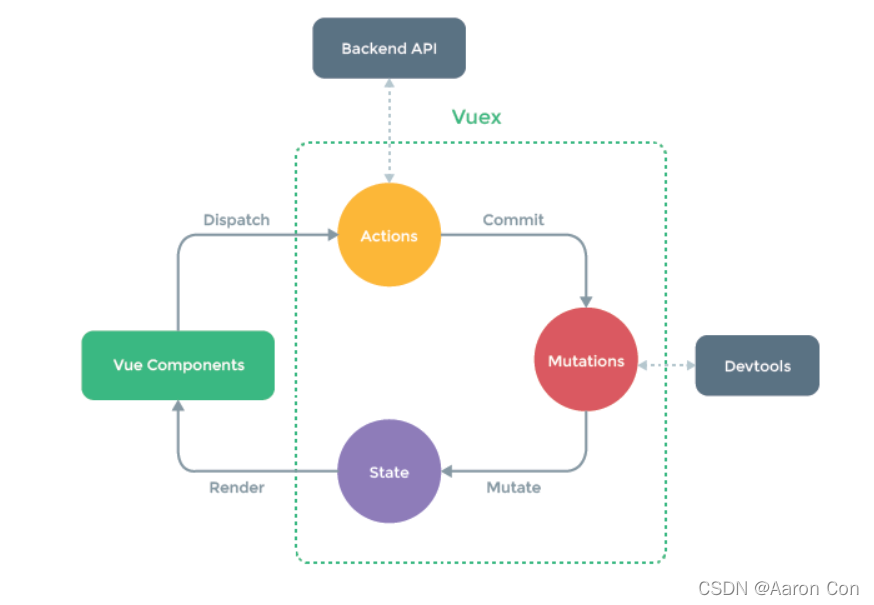
2.vuex安装初始化
第一步:安装npm i vuex --save
第二步: 在main.js中import Vuex from 'vuex'
第三步: 在main.js调用vuex的install方法Vue.use(Vuex)
第四步: 生成store实例const store = new Vuex.Store({ })
第五步: 配置store选项new Vue({ el: '#app', store })
3.vuex使用(state)
定义 state
const store = new Vuex.Store({
  state: {
    // 全局共享数据
    count: 0
  }
})
获取数据
- 原始形式 - 插值表达式
<div> state 的数据是: {{ $store.state.count }} <div>
- 计算属性 - computed
<div> state 的数据是: {{ count }} <div>
computed: {
  count () {
    return this.$store.state.count
  }
}
- 辅助函数 - mapState
<div> state 的数据是: {{ count }} <div>
import { mapState } from 'vuex'
computed: {
  ...mapState(['count'])
}
4.vuex的使用(mutations)
定义 mutations
const store = new Vuex.Store({
  state: {
    count: 0
  },
  mutations: {
  }
})
书写 mutations修改state的方法
mutations: {
  // 第一个参数为当前 store中state属性
  // 第二个参数为载荷,可以通过调用时传递参数过来
  addCount (state, payload) {
    state.count += payload
  }
}
调用 mutations
- 原始形式 - $store
<template>
  <button @click="addCount">+1</button>
</template>
<script>
export default {
  methods: {
    addCount() {
      // 通过commit提交muations
      // 10 表示传递到 payload的实参
      this.$store.commit('addCount', 10)
    }
  }
}
</script>
- 辅助函数 - mapMutations
<template>
  <button @click="addCount(10)">+10</button>
</template>
<script>
export default {
  import { mapMutations } from  'vuex'
  methods: {
    ...mapMutations(['addCount])
  }
}
</script>
5.vuex的使用(actions)
定义 actions
actions: {
  // context 表示当前 store 的实例
  getAsyncCount (context) {
    setTimeout(function(){
      context.commit('addCount', 123)
    }, 1000)
  }
}
调用 actions
- 原始调用 - $store
addAsyncCount () {
  this.$store.dispatch('getAsyncCount', 123)
}
- 辅助函数 - mapActions
<button @click="getAsyncCount(100)">异步</button>
import { mapActions } from 'vuex'
methods: {
   ...mapActions(['getAsyncCount'])
}
6.vuex的使用(getters)
定义gettters
state: {
  list: [1,2,3,4,5,6,7,8,9]
}
getters: {
  filterList: state => state.list.filter(item => item > 5)
}
使用 getters
- 原始方法 - $store
<div>{{ $store.getters.filterList }}</div>
- 辅助函数 - mapGetters
<div>{{ filterList }}</div>
import { mapGetters } from 'vuex'
computed: {
  ...mapGetters(['filterList'])
}
7.vuex的使用(Module)
前面使用的这些都是全局性的共享, 如果使用这种方法, 当项目规模大时, vuex会越来越臃肿, 并且难以维护。vuex模块化可以解决这个问题。
应用:
定义两个模块 user 和 login
const store = new Vuex.Store({
  modules: {
    user: {
      state: {
        name: 'xiaoming'
      }
    },
    login: {
      state: {
        token: '123'
      }
    }
  }
})
使用子模块
- 通过 $store.state.模块名.属性名
<div>用户名: {{ $store.state.user.name }}<div>
<div>token: {{ $store.state.login.token }}<div>
// 优化
getters: {
  name: state => state.user.name,
  token: state = > state.login.token
}
- 通过 mapGetters使用
computed: {
  ...mapGetters(['name', 'token'])
}
命名空间 namespaced
默认情况下定义的模块依旧在全局共享, 这并不时我们想要的效果, 这是我们得用到namespaced给子模块加锁
给子模块加锁
login: {
  namespaced: true,
  state: {
    token: '123'
  },
  mutations: {
    updateToken(state) {
      state.token = 678
    }
  }
}
给模块加锁后 调用 action/mutations时要带上属性名路径
- 直接调用-带上模块的属性名路径
test () {
  this.$store.commit('login/updateToken') // 直接调用方法
}
- 辅助函数-带上模块的属性名路径
methods: {
       ...mapMutations(['login/updateToken']),
       test () {
           this['user/updateToken']()
       }
   }
  <button @click="test">修改token</button>
createNamespacedHelpers
import { mapGetters, createNamespacedHelpers } from 'vuex'
const { mapMutations } = createNamespacedHelpers('login')
<button @click="updateToken">修改token2</button>