🎉 前言
本文来讲解MyBatis中的的重点内容:配置文件 和 映射文件
学完本节,将会理解和掌握配置、映射文件
个人主页:艺杯羹🌿
系列专栏:MyBatis🚀
1. 配置文件
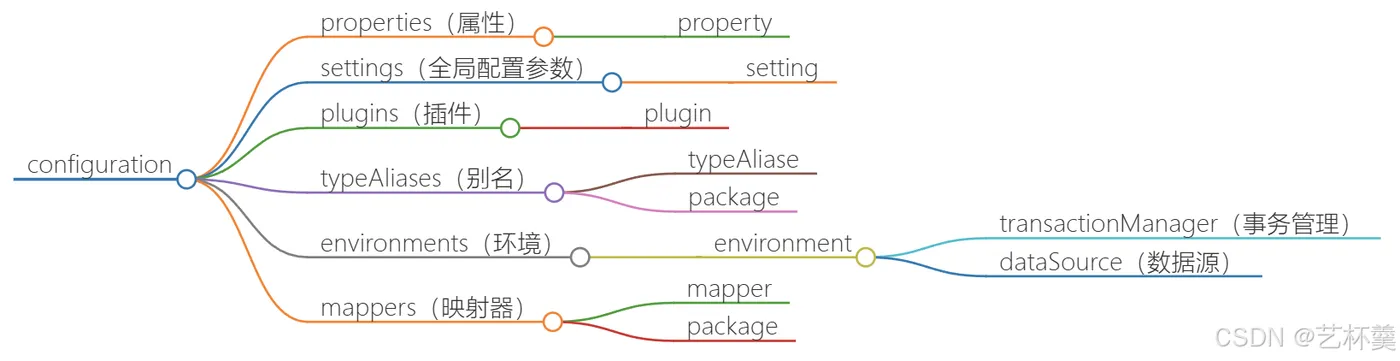
先来看看配置文件的结构
-configuration
    -properties(属性)
        -property
    -settings(全局配置参数)
        -setting
    -plugins(插件)
        -plugin
    -typeAliases(别名)
        -typeAliase
        -package
    -environments(环境)
        -environment
            -transactionManager(事务管理)
            -dataSource(数据源)
    -mappers(映射器)
        -mapper
        -package
1.1. properties
属性值定义
properties标签中可以定义属性值,也可以引入外部配置文件
无论是内部定义还是外部引入,都可以使用 ${name}获取值
可以动态的配置数据源
例如:我们可以将数据源配置写到外部的 db.properties 中,再使用properties标签引入外部配置文件,这样可以做到动态配置数据源
下面来演示一下
1.1.1. 编写db.properties
jdbc.driver=com.mysql.jdbc.Driver
jdbc.url=jdbc:mysql://localhost:3306/mybatis
jdbc.username=root
jdbc.password=root
1.1.2. 在配置文件中引入db.properties
-- 关键一句
<properties resource="db.properties"></properties>
<environments default="mysql">
  <environment id="mysql">
    <transactionManager type="JDBC"></transactionManager>
    <dataSource type="POOLED">
      <property name="driver" value="${jdbc.driver}"/>
      <property name="url" value="${jdbc.url}"/>
      <property name="username" value="${jdbc.username}"/>
      <property name="password" value="${jdbc.password}"/>
    </dataSource>
  </environment>
</environments>
1.2. settings
是配置MyBatis运行时的一些行为的 例如 缓存、延迟加载、命名规则等一系列控制性参数 后期我们会使用该标签配置缓存和延迟加载等。
1.3. plugins
是配置MyBatis插件的 插件可以增强MyBatis功能,比如进行sql增强,打印日志,异常处理等 后期我们会使用该标签配置分页插件
1.4. typeAliases
MyBatis对常用类有默认别名支持
比如java.lang.Stirng的别名为string
除此之外,我们也可以使用设置自定义别名
1.4.1. 为一个类配置别名
<typeAliases>
    <typeAlias type="全类名" alias="别名"></typeAlias>
</typeAliases>
此时我们即可在映射文件中使用自定义别名,如:
a. 配置文件
<typeAliases>
    <!--设置别名-->
    <typeAlias type="com.yibeigen.pojo.User" alias="User"> </typeAlias>
</typeAliases>
注意:要写在properties下面
b. 映射文件
<!--这里就不用写全类名了,直接写User别名即可-->
<select id="findAll" resultType="User">
   select * from user
</select>
1.4.2. 为一个所有包下的所有类配置别名
<typeAliases>
  <package name="包名"></package>
</typeAliases>
此时该包下的所有类都有了别名,别名省略包名,也就是直接写类名即可。例如:
a. 配置文件
<typeAliases>
  <package name="com.yibeigen.pojo"></package>
</typeAliases>
b. 映射文件
<!--直接写返回值类型就可以了,因为省略了包名-->
<select id="findPage2" resultType="User" parameterType="PageQuery">
   select * from user limit #{startIndex},#{pageSize}
</select>
1.5. environments
可以为MyBatis配置数据环境
1.5.1. 事务管理
<environments default="mysql">
  <environment id="mysql">
    <!--
    type的参数
    JDBC:使用JDBC的提交和回滚 MANAGED:不做事务处理
    -->
    <transactionManager type="JDBC"></transactionManager>
  </environment>
</environments>
1.5.2. 连接池
<environments default="mysql">
  <environment id="mysql">
    <transactionManager type="JDBC"></transactionManager>
    <!-- 连接池设置 -->
    <dataSource type="POOLED">
      <!-- 数据源设置... -->
    </dataSource>
  </environment>
</environments>
dataSource的type属性:
- POOLED:使用连接池管理连接,使用MyBatis自带的连接池。
- UNPOOLED:不使用连接池,直接由JDBC连接。
- JNDI:由JAVAEE服务器管理连接,如果使用Tomcat作为服务器则使用Tomcat自带的连接池管理
1.6. mappers
用于注册映射文件或持久层接口 只有注册的映射文件才能使用,共有四种方式都可以完成注册:
1.6.1. 使用相对路径注册映射文件
<mappers>
 <mapper resource="com/yibeigen/mapper/UserMapper.xml"/>
</mappers>
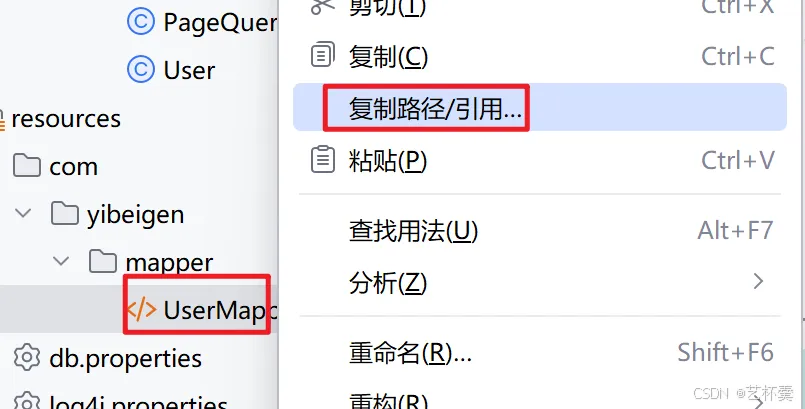
1.6.2. 使用绝对路径注册映射文件
<mappers>
  <mapper url="file:///C:\Users\a\IdeaProjects\mybatiscase\mybatisDemo1\src\main\resources\com\itbaizhan\mapper\UserMapper.xml"/>
</mappers>
1.6.3. 注册持久层接口
<mappers>
  <mapper class="com.yibeigen.mapper.UserMapper"/>
</mappers>
1.6.4. 注册一个包下的所有持久层接口
<mappers>
  <package name="com.yibeigen.mapper"/>
</mappers>
也就是,要么注册接口,要么注册xml文件
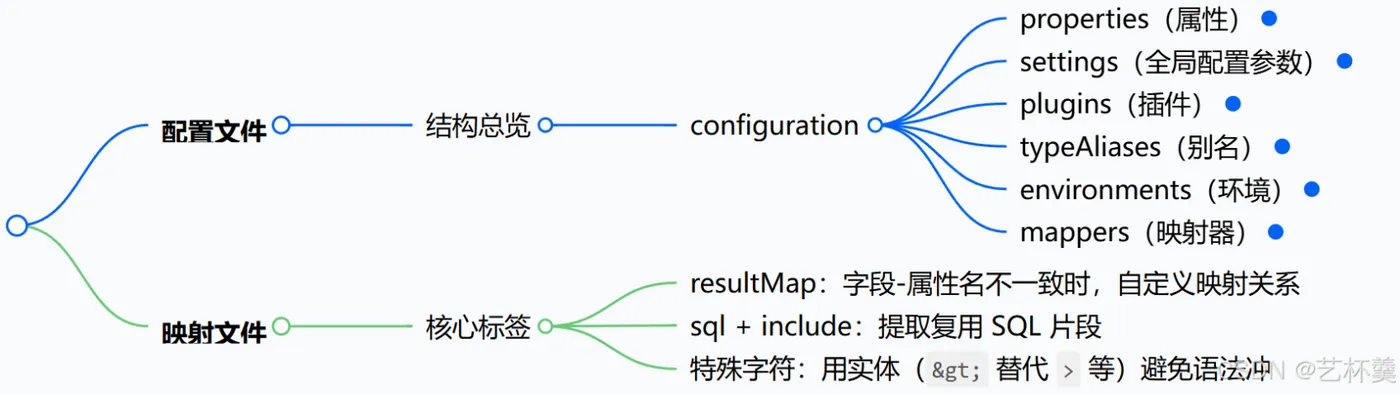
2. 映射文件
MyBatis映射文件中除了、、、外,还有一些标签可以使用:
2.1. resultMap
标签的作用的自定义映射关系
MyBatis可以将数据库结果集封装到对象中,是因为结果集的列名和对象属性名相同
那如果结果集合对象属性不相同时,MyBatis就不知道怎么配对了,所以就要用到resultMAp标签来做映射
<select id="findAll" resultType="com.itbaizhan.pojo.Teacher">
   select tid as id,tname as teacherName from teacher;
</select>
MyBatis 默认通过 字段名与属性名完全一致 来自动映射
如果不一致,对应的属性将被设置为 null(不会报错,但数据会丢失)
- tid as id:把表中的 tid 字段重命名为 id,这样就能和 Teacher 类中的 id 属性相对应。
- tname as teacherName:将 tname 字段重命名为 teacherName,以和 Teacher 类里的 teacherName 属性相匹配
自定义映射关系
在映射文件中,使用自定义映射关系:
<!-- id:自定义映射名 type:自定义映射的对象类型  -->
<resultMap id="teacherMapper" type="com.itbaizhan.pojo.Teacher">
  <!-- id定义主键列  property:POJO属性名 column:数据库列名  -->
  <id property="id" column="tid"></id>
  <!-- result定义普通列  property:POJO属性名 column:数据库列名  -->
  <result property="teacherName" column="tname"></result>
</resultMap>
在标签中,使用resultMap属性代替resultType属性,使用自定义映射关系
<select id="findAll" resultMap="teacherMapper">
   select * from teacher
</select>
2.2. sql、include
用来定义可重用的Sql片段,通过 引入该片段 如:Sql语句的查询字段起与POJO属性相同的别名,该Sql片段就可以重用
<sql id="selectAllField">
   select tid as id,tname as teacherName
</sql>
<select id="findAll" resultType="com.yibeigen.pojo.Teacher">
  <include refid="selectAllField"></include>
   from teacher;
</select>
<select id="findById" resultType="com.itbaizhan.pojo.Teacher">
  <include refid="selectAllField"></include>
   from teacher where tid = #{id}
</select>
2.3. 特殊字符处理
在Mybatis映射文件中尽量不要使用一些特殊字符,如:<,>等。
我们可以使用符号的实体来表示:
符号 |
实体 |
< |
< |
> |
> |
& |
& |
' |
' |
" |
" |
例如:
<select id="findById2" resultType="com.yibeigen.pojo.Teacher"> <include refid="selectAllField"></include> from teacher where tid > #{id} </select>
3. 总结
到此,就结束了配置和映射文件的学习了,希望对你有所帮助 (๑•̀ㅂ•́)و✧