1. 限流核心概念
1.1 什么是限流?
限流(Rate Limiting)是通过控制单位时间内系统能够处理的请求数量,来保护系统免受过载流量冲击的技术手段。
// 限流的现实比喻
public class RateLimitingAnalogy {

    /**
     * 交通系统 vs 限流系统
     */
    public class TrafficSystemComparison {
        // 交通信号灯 → 限流控制器
        // 高速公路收费站 → 令牌桶算法
        // 车流量统计 → 请求计数器
        // 交通管制 → 限流策略
    }

    /**
     * 没有限流的风险
     */
    public class WithoutRateLimiting {
        // 1. 资源耗尽:突发流量耗尽CPU、内存、数据库连接
        // 2. 服务雪崩:一个服务崩溃引发连锁反应
        // 3. 安全风险:DDoS攻击导致服务不可用
        // 4. 用户体验:系统响应缓慢或完全不可用
    }
}
1.2 限流的核心目标

2. 限流算法深度解析
2.1 主流限流算法对比
算法 |
原理 |
优点 |
缺点 |
适用场景 |
固定窗口 |
固定时间窗口计数 |
实现简单 |
临界问题、不够平滑 |
简单限流 |
滑动窗口 |
多个子窗口统计 |
相对精确 |
实现复杂 |
精确控制 |
漏桶算法 |
恒定速率处理 |
流量整形 |
无法应对突发 |
平滑流量 |
令牌桶算法 |
按速率生成令牌 |
允许突发 |
实现复杂 |
大部分场景 |
自适应限流 |
动态调整阈值 |
智能调节 |
算法复杂 |
动态环境 |
2.2 限流算法架构
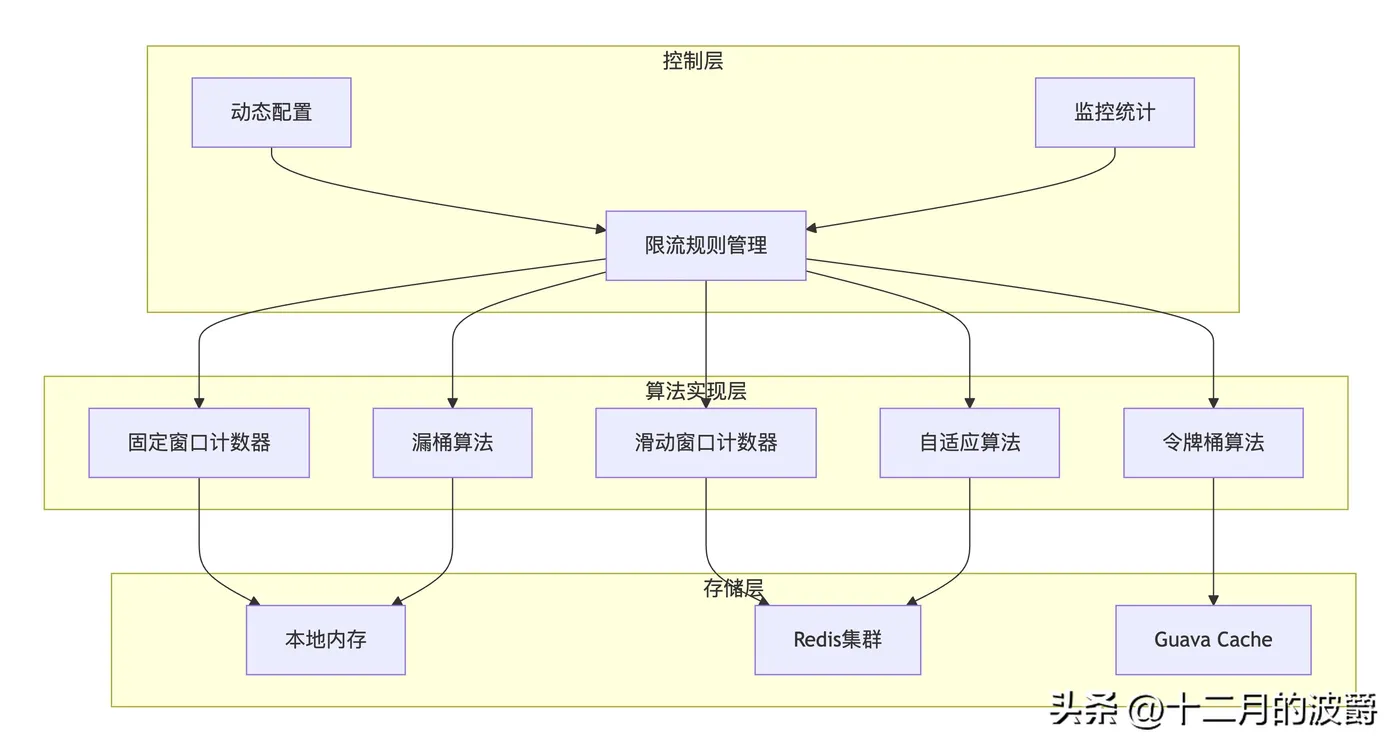
3. Spring Cloud Alibaba Sentinel 限流实战
3.1 环境准备与依赖配置
<!-- pom.xml Sentinel限流依赖 -->
<dependencies>
    <!-- Sentinel Core -->
    <dependency>
        <groupId>com.alibaba.csp</groupId>
        <artifactId>sentinel-core</artifactId>
        <version>1.8.6</version>
    </dependency>

    <!-- Sentinel Spring Cloud Integration -->
    <dependency>
        <groupId>com.alibaba.cloud</groupId>
        <artifactId>spring-cloud-starter-alibaba-sentinel</artifactId>
        <version>2022.0.0.0</version>
    </dependency>

    <!-- Sentinel Datasource Nacos -->
    <dependency>
        <groupId>com.alibaba.csp</groupId>
        <artifactId>sentinel-datasource-nacos</artifactId>
        <version>1.8.6</version>
    </dependency>

    <!-- Spring Boot Web -->
    <dependency>
        <groupId>org.springframework.boot</groupId>
        <artifactId>spring-boot-starter-web</artifactId>
    </dependency>

    <!-- Spring Boot Actuator -->
    <dependency>
        <groupId>org.springframework.boot</groupId>
        <artifactId>spring-boot-starter-actuator</artifactId>
    </dependency>

    <!-- AOP -->
    <dependency>
        <groupId>org.springframework.boot</groupId>
        <artifactId>spring-boot-starter-aop</artifactId>
    </dependency>
</dependencies>
3.2 Sentinel基础限流配置
# application.yml Sentinel配置
spring:
  application:
    name: order-service
  cloud:
    sentinel:
      enabled: true
      eager: true
      transport:
        dashboard: 192.168.1.100:8080  # Sentinel控制台
        port: 8719
      # 限流规则数据源
      datasource:
        flow-rule:
          nacos:
            server-addr: 192.168.1.100:8848
            dataId: ${spring.application.name}-flow-rules
            groupId: SENTINEL_GROUP
            rule-type: flow
            namespace: sentinel-config
# 日志配置
logging:
  level:
    com.alibaba.csp.sentinel: INFO
    org.springframework.cloud.alibaba.sentinel: DEBUG
# 监控端点
management:
  endpoints:
    web:
      exposure:
        include: sentinel,health,metrics
  endpoint:
    sentinel:
      enabled: true
3.3 基础限流实战
// 订单服务限流控制器
@RestController
@RequestMapping("/api/orders")
@Slf4j
public class OrderRateLimitController {

    @Autowired
    private OrderService orderService;

    /**
     * 创建订单 - QPS限流
     */
    @PostMapping
    @SentinelResource(
        value = "createOrder",
        blockHandler = "createOrderBlockHandler",
        fallback = "createOrderFallback",
        blockHandlerClass = OrderRateLimitHandlers.class
    )
    public ResponseEntity<OrderDTO> createOrder(@RequestBody @Valid OrderCreateRequest request) {
        log.info("创建订单请求: 用户{}, 商品{}, 数量{}",
            request.getUserId(), request.getProductId(), request.getQuantity());

        OrderDTO order = orderService.createOrder(request);
        return ResponseEntity.ok(order);
    }

    /**
     * 查询订单 - 线程数限流
     */
    @GetMapping("/{orderId}")
    @SentinelResource(
        value = "getOrderDetail",
        blockHandler = "getOrderBlockHandler",
        fallback = "getOrderFallback"
    )
    public ResponseEntity<OrderDTO> getOrder(@PathVariable String orderId) {
        log.info("查询订单详情: {}", orderId);

        OrderDTO order = orderService.getOrderDetail(orderId);
        return ResponseEntity.ok(order);
    }

    /**
     * 订单列表 - 关联限流
     */
    @GetMapping
    @SentinelResource(
        value = "listOrders",
        blockHandler = "listOrdersBlockHandler"
    )
    public ResponseEntity<PageResult<OrderDTO>> listOrders(
            @RequestParam(defaultValue = "1") int page,
            @RequestParam(defaultValue = "20") int size) {

        log.info("查询订单列表: 第{}页, 每页{}条", page, size);

        PageResult<OrderDTO> orders = orderService.listOrders(page, size);
        return ResponseEntity.ok(orders);
    }

    // 流控异常处理
    public ResponseEntity<OrderDTO> getOrderBlockHandler(String orderId, BlockException ex) {
        log.warn("查询订单触发流控, 订单ID: {}, 规则: {}", orderId, ex.getRule());

        RateLimitResponse response = RateLimitResponse.builder()
            .code(429)
            .message("系统繁忙,请稍后重试")
            .retryAfter(5) // 5秒后重试
            .build();

        return ResponseEntity.status(HttpStatus.TOO_MANY_REQUESTS).body(null);
    }

    public ResponseEntity<OrderDTO> getOrderFallback(String orderId, Throwable ex) {
        log.error("查询订单服务降级, 订单ID: {}", orderId, ex);
        return ResponseEntity.status(HttpStatus.SERVICE_UNAVAILABLE).body(null);
    }

    public ResponseEntity<PageResult<OrderDTO>> listOrdersBlockHandler(
            Integer page, Integer size, BlockException ex) {

        log.warn("查询订单列表触发流控, 页码: {}, 规则: {}", page, ex.getRule());

        // 返回空结果而不是错误,提升用户体验
        PageResult<OrderDTO> emptyResult = PageResult.empty();
        return ResponseEntity.ok(emptyResult);
    }
}
// 统一的限流异常处理类
@Slf4j
public class OrderRateLimitHandlers {

    /**
     * 创建订单流控处理
     */
    public static ResponseEntity<OrderDTO> createOrderBlockHandler(
            OrderCreateRequest request, BlockException ex) {

        log.warn("创建订单触发流控, 用户: {}, 规则: {}",
            request.getUserId(), ex.getRule());

        RateLimitResponse response = RateLimitResponse.builder()
            .code(429)
            .message("当前下单人数过多,请稍后重试")
            .retryAfter(10)
            .suggestTime(LocalDateTime.now().plusSeconds(30))
            .build();

        return ResponseEntity.status(HttpStatus.TOO_MANY_REQUESTS).body(null);
    }

    /**
     * 创建订单降级处理
     */
    public static ResponseEntity<OrderDTO> createOrderFallback(
            OrderCreateRequest request, Throwable ex) {

        log.error("创建订单服务降级, 请求: {}", request, ex);

        // 根据异常类型提供不同的降级策略
        if (ex instanceof TimeoutException) {
            return ResponseEntity.status(HttpStatus.REQUEST_TIMEOUT)
                .body(null);
        } else if (ex instanceof ServiceUnavailableException) {
            return ResponseEntity.status(HttpStatus.SERVICE_UNAVAILABLE)
                .body(null);
        } else {
            return ResponseEntity.status(HttpStatus.INTERNAL_SERVER_ERROR)
                .body(null);
        }
    }
}
// 限流响应封装
@Data
@Builder
@AllArgsConstructor
@NoArgsConstructor
public class RateLimitResponse {
    private int code;
    private String message;
    private Integer retryAfter; // 重试等待时间(秒)
    private LocalDateTime suggestTime; // 建议重试时间
    private String requestId;

    @Builder.Default
    private long timestamp = System.currentTimeMillis();
}
3.4 高级限流规则配置
// Sentinel限流规则配置
@Component
@Slf4j
public class SentinelRateLimitConfig {

    /**
     * 初始化限流规则
     */
    @PostConstruct
    public void initFlowRules() {
        List<FlowRule> rules = new ArrayList<>();

        // 1. 创建订单 - QPS限流,预热模式
        FlowRule createOrderRule = new FlowRule();
        createOrderRule.setResource("createOrder");
        createOrderRule.setGrade(RuleConstant.FLOW_GRADE_QPS);
        createOrderRule.setCount(100); // 阈值100 QPS
        createOrderRule.setControlBehavior(RuleConstant.CONTROL_BEHAVIOR_WARM_UP);
        createOrderRule.setWarmUpPeriodSec(10); // 预热10秒
        createOrderRule.setLimitApp(RuleConstant.LIMIT_APP_DEFAULT);
        rules.add(createOrderRule);

        // 2. 查询订单 - QPS限流,排队等待
        FlowRule getOrderRule = new FlowRule();
        getOrderRule.setResource("getOrderDetail");
        getOrderRule.setGrade(RuleConstant.FLOW_GRADE_QPS);
        getOrderRule.setCount(500); // 阈值500 QPS
        getOrderRule.setControlBehavior(RuleConstant.CONTROL_BEHAVIOR_RATE_LIMITER);
        getOrderRule.setMaxQueueingTimeMs(1000); // 最大排队1秒
        rules.add(getOrderRule);

        // 3. 订单列表 - 线程数限流
        FlowRule listOrdersRule = new FlowRule();
        listOrdersRule.setResource("listOrders");
        listOrdersRule.setGrade(RuleConstant.FLOW_GRADE_THREAD);
        listOrdersRule.setCount(50); // 最大50个并发线程
        rules.add(listOrdersRule);

        // 4. 关联限流 - 创建订单和查询订单关联
        FlowRule relationRule = new FlowRule();
        relationRule.setResource("createOrder");
        relationRule.setGrade(RuleConstant.FLOW_GRADE_QPS);
        relationRule.setCount(50);
        relationRule.setRefResource("getOrderDetail");
        relationRule.setStrategy(RuleConstant.STRATEGY_RELATE);
        rules.add(relationRule);

        FlowRuleManager.loadRules(rules);
        log.info("初始化Sentinel限流规则完成,规则数量: {}", rules.size());
    }

    /**
     * 热点参数限流规则
     */
    @PostConstruct
    public void initParamFlowRules() {
        List<ParamFlowRule> paramRules = new ArrayList<>();

        // 商品详情热点参数限流
        ParamFlowRule productRule = new ParamFlowRule("getProductDetail")
            .setParamIdx(0) // 第一个参数(商品ID)
            .setCount(10)   // 单商品阈值10 QPS
            .setGrade(RuleConstant.FLOW_GRADE_QPS);

        // 特殊商品独立限流
        ParamFlowItem hotProduct1 = new ParamFlowItem()
            .setObject("HOT_PRODUCT_001")
            .setClassType(String.class.getName())
            .setCount(1); // 爆款商品限流1 QPS

        ParamFlowItem hotProduct2 = new ParamFlowItem()
            .setObject("HOT_PRODUCT_002")
            .setClassType(String.class.getName())
            .setCount(1);

        productRule.setParamFlowItemList(Arrays.asList(hotProduct1, hotProduct2));
        paramRules.add(productRule);

        ParamFlowRuleManager.loadRules(paramRules);
        log.info("初始化热点参数限流规则完成");
    }

    /**
     * 集群流控规则
     */
    @PostConstruct
    public void initClusterFlowRules() {
        // 集群流控配置
        ClusterFlowConfig clusterConfig = new ClusterFlowConfig();
        clusterConfig.setFlowId(1L);
        clusterConfig.setThresholdType(1);
        clusterConfig.setFallbackToLocalWhenFail(true);

        // 全局限流规则
        FlowRule clusterRule = new FlowRule();
        clusterRule.setResource("globalCreateOrder");
        clusterRule.setGrade(RuleConstant.FLOW_GRADE_QPS);
        clusterRule.setCount(1000); // 集群总阈值1000 QPS
        clusterRule.setClusterMode(true);
        clusterRule.setClusterConfig(clusterConfig);

        FlowRuleManager.loadRules(Collections.singletonList(clusterRule));
        log.info("初始化集群流控规则完成");
    }
}
// 动态规则管理器
@Service
@Slf4j
public class DynamicRateLimitManager {

    @Autowired
    private NacosConfigManager nacosConfigManager;

    /**
     * 动态更新限流规则
     */
    public void updateFlowRule(String resource, double qpsThreshold) {
        List<FlowRule> rules = FlowRuleManager.getRules();

        // 查找现有规则
        Optional<FlowRule> existingRule = rules.stream()
            .filter(rule -> rule.getResource().equals(resource))
            .findFirst();

        if (existingRule.isPresent()) {
            // 更新现有规则
            FlowRule rule = existingRule.get();
            rule.setCount(qpsThreshold);
            log.info("更新限流规则: {} -> {} QPS", resource, qpsThreshold);
        } else {
            // 创建新规则
            FlowRule newRule = new FlowRule();
            newRule.setResource(resource);
            newRule.setGrade(RuleConstant.FLOW_GRADE_QPS);
            newRule.setCount(qpsThreshold);
            rules.add(newRule);
            log.info("创建限流规则: {} -> {} QPS", resource, qpsThreshold);
        }

        FlowRuleManager.loadRules(rules);
    }

    /**
     * 根据系统负载动态调整限流阈值
     */
    @Scheduled(fixedRate = 60000) // 每分钟调整一次
    public void adaptiveRateLimit() {
        double systemLoad = getSystemLoadAverage();
        double cpuUsage = getCpuUsage();

        // 根据系统负载调整限流阈值
        if (systemLoad > 4.0 || cpuUsage > 0.8) {
            // 高负载时降低限流阈值
            updateFlowRule("createOrder", 50);
            updateFlowRule("getOrderDetail", 200);
            log.warn("系统高负载,降低限流阈值");
        } else if (systemLoad < 1.0 && cpuUsage < 0.3) {
            // 低负载时提高限流阈值
            updateFlowRule("createOrder", 200);
            updateFlowRule("getOrderDetail", 800);
            log.info("系统低负载,提高限流阈值");
        }
    }

    private double getSystemLoadAverage() {
        // 获取系统负载
        return ManagementFactory.getOperatingSystemMXBean().getSystemLoadAverage();
    }

    private double getCpuUsage() {
        // 获取CPU使用率
        com.sun.management.OperatingSystemMXBean osBean =
            (com.sun.management.OperatingSystemMXBean) ManagementFactory.getOperatingSystemMXBean();
        return osBean.getSystemCpuLoad();
    }
}
4. 自定义限流器实现
4.1 令牌桶限流器
// 令牌桶限流器实现
@Component
@Slf4j
public class TokenBucketRateLimiter {

    private final Map<String, TokenBucket> buckets = new ConcurrentHashMap<>();
    private final ScheduledExecutorService refillScheduler = Executors.newScheduledThreadPool(1);

    /**
     * 令牌桶配置
     */
    @Data
    @AllArgsConstructor
    public static class TokenBucketConfig {
        private int capacity;          // 桶容量
        private int refillTokens;      // 每次补充的令牌数
        private long refillIntervalMs; // 补充间隔(毫秒)
    }

    /**
     * 令牌桶实例
     */
    private static class TokenBucket {
        private final String key;
        private final AtomicInteger tokens;
        private final int capacity;
        private final int refillTokens;
        private final long refillIntervalMs;
        private volatile long lastRefillTime;

        public TokenBucket(String key, TokenBucketConfig config) {
            this.key = key;
            this.capacity = config.getCapacity();
            this.refillTokens = config.getRefillTokens();
            this.refillIntervalMs = config.getRefillIntervalMs();
            this.tokens = new AtomicInteger(capacity);
            this.lastRefillTime = System.currentTimeMillis();
        }

        public boolean tryAcquire(int tokensRequired) {
            refill();

            while (true) {
                int currentTokens = tokens.get();
                if (currentTokens < tokensRequired) {
                    return false;
                }

                if (tokens.compareAndSet(currentTokens, currentTokens - tokensRequired)) {
                    return true;
                }
            }
        }

        private void refill() {
            long currentTime = System.currentTimeMillis();
            long timeSinceLastRefill = currentTime - lastRefillTime;

            if (timeSinceLastRefill > refillIntervalMs) {
                int refillCount = (int) (timeSinceLastRefill / refillIntervalMs) * refillTokens;

                tokens.updateAndGet(current -> Math.min(capacity, current + refillCount));
                lastRefillTime = currentTime;

                log.debug("补充令牌: {} -> {}", key, tokens.get());
            }
        }

        public int getAvailableTokens() {
            refill();
            return tokens.get();
        }
    }

    public TokenBucketRateLimiter() {
        // 启动定时清理任务
        refillScheduler.scheduleAtFixedRate(this::cleanupIdleBuckets, 1, 1, TimeUnit.HOURS);
    }

    /**
     * 尝试获取令牌
     */
    public boolean tryAcquire(String key) {
        return tryAcquire(key, 1);
    }

    /**
     * 尝试获取指定数量的令牌
     */
    public boolean tryAcquire(String key, int tokensRequired) {
        TokenBucket bucket = buckets.computeIfAbsent(key, k ->
            new TokenBucket(k, new TokenBucketConfig(100, 10, 1000))); // 默认配置

        boolean acquired = bucket.tryAcquire(tokensRequired);

        if (!acquired) {
            log.debug("令牌桶限流: {}, 可用令牌: {}", key, bucket.getAvailableTokens());
        }

        return acquired;
    }

    /**
     * 创建自定义令牌桶
     */
    public void createBucket(String key, TokenBucketConfig config) {
        TokenBucket bucket = new TokenBucket(key, config);
        buckets.put(key, bucket);
        log.info("创建令牌桶: {}, 容量: {}", key, config.getCapacity());
    }

    /**
     * 获取可用令牌数量
     */
    public int getAvailableTokens(String key) {
        TokenBucket bucket = buckets.get(key);
        return bucket != null ? bucket.getAvailableTokens() : 0;
    }

    /**
     * 清理空闲的令牌桶
     */
    private void cleanupIdleBuckets() {
        long now = System.currentTimeMillis();
        Iterator<Map.Entry<String, TokenBucket>> iterator = buckets.entrySet().iterator();

        while (iterator.hasNext()) {
            Map.Entry<String, TokenBucket> entry = iterator.next();
            // 可以基于最后使用时间等策略清理
            // 这里简化实现
        }

        log.info("令牌桶清理完成,当前桶数量: {}", buckets.size());
    }

    @PreDestroy
    public void destroy() {
        refillScheduler.shutdown();
    }
}
// 令牌桶限流注解
@Target(ElementType.METHOD)
@Retention(RetentionPolicy.RUNTIME)
public @interface TokenBucketRateLimit {
    String key();               // 限流键
    int capacity() default 100; // 桶容量
    int refillTokens() default 10; // 每次补充令牌数
    long refillIntervalMs() default 1000; // 补充间隔毫秒
    int tokensRequired() default 1; // 每次请求需要的令牌数
    String message() default "系统繁忙,请稍后重试";
}
// 令牌桶限流切面
@Aspect
@Component
@Slf4j
public class TokenBucketRateLimitAspect {

    @Autowired
    private TokenBucketRateLimiter rateLimiter;

    /**
     * 令牌桶限流切面
     */
    @Around("@annotation(rateLimit)")
    public Object rateLimit(ProceedingJoinPoint joinPoint, TokenBucketRateLimit rateLimit) throws Throwable {
        String key = buildRateLimitKey(joinPoint, rateLimit.key());

        // 初始化令牌桶
        TokenBucketRateLimiter.TokenBucketConfig config =
            new TokenBucketRateLimiter.TokenBucketConfig(
                rateLimit.capacity(),
                rateLimit.refillTokens(),
                rateLimit.refillIntervalMs()
            );
        rateLimiter.createBucket(key, config);

        // 尝试获取令牌
        if (!rateLimiter.tryAcquire(key, rateLimit.tokensRequired())) {
            log.warn("令牌桶限流触发: {}", key);
            throw new RateLimitException(rateLimit.message());
        }

        return joinPoint.proceed();
    }

    private String buildRateLimitKey(ProceedingJoinPoint joinPoint, String keyTemplate) {
        // 解析SpEL表达式构建限流键
        MethodSignature signature = (MethodSignature) joinPoint.getSignature();
        Method method = signature.getMethod();
        Object[] args = joinPoint.getArgs();

        ExpressionParser parser = new SpelExpressionParser();
        Expression expression = parser.parseExpression(keyTemplate);

        EvaluationContext context = new StandardEvaluationContext();
        context.setVariable("args", args);
        context.setVariable("method", method);

        // 添加参数到上下文
        Parameter[] parameters = method.getParameters();
        for (int i = 0; i < parameters.length; i++) {
            context.setVariable(parameters[i].getName(), args[i]);
        }

        return expression.getValue(context, String.class);
    }
}
// 限流异常
public class RateLimitException extends RuntimeException {
    private final int code;
    private final long retryAfter;

    public RateLimitException(String message) {
        this(429, message, 5);
    }

    public RateLimitException(int code, String message, long retryAfter) {
        super(message);
        this.code = code;
        this.retryAfter = retryAfter;
    }

    // getters...
}
4.2 滑动窗口限流器
// 滑动窗口限流器
@Component
@Slf4j
public class SlidingWindowRateLimiter {

    private final Map<String, SlidingWindow> windows = new ConcurrentHashMap<>();
    private final ScheduledExecutorService windowRotator = Executors.newScheduledThreadPool(1);

    /**
     * 滑动窗口配置
     */
    @Data
    @AllArgsConstructor
    public static class SlidingWindowConfig {
        private int windowSizeMs;      // 窗口大小(毫秒)
        private int numberOfWindows;   // 子窗口数量
        private int threshold;         // 阈值
    }

    /**
     * 滑动窗口实例
     */
    private static class SlidingWindow {
        private final String key;
        private final long windowSizeMs;
        private final int numberOfWindows;
        private final int threshold;
        private final long subWindowSizeMs;

        private final AtomicReferenceArray<WindowBucket> buckets;
        private volatile long currentWindowStart;

        public SlidingWindow(String key, SlidingWindowConfig config) {
            this.key = key;
            this.windowSizeMs = config.getWindowSizeMs();
            this.numberOfWindows = config.getNumberOfWindows();
            this.threshold = config.getThreshold();
            this.subWindowSizeMs = windowSizeMs / numberOfWindows;
            this.buckets = new AtomicReferenceArray<>(numberOfWindows);
            this.currentWindowStart = System.currentTimeMillis() / subWindowSizeMs * subWindowSizeMs;

            // 初始化桶
            for (int i = 0; i < numberOfWindows; i++) {
                buckets.set(i, new WindowBucket());
            }
        }

        public synchronized boolean tryAcquire() {
            long currentTime = System.currentTimeMillis();
            long currentSubWindowStart = currentTime / subWindowSizeMs * subWindowSizeMs;

            // 滑动窗口
            slideWindow(currentSubWindowStart);

            // 计算当前窗口内的请求总数
            int totalRequests = 0;
            for (int i = 0; i < numberOfWindows; i++) {
                WindowBucket bucket = buckets.get(i);
                if (bucket != null) {
                    totalRequests += bucket.getCount();
                }
            }

            // 检查是否超过阈值
            if (totalRequests >= threshold) {
                log.debug("滑动窗口限流: {}, 当前请求数: {}/{}", key, totalRequests, threshold);
                return false;
            }

            // 记录当前请求
            int subWindowIndex = (int) ((currentSubWindowStart - currentWindowStart) / subWindowSizeMs);
            if (subWindowIndex >= 0 && subWindowIndex < numberOfWindows) {
                WindowBucket bucket = buckets.get(subWindowIndex);
                if (bucket != null) {
                    bucket.increment();
                }
            }

            return true;
        }

        private void slideWindow(long currentSubWindowStart) {
            long elapsedSubWindows = (currentSubWindowStart - currentWindowStart) / subWindowSizeMs;

            if (elapsedSubWindows >= numberOfWindows) {
                // 重置所有桶
                for (int i = 0; i < numberOfWindows; i++) {
                    buckets.set(i, new WindowBucket());
                }
                currentWindowStart = currentSubWindowStart;
            } else if (elapsedSubWindows > 0) {
                // 滑动窗口:清除过期的桶,创建新的桶
                for (int i = 0; i < elapsedSubWindows; i++) {
                    int expiredIndex = (int) ((currentWindowStart / subWindowSizeMs + i) % numberOfWindows);
                    buckets.set(expiredIndex, new WindowBucket());
                }
                currentWindowStart += elapsedSubWindows * subWindowSizeMs;
            }
        }

        public int getCurrentCount() {
            int total = 0;
            for (int i = 0; i < numberOfWindows; i++) {
                WindowBucket bucket = buckets.get(i);
                if (bucket != null) {
                    total += bucket.getCount();
                }
            }
            return total;
        }
    }

    /**
     * 窗口桶
     */
    private static class WindowBucket {
        private final AtomicInteger count = new AtomicInteger(0);

        public void increment() {
            count.incrementAndGet();
        }

        public int getCount() {
            return count.get();
        }

        public void reset() {
            count.set(0);
        }
    }

    public SlidingWindowRateLimiter() {
        // 启动窗口维护任务
        windowRotator.scheduleAtFixedRate(this::maintainWindows, 1, 1, TimeUnit.SECONDS);
    }

    /**
     * 尝试获取许可
     */
    public boolean tryAcquire(String key) {
        SlidingWindow window = windows.computeIfAbsent(key, k ->
            new SlidingWindow(k, new SlidingWindowConfig(60000, 6, 100))); // 1分钟6个窗口,阈值100

        return window.tryAcquire();
    }

    /**
     * 创建自定义滑动窗口
     */
    public void createWindow(String key, SlidingWindowConfig config) {
        SlidingWindow window = new SlidingWindow(key, config);
        windows.put(key, window);
        log.info("创建滑动窗口: {}, 窗口大小: {}ms, 阈值: {}",
            key, config.getWindowSizeMs(), config.getThreshold());
    }

    /**
     * 获取当前窗口计数
     */
    public int getCurrentCount(String key) {
        SlidingWindow window = windows.get(key);
        return window != null ? window.getCurrentCount() : 0;
    }

    /**
     * 维护窗口,清理长时间不使用的窗口
     */
    private void maintainWindows() {
        long now = System.currentTimeMillis();
        Iterator<Map.Entry<String, SlidingWindow>> iterator = windows.entrySet().iterator();

        int removedCount = 0;
        while (iterator.hasNext()) {
            Map.Entry<String, SlidingWindow> entry = iterator.next();
            // 可以根据最后使用时间等策略清理
            // 这里简化实现,不实际清理
        }

        if (removedCount > 0) {
            log.info("滑动窗口维护完成,清理 {} 个窗口", removedCount);
        }
    }

    @PreDestroy
    public void destroy() {
        windowRotator.shutdown();
    }
}
5. 分布式限流实现
5.1 基于Redis的分布式限流
// Redis分布式限流器
@Component
@Slf4j
public class RedisDistributedRateLimiter {

    @Autowired
    private RedisTemplate<String, Object> redisTemplate;

    private final String RATE_LIMIT_KEY_PREFIX = "rate_limit:";

    /**
     * 固定窗口限流 - 基于Redis
     */
    public boolean fixedWindowAcquire(String key, int threshold, long windowSizeMs) {
        String redisKey = RATE_LIMIT_KEY_PREFIX + key;
        long currentTime = System.currentTimeMillis();
        long windowStart = currentTime / windowSizeMs * windowSizeMs;
        String windowKey = redisKey + ":" + windowStart;

        // 使用Lua脚本保证原子性
        String luaScript = """
            local key = KEYS[1]
            local threshold = tonumber(ARGV[1])
            local windowSize = tonumber(ARGV[2])
            local currentTime = tonumber(ARGV[3])

            local count = redis.call('GET', key)
            if count == false then
                redis.call('SET', key, 1, 'PX', windowSize)
                return 1
            else
                if tonumber(count) < threshold then
                    redis.call('INCR', key)
                    return 1
                else
                    return 0
                end
            end
            """;

        RedisScript<Long> script = RedisScript.of(luaScript, Long.class);
        Long result = redisTemplate.execute(script, Collections.singletonList(windowKey),
            threshold, windowSizeMs, currentTime);

        return result != null && result == 1;
    }

    /**
     * 滑动窗口限流 - 基于Redis
     */
    public boolean slidingWindowAcquire(String key, int threshold, long windowSizeMs, int numberOfWindows) {
        String redisKey = RATE_LIMIT_KEY_PREFIX + key;
        long currentTime = System.currentTimeMillis();
        long subWindowSizeMs = windowSizeMs / numberOfWindows;
        long currentSubWindowStart = currentTime / subWindowSizeMs * subWindowSizeMs;

        // Lua脚本实现滑动窗口
        String luaScript = """
            local key = KEYS[1]
            local threshold = tonumber(ARGV[1])
            local windowSize = tonumber(ARGV[2])
            local subWindowSize = tonumber(ARGV[3])
            local currentTime = tonumber(ARGV[4])
            local numWindows = tonumber(ARGV[5])

            -- 删除过期的子窗口
            local expiredBefore = currentTime - windowSize
            local subWindowStart = expiredBefore - (expiredBefore % subWindowSize)

            while subWindowStart < currentTime do
                local subKey = key .. ':' .. subWindowStart
                redis.call('DEL', subKey)
                subWindowStart = subWindowStart + subWindowSize
            end

            -- 计算当前窗口内的请求总数
            local total = 0
            local startTime = currentTime - windowSize + subWindowSize
            subWindowStart = startTime - (startTime % subWindowSize)

            while subWindowStart <= currentTime do
                local subKey = key .. ':' .. subWindowStart
                local count = redis.call('GET', subKey)
                if count ~= false then
                    total = total + tonumber(count)
                end
                subWindowStart = subWindowStart + subWindowSize
            end

            -- 检查是否超过阈值
            if total >= threshold then
                return 0
            end

            -- 记录当前请求
            local currentSubKey = key .. ':' .. (currentTime - (currentTime % subWindowSize))
            redis.call('INCR', currentSubKey)
            redis.call('PEXPIRE', currentSubKey, windowSize + subWindowSize)

            return 1
            """;

        RedisScript<Long> script = RedisScript.of(luaScript, Long.class);
        Long result = redisTemplate.execute(script, Collections.singletonList(redisKey),
            threshold, windowSizeMs, subWindowSizeMs, currentTime, numberOfWindows);

        return result != null && result == 1;
    }

    /**
     * 令牌桶限流 - 基于Redis
     */
    public boolean tokenBucketAcquire(String key, int capacity, int refillTokens, long refillIntervalMs) {
        String redisKey = RATE_LIMIT_KEY_PREFIX + "token_bucket:" + key;
        long currentTime = System.currentTimeMillis();

        String luaScript = """
            local key = KEYS[1]
            local capacity = tonumber(ARGV[1])
            local refillTokens = tonumber(ARGV[2])
            local refillInterval = tonumber(ARGV[3])
            local currentTime = tonumber(ARGV[4])
            local tokensRequired = tonumber(ARGV[5])

            local bucket = redis.call('HMGET', key, 'tokens', 'lastRefillTime')
            local tokens = tonumber(bucket[1] or capacity)
            local lastRefillTime = tonumber(bucket[2] or currentTime)

            -- 补充令牌
            local timeSinceLastRefill = currentTime - lastRefillTime
            if timeSinceLastRefill > refillInterval then
                local refillCount = math.floor(timeSinceLastRefill / refillInterval) * refillTokens
                tokens = math.min(capacity, tokens + refillCount)
                lastRefillTime = currentTime
            end

            -- 检查是否有足够令牌
            if tokens < tokensRequired then
                -- 更新状态
                redis.call('HMSET', key, 'tokens', tokens, 'lastRefillTime', lastRefillTime)
                redis.call('PEXPIRE', key, math.floor(capacity / refillTokens * refillInterval * 2))
                return 0
            end

            -- 消费令牌
            tokens = tokens - tokensRequired
            redis.call('HMSET', key, 'tokens', tokens, 'lastRefillTime', lastRefillTime)
            redis.call('PEXPIRE', key, math.floor(capacity / refillTokens * refillInterval * 2))

            return 1
            """;

        RedisScript<Long> script = RedisScript.of(luaScript, Long.class);
        Long result = redisTemplate.execute(script, Collections.singletonList(redisKey),
            capacity, refillTokens, refillIntervalMs, currentTime, 1);

        boolean acquired = result != null && result == 1;

        if (!acquired) {
            log.debug("Redis令牌桶限流: {}", key);
        }

        return acquired;
    }

    /**
     * 获取限流统计信息
     */
    public RateLimitStats getRateLimitStats(String key) {
        String redisKey = RATE_LIMIT_KEY_PREFIX + key;

        // 实现获取统计信息的逻辑
        return new RateLimitStats();
    }

    @Data
    public static class RateLimitStats {
        private String key;
        private long currentCount;
        private long threshold;
        private long resetTime;
        private double utilization; // 使用率
    }
}
// 分布式限流配置
@Configuration
public class RedisRateLimitConfig {

    @Bean
    public RedisTemplate<String, Object> redisTemplate(RedisConnectionFactory factory) {
        RedisTemplate<String, Object> template = new RedisTemplate<>();
        template.setConnectionFactory(factory);

        // 使用String序列化
        template.setKeySerializer(new StringRedisSerializer());
        template.setValueSerializer(new GenericJackson2JsonRedisSerializer());
        template.setHashKeySerializer(new StringRedisSerializer());
        template.setHashValueSerializer(new GenericJackson2JsonRedisSerializer());

        template.afterPropertiesSet();
        return template;
    }

    @Bean
    public RedisDistributedRateLimiter redisDistributedRateLimiter() {
        return new RedisDistributedRateLimiter();
    }
}
6. 限流监控与运维
6.1 限流监控体系
// 限流监控服务
@Component
@Slf4j
public class RateLimitMonitor {

    @Autowired
    private MeterRegistry meterRegistry;

    private final Map<String, RateLimitMetrics> metricsMap = new ConcurrentHashMap<>();
    private final ScheduledExecutorService monitorScheduler = Executors.newScheduledThreadPool(1);

    /**
     * 限流指标数据
     */
    @Data
    public static class RateLimitMetrics {
        private String resource;
        private long totalRequests;
        private long limitedRequests;
        private long lastLimitedTime;
        private double limitRate; // 限流比例
        private long windowStartTime;
        private int currentQps;

        public void recordRequest(boolean limited) {
            totalRequests++;
            if (limited) {
                limitedRequests++;
                lastLimitedTime = System.currentTimeMillis();
            }

            limitRate = totalRequests > 0 ? (double) limitedRequests / totalRequests : 0.0;
        }

        public void resetWindow() {
            windowStartTime = System.currentTimeMillis();
            currentQps = 0;
        }
    }

    public RateLimitMonitor() {
        // 启动监控任务
        monitorScheduler.scheduleAtFixedRate(this::collectMetrics, 30, 30, TimeUnit.SECONDS);
    }

    /**
     * 记录限流事件
     */
    public void recordRateLimitEvent(String resource, boolean limited) {
        RateLimitMetrics metrics = metricsMap.computeIfAbsent(resource,
            k -> new RateLimitMetrics());

        metrics.setResource(resource);
        metrics.recordRequest(limited);

        // 记录到监控系统
        Counter.builder("ratelimit.requests")
            .tag("resource", resource)
            .tag("limited", String.valueOf(limited))
            .register(meterRegistry)
            .increment();
    }

    /**
     * 收集监控指标
     */
    private void collectMetrics() {
        for (Map.Entry<String, RateLimitMetrics> entry : metricsMap.entrySet()) {
            String resource = entry.getKey();
            RateLimitMetrics metrics = entry.getValue();

            // 记录限流比例
            Gauge.builder("ratelimit.rate")
                .tag("resource", resource)
                .register(meterRegistry, metrics, m -> m.getLimitRate());

            // 检查异常情况
            checkAnomalies(resource, metrics);
        }
    }

    /**
     * 检查限流异常
     */
    private void checkAnomalies(String resource, RateLimitMetrics metrics) {
        // 高限流比例告警
        if (metrics.getLimitRate() > 0.1) { // 10%限流比例
            log.warn("资源 {} 限流比例过高: {:.2f}%",
                resource, metrics.getLimitRate() * 100);
            sendAlert("限流比例告警",
                String.format("资源 %s 限流比例过高: %.2f%%", resource, metrics.getLimitRate() * 100));
        }

        // 持续限警告警
        if (metrics.getLimitedRequests() > 100 &&
            System.currentTimeMillis() - metrics.getLastLimitedTime() < 60000) {
            log.warn("资源 {} 持续触发限流", resource);
            sendAlert("持续限警告警",
                String.format("资源 %s 持续触发限流", resource));
        }
    }

    /**
     * 获取限流统计报告
     */
    public RateLimitReport generateReport() {
        RateLimitReport report = new RateLimitReport();
        report.setTimestamp(Instant.now());
        report.setMetrics(new HashMap<>(metricsMap));

        // 计算总体统计
        long totalRequests = metricsMap.values().stream()
            .mapToLong(RateLimitMetrics::getTotalRequests)
            .sum();
        long totalLimited = metricsMap.values().stream()
            .mapToLong(RateLimitMetrics::getLimitedRequests)
            .sum();

        report.setTotalRequests(totalRequests);
        report.setTotalLimitedRequests(totalLimited);
        report.setOverallLimitRate(totalRequests > 0 ? (double) totalLimited / totalRequests : 0.0);

        // 找出限流最严重的资源
        Optional<Map.Entry<String, RateLimitMetrics>> worstResource = metricsMap.entrySet().stream()
            .max(Comparator.comparingDouble(entry -> entry.getValue().getLimitRate()));

        worstResource.ifPresent(entry -> {
            report.setWorstResource(entry.getKey());
            report.setWorstLimitRate(entry.getValue().getLimitRate());
        });

        return report;
    }

    /**
     * 获取资源详情
     */
    public RateLimitMetrics getResourceMetrics(String resource) {
        return metricsMap.get(resource);
    }

    private void sendAlert(String title, String message) {
        // 发送告警通知
        log.warn("发送限流告警: {} - {}", title, message);

        // 集成告警系统:邮件、钉钉、企业微信等
        // alertService.sendAlert(title, message);
    }

    @PreDestroy
    public void destroy() {
        monitorScheduler.shutdown();
    }

    @Data
    public static class RateLimitReport {
        private Instant timestamp;
        private Map<String, RateLimitMetrics> metrics;
        private long totalRequests;
        private long totalLimitedRequests;
        private double overallLimitRate;
        private String worstResource;
        private double worstLimitRate;
        private List<String> recommendations;
    }
}
// 限流监控控制器
@RestController
@RequestMapping("/monitor/ratelimit")
@Slf4j
public class RateLimitMonitorController {

    @Autowired
    private RateLimitMonitor rateLimitMonitor;

    /**
     * 获取限流概览
     */
    @GetMapping("/overview")
    public ResponseEntity<RateLimitMonitor.RateLimitReport> getOverview() {
        RateLimitMonitor.RateLimitReport report = rateLimitMonitor.generateReport();
        return ResponseEntity.ok(report);
    }

    /**
     * 获取资源详情
     */
    @GetMapping("/resources/{resource}")
    public ResponseEntity<RateLimitMonitor.RateLimitMetrics> getResourceMetrics(
            @PathVariable String resource) {

        RateLimitMonitor.RateLimitMetrics metrics = rateLimitMonitor.getResourceMetrics(resource);
        if (metrics == null) {
            return ResponseEntity.notFound().build();
        }

        return ResponseEntity.ok(metrics);
    }

    /**
     * 手动触发限流规则调整
     */
    @PostMapping("/resources/{resource}/adjust")
    public ResponseEntity<Map<String, Object>> adjustRateLimit(
            @PathVariable String resource,
            @RequestParam int newThreshold) {

        log.info("手动调整限流阈值: {} -> {}", resource, newThreshold);

        // 调用动态限流管理器调整阈值
        // dynamicRateLimitManager.updateThreshold(resource, newThreshold);

        Map<String, Object> result = new HashMap<>();
        result.put("resource", resource);
        result.put("newThreshold", newThreshold);
        result.put("timestamp", Instant.now());
        result.put("status", "success");

        return ResponseEntity.ok(result);
    }
}
// 限流健康检查
@Component
public class RateLimitHealthIndicator implements HealthIndicator {

    @Autowired
    private RateLimitMonitor rateLimitMonitor;

    @Override
    public Health health() {
        try {
            RateLimitMonitor.RateLimitReport report = rateLimitMonitor.generateReport();

            // 检查限流健康状态
            if (report.getOverallLimitRate() > 0.3) {
                return Health.down()
                    .withDetail("message", "限流比例过高")
                    .withDetail("limitRate", report.getOverallLimitRate())
                    .withDetail("worstResource", report.getWorstResource())
                    .build();
            } else if (report.getOverallLimitRate() > 0.1) {
                return Health.up()
                    .withDetail("message", "限流比例正常")
                    .withDetail("limitRate", report.getOverallLimitRate())
                    .withDetail("totalRequests", report.getTotalRequests())
                    .build();
            } else {
                return Health.up()
                    .withDetail("message", "系统运行良好")
                    .withDetail("limitRate", report.getOverallLimitRate())
                    .build();
            }

        } catch (Exception e) {
            return Health.down(e)
                .withDetail("message", "限流监控异常")
                .build();
        }
    }
}
总结
限流是微服务架构中保护系统稳定性的关键技术。通过本文的实战指南,我们掌握了:
核心限流算法:
- 固定窗口计数器:简单高效,但有临界问题
- 滑动窗口计数器:更精确的控制,解决临界问题
- 漏桶算法:恒定速率处理,适合流量整形
- 令牌桶算法:允许突发流量,适用大部分场景
技术实现层次:
- 应用层限流:Sentinel注解、自定义限流器
- 中间件限流:Redis分布式限流
- 网关层限流:统一入口控制
生产最佳实践:
- 建立多级限流防御体系
- 实施动态限流阈值调整
- 建立完善的监控告警机制
- 设计优雅的限流响应策略
限流不是简单的技术开关,而是需要根据业务特点、系统容量和用户体验进行精细化设计的系统工程。正确的限流实践能够为微服务架构提供坚实的稳定性保障。