说明
【Vue 开发实战】学习笔记。
发布到npm
具体可以参考我的这篇文章:怎么将自己写的库发布到npm上面?
这里具体介绍一下 nrm的使用
什么是 nrm
nrm 可以帮助您轻松快速地在不同的NPM注册表之间切换,现在包括:NPM, cnpm,taobao,nj(nodejitsu)。
npm install -g nrm
使用 nrm ls 可以查看注册列表
nrm ls
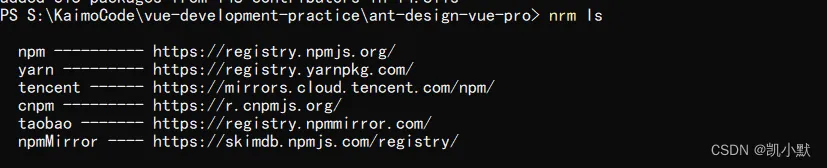
将注册表切换到CNPM
nrm use cnpm
更多用法:
Usage: nrm [options] [command]
  Commands:
    ls                                    List all the registries
    current                               Show current registry name
    use <registry>                        Change registry to registry
    add <registry> <url> [home]           Add one custom registry
    login <registry> [value]              Set authorize information for a registry with a base64 encoded string or username and pasword
      -a  --always-auth                     Set is always auth
      -u  --username <username>             Your user name for this registry
      -p  --password <password>             Your password for this registry
      -e  --email <email>                   Your email for this registry
    set-hosted-repo <registry> <value>    Set hosted npm repository for a custom registry to publish packages
    set-scope <scopeName> <value>         Associating a scope with a registry
    del-scope <scopeName>                 Remove a scope
    set <registryName>                    Set custom registry attribute
      -a  --attr <attr>                    Set custorm registry attribute
      -v  --value <value>                  Set custorm registry value
    del <registry>                        Delete one custom registry
    rename <registryName> <newName>       Set custom registry name
    home <registry> [browser]             Open the homepage of registry with optional browser
    publish [<tarball>|<folder>]          Publish package to current registry if current registry is a custom registry. The field 'repository' of current custom registry is required running this command. If you're not using custom registry, this command will run npm publish directly
      -t  --tag [tag]                        Add tag
      -a  --access <public|restricted>       Set access
      -o  --otp [otpcode]                    Set otpcode
      -dr --dry-run                          Set is dry run
    test [registry]                       Show the response time for one or all registries
    help                                  Print this help
  Options:
    -h  --help     output usage information
    -V  --version  output the version number