
Handler笔记
什么是handler机制?
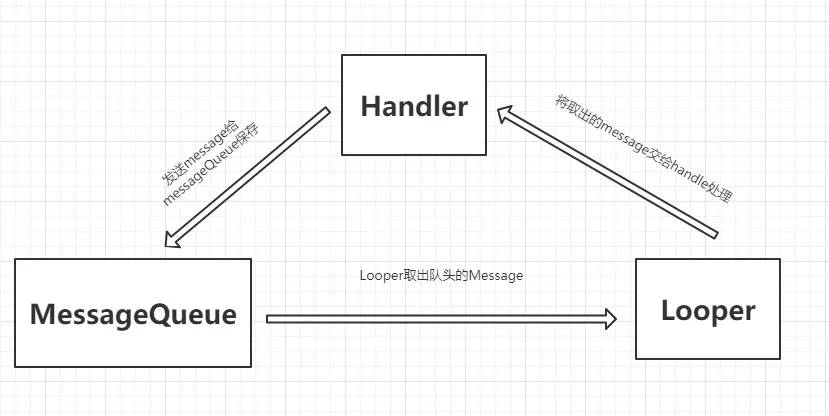
handler机制的主要成员
1、handler:负责发送处理消息
2、message:消息的信息的载体
3、messageQueue:存放message的队列
4、looper:handler机制的动力,无限循环的从messageQueue队列中取出message给handler
1、Handler
(1)我们先来看看handler的构造方法
      public Handler() {
        this(null, false);
    }

     public Handler(Callback callback, boolean async) {
        if (FIND_POTENTIAL_LEAKS) {
            final Class<? extends Handler> klass = getClass();
            if ((klass.isAnonymousClass() || klass.isMemberClass() || klass.isLocalClass()) &&
                    (klass.getModifiers() & Modifier.STATIC) == 0) {
                Log.w(TAG, "The following Handler class should be static or leaks might occur: " +
                    klass.getCanonicalName());
            }
        }

        mLooper = Looper.myLooper();
        if (mLooper == null) {
            throw new RuntimeException(
                "Can't create handler inside thread that has not called Looper.prepare()");
        }
        mQueue = mLooper.mQueue;
        mCallback = callback;
        mAsynchronous = async;
    }
(2)默认的构造方法走了 Handler(Callback callback, boolean async) 构造方法,此方法用 mLooper = Looper.myLooper();获取了looper,然后又用looper创建了messageQueue
2、Looper
在Looper类中
    /**
     * Return the Looper object associated with the current thread.  Returns
     * null if the calling thread is not associated with a Looper.
     */
    public static @Nullable Looper myLooper() {
        return sThreadLocal.get();
    }
注意上面的注释 返回一个与当前线程关联的Looper对象
那Looper是怎么创建的呢,既然有get方法,那应该就有set方法。搜索sThreadLocal.set,果然找到了
 private static void prepare(boolean quitAllowed) {
        if (sThreadLocal.get() != null) {
            throw new RuntimeException("Only one Looper may be created per thread");
        }
        sThreadLocal.set(new Looper(quitAllowed));
    }
说明prepare方法直接创建了一个当前线程的Looper
在UI主线程中,会默认的创建好Looper对象,而在子线程中要使用本线程的Handler需要手动创建Looper对象,如下
class LooperThread extends Thread {
        public Handler mHandler;

        public void run() {
            Looper.prepare();

            mHandler = new Handler() {
                public void handleMessage(Message msg) {

                }
            };

            Looper.loop();
        }
    }
3、MessageQueue
在handler中我们知道MessageQueue对象通过
mQueue = mLooper.mQueue;
其中的消息是怎么来的呢我们我们通过handler的sendMessage()方法来进行分析
public final boolean sendMessage(Message msg)
   {
       return sendMessageDelayed(msg, 0);
   }
handler的sendMessage()方法又调用了
 public final boolean sendMessageDelayed(Message msg, long delayMillis)
    {
        if (delayMillis < 0) {
            delayMillis = 0;
        }
        return sendMessageAtTime(msg, SystemClock.uptimeMillis() + delayMillis);
    }
sendMessageAtTime()又调用了
 public boolean sendMessageAtTime(Message msg, long uptimeMillis) {
        MessageQueue queue = mQueue;
        if (queue == null) {
            RuntimeException e = new RuntimeException(
                    this + " sendMessageAtTime() called with no mQueue");
            Log.w("Looper", e.getMessage(), e);
            return false;
        }
        return enqueueMessage(queue, msg, uptimeMillis);
    }
此方法先获取了全局的messageQueue对象mQueue最后通过MessageQueue.enqueueMessage()将message存到了messageQueue队列中
private boolean enqueueMessage(MessageQueue queue, Message msg, long uptimeMillis) {
        msg.target = this;
        if (mAsynchronous) {
            msg.setAsynchronous(true);
        }
        return queue.enqueueMessage(msg, uptimeMillis);
    }
通过上面的分析我们知道了messageQueue是怎么进数据的,后边我们分析一下怎么从里面取数据
我们在子线程中使用Handler的示例中最后一步 调用Looper.loop();然后我们来看看
    public static void loop() {
        final Looper me = myLooper();
        ······
        for (;;) {
            Message msg = queue.next(); // might block
            ······
             try {
                msg.target.dispatchMessage(msg);
                end = (slowDispatchThresholdMs == 0) ? 0 : SystemClock.uptimeMillis();
            } finally {
                if (traceTag != 0) {
                    Trace.traceEnd(traceTag);
                }
            }
            ······
        }
    }
在Looper.loop();方法中我们可以看到for循环中从queue中取出message,然后message是怎么给到handler呢?
在msg.target.dispatchMessage(msg);这一步中我们先看看target是个什么?转到message类中会发现
/*package*/ Handler target;
target是个handler实例 由此可以得出整个message的传播回路
总结:
在一个线程中创建handler、looper、messageQueue
handler把带有信息的message通过sendmessage()发送给messageQueue队列,然后looper通过Looper.loop()无限循环从messageQueue中取出message,然后在发送给handler,handler在handleMessage()方法中处理信息
最后感谢前人的好文章的指导,个人根据个人的理解总结如有不对的地方,请留言。
https://blog.csdn.net/reakingf/article/details/52054598
https://blog.csdn.net/pgg_cold/article/details/79400435?utm_source=blogxgwz2
https://blog.csdn.net/qian520ao/article/details/78262289?locationNum=2&fps=1
https://blog.csdn.net/qq_32770809/article/details/79132363?utm_source=blogxgwz1

