
前几篇已经实现了对单个服务实例的监控,当然在实际应用中,单个实例的监控数据没有多大的价值,我们其实更需要的是一个集群系统的监控信息,这时就需要引入Turbine。Turbine能够汇集监控信息,并将聚合后的信息提供给Hystrix Dashboard来集中展示和监控。
本文将结合之前学习的注册中心Eureka、服务提供者Provider、断路器Hystrix和仪表盘Dashboard,学习断路器集群监控Turbine,最终整体架构如下:
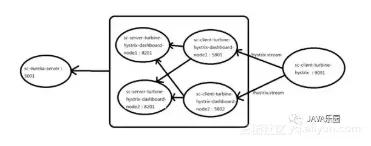
项目说明:
注册中心:
sc-eureka-server
服务提供者:
sc-server-turbine-hystrix-dashboard-node1
sc-server-turbine-hystrix-dashboard-node2
服务消费者、断路器:
sc-client-turbine-hystrix-dashboard-node1
sc-client-turbine-hystrix-dashboard-node2
集群监控、仪表盘:
sc-client-turbine-hystrix
1、注册中心项目sc-eureka-server参考Spring Cloud 2.x系列之eureka注册中心单机
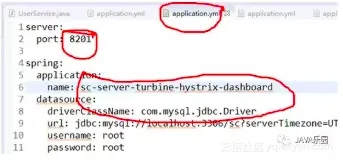
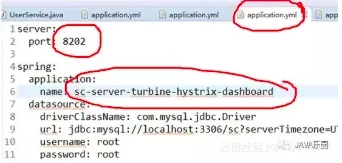
2、服务提供者项目sc-server-turbine-hystrix-dashboard-node1、sc-server-turbine-hystrix-dashboard-node2由项目sc-eureka-client-provider改造而来。 参考Spring Cloud 2.x系列之服务注册&服务提供者
sc-server-turbine-hystrix-dashboard-node1:
sc-server-turbine-hystrix-dashboard-node2:
3、服务消费者、断路器项目sc-client-turbine-hystrix-dashboard-node1、sc-client-turbine-hystrix-dashboard-node2由项目sc-feign-hystrix-dashboard改造而来。
sc-client-turbine-hystrix-dashboard-node1
(1)bootstrap.yml修改
server:

  port: 5801
(2)application.yml文件修改
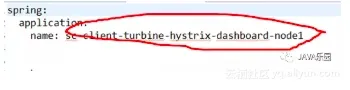
(3)去掉springcloud启动类的EnableHystrixDashboard注解
sc-client-turbine-hystrix-dashboard-node2
(1)bootstrap.yml修改
server:

  port: 5802
(2)application.yml文件修改
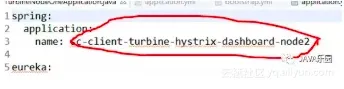
(3)去掉springcloud启动类的EnableHystrixDashboard注解
注: turbine只能监控Hystrix服务。不是Hystrix的服务不能监控。所以配置文件都配置了如下配置项
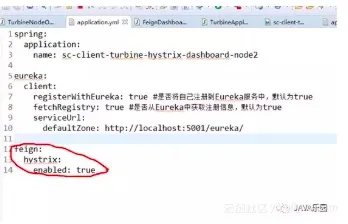
4、 新建集群监控、仪表盘项目sc-client-turbine-hystrix,对应的pom.xml文件如下
<project xmlns="http://maven.apache.org/POM/4.0.0" xmlns:xsi="http://www.w3.org/2001/XMLSchema-instance"
xsi:schemaLocation="http://maven.apache.org/POM/4.0.0http://maven.apache.org/xsd/maven-4.0.0.xsd">

   <modelVersion>4.0.0</modelVersion>

   <groupId>spring-cloud</groupId>

   <artifactId>sc-client-turbine-hystrix</artifactId>

   <version>0.0.1-SNAPSHOT</version>

   <packaging>jar</packaging>


   <name>sc-client-turbine-hystrix</name>

   <url>http://maven.apache.org</url>


  <parent>

      <groupId>org.springframework.boot</groupId>

      <artifactId>spring-boot-starter-parent</artifactId>

      <version>2.0.4.RELEASE</version>

   </parent>

   <dependencyManagement>

      <dependencies>

        <dependency>

           <groupId>org.springframework.cloud</groupId>

           <artifactId>spring-cloud-dependencies</artifactId>

           <version>Finchley.RELEASE</version>

           <type>pom</type>

           <scope>import</scope>

        </dependency>


      </dependencies>

   </dependencyManagement>


   <properties>

      <project.build.sourceEncoding>UTF-8</project.build.sourceEncoding>

      <maven.compiler.source>1.8</maven.compiler.source>

      <maven.compiler.target>1.8</maven.compiler.target>

   </properties>


   <dependencies>

   <!-- <dependency>

         <groupId>org.springframework.cloud</groupId>

          <artifactId>spring-cloud-starter-turbine</artifactId>

         <version>1.4.5.RELEASE</version>

      </dependency>-->


      <dependency>

          <groupId>org.springframework.cloud</groupId>

          <artifactId>spring-cloud-starter-netflix-turbine</artifactId>

      </dependency>


   <!-- <dependency>

         <groupId>org.springframework.cloud</groupId>

          <artifactId>spring-cloud-starter-hystrix-dashboard</artifactId>

         <version>1.4.5.RELEASE</version>

      </dependency>-->


      <dependency>

          <groupId>org.springframework.cloud</groupId>

          <artifactId>spring-cloud-starter-netflix-hystrix-dashboard</artifactId>

      </dependency>


      <dependency>

          <groupId>org.springframework.boot</groupId>

          <artifactId>spring-boot-starter-actuator</artifactId>

      </dependency>

      <dependency>

        <groupId>org.springframework.boot</groupId>

        <artifactId>spring-boot-starter-web</artifactId>

      </dependency>

   </dependencies>

</project>
5、 新建配置文件application.yml
spring:

  application:

    name: sc-client-turbine-hystrix

eureka:

  client:

    registerWithEureka: true #是否将自己注册到Eureka服务中,默认为true

    fetchRegistry: true #是否从Eureka中获取注册信息,默认为true

    serviceUrl:

      defaultZone:http://localhost:5001/eureka/

server:

  port: 9091


turbine:

  appConfig: sc-client-turbine-hystrix-dashboard-node1,sc-client-turbine-hystrix-dashboard-node2 # 配置Eureka中的serviceId列表,表明监控哪些服务

  clusterNameExpression: newString("default")

  # 1. clusterNameExpression指定集群名称,默认表达式appName;此时:turbine.aggregator.clusterConfig需要配置想要监控的应用名称

  # 2. 当clusterNameExpression:default时,turbine.aggregator.clusterConfig可以不写,因为默认就是default

  # 3. 当clusterNameExpression:metadata['cluster']时,假设想要监控的应用配置了eureka.instance.metadata-map.cluster: ABC,则需要配置,同时turbine.aggregator.clusterConfig: ABC

  instanceUrlSuffix: /hystrix.stream

  aggregator:

    clusterConfig: default  # 指定聚合哪些集群,多个使用","分割,默认为default。可使用http://.../turbine.stream?cluster={clusterConfig之一}访问
6、新建springboot启动类
package sc.client.turbine;


import org.springframework.boot.SpringApplication;

import org.springframework.boot.autoconfigure.SpringBootApplication;

import org.springframework.cloud.netflix.eureka.EnableEurekaClient;

import org.springframework.cloud.netflix.hystrix.dashboard.EnableHystrixDashboard;

import org.springframework.cloud.netflix.turbine.EnableTurbine;

@SpringBootApplication
@EnableHystrixDashboard
@EnableTurbine
@EnableEurekaClient
public class TurbineApplication {


   public static void main(String[] args) {

        SpringApplication.run(TurbineApplication.class, args);

   }


}
7、按照如下先后顺序启动项目
(1)sc-eureka-server
(2)sc-server-turbine-hystrix-dashboard-node1
sc-server-turbine-hystrix-dashboard-node2
(3)sc-client-turbine-hystrix-dashboard-node1
sc-client-turbine-hystrix-dashboard-node2
(4)sc-client-turbine-hystrix
8、访问注册中心http://127.0.0.1:5001/确认服务都启动成功
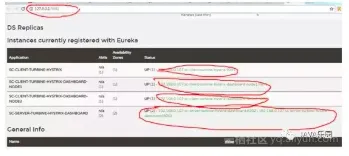
9、验证Turbine集群监控
访问http://localhost:9091/turbine.stream,返回如下数据
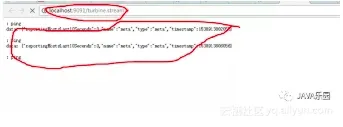
并且会不断刷新以获取实时的监控数据,说明与单个的监控类似,返回监控项目的信息。进行图形化监控查看,输入http://localhost:9091/hystrix,返回如下界面
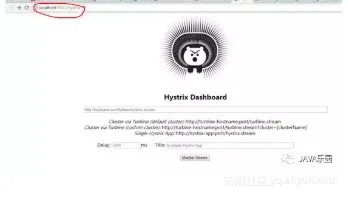
输入http://localhost:9091/turbine.stream,然后点击Monitor Stream ,可以看到出现如下界面
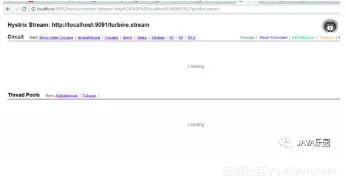
没有出现任何监控图表。分别访问http://127.0.0.1:5801/feign/user/getUser/1和http://127.0.0.1:5802/feign/user/listUser(尽量多访问几次)
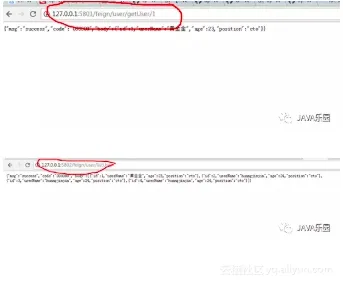
返回查看Turbine集群监控图表界面
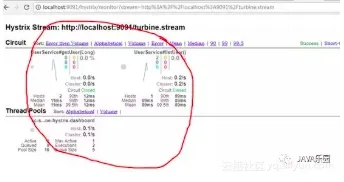
源码:
https://gitee.com/hjj520/spring-cloud-2.x/tree/master/sc-client-turbine-hystrix-dashboard-node1
https://gitee.com/hjj520/spring-cloud-2.x/tree/master/sc-client-turbine-hystrix-dashboard-node2
https://gitee.com/hjj520/spring-cloud-2.x/tree/master/sc-server-turbine-hystrix-dashboard-node1
https://gitee.com/hjj520/spring-cloud-2.x/tree/master/sc-server-turbine-hystrix-dashboard-node2
https://gitee.com/hjj520/spring-cloud-2.x/tree/master/sc-client-turbine-hystrix
本文作者: java乐园
