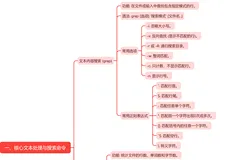
一、时间管理类date/hwclock/cal
date [OPTION]... [+FORMAT]: 显示时间
FORMAT: 格式符号 %F:日期 %D:日期(两者显示格式不同) %T:时间
|
1
2
3
4
5
6
|
[root@mylinux ~]
# date +%F #日期
2017-03-06
[root@mylinux ~]
# date +%D
03
/06/17
[root@mylinux ~]
# date +%T #时间
19:21:09
|
date [MMDDhhmm[[CC]YY][.ss]]: 设置时间
YY: 两位年份 CCYY:四位年份 MM:月分 DD:几号 hh:小时 mm:分钟 .ss:秒钟
hwclock: 显示硬件时钟
-s, --hctosys 以硬件时钟为准 -w, --systohc 以系统时钟为准
|
1
2
3
4
5
6
7
8
|
[root@mylinux ~]
# cal #显示日历
三月 2017
日 一 二 三 四 五 六
1 2 3 4
5 6 7 8 9 10 11
12 13 14 15 16 17 18
19 20 21 22 23 24 25
26 27 28 29 30 31
|
二、目录管理类cd/pwd/mkdir/rmdir/ls/tree
cd:目录切换
cd 或 cd ~: 回当前用户的主目录
cd ~USERNAME: 切换至指定用户的主目录
cd -: 在上一个目录和当前目录之间来回切换
pwd: 显示当前目录
|
1
2
|
[root@mylinux home]
# pwd
/home
|
mkdir: 创建目录
-p: 父目录不存在时先创建父目录; -v: 显示详细信息; -m MODE: 创建目录时直接指定权限
|
1
2
3
4
5
6
|
[root@mylinux home]
# mkdir -pv dir1/dir2
mkdir
: 已创建目录
"dir1"
mkdir
: 已创建目录
"dir1/dir2"
[root@mylinux home]
# mkdir -m 644 dir3
[root@mylinux home]
# ls -ld dir3
drw-r--r-- 2 root root 4096 3月 6 19:28 dir3
|
rmdir: 只能删除空目录
|
1
2
3
4
|
[root@mylinux home]
# rmdir dir1
rmdir
: 删除
"dir1"
失败: 目录非空
[root@mylinux home]
# rmdir dir3
[root@mylinux home]
#
|
ls: 列出文件
-l:长格式 -h: 做单位转换,以较读的方式列出
-a: 显示所有文件,包括隐藏文件 -A: 显示所有文件文件但不包括隐藏文件
-d: 显示目录自身属性 -i: index node, inode(索引节点号)
-r: 逆序显示 -R: 递归(recursive)显示
|
1
2
3
4
5
6
7
8
9
10
11
12
13
|
[root@mylinux tmp]
# ls -l conf/
总用量 52
-rw-r--r-- 1 root root 34595 3月 6 19:41 httpd.conf
-rw-r--r-- 1 root root 13139 3月 6 19:41 magic
[root@mylinux tmp]
# ls -la conf/
总用量 64
drwxr-xr-x 2 root root 4096 3月 6 19:41 .
drwxrwxrwt. 4 root root 4096 3月 6 19:41 ..
-rw-r--r-- 1 root root 86 3月 6 19:41 .htpasswd
-rw-r--r-- 1 root root 34595 3月 6 19:41 httpd.conf
-rw-r--r-- 1 root root 13139 3月 6 19:41 magic
[root@mylinux tmp]
# ls -lad conf/
drwxr-xr-x 2 root root 4096 3月 6 19:41 conf/
|
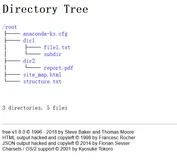
tree: 树状结构显示目录内容
-d: 只显示目录 -L level:指定显示的层级数目
-P pattern: 只显示由指定pattern匹配到的路径
|
1
2
3
4
5
6
7
8
9
10
11
12
13
14
15
16
17
18
19
20
21
|
[root@mylinux tmp]
# tree httpd/
httpd/
├── conf
│ ├── httpd.conf
│ └── magic
├── conf.d
│ ├── php.conf
│ ├── README
│ └── welcome.conf
├── logs -> ../..
/var/log/httpd
├── modules -> ../..
/usr/lib64/httpd/modules
└── run -> ../..
/var/run/httpd
5 directories, 5 files
[root@mylinux tmp]
# tree -L 1 httpd/
httpd/
├── conf
├── conf.d
├── logs -> ../..
/var/log/httpd
├── modules -> ../..
/usr/lib64/httpd/modules
└── run -> ../..
/var/run/httpd
|
三、查看文本类file/cat/tac/more/less/head/tail
file:查看文件内容的格式
|
1
2
3
4
5
6
7
8
9
|
[root@mylinux tmp]
# file conf
conf: directory
[root@mylinux tmp]
# file agent_cmd.sock
agent_cmd.sock: socket
[root@mylinux tmp]
# cd conf/
[root@mylinux conf]
# ls
httpd.conf magic
[root@mylinux conf]
# file httpd.conf
httpd.conf: ASCII English text
|
cat:连接文件, 并显示
-E:显示行结束符$ -v:显示非打印字符 -e:相当于-vE -n:显示行号
-s:多个连续空白行只显示一次
|
1
2
3
4
5
6
7
8
9
10
11
12
13
14
|
[root@mylinux tmp]
# cat -E fstab
/dev/vda1
/ ext3 noatime,acl,user_xattr 1 1$
proc
/proc
proc defaults 0 0$
sysfs
/sys
sysfs noauto 0 0$
debugfs
/sys/kernel/debug
debugfs noauto 0 0$
devpts
/dev/pts
devpts mode=0620,gid=5 0 0$
/dev/myvg/mydata
/mydata
ext3 defaults 0 0$
[root@mylinux tmp]
# cat -ns fstab
1
/dev/vda1
/ ext3 noatime,acl,user_xattr 1 1
2 proc
/proc
proc defaults 0 0
3 sysfs
/sys
sysfs noauto 0 0
4 debugfs
/sys/kernel/debug
debugfs noauto 0 0
5 devpts
/dev/pts
devpts mode=0620,gid=5 0 0
6
/dev/myvg/mydata
/mydata
ext3 defaults 0 0
|
tac:与cat相比按行逆序显示
|
1
2
3
4
5
6
7
|
[root@mylinux tmp]
# tac fstab
/dev/myvg/mydata
/mydata
ext3 defaults 0 0
devpts
/dev/pts
devpts mode=0620,gid=5 0 0
debugfs
/sys/kernel/debug
debugfs noauto 0 0
sysfs
/sys
sysfs noauto 0 0
proc
/proc
proc defaults 0 0
/dev/vda1
/ ext3 noatime,acl,user_xattr 1 1
|
more: 分屏显示,翻到尾部时不能向后翻
-d: 显示翻页及退出提示
|
1
2
3
4
5
6
7
8
9
10
11
12
13
14
15
|
# /etc/profile
# System wide environment and startup programs, for login setup
# Functions and aliases go in /etc/bashrc
# It's NOT a good idea to change this file unless you know what you
# are doing. It's much better to create a custom.sh shell script in
# /etc/profile.d/ to make custom changes to your environment, as this
# will prevent the need for merging in future updates.
pathmunge () {
case
":${PATH}:"
in
*:
"$1"
:*)
;;
*)
if
[
"$2"
=
"after"
] ;
then
PATH=$PATH:$1
--More--(29%)
|
less: 分屏显示,支持前后翻
head: 查看前 10 行
-n #: 显示指定行
|
1
2
3
4
5
6
7
8
|
[root@mylinux tmp]
# head profile
# /etc/profile
# System wide environment and startup programs, for login setup
# Functions and aliases go in /etc/bashrc
# It's NOT a good idea to change this file unless you know what you
# are doing. It's much better to create a custom.sh shell script in
# /etc/profile.d/ to make custom changes to your environment, as this
# will prevent the need for merging in future updates.
|
tail: 查看后 10 行
-n #: 显示指定行 -c #: 指定获取后#字节
-f:看文件尾部,不退出,等待显示后续追加至此文件的新内容
|
1
2
3
4
5
6
7
|
[root@mylinux tmp]
# tail -n 5 profile
unset
i
unset
-f pathmunge
export
HISTSIZE=100
export
HISTFILESIZE=50
[root@mylinux tmp]
# tail -c 5 profile
E=50
|
四、文件操作类cp/rm/mv/touch/stat/nano
cp:cp SRC(源)... DEST(目标)
| 假如 SRC 是一个文件: | 目标是一个文件且存在:覆盖 目标文件不存在:创建新文件 目标存在,且是个目录:复制源至目标目录,并保持原名 |
| 假如 SRC 有多个文件: | 目标存在,且是一个文件:复制无法进行 目标存在,且是一个目录:复制各文件至目标目录中,并保持原名 目标不存在:复制无法进行 |
| 如果 SRC 只有一个且是目录: | 目标是一个文件且存在:失败 目标存在,且是个目录:复制源目录至目标目录中,且保持原名 目标文件不存在:创建新目录 |
-r:源是目录时需要此选项 -i: 交互式 -r,-R: 递归复制目录及内部的所有内容;
-a: 归档,相当于-dR --preserv=all
-d: --no-dereference --preserv=links 源文件为链接文件,则复制链接文件
-p: --preserv=mode,ownership,timestamp 保持原有属性
-v: --verbose
-f: 强制覆盖
-u: 目标比原文件旧才复制
|
1
2
3
4
5
6
7
8
9
10
11
12
13
|
[root@mylinux tmp]
# ls -l fstab
-rw-r--r-- 1 root root 477 3月 6 20:10 fstab
[root@mylinux tmp]
# cp /etc/fstab .
cp
:是否覆盖
"./fstab"
? y
[root@mylinux tmp]
# ls -l fstab
-rw-r--r-- 1 root root 477 3月 6 20:15 fstab
[root@mylinux tmp]
# cp /etc/httpd/conf . #无法直接复制目录
cp
: 略过目录
"/etc/httpd/conf"
[root@mylinux tmp]
# cp -Rr /etc/httpd/conf . #加选项-r可以复制,-R递归
cp
:是否覆盖
"./conf/magic"
? y
cp
:是否覆盖
"./conf/.htpasswd"
? y
cp
:是否覆盖
"./conf/httpd.conf"
? y
[root@mylinux tmp]
#
|
mv:移动文件用法与cp相近
-i: 交互式 -f: 强制
|
1
2
3
|
[root@mylinux tmp]
# mv /etc/skel . #可以直接复制目录
[root@mylinux tmp]
# ls
1703061940.00 agent_cmd.sock conf fstab httpd profile skel
|
rm: 移除文件( 删除) 注:不能读取标准输入
-i: 交互式 -f: 强制 -r:递归删除
|
1
2
3
4
5
6
7
8
9
|
[root@mylinux tmp]
# rm samba/
rm
: 无法删除
"samba/"
: 是一个目录
[root@mylinux tmp]
# rm -r samba/
rm
:是否进入目录
"samba"
? y
rm
:是否删除普通文件
"samba/lmhosts"
?y
rm
:是否删除普通文件
"samba/smb.conf.bak"
?y
rm
:是否删除普通文件
"samba/smb.conf.rpmsave"
?y
rm
:是否删除普通文件
"samba/smb.conf"
?y
rm
:是否删除目录
"samba"
?y
|
touch:文件时间戳管理
-a: 仅修改访问时间 -m:仅修改修改时间
-t [[CC]YY]MMDDhhmm[.ss] ctime 是自动改变的
-c: 如果文件不存,则不予创建
|
1
2
3
4
5
6
7
8
9
10
11
12
13
14
15
16
17
|
[root@mylinux tmp]
# stat fstab
File:
"fstab"
Size: 477 Blocks: 8 IO Block: 4096 普通文件
Device: fc01h
/64513d
Inode: 262152 Links: 1
Access: (0644
/-rw-r--r--
) Uid: ( 0/ root) Gid: ( 0/ root)
Access: 2017-03-06 20:09:50.000000000 +0800
#原本访问时间
Modify: 2017-03-06 20:10:29.000000000 +0800
Change: 2017-03-06 20:10:29.000000000 +0800
[root@mylinux tmp]
# touch -a -t 1703061900.00 fstab #修改访问时间
[root@mylinux tmp]
# stat fstab
File:
"fstab"
Size: 477 Blocks: 8 IO Block: 4096 普通文件
Device: fc01h
/64513d
Inode: 262152 Links: 1
Access: (0644
/-rw-r--r--
) Uid: ( 0/ root) Gid: ( 0/ root)
Access: 2017-03-06 19:00:00.000000000 +0800
#修改后访问时间
Modify: 2017-03-06 20:10:29.000000000 +0800
Change: 2017-03-06 20:11:58.000000000 +0800
|
stat:查看文件的元数据信息
|
1
2
3
4
5
6
7
8
|
[root@mylinux tmp]
# stat profile
File:
"profile"
Size: 1825 Blocks: 8 IO Block: 4096 普通文件
Device: fc01h
/64513d
Inode: 262149 Links: 1
Access: (0644
/-rw-r--r--
) Uid: ( 0/ root) Gid: ( 0/ root)
Access: 2017-03-06 19:49:40.000000000 +0800
Modify: 2017-03-06 19:49:40.000000000 +0800
Change: 2017-03-06 19:49:40.000000000 +0800
|
nano:文本编辑工具
|
1
2
3
4
5
6
7
8
9
10
|
GNU nano 2.0.9 文件: fstab
/dev/vda1
/ ext3 noatime,acl,user_xattr 1 1
proc
/proc
proc defaults 0 0
sysfs
/sys
sysfs noauto 0 0
debugfs
/sys/kernel/debug
debugfs noauto 0 0
devpts
/dev/pts
devpts mode=0620,gid=5 0 0
/dev/myvg/mydata
/mydata
ext3 defaults 0 0
[ 已读取 6 行 ]
^G 求助 ^O 写入 ^R 读档 ^Y 上页 ^K 剪下文字 ^C 游标位置
^X 离开 ^J 对齐 ^W 搜寻 ^V 下页 ^U 还原剪下 ^T 拼写检查
|
五、文本处理类wc/cut/sort/uniq/tr/seq
wc:[OPTION]... [FILE]... 文本统计命令
-l: lines -w: words -c: characters
|
1
2
3
4
5
6
7
8
9
|
[root@mylinux tmp]
# wc profile
79 261 1825 profile
[root@mylinux tmp]
# wc -l profile
79 profile
[root@mylinux tmp]
# wc -w profile
261 profile
[root@mylinux tmp]
# wc -c profile
1825 profile
[root@mylinux tmp]
#
|
cut:[OPTION]... [FILE]... 从文件中输出指定部分
-d DELIMITER: 指明分隔符
-f FILEDS: 制定显示字段
#: 第#个字段 #,#[,#]:离散的多个字段,例如 1,3,6 #-#:连续的多个字段,例如1-6
|
1
2
3
4
5
6
7
8
9
10
11
12
13
14
15
|
[root@mylinux tmp]
# cut -d: -f1 passwd.txt
root
bin
daemon
adm
lp
sync
...
[root@mylinux tmp]
# cut -d: -f1,2,6 passwd.txt
root:x:
/root
bin:x:
/bin
daemon:x:
/sbin
adm:x:
/var/adm
lp:x:
/var/spool/lpd
...
|
sort:[OPTION]... [FILE]... 文本排序
-f: 忽略字符大小写 -r:逆序 -t DELIMITER: 字段分隔符
-k #:以指定字段为标准排序 -n: 以数值大小进行排序 -u:排序后去重
|
1
2
3
4
5
6
7
|
[root@mylinux tmp]
# sort -t: -k1 passwd.txt
abrt:x:173:173::
/etc/abrt
:
/sbin/nologin
adm:x:3:4:adm:
/var/adm
:
/sbin/nologin
apache:x:48:48:Apache:
/var/www
:
/sbin/nologin
bin:x:1:1:bin:
/bin
:
/sbin/nologin
daemon:x:2:2:daemon:
/sbin
:
/sbin/nologin
...
|
uniq:[OPTION]... [FILE]... 去重(相邻的行相同才算重复)
-c: 显示每行重复出现的次数; -d: 仅显示重复过的行;
-u: 仅显示不曾重复的行;
|
1
2
3
4
5
6
7
8
9
10
11
12
13
14
15
|
[root@mylinux tmp]
# cat abc.txt
qwe
qwe
sdfsa
asda
zvsdsddf
asda
[root@mylinux tmp]
# uniq abc.txt
qwe
sdfsa
asda
zvsdsddf
asda
[root@mylinux tmp]
# uniq -d abc.txt
qwe
|
tr:[OPTION]... SET1 [SET2] 转换或删除字符,只能结合管道作为文本输入
-d:删除匹配SET1的内容,并不作替换 -t:先将SET1的长度截为和SET2相等
|
1
2
3
4
5
6
7
8
9
10
11
12
13
14
|
[root@mylinux tmp]
# cat abc.txt | tr -d qwe
sdfsa
asda
zvsdsddf
asda
[root@mylinux tmp]
# cat abc.txt | tr -t sdfsa 3
qwe
qwe
3df3a
a3da
zv3d3ddf
a3da
|
seq: seq [选项]... [首数 [增量]] 尾数
-s:使用指定字符串分隔数字 -w:在列前添加0使得宽度相同 -f:使用printf样式的浮点格式
|
1
2
3
4
5
6
7
8
9
|
[root@mylinux tmp]
# seq 4
1
2
3
4
[root@mylinux tmp]
# seq -s: 4
1:2:3:4
[root@mylinux tmp]
# seq -s: -w 10
01:02:03:04:05:06:07:08:09:10
|
六、文件查找类find/locate/which/whereis
各种查找命令区别:
| locate | 非实时,模糊匹配,查找是根据全系统文件数据库进行的,使用updatedb命令可以手动生成文件数据库。 |
| find | 实时,精确,支持众多查找标准,遍历指定目录中的所有文件完成查找,速度慢。 |
| which | 查找可执行命令的位置 |
| whereis | 找文件位置, 能找到可执行文件和 man page |
find [OPTION]... [查找路径] [查找条件] [处理动作]
查找路径: 默认为当前目录
查找条件: 默认为指定路径下的所有文件
处理运作: 默认为显示
查找条件:
-name 'FILENAME': 对文件名称精确匹配 (支持文件名通配)
-iname 'FILENAME': 文件名匹配时不区分大小写
-user USERNAME: 根据属主查找
-group GROUPNAME: 根据属组查找
-uid UID: 根据 UID 查找
-gid GID: 根据GID查找
-nouser:查找没有属主的文件 -nogroup: 查找没有属组的文件
-type 文件类型查找
f:普通文件 d:目录 c:字符设备 b:块设备
l:符号链接 p:命名管道 s:套接字
-size [+|-]文件查找大小 #k #M #G ‘一个单位内的文件都符合条件’
-mtime -ctime -atime [+|-]# 以天为单位查找
-mmin -cmin -amin [+|-]# 以分钟为单位查找

根据权限查找:
-perm MODE: 精确匹配权限
-perm [/+]MODE: 任何一类用户的任何一位权限匹配
-perm -MODE: 文件权限能完全包含此 MODE 时才符合条件
处理动作:
-print: 显示 -ls:类似ls -l的形式显示每一个文件的详细
-delete:删除查找到的文件
-fls /path/to/somefile: 查找到的所有文件的长格式信息保存至指定文件中
-ok COMMAND {} \; 每一次操作都需要用户确认({}引用找到的文件名)
-exec COMMAND {} \; 对查找到的每个文件执行由COMMAND 指定的命令
注意:find 传递查找到的文件至后面指定的命令时,查找到所有符合条件的文件一次性传递给后面的命令;有些命令不能接受过多参数,此时命令执行可能会失败;此时可使用'find | xargs COMMAND'。
|
1
2
3
4
5
6
7
8
9
10
11
12
13
14
15
16
17
18
19
20
21
22
23
24
25
26
27
28
29
30
31
32
33
34
35
36
37
38
39
40
41
42
43
44
45
46
47
48
49
50
51
52
53
54
55
56
57
58
59
60
61
62
63
64
65
66
67
68
69
70
71
72
73
74
75
76
77
78
79
80
81
82
83
84
85
86
87
88
89
90
91
92
93
94
95
96
97
98
99
100
101
102
103
104
105
106
107
108
|
[root@mylinux tmp]
# find / -name host.conf #精确查找
/etc/host
.conf
[root@mylinux tmp]
# find / -iname HOST.conf #不区分大小写
/etc/host
.conf
[root@mylinux tmp]
# find -user root #根据属主查找
.
.
/conf
.
/conf/magic
.
/conf/
.htpasswd
.
/conf/httpd
.conf
./.ICE-unix
.
/1703061940
.00
.
/httpd
.
/httpd/conf
.
/httpd/conf/magic
.
/httpd/conf/
.htpasswd
...
[root@mylinux tmp]
# find -type f #查找普通文件
.
/conf/magic
.
/conf/
.htpasswd
.
/conf/httpd
.conf
.
/1703061940
.00
.
/httpd/conf/magic
.
/httpd/conf/
.htpasswd
.
/httpd/conf/httpd
.conf
...
[root@mylinux tmp]
# ls -lh
总用量 24K
-rw-r--r-- 1 root root 0 3月 6 20:10 1703061940.00
-rw-r--r-- 1 root root 33 3月 7 08:50 abc.txt
srwxrwxrwx 1 root root 0 11月 15 16:47 agent_cmd.sock
drwxr-xr-x 2 root root 4.0K 3月 6 19:41 conf
-rw-r--r-- 1 root root 477 3月 6 20:15 fstab
drwxr-xr-x 4 root root 4.0K 3月 6 19:43 httpd
-rw-r--r-- 1 root root 1.5K 3月 7 08:29
passwd
.txt
-rw-r--r-- 1 root root 1.8K 3月 6 19:49 profile
[root@mylinux tmp]
# find -size 2k #显示了1k-2k的所有文件
.
/passwd
.txt
.
/profile
[root@mylinux tmp]
# find -size -2k #显示小于2k的文件
.
/conf/
.htpasswd
.
/1703061940
.00
.
/httpd/conf/
.htpasswd
.
/httpd/conf
.d
/README
.
/httpd/conf
.d
/welcome
.conf
.
/httpd/conf
.d
/php
.conf
.
/httpd/modules
.
/httpd/logs
.
/httpd/run
./.PATH
.
/agent_cmd
.sock
.
/fstab
.
/abc
.txt
[root@mylinux tmp]
# find -size +2k #显示大于2k的文件,包括文件夹
.
.
/conf
.
/conf/magic
.
/conf/httpd
.conf
./.ICE-unix
.
/httpd
.
/httpd/conf
.
/httpd/conf/magic
.
/httpd/conf/httpd
.conf
.
/httpd/conf
.d
[root@mylinux tmp]
# date
2017年 03月 08日 星期三 16:23:11 CST
[root@mylinux tmp]
# find / -ctime 3 #查找3天前到第4天的文件,今天8号即可查5号的文件。
/var/log/httpd
/var/log/httpd/error_log
/var/log/httpd/error_log-20170305
/var/run/httpd/httpd
.pid
...
[root@mylinux tmp]
# ls -l /var/log/httpd/error_log
-rw-r--r-- 1 root root 255 3月 5 03:46
/var/log/httpd/error_log
[root@mylinux tmp]
# find -ctime -3 #今天8号,即可找到6号到今天的文件
.
.
/conf
.
/conf/magic
.
/conf/
.htpasswd
.
/conf/httpd
.conf
.
/1703061940
.00
...
[root@mylinux tmp]
# ls -l conf/.htpasswd
-rw-r--r-- 1 root root 86 3月 6 20:19 conf/.htpasswd
[root@mylinux tmp]
# find -atime +3 #今天8号,即可找到5号以前的文件
.
./.ICE-unix
./.PATH
.
/agent_cmd
.sock
.
/passwd
.txt
[root@mylinux tmp]
# ls -l passwd.txt
-rw-r--r-- 1 root root 1486 3月 1 00:00
passwd
.txt
[root@mylinux tmp]
# find -perm 644 #精确权限匹配
.
/conf/magic
.
/conf/
.htpasswd
.
/conf/httpd
.conf
.
/1703061940
.00
.
/httpd/conf/magic
[root@mylinux tmp]
# ls -l conf/magic
-rw-r--r-- 1 root root 13139 3月 6 20:19 conf
/magic
[root@mylinux tmp]
# find -perm +644 #任意一类用户的权限匹配
.
.
/conf
.
/conf/magic
.
/conf/
.htpasswd
.
/conf/httpd
.conf
./.ICE-unix
.
/1703061940
.00
|
七、用户登录信息查看类last/lastb
w :当前系统登录用户以及当前的操作
|
1
2
3
4
|
[root@mylinux tmp]
# w
16:52:49 up 76 days, 18:59, 1 user, load average: 0.00, 0.00, 0.00
USER TTY FROM LOGIN@ IDLE JCPU PCPU WHAT
root pts
/0
192.168.1.12 08:55 0.00s 0.34s 0.00s w
|
sleep:睡眠
whoami:自己的户名
|
1
2
|
[root@mylinux tmp]
# whoami
root
|
last,/var/log/wtmp 文件, 显示用户成功登录信息
-n #: 显示最近#次的相关信息
lastb:/var/log/btmp 文件,显示用户错误的登录尝试-n #:
lastlog: 显示每一个用户最近一次的成功登录信息;
-u USERNAME: 显示特定用户最近的登录信息
watch: watch -n # 'COMMAND' 周期性地执行指定命令, 并以全屏方式显示结果
-n #: 指定周期长度,单位为秒,默认为 2。
八、文本比较工具 diff
diff 用来比较两个文本文件的差异, 是代码版本管理的核心工具之一。
# diff <变动前的文件> <变动后的文件>
diff 有三种格式:
| 正常格式( normal diff) | # diff file1 file2对file1(变动前的文件)和file2(变动后的文件)进行比较。显示结果中,第一行说明变动位置。 前面的数字, 表示file1的第 n 行有变化; 中间的"c"表示内容改变,”a”代表增加、 "d”代表删除。 |
| 上下文格式(context diff) | diff -c f1 f2 第一部分的两行,显示两个文件文件名和时间信息, "***"表示变动前的文件, "---"表示变动后的文件。第二部分是15个星号,将文件的基本情况与变动内容分割开。 第三部分显示变动前的文件,即file1。文件内容的每一行最前面, 有标记位。 空表示该行无变化;感叹号(!)表示该行有改动; 减号(-), 表示该行被删除;加号(+)表示该行为新增。 第四部分显示变动后的文件, 即 file2。 |
| 合并格式( unified diff) | # diff -u f1 f2 第一部分文件的基本信息。 "---"表示变动前的文件, "+++"表示变动后的文件。 第二部分, 变动的位置用两个@作为起首和结束。第三部分是变动的具体内容。除了有变动的那些行以外,上下文 各显示 3 行。 它将两个文件的上下文,合并显示在一起,所以叫做"合并格式". 每一行最前面的标志位: 空表示无变动, 减号表示第一个文件删除的行, 加号表示第二个文件新增的行。 |
|
1
2
3
4
5
6
7
8
9
10
11
12
13
14
15
16
17
18
19
20
21
22
23
24
25
26
27
28
29
30
31
32
33
34
35
36
37
38
39
40
41
42
43
44
45
46
47
48
49
50
51
52
53
54
55
56
57
|
[root@mylinux tmp]
# cat abc.txt
qwe
qwe
sdfsa
asda
zvsdsddf
asda
[root@mylinux tmp]
# cat abc2.txt
qw12e
sdfsa
asda24
zvsdsddf
af
asda
[root@mylinux tmp]
# diff abc.txt abc2.txt 正常格式
1,2c1
#说明abc.txt 前两行与abc2.txt的第一行不同,内容改变
< qwe
< qwe
---
> qw12e
4c3
#说明abc.txt 第4行与abc2.txt的第3行不同,内容改变
< asda
---
> asda24
#说明abc.txt 第5行与abc2.txt的第5行不同,增加af
5a5
> af
[root@mylinux tmp]
# diff -c abc.txt abc2.txt #上下文格式
*** abc.txt 2017-03-07 08:50:39.000000000 +0800
#文件时间
--- abc2.txt 2017-03-08 17:05:59.000000000 +0800
***************
*** 1,6 ****
#变动前的文件abc.txt
! qwe
#!内容改动
! qwe
sdfsa
! asda
zvsdsddf
asda
--- 1,6 ----
#变动后的文件abc2.txt
! qw12e
sdfsa
! asda24
zvsdsddf
+ af
#+新增的
asda
[root@mylinux tmp]
# diff -u abc.txt abc2.txt #合并的格式
--- abc.txt 2017-03-07 08:50:39.000000000 +0800
#文件时间
+++ abc2.txt 2017-03-08 17:05:59.000000000 +0800
@@ -1,6 +1,6 @@
-qwe
#改动前,删除
-qwe
+qw12e
#新增
sdfsa
-asda
+asda24
zvsdsddf
+af
asda
|