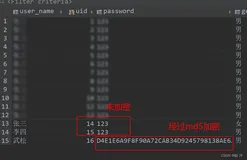
如何使用MD5对密码实现加密。
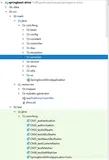
附件中有MD5的java包,编译后保存在:\WEB-INF\classes\beartool中
验证登陆名和密码。
<%@ page contentType="text/html; charset=gb2312" language="java" import="java.sql.*" errorPage="" %>
<%@ page import="com.bwm.db.conndb"%>
<jsp:useBean id='oMD5' scope='request' class='beartool.MD5'/>
<html>
<head>
<meta http-equiv="Content-Type" content="text/html; charset=gb2312">
<title>登录检验窗口</title>
</head>
<body>
<%
conndb con=new conndb();
String uname=request.getParameter("uname");
String password=request.getParameter("password");
String pwdmd5 = oMD5.getMD5ofStr(password);
<%@ page import="com.bwm.db.conndb"%>
<jsp:useBean id='oMD5' scope='request' class='beartool.MD5'/>
<html>
<head>
<meta http-equiv="Content-Type" content="text/html; charset=gb2312">
<title>登录检验窗口</title>
</head>
<body>
<%
conndb con=new conndb();
String uname=request.getParameter("uname");
String password=request.getParameter("password");
String pwdmd5 = oMD5.getMD5ofStr(password);
session.setAttribute("login_name",uname);
String loginsql="select * from c_login where login_name='"+uname+"' and login_password='"+pwdmd5+"'";
ResultSet rs=con.executeQuery(loginsql);
if(rs.next()){
String operate="登陆系统!";
String log_sid="";
%>
String loginsql="select * from c_login where login_name='"+uname+"' and login_password='"+pwdmd5+"'";
ResultSet rs=con.executeQuery(loginsql);
if(rs.next()){
String operate="登陆系统!";
String log_sid="";
%>
<%@ include file="log/log.jsp"%>
<%
response.sendRedirect("main.htm");
}else{
%>
<script language="javascript">
alert("登录ID或密码错误");
history.back();
</script>
<%
}
con.close();
%>
</body>
</html>
<%
response.sendRedirect("main.htm");
}else{
%>
<script language="javascript">
alert("登录ID或密码错误");
history.back();
</script>
<%
}
con.close();
%>
</body>
</html>
附件:http://down.51cto.com/data/2348046
本文转自yuhaijunll 51CTO博客,原文链接:http://blog.51cto.com/yuhaijunll/29349,如需转载请自行联系原作者