本例是用简单角色验证方式来通过用户登录后,获取用户角色,每种角色可以通过[Authorize(Roles = "admin,user")]在Action上来控制访问的权限,也就是说,只有属性这个角色才能访问这个Action。
道先添加Microsoft.AspNetCore.Authentication.Cookies引用
在StartUp.cs的Configure方法中添加
|
1
2
3
4
5
6
7
8
9
10
11
12
13
|
//为验证添加中间件
app.UseCookieAuthentication(
new
CookieAuthenticationOptions
{
//验证方案名称
AuthenticationScheme =
"loginvalidate"
,
//没有权限时导航的登录action
LoginPath =
new
Microsoft.AspNetCore.Http.PathString(
"/login"
),
//访问被拒绝后的acion
AccessDeniedPath =
new
Microsoft.AspNetCore.Http.PathString(
"/Home/NoPermission"
),
AutomaticAuthenticate =
true
,
AutomaticChallenge =
true
,
SlidingExpiration =
true
});
|
HomeController中的登录的action实现
|
1
2
3
4
5
6
7
8
9
10
11
12
13
14
15
16
17
18
19
20
21
22
23
24
25
26
27
28
29
30
31
32
33
34
35
36
37
38
39
40
41
42
43
44
45
46
47
48
49
50
51
52
53
54
55
56
57
58
59
60
61
62
63
64
65
66
67
68
69
70
71
72
73
74
75
76
77
78
79
80
81
82
83
84
85
86
87
88
89
90
91
92
93
94
95
96
97
98
99
100
101
102
103
104
|
using
System.Collections.Generic;
using
System.Linq;
using
Microsoft.AspNetCore.Mvc;
using
Microsoft.AspNetCore.Authorization;
using
System.Security.Claims;
namespace
webAuth.Controllers
{
/// <summary>
/// 本Controller允许admin和user两种角色可以访问
/// </summary>
[Authorize(Roles =
"admin,user"
)]
public
class
HomeController : Controller
{
public
IActionResult Index()
{
return
View();
}
/// <summary>
/// aobout只允许user角色访问
/// </summary>
/// <returns></returns>
[Authorize(Roles =
"user"
)]
public
IActionResult About()
{
var
id = User.Claims.SingleOrDefault(c => c.Type == ClaimTypes.Sid).Value;
ViewData[
"Message"
] =
"UserID:"
+ id;
return
View();
}
/// <summary>
/// contact只允许admin角色访问
/// </summary>
/// <returns></returns>
[Authorize(Roles =
"admin"
)]
public
IActionResult Contact()
{
var
id=User.Claims.SingleOrDefault(c => c.Type == ClaimTypes.Sid).Value;
ViewData[
"Message"
] =
"UserID:"
+ id;
return
View();
}
public
IActionResult NoPermission()
{
return
View();
}
/// <summary>
/// 允许所有登录者
/// </summary>
/// <param name="returnUrl">如果用户访问的不是登录页,returnUrl将把这个url传进来,待登录成功后返回这个地址</param>
/// <returns></returns>
[AllowAnonymous]
[HttpGet(
"login"
)]
public
IActionResult Login(
string
returnUrl)
{
//判断是否验证
if
(!HttpContext.User.Identity.IsAuthenticated)
{
//把返回地址保存在前台的hide表单中
ViewBag.returnUrl = returnUrl;
}
ViewBag.error =
null
;
return
View();
}
/// <summary>
/// 允许所有登录者
/// </summary>
/// <param name="username">用户名</param>
/// <param name="password">密码</param>
/// <param name="returnUrl">返回u</param>
/// <returns></returns>
[AllowAnonymous]
[HttpPost(
"login"
)]
public
IActionResult Login(
string
username,
string
password,
string
returnUrl)
{
//从数据库验证用户,关取出用户所需要信息
var
users =
new
List<dynamic>() {
new
{ ID = 1, UserName =
"zsf"
,Password=
"111"
, Name =
"张三丰"
, RoleTypeID = 1, RoleType =
"admin"
, RoleTypeName =
"管理员"
},
new
{ ID = 2, UserName =
"zwj"
,Password=
"222"
, Name =
"张无忌"
, RoleTypeID = 2, RoleType =
"user"
, RoleTypeName =
"普通用户"
}
};
var
user = users.SingleOrDefault(u => u.UserName == username && u.Password == password);
if
(user!=
null
)
{
//登录成功后,设置声明
var
claims =
new
Claim[] {
new
Claim(ClaimTypes.UserData,username),
new
Claim(ClaimTypes.Role,user.RoleType),
new
Claim(ClaimTypes.Name,user.Name),
new
Claim(ClaimTypes.Sid,user.ID.ToString())
};
HttpContext.Authentication.SignInAsync(
"loginvalidate"
,
new
ClaimsPrincipal(
new
ClaimsIdentity(claims,
"Cookie"
)));
HttpContext.User =
new
ClaimsPrincipal(
new
ClaimsIdentity(claims));
return
new
RedirectResult(returnUrl ==
null
?
"/"
: returnUrl);
}
else
{
ViewBag.error =
"用户名或密码错误!"
;
return
View();
}
}
}
}
|
Login.cshtml页面如下:
|
1
2
3
4
5
6
7
8
9
10
11
12
13
14
15
16
17
18
19
20
21
22
23
24
25
26
27
28
29
30
31
32
33
34
35
36
37
38
39
40
41
42
43
44
45
46
47
48
49
50
51
52
53
54
55
56
57
58
59
60
61
62
|
@{
Layout = null;
}
<!DOCTYPE html>
<
html
>
<
head
>
<
meta
charset
=
"utf-8"
/>
<
meta
name
=
"viewport"
content
=
"width=device-width, initial-scale=1.0"
/>
<
title
>登录</
title
>
<
link
href
=
"~/lib/bootstrap/dist/css/bootstrap.css"
rel
=
"stylesheet"
/>
<
style
>
.col-md-12 {
text-align: center;
margin-top: 10px;
}
.input-group {
width: 300px;
margin: 0 auto;
}
.input-group-addon{
width:80px;
}
</
style
>
</
head
>
<
body
>
<
form
method
=
"post"
action
=
"/login"
>
<
div
class
=
"container"
>
<
div
class
=
"row"
style
=
"margin-top:200px"
>
<
div
class
=
"col-md-12"
>
<
div
class
=
"input-group"
>
<
span
class
=
"input-group-addon"
id
=
"basic-addon1"
>用户名</
span
>
<
input
type
=
"text"
class
=
"form-control"
name
=
"username"
aria-describedby
=
"basic-addon1"
>
</
div
>
</
div
>
</
div
>
<
div
class
=
"row"
>
<
div
class
=
"col-md-12"
>
<
div
class
=
"input-group"
>
<
span
class
=
"input-group-addon"
id
=
"basic-addon1"
>密码</
span
>
<
input
type
=
"password"
class
=
"form-control"
name
=
"password"
aria-describedby
=
"basic-addon1"
>
</
div
>
</
div
>
</
div
>
<
div
class
=
"row"
>
<
div
class
=
"col-md-12"
>
<
div
class
=
"input-group"
style
=
"text-align:right;"
>
<
input
type
=
"hidden"
value
=
"@ViewBag.returnUrl"
name
=
"returnUrl"
/>
<
button
type
=
"submit"
class
=
"btn btn-primary"
style
=
"width:90px"
>登录</
button
>
</
div
>
</
div
>
</
div
>
@if (ViewBag.error != null)
{
<
font
color
=
"red"
>@ViewBag.error</
font
>
}
</
div
>
</
form
>
<
script
src
=
"~/lib/bootstrap/dist/js/bootstrap.js"
></
script
>
<
script
src
=
"~/lib/jquery/dist/jquery.js"
></
script
>
</
body
>
</
html
>
|
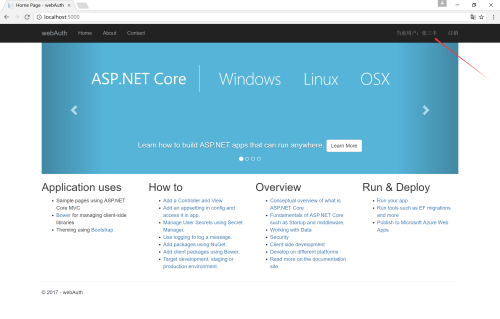
如果在其他页面使用User,可以像下面这样使用
<span>当前用户:@User.Identity.Name</span>
当然也可以从User中查到其他登录时存储的Claim的值
登录成功后
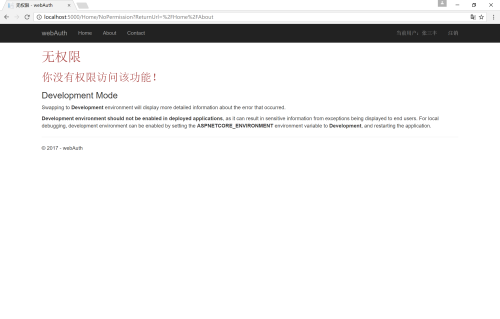
登录成功后访问没有权限页面(当然可以不让这种角色看到不能访问的链接)
本文转自桂素伟51CTO博客,原文链接:http://blog.51cto.com/axzxs/1894399 ,如需转载请自行联系原作者