在MonoRail中我们可以定义一些可重用的组件,在其他需要使用的页面引入这个组件就可以了。有点相当于.NET中的自定义控件,可以节约代码,方便开发,提高重用性。
在MonoRail中把这一功能叫做ViewComponent,下面就来具体看看它的使用方法:
ViewComponent可以使用现成的view,可以给父view发送数据,也支持参数输入和内部多节的方式
1、生成ViewComponent类:
要生成自己的ViewComponet必须从抽象类ViewComponent继承,继承后有三个方法可以被覆盖:
Initialize:初始化,可以在这个方法中接收传递的参数
Render:渲染实际的显示内容
SupportsSection:指定这个组件可以支持哪些子节点
最简单的一个ViewComponent:
 using
Castle.MonoRail.Framework;
using
Castle.MonoRail.Framework;
public
class
HeaderComponent : ViewComponent
 {
{
 }
当使用这个组件时会直接渲染views下的
components/headercomponent/default.vm
文件
}
当使用这个组件时会直接渲染views下的
components/headercomponent/default.vm
文件
当然和Controller一样,我们也可以指定一个渲染的vm文件:
using
Castle.MonoRail.Framework;
public
class
HeaderComponent : ViewComponent
{
 public override void Render()
 {
{
RenderView("otherview");
 }
}
}
这样的话就会使用views下的
components/headercomponent/otherview.vm文件
2、使用ViewComponent组件
生成组件之后,接下来就要看看如何使用它。主要的使用方式有两种:普通方式和嵌套内容的方式,使用时都是直接把类名作为组件名称来使用的
a、普通方式:
#component(HeaderComponent)
使用component关键字来使用
b、嵌套内容的方式:
C#代码:
public
class
BlockViewComponent2 : ViewComponent
{
public BlockViewComponent2()
{
}
public override void Render()
{
Context.ContextVars["it"] = "GSpring";
Context.RenderBody();
}
}
vm代码:
#blockcomponent(BlockViewComponent2)
inner content $it
#end
调用之后,显示在页面上的内容就是:
inner content GSpring
嵌套方式主要就是使用关键字:blockcomponent
Context.RenderBody()方法是用来渲染内容的,可以同时调用多次,那么所包含的内容就会显示多次
3、使用参数
正如.NET的自定义控件一样,MonoRail中的自定义控件也可以从外部接收一些参数,比如显示的颜色、大小、其他参数等。
使用ComponentParams属性在Initialize方法中来接收:
using
Castle.MonoRail.Framework;
public
class
TableComponent : ViewComponent
{
private ICollection elements;
private object border;
private string style;
private object cellpadding;
private object cellspacing;
public override void Initialize()
{
elements = (ICollection) ComponentParams["elements"];
border = ComponentParams["border"];
style = (String) ComponentParams["style"];
cellpadding = ComponentParams["cellpadding"];
cellspacing = ComponentParams["cellspacing"];
base.Initialize();
}
调用的时候,就可以写成这样:
#blockcomponent(TableComponent with "elements=$items" "border=0" "style=border: 1px solid black;" "cellpadding=0" "cellspacing=2")

#end
或:
#component(TableComponent with "elements=$items" "border=0" "style=border: 1px solid black;" "cellpadding=0" "cellspacing=2")
4、嵌套子节点的使用
在ViewComponet中还可以定义多个子节点,在一些复杂的情况下比较方便,看下面的一个实例:
Contoller代码:
public
void
Default()
{
ArrayList items = new ArrayList();
items.Add("项目1");
items.Add("项目2");
items.Add("项目3");
PropertyBag.Add("items", items);
}
ViewCompoent代码:
public
class
TableComponent : ViewComponent
{
private ICollection elements;
private object border;
private string style;
private object cellpadding;
private object cellspacing;
public override void Initialize()
{
elements = (ICollection)ComponentParams["elements"];
border = ComponentParams["border"];
style = (String)ComponentParams["style"];
cellpadding = ComponentParams["cellpadding"];
cellspacing = ComponentParams["cellspacing"];
base.Initialize();
}
public override void Render()
{
RenderText(
String.Format("<table border=\"{0}\" style=\"{1}\" cellpadding=\"{2}\" cellspacing=\"{3}\">",
border, style, cellpadding, cellspacing));
if (Context.HasSection("colheaders"))
{
Context.RenderSection("colheaders");
}
if (elements != null)
{
int index = 0;
foreach (object item in elements)
{
PropertyBag["index"] = ++index;
PropertyBag["item"] = item;
if (Context.HasSection("altitem") && index % 2 != 0)
{
Context.RenderSection("altitem");
}
else
{
Context.RenderSection("item");
}
}
}
RenderText("</table>");
}
public override bool SupportsSection(string name)
{
return name == "colheaders" || name == "item" || name == "altitem";
}
}
vm代码:
#blockcomponent(TableComponent with "elements=$items")
#colheaders
<
tr
>
<
th
>
</
th
>
<
th
>
Element
</
th
>
</
tr
>
#end
#item
<
tr
>
<
td
>
$index
</
td
>
<
td
>
$item
</
td
>
</
tr
>
#end
#altitem
<
tr
>
<
td
style
="background-color:Red"
>
$index
</
td
>
<
td
style
="background-color:Red"
>
$item
</
td
>
</
tr
>
#end
#end
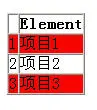
显示的效果,如下图所示:
在MonoRail中把这一功能叫做ViewComponent,下面就来具体看看它的使用方法:
ViewComponent可以使用现成的view,可以给父view发送数据,也支持参数输入和内部多节的方式
1、生成ViewComponent类:
要生成自己的ViewComponet必须从抽象类ViewComponent继承,继承后有三个方法可以被覆盖:
Initialize:初始化,可以在这个方法中接收传递的参数
Render:渲染实际的显示内容
SupportsSection:指定这个组件可以支持哪些子节点
最简单的一个ViewComponent:
using
Castle.MonoRail.Framework;
public
class
HeaderComponent : ViewComponent
{}
当然和Controller一样,我们也可以指定一个渲染的vm文件:
using
Castle.MonoRail.Framework;
public
class
HeaderComponent : ViewComponent
{ public override void Render() { RenderView("otherview"); }}
2、使用ViewComponent组件
生成组件之后,接下来就要看看如何使用它。主要的使用方式有两种:普通方式和嵌套内容的方式,使用时都是直接把类名作为组件名称来使用的
a、普通方式:
#component(HeaderComponent)
b、嵌套内容的方式:
C#代码:
public
class
BlockViewComponent2 : ViewComponent
{ public BlockViewComponent2() { } public override void Render() { Context.ContextVars["it"] = "GSpring"; Context.RenderBody(); } }
#blockcomponent(BlockViewComponent2)inner content $it#end
inner content GSpring
Context.RenderBody()方法是用来渲染内容的,可以同时调用多次,那么所包含的内容就会显示多次
3、使用参数
正如.NET的自定义控件一样,MonoRail中的自定义控件也可以从外部接收一些参数,比如显示的颜色、大小、其他参数等。
使用ComponentParams属性在Initialize方法中来接收:
using
Castle.MonoRail.Framework;
public
class
TableComponent : ViewComponent
{ private ICollection elements; private object border; private string style; private object cellpadding; private object cellspacing; public override void Initialize() { elements = (ICollection) ComponentParams["elements"]; border = ComponentParams["border"]; style = (String) ComponentParams["style"]; cellpadding = ComponentParams["cellpadding"]; cellspacing = ComponentParams["cellspacing"]; base.Initialize(); }
#blockcomponent(TableComponent with "elements=$items" "border=0" "style=border: 1px solid black;" "cellpadding=0" "cellspacing=2")#end
#component(TableComponent with "elements=$items" "border=0" "style=border: 1px solid black;" "cellpadding=0" "cellspacing=2")
4、嵌套子节点的使用
在ViewComponet中还可以定义多个子节点,在一些复杂的情况下比较方便,看下面的一个实例:
Contoller代码:
public
void
Default()
{ ArrayList items = new ArrayList(); items.Add("项目1"); items.Add("项目2"); items.Add("项目3"); PropertyBag.Add("items", items); }
public
class
TableComponent : ViewComponent
{ private ICollection elements; private object border; private string style; private object cellpadding; private object cellspacing; public override void Initialize() { elements = (ICollection)ComponentParams["elements"]; border = ComponentParams["border"]; style = (String)ComponentParams["style"]; cellpadding = ComponentParams["cellpadding"]; cellspacing = ComponentParams["cellspacing"]; base.Initialize(); } public override void Render() { RenderText( String.Format("<table border=\"{0}\" style=\"{1}\" cellpadding=\"{2}\" cellspacing=\"{3}\">", border, style, cellpadding, cellspacing)); if (Context.HasSection("colheaders")) { Context.RenderSection("colheaders"); } if (elements != null) { int index = 0; foreach (object item in elements) { PropertyBag["index"] = ++index; PropertyBag["item"] = item; if (Context.HasSection("altitem") && index % 2 != 0) { Context.RenderSection("altitem"); } else { Context.RenderSection("item"); } } } RenderText("</table>"); } public override bool SupportsSection(string name) { return name == "colheaders" || name == "item" || name == "altitem"; } }
#blockcomponent(TableComponent with "elements=$items")#colheaders
<
tr
>
<
th
>
</
th
>
<
th
>
Element
</
th
>
</
tr
>
#end#item
<
tr
>
<
td
>
$index
</
td
>
<
td
>
$item
</
td
>
</
tr
>
#end#altitem
<
tr
>
<
td
style
="background-color:Red"
>
$index
</
td
>
<
td
style
="background-color:Red"
>
$item
</
td
>
</
tr
>
#end#end
显示的效果,如下图所示:
本文转自永春博客园博客,原文链接:http://www.cnblogs.com/firstyi/archive/2007/11/21/966670.html,如需转载请自行联系原作者