设计模式 - 适配器
适配器也叫接口适配,其目的是为了减少不同类型数据之间的耦合度而进行的数据转换,有利于减少冗余代码。
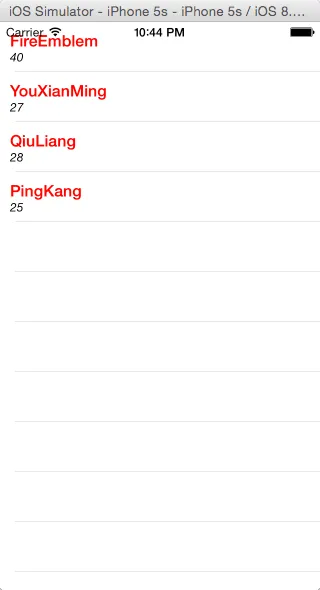
源码如下:
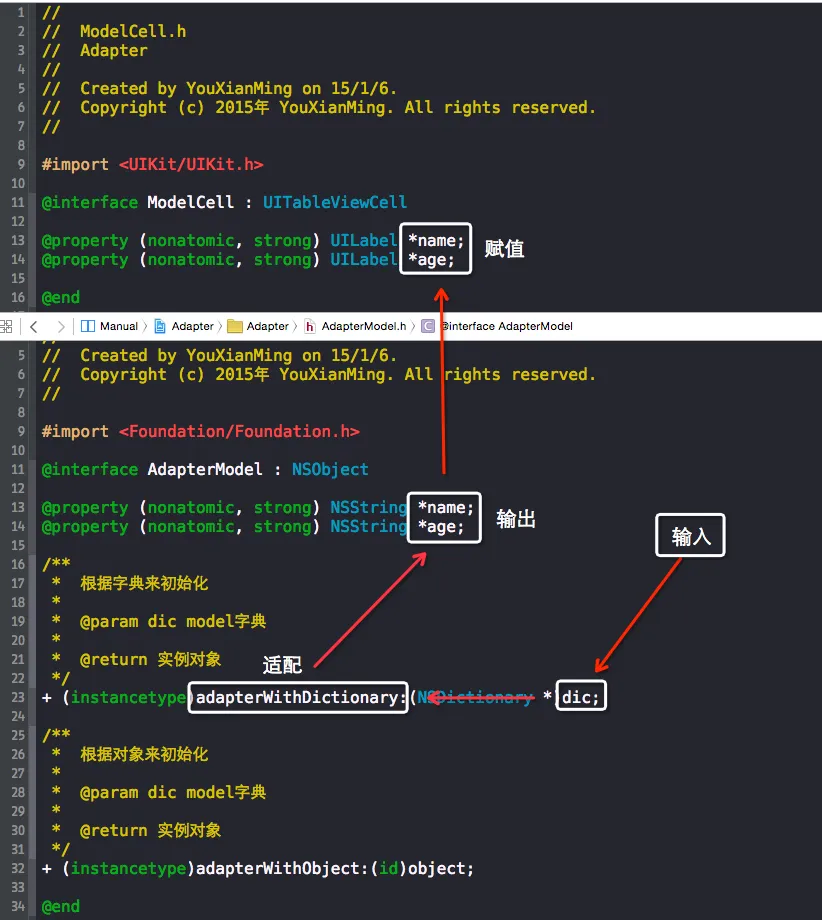
ModelCell.h 与 ModelCell.m
//
//  ModelCell.h
//  Adapter
//
//  Created by YouXianMing on 15/1/6.
//  Copyright (c) 2015年 YouXianMing. All rights reserved.
//

#import <UIKit/UIKit.h>

@interface ModelCell : UITableViewCell

@property (nonatomic, strong) UILabel *name;
@property (nonatomic, strong) UILabel *age;

@end
//
// ModelCell.m
// Adapter
//
// Created by YouXianMing on 15/1/6.
// Copyright (c) 2015年 YouXianMing. All rights reserved.
//
#import "ModelCell.h"
@implementation ModelCell
- (instancetype)initWithStyle:(UITableViewCellStyle)style reuseIdentifier:(NSString *)reuseIdentifier {
if (self = [super initWithStyle:style reuseIdentifier:reuseIdentifier]) {
self.name = [[UILabel alloc] initWithFrame:CGRectMake(10, 10, 200, 18)];
self.name.font = [UIFont boldSystemFontOfSize:16.f];
self.name.textColor = [UIColor redColor];
[self addSubview:self.name];
self.age = [[UILabel alloc] initWithFrame:CGRectMake(10, 18 + 10, 200, 14)];
self.age.font = [UIFont italicSystemFontOfSize:12.f];
self.age.textColor = [UIColor blackColor];
[self addSubview:self.age];
}
return self;
}
@endAdapterModel.h 与 AdapterModel.m
//
//  AdapterModel.h
//  Adapter
//
//  Created by YouXianMing on 15/1/6.
//  Copyright (c) 2015年 YouXianMing. All rights reserved.
//

#import <Foundation/Foundation.h>

@interface AdapterModel : NSObject

@property (nonatomic, strong) NSString *name;
@property (nonatomic, strong) NSString *age;

/**
 *  根据字典来初始化
 *
 *  @param dic model字典
 *
 *  @return 实例对象
 */
+ (instancetype)adapterWithDictionary:(NSDictionary *)dic;

/**
 *  根据对象来初始化
 *
 *  @param dic model字典
 *
 *  @return 实例对象
 */
+ (instancetype)adapterWithObject:(id)object;

@end
//
// AdapterModel.m
// Adapter
//
// Created by YouXianMing on 15/1/6.
// Copyright (c) 2015年 YouXianMing. All rights reserved.
//
#import "AdapterModel.h"
@implementation AdapterModel
+ (instancetype)adapterWithDictionary:(NSDictionary *)dic {
AdapterModel *model = nil;
if (dic != nil && [dic isKindOfClass:[NSDictionary class]]) {
model = [AdapterModel new];
model.name = dic[@"name"];
model.age = dic[@"age"];
}
return model;
}
+ (instancetype)adapterWithObject:(id)object {
// 预留
return [AdapterModel new];
}
@end控制器源码:
//
//  ViewController.m
//  Adapter
//
//  Created by YouXianMing on 15/1/6.
//  Copyright (c) 2015年 YouXianMing. All rights reserved.
//

#import "ViewController.h"
#import "ModelCell.h"
#import "AdapterModel.h"

static NSString *ModelCellFlag = @"ModelCell";

@interface ViewController ()<UITableViewDataSource, UITableViewDelegate>

@property (nonatomic, strong) UITableView     *tableView;
@property (nonatomic, strong) NSMutableArray  *dataArray;

@end

@implementation ViewController

- (void)viewDidLoad {
    [super viewDidLoad];

    // 初始化数据源
    [self createDataSource];

    // 初始化tableView
    [self createTableView];
}

#pragma mark - 数据源相关
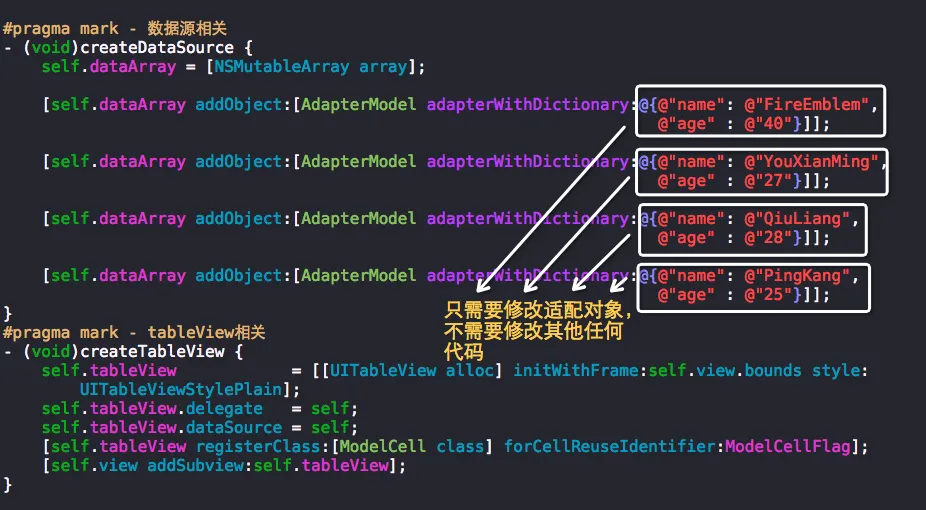
- (void)createDataSource {
    self.dataArray = [NSMutableArray array];

    [self.dataArray addObject:[AdapterModel adapterWithDictionary:@{@"name": @"FireEmblem",
                                                                    @"age" : @"40"}]];

    [self.dataArray addObject:[AdapterModel adapterWithDictionary:@{@"name": @"YouXianMing",
                                                                    @"age" : @"27"}]];

    [self.dataArray addObject:[AdapterModel adapterWithDictionary:@{@"name": @"QiuLiang",
                                                                    @"age" : @"28"}]];

    [self.dataArray addObject:[AdapterModel adapterWithDictionary:@{@"name": @"PingKang",
                                                                    @"age" : @"25"}]];
}
#pragma mark - tableView相关
- (void)createTableView {
    self.tableView            = [[UITableView alloc] initWithFrame:self.view.bounds style:UITableViewStylePlain];
    self.tableView.delegate   = self;
    self.tableView.dataSource = self;
    [self.tableView registerClass:[ModelCell class] forCellReuseIdentifier:ModelCellFlag];
    [self.view addSubview:self.tableView];
}

#pragma mark row数量
- (NSInteger)tableView:(UITableView *)tableView numberOfRowsInSection:(NSInteger)section {
    return self.dataArray.count;
}
#pragma mark cell初始化
- (UITableViewCell *)tableView:(UITableView *)tableView cellForRowAtIndexPath:(NSIndexPath *)indexPath {

    ModelCell *cell     = [tableView dequeueReusableCellWithIdentifier:ModelCellFlag];

    AdapterModel *model = self.dataArray[indexPath.row];

    cell.name.text      = model.name;
    cell.age.text       = model.age;

    return cell;
}
#pragma mark cell高度
- (CGFloat)tableView:(UITableView *)tableView heightForRowAtIndexPath:(NSIndexPath *)indexPath {
    return 50;
}

@end
以下是核心代码处: