
四、组件化开发:构建可复用的代码块
4.1 组件的定义与使用
组件是Vue的核心概念,它允许你将UI拆分成独立、可复用的模块:
// 定义全局组件
app.component('my-button', {
    props: ['type'],
    template: `
        <button :class="['btn', 'btn-' + type]">
            <slot></slot>
        </button>
    `
});

// 在模板中使用
<my-button type="primary">点击我</my-button>
4.2 单文件组件(SFC)
在实际项目中,更常用的是单文件组件(.vue文件),它将模板、脚本和样式整合在一个文件中:
<template>
    <div class="user-card">
        <h3>{
  { name }}</h3>
        <p>{
  { email }}</p>
        <button @click="sayHello">打招呼</button>
    </div>
</template>

<script setup>
import { defineProps } from 'vue';

// 接收父组件传递的数据
const props = defineProps({
    name: String,
    email: String
});

const sayHello = () => {
    alert(`你好,我是${props.name}`);
};
</script>

<style scoped>
.user-card {
    border: 1px solid #ddd;
    padding: 15px;
    border-radius: 8px;
}
</style>
单文件组件三部分:
< template>:组件的HTML结构
< script>:组件的逻辑和数据
< style>:组件的样式,添加scoped属性可使样式仅作用于当前组件
4.3 组件通信
组件之间需要共享数据,Vue提供了多种通信方式: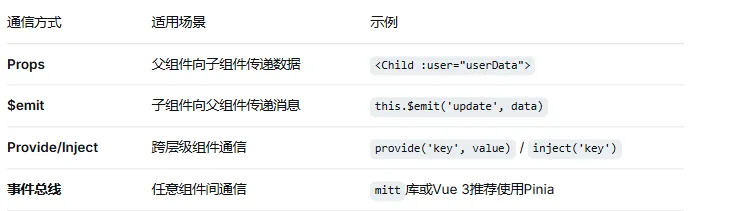
父子组件通信示例:
<!-- 父组件 -->
<template>
    <Child :count="count" @increment="handleIncrement" />
</template>

<script setup>
import { ref } from 'vue';
import Child from './Child.vue';

const count = ref(0);
const handleIncrement = () => {
    count.value++;
};
</script>

<!-- 子组件 Child.vue -->
<template>
    <div>
        <p>当前计数:{
  { count }}</p>
        <button @click="$emit('increment')">父组件加1</button>
    </div>
</template>

<script setup>
defineProps(['count']);
defineEmits(['increment']);
</script>
五、生命周期:理解组件的成长轨迹
每个Vue组件从创建到销毁都会经历一系列阶段,这些阶段被称为生命周期:
<script setup>
import { onMounted, onUpdated, onUnmounted } from 'vue';

// 组件创建完成(响应式数据已初始化)
console.log('setup');

// DOM挂载完成(可以操作DOM、发起异步请求)
onMounted(() => {
    console.log('组件已挂载');
    fetchData();  // 推荐在此发起异步请求
});

// 数据更新完成
onUpdated(() => {
    console.log('组件已更新');
});

// 组件销毁前(清理定时器、取消订阅)
onUnmounted(() => {
    console.log('组件即将销毁');
});
</script>
常用钩子:
onMounted:DOM挂载完成,适合操作DOM、发起异步请求
onUpdated:数据更新完成,适合在更新后执行操作
onUnmounted:组件销毁前,适合清理定时器、取消订阅
六、路由与状态管理:构建完整应用
6.1 Vue Router:单页应用的路由管理
当构建多页面应用时,需要Vue Router来管理页面导航:
npm install vue-router@4
// router/index.js
import { createRouter, createWebHistory } from 'vue-router';
import Home from '../views/Home.vue';
import About from '../views/About.vue';

const routes = [
    { path: '/', component: Home },
    { path: '/about', component: About },
    { path: '/user/:id', component: User }  // 动态路由
];

const router = createRouter({
    history: createWebHistory(),
    routes
});

export default router;
在组件中使用路由:
<template>
    <router-link to="/">首页</router-link>
    <router-link to="/about">关于</router-link>

    <router-view></router-view>  <!-- 路由视图 -->
</template>

<script setup>
import { useRoute, useRouter } from 'vue-router';

const route = useRoute();    // 获取当前路由信息
const router = useRouter();  // 路由实例,可用于编程式导航

// 跳转到用户页
const goToUser = (id) => {
    router.push(`/user/${id}`);
};
</script>
6.2 Pinia:新一代状态管理
对于中大型应用,组件间共享状态变得复杂,此时需要Pinia(Vue官方推荐的状态管理库,替代Vuex):
npm install pinia
// stores/counter.js
import { defineStore } from 'pinia';

export const useCounterStore = defineStore('counter', {
    state: () => ({
        count: 0,
        name: '计数器'
    }),
    getters: {
        doubleCount: (state) => state.count * 2
    },
    actions: {
        increment() {
            this.count++;
        },
        async fetchData() {
            // 支持异步操作
            const data = await fetch('/api/data');
            this.count = data.count;
        }
    }
});
在组件中使用:
<script setup>
import { useCounterStore } from '../stores/counter';

const counter = useCounterStore();

// 直接访问state
console.log(counter.count);

// 使用action
counter.increment();

// 使用getter
console.log(counter.doubleCount);
</script>
