【已解决】kex_exchange_identification: Connection closed by remote host fatal: Could not read from

简介: 【已解决】kex_exchange_identification: Connection closed by remote host fatal: Could not read from

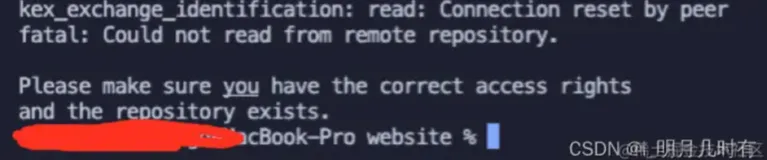
报错及效果图


报错代码

kex_exchange_identification: Connection closed by remote host
fatal: Could not read from remote repository.

Please make sure you have the correct access rights
and the repository exists.


成功效果图



解决方案

必要的解决方法

如果平时没有什么特别操作的话,换个网络就可以了,换个无线或者切换手机热点,实在不行等下再弄。不用去搞这个那个的配置。


可能有用的解决方法

可能需要把代理关了,没开代理的忽略

相关文章
|
网络安全 开发工具 git
git 出现错误:kex_exchange_identification: read: Connection reset by peer fatal
|
Kubernetes Linux Shell
k8s教程(pod篇)-定时任务
k8s教程(pod篇)-定时任务
1018 1
|
Kubernetes Linux API
[没接触过kubevirt?]15分钟快速入门kubevirt
什么是kubevirt? kubevirt是一个容器方式运行虚拟机的项目。`kubevirt`是附加`kubernetes`集群上的,它是通过 `CustomResourceDefinition(CRD)`部署到`Kubernetes API`变成资源对象。使用方式类似创建`deploy、pod`......这些资源清单。
5622 0
[没接触过kubevirt?]15分钟快速入门kubevirt
|
安全 网络安全 开发工具
git 提示:fatal: Could not read from remote repository.
1941 0
git 提示:fatal: Could not read from remote repository.
|
缓存 Linux 开发工具
CentOS 7- 配置阿里镜像源
阿里镜像官方地址http://mirrors.aliyun.com/ 1、点击官方提供的相应系统的帮助 :2、查看不同版本的系统操作: 下载源1、安装wget yum install -y wget2、下载CentOS 7的repo文件wget -O /etc/yum.
264329 0
|
网络安全 虚拟化 Windows
windows 11安装openSSH server 遇到的"kex_exchange_identification: read: Connection reset"问题
2066 60
|
6月前
|
机器学习/深度学习 运维 监控
实时异常检测实战:Flink+PAI 算法模型服务化架构设计
本文深入探讨了基于 Apache Flink 与阿里云 PAI 构建的实时异常检测系统。内容涵盖技术演进、架构设计、核心模块实现及金融、工业等多领域实战案例,解析流处理、模型服务化、状态管理等关键技术,并提供性能优化与高可用方案,助力企业打造高效智能的实时异常检测平台。
526 1
|
运维 网络安全
解决ssh: connect to host IP port 22: Connection timed out报错(scp传文件指定端口)
通过这些步骤和方法,您可以有效解决“ssh: connect to host IP port 22: Connection timed out”问题,并顺利使用 `scp`命令传输文件。
12224 7
|
网络协议 Ubuntu Linux
解决ssh: connect to host IP port 22: Connection timed out报错(scp传文件指定端口)
解决 `ssh: connect to host IP port 22: Connection timed out` 报错涉及检查 SSH 服务状态、防火墙配置、网络连通性和主机名解析等多个方面。通过逐步排查上述问题,并在 `scp` 命令中正确指定端口,可以有效解决连接超时的问题,确保文件传输的顺利进行。希望本文提供的解决方案能帮助您快速定位并解决该错误。
3095 3
|
Ubuntu 计算机视觉 C++
Ubuntu 20.04 编译 Opencv 4.11,详细步骤(带图)及报错解决,我的踩坑之旅~
9859 0

热门文章

最新文章