先看效果图
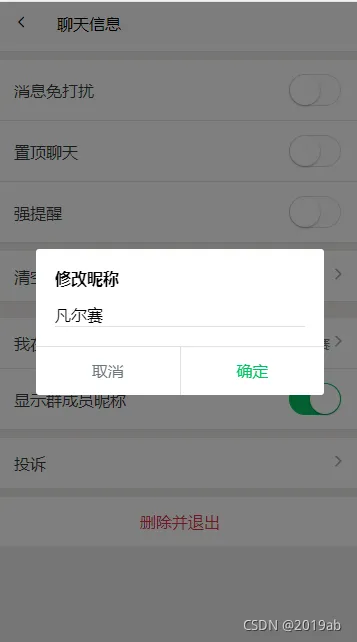
/pages/chat/chat-set/chat-set.vue
<template> <view style="background-color: #EDEDED;"> <!-- 导航栏 --> <free-nav-bar title="聊天信息" showBack :showRight="false"></free-nav-bar> <view class="flex flex-wrap py-3 bg-white"> <!-- 私聊 --> <view v-if="detail.chat_type === 'user'" class="flex flex-column align-center justify-center mb-2" style="width: 150rpx;"> <free-avatar :src="detail.avatar || '/static/images/userpic.png'" size="110"></free-avatar> <text class="font text-muted mt-1" >{{detail.name}}</text> </view> <!-- 群聊 --> <view v-else class="flex flex-column align-center justify-center mb-2" style="width: 150rpx;" v-for="(item,index) in list" :key='index'> <free-avatar :src="item.avatar || '/static/images/userpic.png'" size="110"></free-avatar> <text class="font text-muted mt-1" >{{item.name}}</text> </view> <view class="flex flex-column align-center justify-center mb-2" style="width: 150rpx;" @click="openMail"> <view class="flex align-center justify-center border" hover-class="bg-light" style="width: 120rpx;height: 120rpx;"> <text class="text-light-muted" style="font-size: 100rpx;" >+</text> </view> </view> </view> <free-divider></free-divider> <view v-if="detail.chat_type==='group'"> <free-list-item title="群聊名称" showRight :showLeftIcon="false" @click="updateName()"> <text slot="right" class="font text-muted">{{detail.name}}</text> </free-list-item> <free-list-item title="群二维码" showRight :showLeftIcon="false"> <text slot="right" class="iconfont font-md text-light-muted"></text> </free-list-item> <free-list-item title="群公告" showRight :showLeftIcon="false" @click="openGroupRemark"></free-list-item> </view> <free-divider></free-divider> <free-list-item title="查找聊天记录" showRight :showLeftIcon="false"></free-list-item> <free-divider></free-divider> <free-list-item title="消息免打扰" showRight :showLeftIcon="false" :showRightIcon="false"> <switch slot="right" :checked="detail.nowarn" @change="" color="#08C060"/> </free-list-item> <free-list-item title="置顶聊天" showRight :showLeftIcon="false" :showRightIcon="false"> <switch slot="right" :checked="detail.istop" @change="" color="#08C060"/> </free-list-item> <free-list-item title="强提醒" showRight :showLeftIcon="false" :showRightIcon="false"> <switch slot="right" :checked="detail.strongwarn" @change="" color="#08C060"/> </free-list-item> <free-divider></free-divider> <free-list-item title="清空聊天记录" showRight :showLeftIcon="false"></free-list-item> <free-divider></free-divider> <view v-if="detail.chat_type==='group'"> <free-divider></free-divider> <free-list-item title="我在本群的昵称" showRight :showLeftIcon="false" @click="updatenickName"> <text slot="right" class="font text-muted">{{nickname}}</text> </free-list-item> <free-list-item title="显示群成员昵称" showRight :showLeftIcon="false" :showRightIcon="false"> <switch slot="right" :checked="detail.shownickname" @change="" color="#08C060"/> </free-list-item> </view> <free-divider></free-divider> <free-list-item title="投诉" showRight :showLeftIcon="false"></free-list-item> <free-divider></free-divider> <view class="py-3 flex align-center justify-center bg-white" hover-class="bg-light"> <text class="font-md text-danger">删除并退出</text> </view> <free-confirm :title="'修改'+confirmTitle" ref="confirm"> <input type="text" class="border-bottom font-md" :placeholder="confirmTitle" v-model="confirmText"/> </free-confirm> <view style="height: 200rpx;"></view> </view> </template> <script> import freeNavBar from '@/components/free-ui/free-nav-bar.vue'; import freeAvatar from '@/components/free-ui/free-avatar.vue'; import freeDivider from '@/components/free-ui/free-divider.vue'; import freeListItem from '@/components/free-ui/free-list-item.vue'; import freeConfirm from '@/components/free-ui/free-confirm.vue'; import { mapState } from 'vuex'; import $H from '@/common/free-lib/request.js'; export default { components:{ freeNavBar, freeAvatar, freeDivider, freeListItem, freeConfirm }, computed:{ ...mapState({ chat:state=>state.user.chat, user:state=>state.user.user }), confirmTitle(){ return this.confirmType === 'name' ? '群名称' : '昵称'; } }, data() { return { list:[], confirmText:'', nickname:'', detail:{ id:0, // 接收人/群 id chat_type:'user', // 接收类型 user 单聊 group群聊 name:'', // 接收人/群 昵称 avatar:"", // 接收人/群 头像 type:'',// 最后一条消息类型 istop:false, // 是否置顶 shownickname:false, // 是否显示昵称 nowarn:false, // 是否免打扰 strongwarn:false, // 是否强提醒 user_id:0,//管理员id, remark:'', // 群公告 invite_confirm:0, // 邀请确认 } } }, methods: { updatenickName(){ this.confirmType = 'nickname'; this.confirmText = this.nickname this.$refs.confirm.show((close)=>{ if(this.confirmText == ''){ return uni.showToast({ title:'昵称不能为空', icon:'none' }) } $H.post('/group/nickname',{ id:this.detail.id, nickname:this.confirmText }).then(res=>{ uni.showToast({ title:'修改成功', icon:'none' }); this.nickname = this.confirmText; close(); }) }); }, openGroupRemark(){ uni.navigateTo({ url: '../group-remark/group-remark?params='+encodeURIComponent(JSON.stringify({ id:this.detail.id, remark:this.detail.remark })) }); }, openMail(){ uni.navigateTo({ url:'/pages/mail/mail/mail?type=createGroup' }) }, updateName(){ this.confirmText = this.detail.name this.$refs.confirm.show((close)=>{ if(this.confirmText == ''){ return uni.showToast({ title:'群名称不能为空', icon:'none' }) } $H.post('/group/rename',{ id:this.detail.id, name:this.confirmText }).then(res=>{ uni.showToast({ title:'修改成功', icon:'none' }); this.detail.name = this.confirmText; close(); }) }); } }, onLoad(e) { if(!e.params){ return this.backToast(); } let detail = JSON.parse(e.params); // 获取当前会话的详细资料 detail = this.chat.getChatListItem(detail.id,detail.chat_type); if(!detail){ return this.backToast() } this.detail = detail; if(this.detail.chat_type === 'group'){ $H.get('/group_info/'+this.detail.id).then(res=>{ this.detail.remark = res.remark; this.list = res.group_users.map(item=>{ if(item.user_id === this.user.id){ this.nickname = item.nickname; } return { id:item.user_id, name:item.nickname || item.user.nickname || item.user.username, avatar:item.user.avatar } }) }).catch(err=>{ uni.navigateBack({ delta:1, }) }) } } } </script> <style> </style>
感谢大家观看,我们下期见