-# 前言
在开发Web应用程序时,前端和后端协作是必不可少的。在本文中,我们将介绍如何在Vue框架下使用Uni-App实现前端和Java后台数据的交互,并演示如何通过Uni-App向Java后台发送请求来实现增删改查操作。文章最后会有前后端代码,
一、什么是Uni-App
Uni-App是DCloud推出的一个跨平台应用开发框架,它支持多种平台,包括iOS、Android、H5等,并具有原生应用的用户体验。Uni-App基于Vue.js开发,使得开发者可以使用Vue.js技术栈来构建跨平台应用,从而提高开发效率。
二、前端实现
发送查询GET请求
发送GET请求
Uni-App提供了封装好的uni.request方法来实现网络请求。在Vue组件中调用uni.request方法发送请求即可。例如:
// 查询js代码
export default {
  data() {
    return {
      list: []
    }
  },
  methods: {
    query() {
      uni.request({
        url: '/api/list',
        method: 'GET',
        success: res => {
          this.list = res.data
        }
      })
    }
  },
  onLoad() {
    this.query()
  }
}
上述代码定义了一个Vue组件,其中query方法通过调用uni.request方法向Java后台发送GET请求,获取数据列表并更新页面显示。这是vue查询.
发送添加POST请求
Uni-App提供了封装好的uni.request方法来实现POST请求。例如:
// 添加js代码
data() {
    return {
        sname: '苹果',
        scount: 100,
        sprice: 10,
        stype: '水果',
      }
    },
  add() {
        // 发送 POST 请求
      uni.request({
        url: 'http://localhost:8080/add',
        method: 'POST',
        data: {
          sname: this.sname,
          scount: this.scount,
          stype: this.stype,
          sprice: this.sprice
        },
        success: function(res) {
          console.log(res.data);
        },
        fail: function(err) {
          console.log(err);
        },
      });
      this.query()
      },
上述代码定义了四个数据进行传递,用到的是post请求,在data里面进行对数据的赋值,POST添加请求.最后添加成功或者失败都重新调用query查询事件来进行查询刷新.
发送删除PUT请求/发送修改POST请求
// 删除PUT请求js代码和部分html代码
<view v-for="(item,index) in List" :key='index'>
      <text class="td">{{item.id}}</text>
      <text class="td">{{item.sname}}</text>
      <text class="td">{{item.scount}}</text>
      <text class="td">{{item.stype}}</text>
      <text class="td">{{item.sprice}}</text>
      <text class="td_" @tap="del(item.id)">删除</text>
      <text class="td_" @tap="updshow(item.id)">修改</text>
</view>
<view class="add" v-show="show">
      <view class="addtitle">
        物资修改
      </view>
      名称:<input class="input" v-model="sname" type="text" />
      数量:<input class="input" v-model="scount" type="number" />
      种类:<input class="input" v-model="stype" type="text" />
      价格:<input class="input" v-model="sprice" type="number" />
      <button @click="upd()">修改</button>
    </view>
    data() {
      return {
        List: [],
        sname: '',
        scount: null,
        sprice: null,
        stype: '',
        show: false,
        upd1:null,
      }
    },
del(id) {
        console.log(id)
        uni.request({
          url: 'http://localhost:8080/del',
          method: 'PUT',
          data: id,
          success: (res) => {
            console.log(res)
            this.query()
          }
        })
      },
      updshow(id) {
        this.show = !this.show
        this.upd1=id
        console.log(this.upd1)
      },
      upd() {
        console.log(this.upd1)
        uni.request({
          url: 'http://localhost:8080/upd',
          method: 'POST',
          data: {
            id:this.upd1,
            sname:this.sname,
            scount:this.scount,
            stype:this.stype,
            sprice:this.sprice
          },
          success: (res) => {
            console.log(res)
          }
        })
        this.query()
        this.show = !this.show
      }
在上述的代码中,我们是根据对象的id值进行判断和删除,主要是通过v-for遍历时的当前对象调用的id,来当del事件的实参,调用后用PUT请求方式,实现根据id来进行删除的操作.
而修改,我们是通过点击事件和v-show来确定修改页面是否显示且把当前事件的id值赋给data中的upd1,然后通过v-model实现双向绑定,最后通过id:this.upd1来进行对更新数据的判定,实现修改数据操作,最后调用查询事件并且把v-show编程false来对修改页面进行隐藏.
前台代码
<template>
  <view>
    <view class="query">
      <view class="th">
        <text class="td">编号</text><text class="td">名称</text><text class="td">数量</text><text
          class="td">类别</text><text class="td">单价</text>
      </view>
      <view v-for="(item,index) in List" :key='index'>
        <text class="td">{{item.id}}</text>
        <text class="td">{{item.sname}}</text>
        <text class="td">{{item.scount}}</text>
        <text class="td">{{item.stype}}</text>
        <text class="td">{{item.sprice}}</text>
        <text class="td_" @tap="del(item.id)">删除</text>
        <text class="td_" @tap="updshow(item.id)">修改</text>
      </view>
    </view>
    <button @click="showadd">添加</button>
    <view class="add" v-show="flag">
      <view class="addtitle">
        物资添加
      </view>
      名称:<input class="input" v-model="sname" type="text" />
      数量:<input class="input" v-model="scount" type="number" />
      种类:<input class="input" v-model="stype" type="text" />
      价格:<input class="input" v-model="sprice" type="number" />
      <button @click="add">添加</button>
    </view>
    <view class="add" v-show="show">
      <view class="addtitle">
        物资修改
      </view>
      名称:<input class="input" v-model="sname" type="text" />
      数量:<input class="input" v-model="scount" type="number" />
      种类:<input class="input" v-model="stype" type="text" />
      价格:<input class="input" v-model="sprice" type="number" />
      <button @click="upd()">修改</button>
    </view>
  </view>
</template>
<script>
  export default {
    data() {
      return {
        List: [],
        sname: '',
        scount: null,
        sprice: null,
        stype: '',
        flag: false,
        show: false,
        upd1:null,
      }
    },
    onLoad() {
      this.query()
    },
    methods: {
      query: function() {
        this.sname= '',
        this.scount= null,
        this.sprice= null,
        this.stype= '',
        uni.request({
          url: 'http://localhost:8080/query',
          success: (res) => {
            console.log(res)
            this.List= res.data
          }
        })
      },
      add() {
        this.flag = !this.flag
        console.log(this.sname + this.scount + this.stype + this.sprice)
        // 发送 POST 请求
        uni.request({
          url: 'http://localhost:8080/add',
          method: 'POST',
          data: {
            sname: this.sname,
            scount: this.scount,
            stype: this.stype,
            sprice: this.sprice
          },
          success: function(res) {
            console.log(res.data);
          },
          fail: function(err) {
            console.log(err);
          },
        });
        this.query()
      },
      updshow(id) {
        this.show = !this.show
        this.upd1=id
        console.log(this.upd1)
      },
      showadd(id) {
        this.flag = !this.flag
      },
      del(id) {
        console.log(id)
        uni.request({
          url: 'http://localhost:8080/del',
          method: 'PUT',
          data: id,
          success: (res) => {
            console.log(res)
            this.query()
          }
        })
      },
      upd() {
        console.log(this.upd1)
        uni.request({
          url: 'http://localhost:8080/upd',
          method: 'POST',
          data: {
            id:this.upd1,
            sname:this.sname,
            scount:this.scount,
            stype:this.stype,
            sprice:this.sprice
          },
          success: (res) => {
            console.log(res)
          }
        })
        this.query()
        this.show = !this.show
      }
    }
  }
</script>
<style>
  .query {
    width: auto;
    margin: 10rpx;
    height: auto;
    /* background-image: linear-gradient(to right, #1f6eb4, #2c9dff); */
  }
  .th {
    font-weight: bold;
  }
  .td {
    display: inline-block;
    margin-left: 5rpx;
    width: 100rpx;
  }
  .td_ {
    display: inline-block;
    margin-left: 5rpx;
    width: 100rpx;
    color: #ff2631;
  }
  .add {
    position: fixed;
    bottom: 0;
  }
  .input {
    border: 1px solid lightgray;
    border-radius: 5rpx;
  }
  .addtitle {
    font-weight: bold;
    text-align: center;
  }
</style>
后台代码
contoller层
package com.supplies.controller;
import com.supplies.pojo.supplies;
import com.supplies.Service.service;
import org.springframework.beans.factory.annotation.Autowired;
import org.springframework.web.bind.annotation.*;
import java.util.List;
@RestController
@ResponseBody
public class controller {
    @Autowired
    service ser;
    @RequestMapping("hello")
    public String hello()
    {
        return "Springboot";
    }
    @RequestMapping("query")
    public List<supplies> query()
    {
        return ser.query();
    }
    @RequestMapping("add")
     public int add(@RequestBody supplies s)
    {
        int res=ser.add(s);
        return res;
    }
    @PutMapping("del")
    public boolean del(@RequestBody int id)
    {
        return ser.del(id);
    }
    @RequestMapping("upd")
    public boolean upd(@RequestBody supplies s)
    {
        return ser.upd(s);
    }
}
实体类层
package com.supplies.pojo;
import lombok.Data;
@Data
public class supplies {
    private Integer id;
    private String sname;
    private Integer scount;
    private String stype;
    private Integer sprice;
}
service层
package com.supplies.Service;
import com.supplies.pojo.supplies;
import java.util.List;
public interface service {
    public List<supplies> query();
    public int add(supplies s);
    public boolean del(int id);
    public boolean upd(supplies s);
}
serviceimpl层
package com.supplies.Service;
import com.supplies.mapper.Smapper;
import com.supplies.pojo.supplies;
import org.springframework.beans.factory.annotation.Autowired;
import org.springframework.stereotype.Service;
import java.util.List;
@Service
public class serviceimpl implements service{
    @Autowired
    Smapper mapper;
    @Override
    public List<supplies> query()
    {
        return mapper.query();
    }
    @Override
    public int add(supplies s){
        int res=mapper.add(s);
        return res;
    }
    @Override
    public boolean del(int id)
    {
        return mapper.del(id);
    }
    @Override
    public boolean upd(supplies s)
    {
        return mapper.upd(s);
    }
}
mapper层
package com.supplies.mapper;
import org.apache.ibatis.annotations.Mapper;
import org.springframework.stereotype.Repository;
import com.supplies.pojo.supplies;
import java.util.List;
@Repository
@Mapper
public interface Smapper {
    public List<supplies> query();
    public int add(supplies s);
    public boolean del(int id);
    public boolean upd(supplies s);
}
mapper.xml层
<?xml version="1.0" encoding="UTF-8"?>
<!DOCTYPE mapper PUBLIC "-//mybatis.org//DTD Mapper 3.0//EN" "http://mybatis.org/dtd/mybatis-3-mapper.dtd">
<mapper namespace="com.supplies.mapper.Smapper">
    <!-- 新增一个对应 querystu 方法的查询语句 -->
    <select id="query" resultType="com.supplies.pojo.supplies">
        SELECT * FROM supplie;
    </select>
    <insert id="add">
        INSERT INTO supplie(sname,scount,stype,sprice) VALUES (#{sname},#{scount} ,#{stype}, #{sprice})
     </insert>
    <delete id="del">
        DELETE  FROM supplie WHERE id=#{id}
    </delete>
    <update id="upd">
        UPDATE supplie set sname=#{sname},scount=#{scount},stype=#{stype},sprice=#{sprice} where id=#{id}
    </update>
</mapper>
pom.xml
<?xml version="1.0" encoding="UTF-8"?>
<project xmlns="http://maven.apache.org/POM/4.0.0" xmlns:xsi="http://www.w3.org/2001/XMLSchema-instance"
         xsi:schemaLocation="http://maven.apache.org/POM/4.0.0 https://maven.apache.org/xsd/maven-4.0.0.xsd">
    <modelVersion>4.0.0</modelVersion>
    <parent>
        <groupId>org.springframework.boot</groupId>
        <artifactId>spring-boot-starter-parent</artifactId>
        <version>2.7.9</version>
        <relativePath/> <!-- lookup parent from repository -->
    </parent>
    <groupId>com.supplies.demo</groupId>
    <artifactId>demo</artifactId>
    <version>0.0.1-SNAPSHOT</version>
    <name>supplies</name>
    <description>Demo project for Spring Boot</description>
    <properties>
        <java.version>17</java.version>
    </properties>
    <dependencies>
        <dependency>
            <groupId>org.springframework.boot</groupId>
            <artifactId>spring-boot-starter-web</artifactId>
        </dependency>
        <dependency>
            <groupId>mysql</groupId>
            <artifactId>mysql-connector-java</artifactId>
            <version>5.1.49</version>
        </dependency>
        <dependency>
            <groupId>org.projectlombok</groupId>
            <artifactId>lombok</artifactId>
            <optional>true</optional>
        </dependency>
        <dependency>
            <groupId>org.springframework.boot</groupId>
            <artifactId>spring-boot-devtools</artifactId>
            <optional>true</optional>
            <scope>true</scope>
        </dependency>
        <dependency>
            <groupId>org.mybatis.spring.boot</groupId>
            <artifactId>mybatis-spring-boot-starter</artifactId>
            <version>2.3.0</version>
        </dependency>
    </dependencies>
    <build>
        <plugins>
            <plugin>
                <groupId>org.springframework.boot</groupId>
                <artifactId>spring-boot-maven-plugin</artifactId>
                <configuration>
                    <excludes>
                        <exclude>
                            <groupId>org.project.lombok</groupId>
                            <artifactId>lombok</artifactId>
                        </exclude>
                    </excludes>
                </configuration>
            </plugin>
        </plugins>
    </build>
</project>
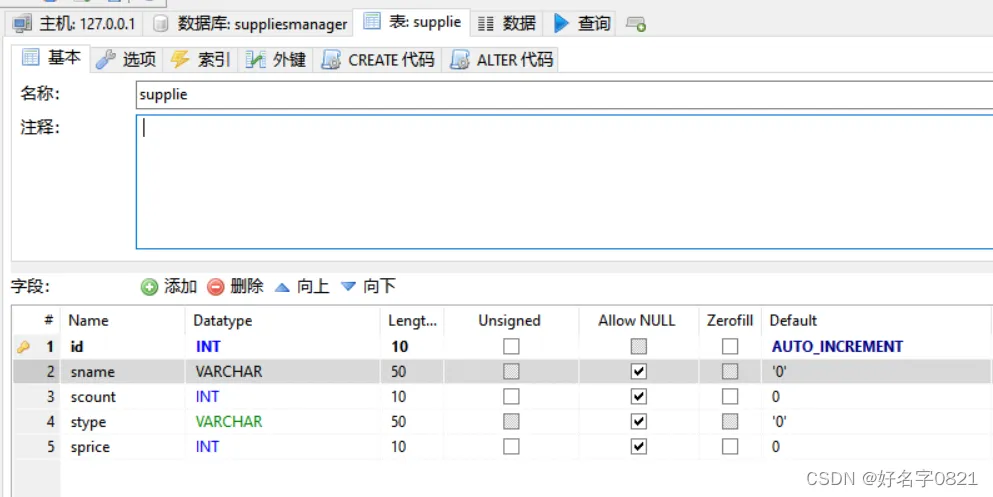
数据表