
1. 引言
在上一篇博客《Vue项目实战(01)-vue-element-admin项目结构分析》,已经对vue-element-admin项目文件做了一个详述的讲解。
本文主要来讲解vue-element-admin的 Vue状态管理模式 - Vuex。
2. Vuex
2.1 什么是Vuex?
Vuex是一个专为Vue.js应用程序开发的状态管理模式。它采用集中式存储管理应用的所有组件的状态,并以相应的规则保证状态以一种可预测的方式发生变化。
2.2 Vuex解决什么问题?
如果在一个项目开发中频繁的使用组件传参的方式来同步data中的值,一旦项目变得很庞大,管理和维护这些值将是相当棘手的工作。
那该如何解决data数据共享的问题呢?
没错,就是使用Vuex。在具有VueX的Vue项目中,我们只需要把这些值定义在VueX中,即可在整个Vue项目的组件中使用。
3. Vuex入门案例
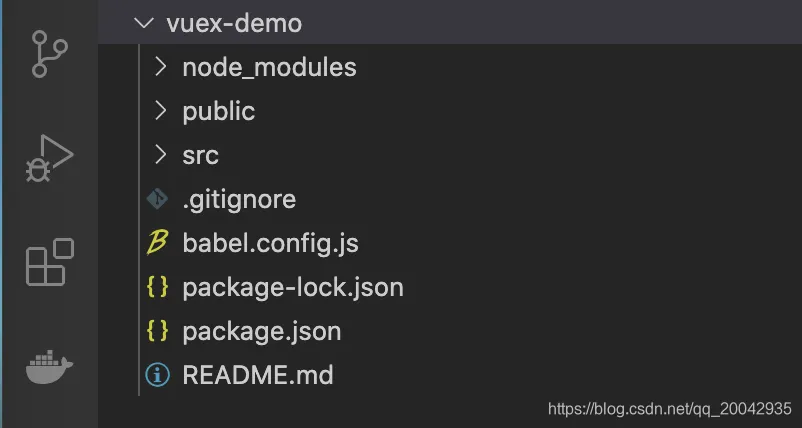
首先我们创建一个vue项目,创建方式可以参考之前写的博客《Java程序员从零开始学Vue(02)- Vue环境搭建、项目创建及运行》。
创建成功后目录结构如下:
3.1 添加vuex依赖
① 在pacakge.json添加vuex依赖,代码块如下:
"dependencies": {
    "core-js": "^3.6.5",
    "vue": "^2.6.11",
    "vuex": "3.1.0"
  },
② 安装依赖(这里使用了cnpm,也可以使用npm):
cnpm install
③ 安装成功:

3.2 配置vuex
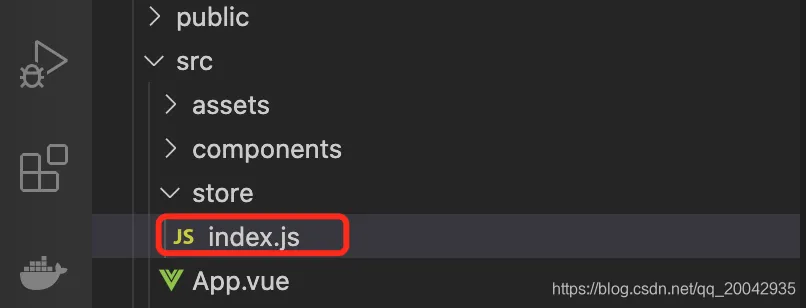
① 在src文件夹下,新增store文件夹,并新增index.js文件,目录结构如下:
② index.js内容如下:
import Vue from 'vue'
import Vuex from 'vuex'
//挂载Vuex
Vue.use(Vuex)
//创建VueX对象
const store = new Vuex.Store({
    state:{
        //存放的键值对就是所要管理的状态
        name:'helloVueX'
    }
})
export default store
③ 挂载store到当前项目的Vue实例当中去(main.js):
import Vue from 'vue'
import App from './App.vue'
import store from './store'
Vue.config.productionTip = false
new Vue({
  store,
  render: h => h(App),
}).$mount('#app')
3.3 使用vuex
① 在App.vue里展示vuex存储的内容:
<template>
  <div id="app">
    name:
        <h1>{{ $store.state.name }}</h1>
  </div>
</template>
<script>
export default {
  name: 'App'
}
</script>
② 启动程序:
npm run serve
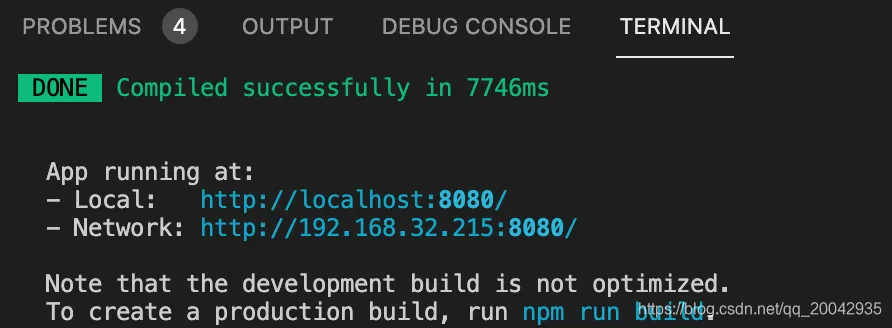
③浏览器输入http://localhost:8080/ ,可以看到运行如下结果:
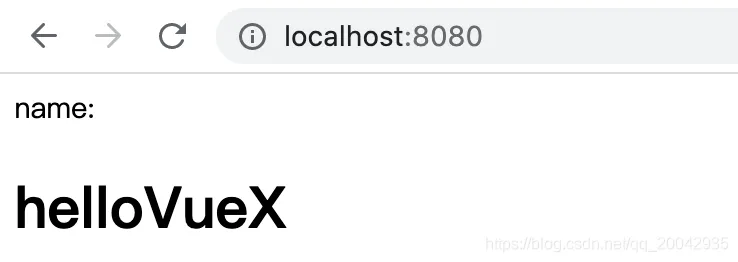
当然,学到这里只是会简单使用vuex而已,下面来更深入的讲解。
4. 详解Vuex
在vuex对象中,其实不止有state,还有用来操作state中数据的方法集,以及当我们需要对state中的数据需要加工的方法集等等成员。
4.1 Vuex核心成员
vuex有几个核心的成员,必须明白其含义:
- state :用来存放状态
- mutations :主要对
state成员进行操作 - getters:加工封装
state成员,供外界调用 - actions:异步操作,一般会调用
mutaions - modules: 模块化状态管理
下图是官网给出的流程图:
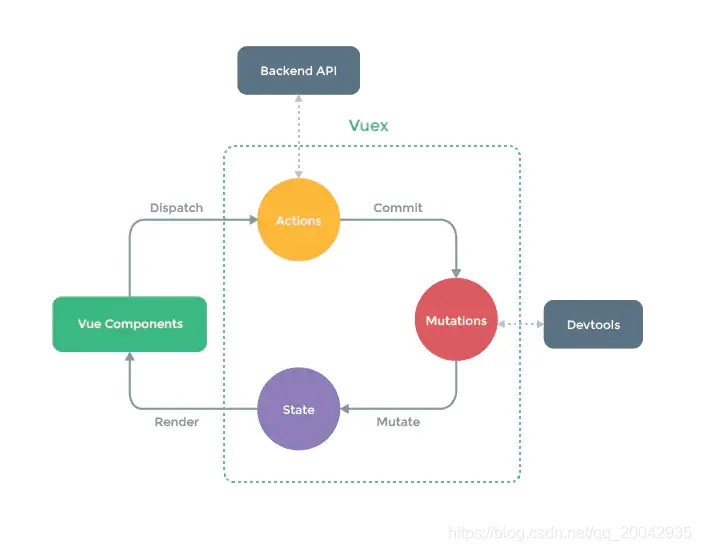
流程解析如下:
- 首先,
Vue组件如果调用某个VueX的方法过程中需要向后端请求时或者说出现异步操作时,需要dispatch VueX中actions的方法,以保证数据的同步。 actions的存在就是为了让mutations中的方法能在异步操作中起作用,不建议在组件中直接对state中的成员进行操作,这是因为直接修改(例如:this.$store.state.name = 'hello')的话不能被VueDevtools所监控到。- 最后被修改后的state成员会被渲染到组件的原位置当中去。
4.1.1 Mutations
mutations作用:操作state数据的方法的集合,比如对该数据的修改、增加、删除等等。
mutations方法都有默认的形参:([state] [,payload])
state:是当前VueX对象中的statepayload:是该方法在被调用时传递参数使用的
4.1.1.1 Mutations 修改数据
例如,我们编写一个方法,当被执行时,能把下例中的name值修改为"jack",我们只需要这样做(index.js):
import Vue from 'vue'
import Vuex from 'vuex'
Vue.use(Vuex)
const store = new Vuex.store({
    state:{
        name:'helloVueX'
    },
    mutations:{
        //es6语法,等同edit:funcion(){...}
        edit(state){
            state.name = 'jack'
        }
    }
})
export default store
而在组件中,我们需要这样去调用这个mutation——例如在App.vue的某个method中:
this.$store.commit('edit')
4.1.1.2 Mutations 增删数据
为了配合 Vue的响应式数据,我们在Mutations的方法中,应当使用Vue提供的方法来进行操作。
如果使用delete或者xx.xx = xx的形式去删或增,则Vue不能对数据进行实时响应。
举例:
① Vue.set: 为某个对象设置成员的值,若不存在则新增。例如对state对象中添加一个age成员:
Vue.set(state,"age",15)
② Vue.delete 删除成员,将刚刚添加的age成员删除:
Vue.delete(state,'age')
4.1.1.3 Mutations 传值
在实际生产过程中,会遇到需要在提交某个mutation时需要携带一些参数给方法使用。
举例:
① 单个值提交时:
this.$store.commit('edit',15)
② 当需要多参提交时,推荐把他们放在一个对象中来提交:
this.$store.commit('edit',{age:15,sex:'男'})
③ 接收挂载的参数:
edit(state,payload){
    state.name = 'jack'
    console.log(payload) // 15或{age:15,sex:'男'}
}
④ 另一种提交方式:
this.$store.commit({
    type:'edit',
    payload:{
        age:15,
        sex:'男'
    }
})
4.1.2 Getters
Getters作用:可以对state中的成员加工后传递给外界,Getters中的方法有两个默认参数:
state: 当前VueX对象中的状态对象getters: 当前getters对象,用于将getters下的其他getter拿来用
举例:
getters:{
    nameInfo(state){
        return "姓名:"+state.name
    },
    fullInfo(state,getters){
        return getters.nameInfo+'年龄:'+state.age
    }
}
调用:
this.$store.getters.fullInfo
4.1.3 Actions
Actions作用:由于直接在mutation方法中进行异步操作,将会引起数据失效。所以提供了Actions来专门进行异步操作,最终提交mutation方法。
Actions中的方法有两个默认参数:
context:上下文(相当于箭头函数中的this)对象payload:挂载参数
举例(setTimeout是异步操作,所以需要使用actions):
actions:{
    aEdit(context,payload){
        setTimeout(()=>{
            context.commit('edit',payload)
        },2000)
    }
}
由于是异步操作,所以我们可以为我们的异步操作封装为一个Promise对象:
aEdit(context,payload){
     return new Promise((resolve,reject)=>{
         setTimeout(()=>{
             context.commit('edit',payload)
             resolve()
         },2000)
     })
 }
在组件中调用:
this.$store.dispatch('aEdit',{age:15})
4.1.4 modules
modules作用:当项目庞大,状态非常多时,可以采用模块化管理模式。Vuex允许我们将 store分割成模块(module)。每个模块拥有自己的 state、mutation、action、getter、甚至是嵌套子模块——从上至下进行同样方式的分割。
modules:{
    a:{
        state:{},
        getters:{},
        ....
    }
}
组件内调用模块a的状态:
this.$store.state.a
而提交或者dispatch某个方法和以前一样,会自动执行所有模块内的对应type的方法:
this.$store.commit('editKey')
this.$store.dispatch('aEditKey')
4.1.4.1 modules细节
① 模块中mutations和getters中的方法接受的第一个参数是自身局部模块内部的state:
modules:{
    a:{
        state:{key:5},
        mutations:{
            editKey(state){
                state.key = 9
            }
        },
        ....
    }
}
② getters中方法的第三个参数是根节点状态:
modules:{
    a:{
        state:{key:5},
        getters:{
            getKeyCount(state,getter,rootState){
                return  rootState.key + state.key
            }
        },
        ....
    }
}
③ actions中方法获取局部模块状态是context.state,根节点状态是context.rootState:
modules:{
    a:{
        state:{key:5},
        actions:{
            aEidtKey(context){
                if(context.state.key === context.rootState.key){
                    context.commit('editKey')
                }
            }
        },
        ....
    }
}
4.2 标准的目录结构
如果把整个store都放在index.js中是不合理的,所以需要拆分。比较合适的目录格式如下:
store:.
│  actions.js
│  getters.js
│  index.js
│  mutations.js
│  mutations_type.js   ##该项为存放mutaions方法常量的文件,按需要可加入
│
└─modules
        Astore.js
对应的内容存放在对应的文件中,和以前一样,在index.js中存放并导出store。
state中的数据尽量放在index.js中。
而modules中的Astore局部模块状态如果多的话也可以进行细分。
5. 详解element项目里的Vuex
Vuex 统一管理的,有如登录token、用户信息或者是一些全局个人偏好设置等,还是用vuex管理更加的方便,具体当然还是要结合自己的业务场景的。
在vue-element-admin项目里的src文件夹下,有一个store文件夹,其目录结构如下:
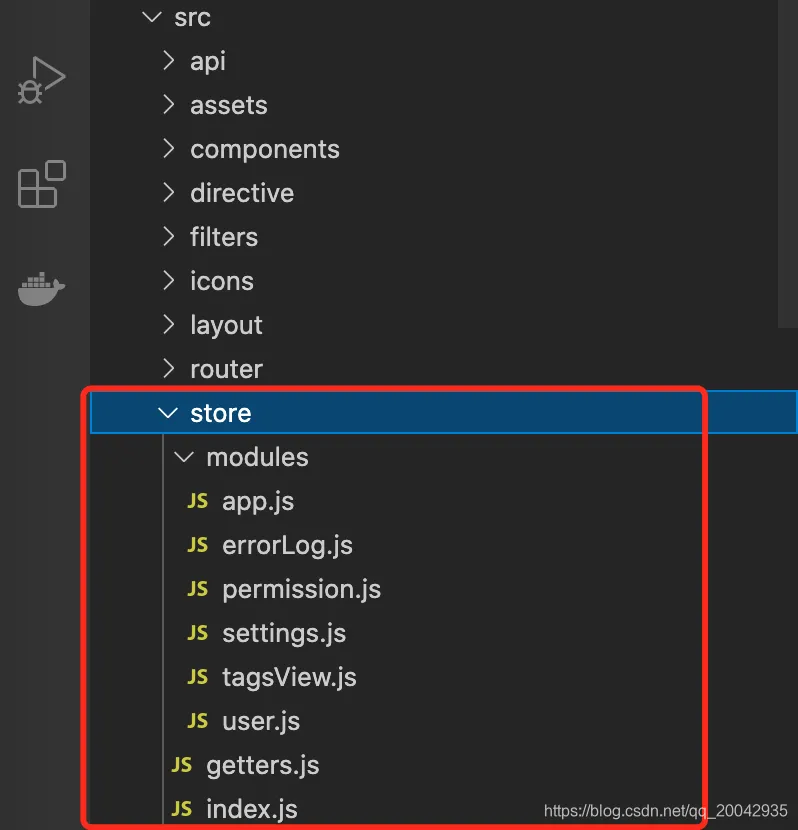
5.1 index.js
首先看看index.js文件,详细解析如下图:
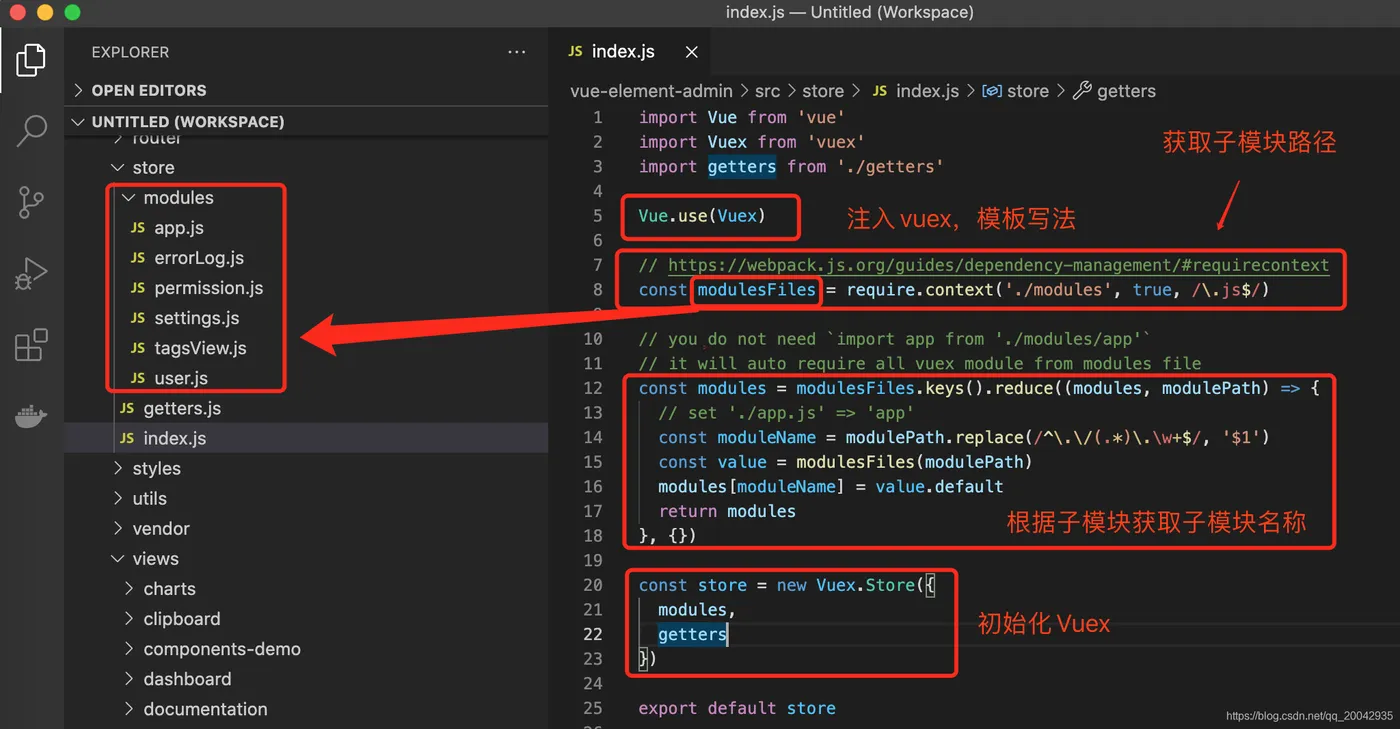
5.2 getters.js
getters.js就是包装好内容,提供给其它组件使用,内容如下(包含一些设备、token、用户等信息):
const getters = {
  sidebar: state => state.app.sidebar,
  size: state => state.app.size,
  device: state => state.app.device,
  visitedViews: state => state.tagsView.visitedViews,
  cachedViews: state => state.tagsView.cachedViews,
  token: state => state.user.token,
  avatar: state => state.user.avatar,
  name: state => state.user.name,
  introduction: state => state.user.introduction,
  roles: state => state.user.roles,
  permission_routes: state => state.permission.routes,
  errorLogs: state => state.errorLog.logs
}
export default getters
5.3 moudules下的信息
就是一些公用的存储信息,内容如下:
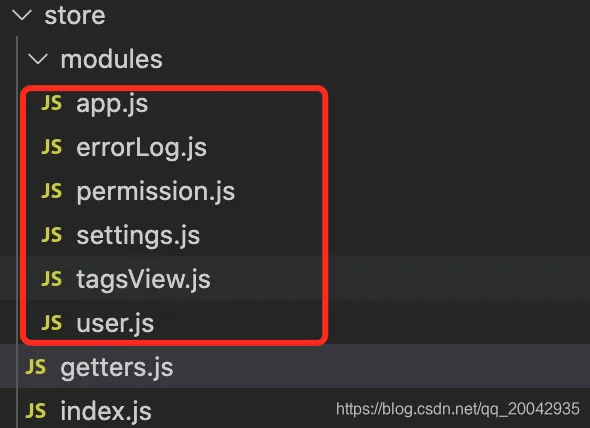
5.4 登录分析
举个登录例子:
① 在视图层(../src/views/login/index.vue),可以看到使用了vuex的dispatch方法(this.$store.dispatch)登录逻辑代码如下:
handleLogin() {
      this.$refs.loginForm.validate(valid => {
        if (valid) {
          this.loading = true
          this.$store.dispatch('user/login', this.loginForm)
            .then(() => {
              this.$router.push({ path: this.redirect || '/', query: this.otherQuery })
              this.loading = false
            })
            .catch(() => {
              this.loading = false
            })
        } else {
          console.log('error submit!!')
          return false
        }
      })
    },
② 该方法会调用src/store/modules/user.js的登录方法,异步返回后并保存登录人信息(如token),会内容如下:
const actions = {
  // user login
  login({ commit }, userInfo) {
    const { username, password } = userInfo
    return new Promise((resolve, reject) => {
      login({ username: username.trim(), password: password }).then(response => {
        const { data } = response
        commit('SET_TOKEN', data.token)
        setToken(data.token)
        resolve()
      }).catch(error => {
        reject(error)
      })
    })
  },
6. 小结
到这里,我们把vuex的整体知识学完了,希望能帮助到各位童鞋,本文完!
