1 CSS3的一些常用的新增选择器
1.1获得class名称是div1下面的第一个子元素
而空格是下面所有包含这类的都改变
.div1>p:first-child{
color: red;
}
div1>p:last-child{
color: green;
}
1.2 获得具体的某一个子元素
.div1>p:nth-child(2){
background-color: palegreen;
}
.div1>p:nth-child(even){
background-color: red;
}
div1>p:nth-child(odd){
background-color: green;
}
1.3 获得空的元素对象
.div1>p:empty{height: 50px;
background-color: darkmagenta;
}
1.4 获得焦点执行的样式
input:focus{
width: 300px;
height:100px;
}
input:checked{
width: 20px;
height: 20px;
}
1.5 伪对象选择器是在指定的对象之前(或者之后)插入内容
.div1:before{
/*content: "我们的祖国是花园";*/
content: url(img/1.jpg);
}
.div1:after{}
测试代码:
<!DOCTYPE html>
<html>
  <head>
    <meta charset="utf-8">
    <title></title>
    <style>
      /*获得class名称是div1下面的第一个子元素*/
      .div1>p:first-child{
        color: red;
      }
      .div1>p:last-child{
      color: green;
      }
      /*获得具体的某一个子元素*/
      /*.div1>p:nth-child(2){
        background-color: palegreen;
      }*/
     /* .div1>p:nth-child(even){
        background-color: red;
      }
      .div1>p:nth-child(odd){
         background-color: green;
      }*/
       /*获得空的元素对象*/
      .div1>p:empty{
          height: 50px;
          background-color: darkmagenta;
      }
      /*获得焦点执行的样式*/
    /*  input:focus{
        width: 300px;
        height:100px;
      }*/
     input:checked{
      width: 20px;
      height: 20px;
     }
    </style>
  </head>
  <body>
    <div class="div1">
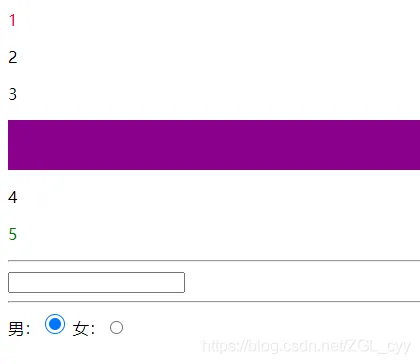
      <p>1</p>
      <p>2</p>
      <p>3</p>
      <p></p>
      <p>4</p>
      <p>5</p>
    </div>
    <hr />
    <input type="text" name="" id="" value="" />
    <hr />
     男:<input type="radio"  name="sex"/>
     女:<input type="radio"  name="sex"/>
  </body>
</html>
运行效果:
1.6 属性选择器
input[type='text']{
width: 300px;
height: 40px;
}
1.7 属性 ^用fom开头的对象
$*/
input[name^='fom']{
width: 300px;
height: 40px;
}
测试代码:
<!DOCTYPE html>
<html>
  <head>
    <meta charset="utf-8">
    <title></title>
    <style>
      /*
       *  伪对象选择器是在指定的对象之前(或者之后)插入内容
       * */
      .div1:before{
        /*content: "我们的祖国是花园";*/
        content: url(img/6.jpg);
      }
      .div1:after{
      }
    </style>
  </head>
  <body>
    <div class="div1">你好</div>
  </body>
</html>
效果:

2 选择器的种类总结:
【1】基础选择器
*
id
class
标签
【2】关系选择器>
+
~
【3】伪类选择器
hover
【4】伪对象选择器
before \after
【5】属性选择器
input[type='text']