思路
准备一些多边形坐标,然后在天地图上利用这些坐标形成面,在面上添加监听事件(比如鼠标移入该面后出现信息框)
知识点
Polygon类创建多边形覆盖物。
构造参数:Polygon(points:Array[,opts:PolygonOptions])
points:坐标数组。
opts:多边形的属性对象,请参考 PolygonOptions。更多参数请参考天地图文档
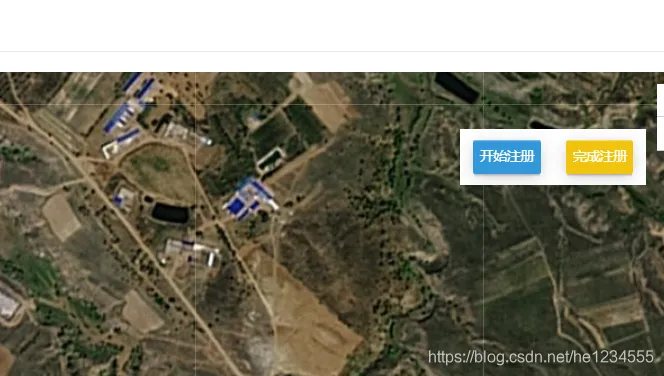
效果图
html部分
<body onLoad="mapTDTLoad()">
    <div id="typeMap">
        <div class="mestable">
            <div class="registerbtn">
                <div class="regcolor1"οnclick="addPolygonClick();"><p>开始注册</p></div>
                <div class="regcolor2"οnclick="removePolygonClick();"><p>完成注册</p></div>
            </div>
        </div>
    </div>
</body>
css部分
*{
  padding: 0;
  margin: 0;
  box-sizing: border-box;
}
body, html{
  width: 100%;
  height: 100%;
  font-family:"微软雅黑";
}
#typeMap{
  width: 100%;
  height: 100%;
}
#typeMap .mestable{
  /*float:left;*/
  top: 50px;
  right: 50px;
  position: absolute;
  z-index: 999;
  width: auto;
  box-shadow: 0 50px 50px rgba(10, 16, 20, 0.24), 0 0 30px rgba(10, 16, 20, 0.12);
  background-color: #8D8D8D;
  cursor: pointer;
  /*display: none;*/
}
#typeMap .mestable .registerbtn{
  padding: 5px 0;
  /*background-color: #D9D9D9;*/
  background-color: rgba(255,255,255,1);
  width: 165px;
  height: 50px;
  display: flex;
  justify-content: space-around;
  align-items: center;
}
#typeMap .mestable .registerbtn>div{
  padding: 0 5px;
  width: 60px;
  height: 30px;
  border-radius: 2px;
  box-shadow: 0 1px 0 rgba(255,255,255,0.34) inset,
              0 2px 0 -1px rgba(0,0,0,0.13),
              0 3px 0 -1px rgba(0,0,0,0.08),
              0 3px 13px -1px rgba(0,0,0,0.21);
}
#typeMap .mestable .registerbtn>div p{
  text-align: center;
  height: 30px;
  line-height: 30px;
  color: #ffffff;
}
#typeMap .mestable .registerbtn>div.regcolor1{
  background-color: #3498db;
}
/*#typeMap .mestable .registerbtn>div.regcolor1:focus{*/
/*  background-color: #fd9644;*/
/*}*/
#typeMap .mestable .registerbtn>div.regcolor2{
  background-color: #f1c40f;
}
js部分
var map,zoom = 17,polygon2;
function mapTDTLoad() {
  const imageURL = "http://t0.tianditu.gov.cn/img_w/wmts?" +
    "SERVICE=WMTS&REQUEST=GetTile&VERSION=1.0.0&LAYER=img&STYLE=default&TILEMATRIXSET=w&FORMAT=tiles" +
    "&TILEMATRIX={z}&TILEROW={y}&TILECOL={x}&tk=你的秘钥";
  const imageURLT = "http://t0.tianditu.gov.cn/cia_w/wmts?" +
    "SERVICE=WMTS&REQUEST=GetTile&VERSION=1.0.0&LAYER=cia&STYLE=default&TILEMATRIXSET=w&FORMAT=tiles" +
    "&TILEMATRIX={z}&TILEROW={y}&TILECOL={x}" +
    "&tk=你的秘钥";
  //创建自定义图层对象
  const lay1 = new T.TileLayer(imageURL, {minZoom: 1, maxZoom: 18});
  const lay2 = new T.TileLayer(imageURLT, {minZoom: 1, maxZoom: 18});
  var config = {layers: [lay1, lay2]};
  map = new T.Map('typeMap', config);
  map.centerAndZoom(new T.LngLat(107.52292,22.35511), zoom);
  //禁用双击放大。
  map.disableDoubleClickZoom();
  //添加面覆盖物
  Polygons();
}
//添加面覆盖物
function Polygons() {
  var points2 = [];
  // points2.push(new T.LngLat());
  points2.push(new T.LngLat(107.52387,22.35681));
  points2.push(new T.LngLat(107.52345,22.35654));
  points2.push(new T.LngLat(107.52306,22.3563));
  points2.push(new T.LngLat(107.52279,22.35609));
  points2.push(new T.LngLat(107.52225,22.35561));
  points2.push(new T.LngLat(107.52284,22.35488));
  points2.push(new T.LngLat(107.52443,22.35597));
  config2 = {
    color: "#ffffff",
    // color: "#16a085",
    weight: 3,
    opacity: 0.5,
    // fillColor: "#eb3b5a",
    fillColor: "#16a085",
    fillOpacity: 0.5
  }
  polygon2 = new T.Polygon(points2, config2);
  //向地图上添加面
  map.addOverLay(polygon2);
}
function addPolygonClick(){
  //开始操作
  layer.msg('开始操作');
  // //移除面的点击事件,防止多次注册
  // removePolygonClick();
  //所有注册面的触发事件
  polygon2.addEventListener("click", tagging);
}
function removePolygonClick(){
  //移除面的注册事件
  polygon2.removeEventListener("click", tagging);
  // 完成操作
  layer.msg('完成操作');
}
//在面的覆盖物上添加标注信息
function tagging() {
  var lnglat = new T.LngLat(107.52303,22.35559);
  //创建信息窗口对象
  var infoWin = new T.InfoWindow();
  //设置信息窗口要显示的内容
  var Content =
    `
    <div id="win_box" style="height: auto; ">
      <table style=" width:300px;border-collapse: separate;font-size:14px;border-spacing:0 6px;table-layout:fixed;">
        <caption style="font-weight:bold;font-size:16px;text-align: left;border-bottom: #d1d8e0 1px solid">地块详情</caption>
        <tr><td style=" width: 20%;font-weight:bold;text-align:left;">地点:</td><td style="text-align:left;width:45%;word-break:keep-all;white-space:nowrap;overflow:hidden;text-overflow:ellipsis;">崇左市江州区渠留屯周边</td></tr>
        <tr><td style=" font-weight:bold;text-align:left;">类别:</td><td style="text-align:left;width:80%;word-break:keep-all;white-space:nowrap;overflow:hidden;text-overflow:ellipsis;">耕地</td></tr>
        <tr><td style=" font-weight:bold;text-align:left;">面积:</td><td style="text-align:left;width:80%;word-break:keep-all;white-space:nowrap;overflow:hidden;text-overflow:ellipsis;">22.5亩</td></tr>
        <tr><td style=" font-weight:bold;text-align:left;">种植类型:</td><td style="text-align:left;width:80%;word-break:keep-all;white-space:nowrap;overflow:hidden;text-overflow:ellipsis;">粤糖 55</td></tr>
        <tr><td style=" font-weight:bold;text-align:left;">种植时间:</td><td style="text-align:left;width:80%;word-break:keep-all;white-space:nowrap;overflow:hidden;text-overflow:ellipsis;">2019/02/04</td></tr>
        <tr><td style=" font-weight:bold;text-align:left;">联系人名:</td><td style="text-align:left;width:80%;word-break:keep-all;white-space:nowrap;overflow:hidden;text-overflow:ellipsis;">龙先生</td></tr>
        <tr><td style=" font-weight:bold;text-align:left;">联系电话:</td><td style="text-align:left;width:80%;word-break:keep-all;white-space:nowrap;overflow:hidden;text-overflow:ellipsis;">135****7823</td></tr>
        <tr><td style=" font-weight:bold;text-align:left;color: #fa8231;cursor: pointer" οnclick="massifExhibit()">最新情况:</td><td style="text-align:left;width:80%;word-break:keep-all;white-space:nowrap;overflow:hidden;text-overflow:ellipsis;"><a href="http://www.tly.cloud/web/index.html#/index">更多内容</a></td></tr>
      </table>
    </div>
    `;
  infoWin.setContent(Content);
  infoWin.setOffset(new T.Point(0,-30))
  infoWin.setLngLat(lnglat);
  //向地图上添加信息窗口
  map.addOverLay(infoWin);
  polygon2.removeEventListener("click",PolygonClick);
}
function massifExhibit() {
  layer.open({
    type:2,
    title: false,
      content: `massiftype/rotat`,
    area: ['600px', '431px'],
  });
}