git fatal: branch ‘master‘ does not exist

简介: git fatal: branch ‘master‘ does not exist

问题重现

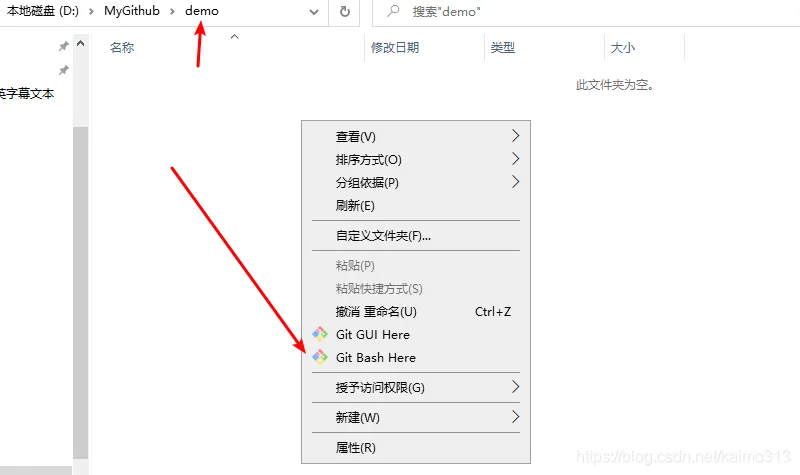
  1. 先在一个空文件夹里右击,然后点击 git bash here


20210609173918352.png


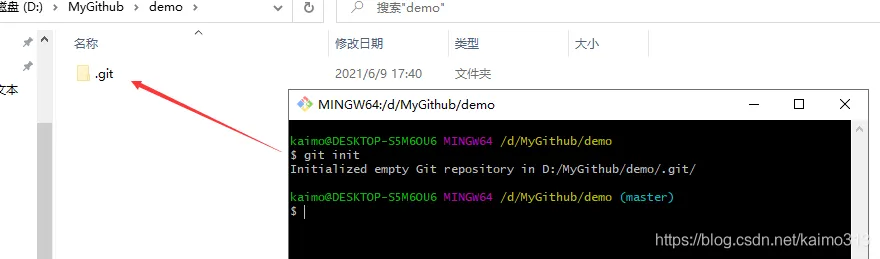
  1. 输入下面命令

git init


20210609174045123.png


  1. 我们假设要关联一个远程分支 https://gitee.com/kaimo313/webgl-demo.git

执行下面命令

git remote add origin https://gitee.com/kaimo313/webgl-demo.git
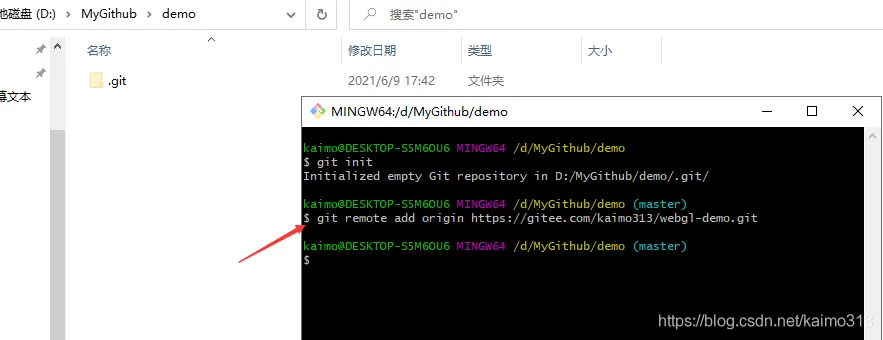
20210609174248191.png


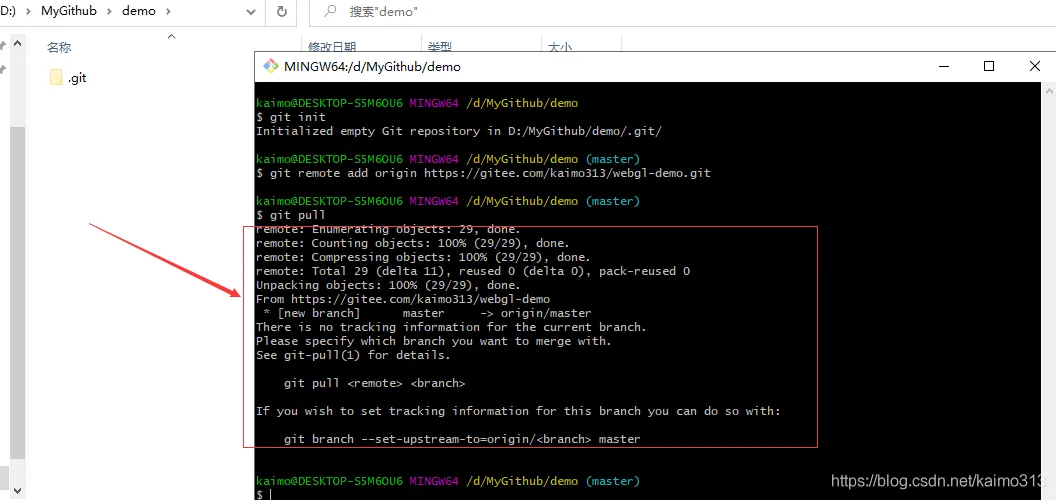
  1. 再执行拉取代码命令
git pull
• 1

不出意外就会报下面的提示


20210609174357570.png


  1. 输入提示的命令
git branch --set-upstream-to=origin/master master
• 1

然后就会提示出来这个问题 fatal: branch 'master' does not exist
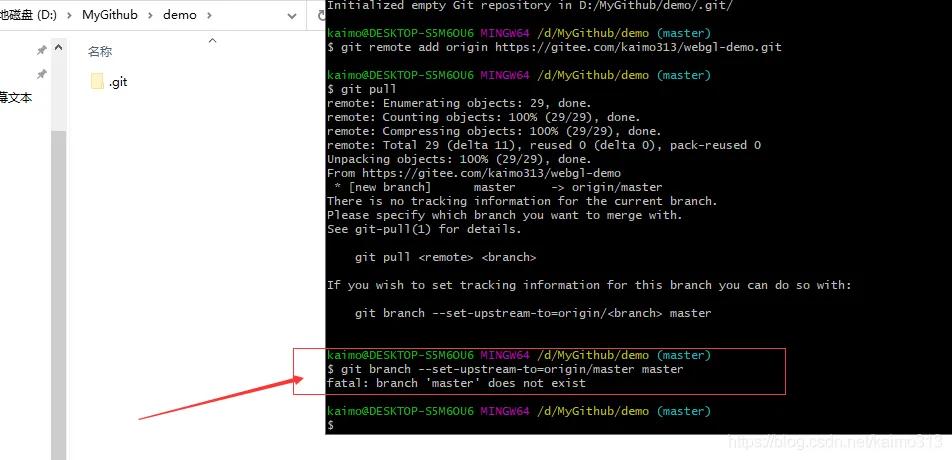

20210609175118832.png


原因


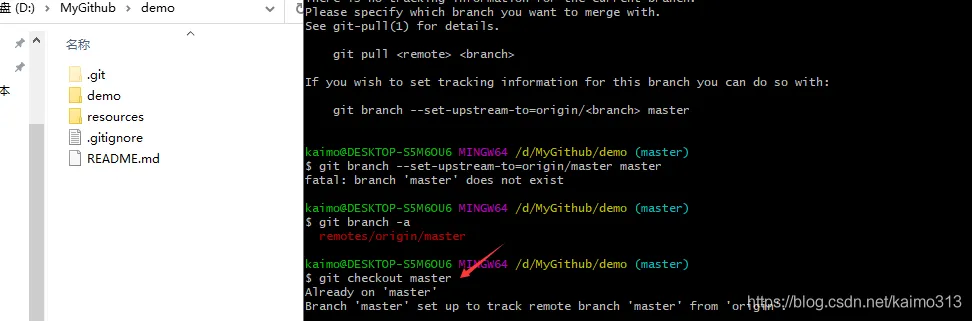
出现这个问题原因就是本地没有 master 分支导致的。


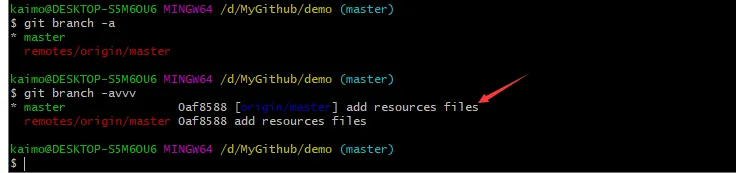
输入 git branch -a。发现只有远程分支。
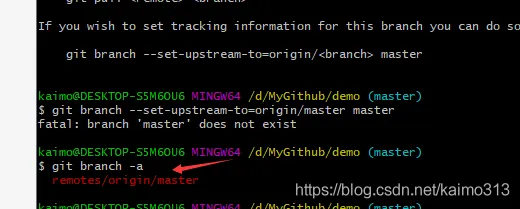
20210609175828862.png


解决

解决方式就是:输入 git checkout master


20210609180007509.png


出现 Already on 'master' ,Branch 'master' set up to track remote branch 'master' from 'origin'.,说明已经切换到 master 上。

再次输入 git branch -a。发现已经有本地分支


20210609180900809.png


在用 git branch -avvv 查看

  • 【a:查看所有分支】
  • 【v:每个分支的最后一个提交(commit)】
  • 【vv:本地分支与远程分支的关联关系】


20210609181020356.png


目录
相关文章
|
开发工具 git C++
【App Service】VS Code直接部署App Service时候遇见 “fatal: not a git repository (or any of the parent directories): .git”
通过VS Code发布Python App Service的时候,遇见了发布失败错误: The deployment failed with error: fatal: not a git repository (or any of the parent directories): .git . Please take a few minutes to help us improve the deployment experience
262 24
|
6月前
|
网络协议 开发工具 git
解决 git 报错 “fatal: unable to access ‘https://github.com/.../.git‘: Recv failure Connection was rese
在使用 Git/Git小乌龟 进行代码管理的过程中,经常会遇到各种各样的问题,其中之一就是在执行 git clone 或 git pull 等操作时出现 “fatal: unable to access ‘https://github.com/…/.git’: Recv failure Connection was reset” 的报错。这个问题通常是由网络连接问题或代理设置不正确导致的。在我的个人使用经验中,我亲自尝试了四种方法,它们都能够有效地解决这个报错。个人比较推荐方法二。
3172 0
|
开发工具 git
git分支管理master/hotfix/develop/feature/release
采用合理的Git分支管理模型可以显著提升团队协作效率和代码管理的质量。本文介绍的 `master`、`develop`、`feature`、`release`和 `hotfix`分支模型是一个行之有效的方法,适用于大多数软件开发项目。通过清晰地划分各个分支的职责,团队成员可以更专注于各自的开发任务,同时确保代码库的稳定性和可维护性。
1242 2
|
网络安全 开发工具 git
解决fatal:remote error:You can’t push to git://github.com/username/*.g
通过上述诊断与修复步骤,绝大多数的推送错误都能得到有效解决,确保您的Git工作流顺畅无阻。
597 1
|
开发工具 git
Git 中的 fork、branch 和 clone
【8月更文挑战第27天】
1414 5
|
编译器 网络安全 开发工具
git学习五:切换本地仓库出现的问题。修改git配置初始化。error:src refspec master does not match any。错误总结,送上几个案例
这篇文章是关于Git使用中遇到的一些问题及其解决方案的总结,包括切换本地仓库时的问题、修改Git初始化配置、以及解决"error: src refspec master does not match any"错误等。
1063 0
|
Shell 开发工具 git
|
开发工具 git
成功解决:fatal: detected dubious ownership in repository at ‘E:/workspace/CSMarket‘。如何使用git工具通过命令行的形式
这篇文章分享了作者在使用Git工具初始化本地仓库时遇到的权限问题,提供了通过命令行解决Git仓库权限问题的方案,并介绍了如何使用Git命令行初始化项目、添加文件、提交以及关联远程仓库的步骤。
成功解决:fatal: detected dubious ownership in repository at ‘E:/workspace/CSMarket‘。如何使用git工具通过命令行的形式
|
网络安全 开发工具 数据安全/隐私保护
Win10使用Git克隆项目出现fatal: Authentication failed for异常
Windows 10系统中使用Git克隆项目时出现"fatal: Authentication failed for"异常的解决方法,主要是通过修改凭据管理器中的Git凭据密码来解决因密码过期导致的身份验证失败问题。
829 0
Win10使用Git克隆项目出现fatal: Authentication failed for异常
|
Shell 网络安全 开发工具
fatal: unable to access 'https://github.com/wolfcw/libfaketime.git/': Encountered end of file